CLEAR Connector
The CLEAR connector lets you verify users using CLEAR’s hosted identity verification UI in your PingOne DaVinci flow.
The connector redirects users to CLEAR for identity verification and receives the verification results, including verified identity traits and document data, that you can use in your flow.
Setup
Resources
You can find more information and setup help in the following:
-
PingOne DaVinci documentation:
Requirements
To use the connector, you’ll need:
-
A CLEAR account with API access
-
A CLEAR API Key
-
A CLEAR Verification Project ID
Configuring the CLEAR connector
Add the connector in PingOne DaVinci as shown in Adding a connector, then configure it as follows.
Connector configuration
| Setting | Description |
|---|---|
PingOne DaVinci Redirect URL |
The PingOne DaVinci redirect URL for this connector. This value is provided automatically as a read-only field. |
Application Return To URL |
The URL where the user is redirected after completing the CLEAR verification flow. If not provided, CLEAR uses a default completion page. |
API Key |
Your CLEAR API Key used to authenticate requests to the CLEAR API. |
Initial Verification Project ID |
The CLEAR project ID used for initial identity verification of new users. |
Re-verification Project ID |
The CLEAR project ID used for reverification of returning users. If not provided, the Initial Verification Project ID is used. |
Secure Endpoint Selection |
The CLEAR API endpoint to use. Select either |
Using the connector in a flow
Verifying a user’s identity with CLEAR
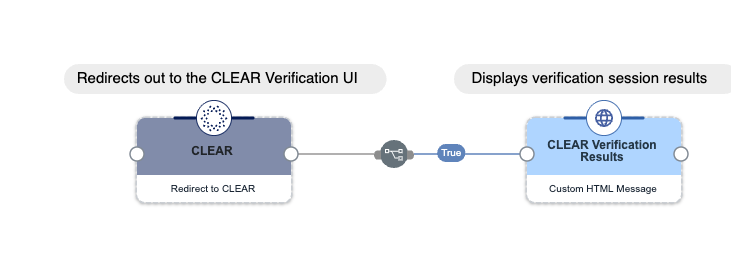
This example flow redirects the user to the CLEAR hosted verification UI and displays the verification session results.
At a high level:
-
The Redirect to CLEAR node redirects the user to the CLEAR verification UI for initial identity verification.
-
After the user completes verification, the flow receives the session results and displays them using a Custom HTML Message node.
Test the flow by clicking Save, Deploy, and Try Flow.
Reverifying a returning user with CLEAR
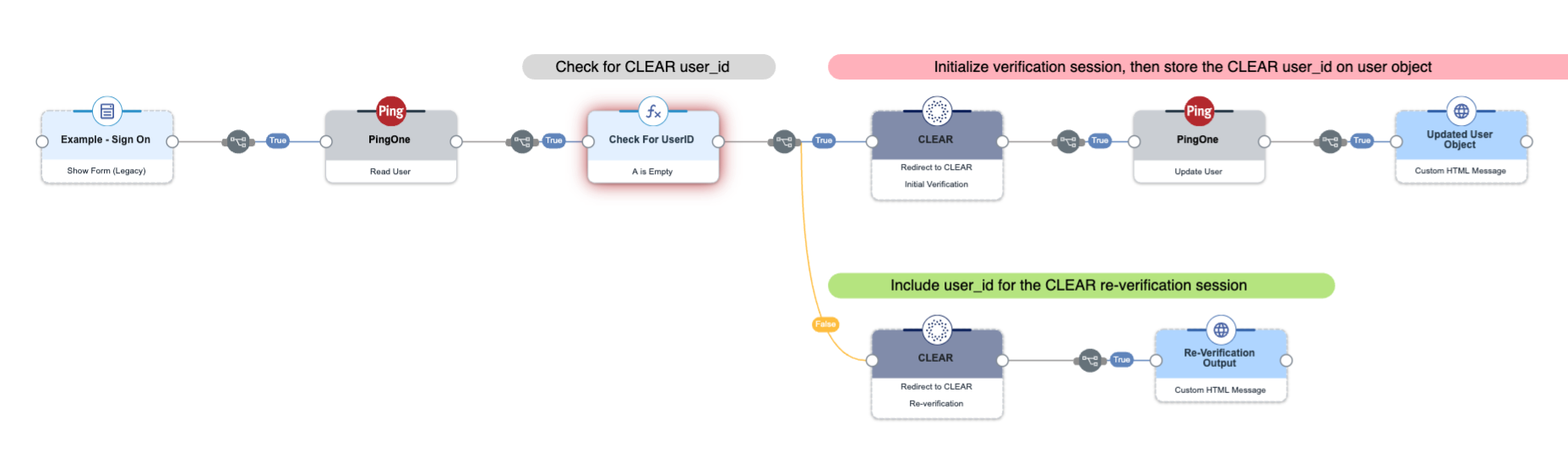
This example flow checks whether a user has an existing CLEAR identity and routes them to either initial verification or reverification accordingly.
At a high level:
-
The flow authenticates the user and reads the user profile from PingOne to check for an existing CLEAR user ID.
-
If no CLEAR user ID exists, the flow redirects to CLEAR for initial verification, then stores the returned CLEAR user ID on the PingOne user object for future reverification sessions.
-
If a CLEAR user ID already exists, the flow redirects to CLEAR for reverification using the stored user ID, which streamlines the verification process for returning users.
-
The flow displays the verification or reverification results.
Test the flow by clicking Save, Deploy, and Try Flow.
Capabilities
Redirect to CLEAR
Redirect user to CLEAR
Show details
-
Properties
-
Output Schema
- Redirect URL textField required
-
The target URL for the post-verification redirect.
- User ID textField
-
CLEAR user ID for re-verification. When provided, triggers a re-verification flow against an existing CLEAR identity instead of a full initial verification.
- Custom Fields keyValueList
-
Custom key-value pairs passed to CLEAR (e.g., your internal customer or employee ID for identity matching).
- First Name textField
-
User’s first name for CLEAR identity matching.
- Last Name textField
-
User’s last name for CLEAR identity matching.
- Date of Birth textField
-
User’s date of birth for CLEAR identity matching.
- Phone textField
-
User’s phone number for CLEAR identity matching.
- Email textField
-
User’s email address for CLEAR identity matching.
- Address Line 1 textField
-
User’s street address line 1 for CLEAR identity matching.
- Address Line 2 textField
-
User’s street address line 2 for CLEAR identity matching.
- City textField
-
User’s city for CLEAR identity matching.
- State textField
-
User’s state for CLEAR identity matching.
- Postal Code textField
-
User’s postal code for CLEAR identity matching.
- Country textField
-
User’s country for CLEAR identity matching.
-
output object
-
rawResponse object
-
statusCode number
-
headers object
-
id string
-
object_name string
-
authenticated boolean
-
authentication_methods array
-
activated_authentication_methods array
-
checks array
-
completed_at number
-
created_at number
-
email string
-
expires_at number
-
fields_to_collect array
-
ip array
-
phone string
-
redirect_url string
-
status string
-
token string
-
updated_at number
-
user_agent array
-
user_created boolean
-
user_id string
-
traits object
-
address object
-
line1 string
-
line2 string
-
city string
-
state string
-
postal_code string
-
country string
-
-
dob object
-
day number
-
month number
-
year number
-
-
email string
-
first_name string
-
last_name string
-
middle_name string
-
second_family_name string
-
full_last_name string
-
phone string
-
ssn4 string
-
ssn9 string
-
identification_number string
-
identification_type string
-
document object
-
nationality string
-
document_type string
-
issuing_country string
-
document_number string
-
date_of_expiry object
-
day number
-
month number
-
year number
-
-
gender string
-
date_of_birth object
-
day number
-
month number
-
year number
-
-
first_name string
-
last_name string
-
middle_name string
-
-
document_front string
-
document_back string
-
face_scan_preview string
-
-
project_id string
-
custom_fields object
-
user_profile_information object
-
name object
-
first_name string
-
last_name string
-
middle_name string
-
-
dob string
-
phone string
-
address object
-
line1 string
-
line2 string
-
city string
-
state string
-
postal_code string
-
country string
-
-
email string
-
-
user_profile_match_status string
-
idv_status string
-
sessions array
-