SentinelOne Connector
The SentinelOne connector allows you to integrate endpoint detection and response capabilities into your PingOne DaVinci flows.
This connector provides the following capability to enforce device trust in real time:
-
Get Agent by Serial Number: Look up a managed device in SentinelOne by its hardware serial number and retrieve its security status, OS, and network details.
Setup
Resources
You can find more information and setup help in the following:
-
PingOne DaVinci documentation:
Requirements
To use the connector, you’ll need:
-
A SentinelOne tenant with administrator access to the SentinelOne Management Console.
-
A SentinelOne API token generated for a service user with read access to agents.
Configuring the SentinelOne connector
Add the connector in PingOne DaVinci as shown in Adding a connector, then configure it as follows.
Connector configuration
Before configuring the connector in PingOne DaVinci, generate an API token in the SentinelOne Management Console:
-
Log in to your SentinelOne Management Console.
-
Navigate to Policies and settings > Service Users.
-
Click Actions > Create New Service User, enter a name and expiration date, and select a role with read access to agents.
-
After creating the service user, click Generate next to API Token, and copy the token value immediately. This is the only time the token is displayed.
Using the connector in a flow
Get Agent by Serial Number
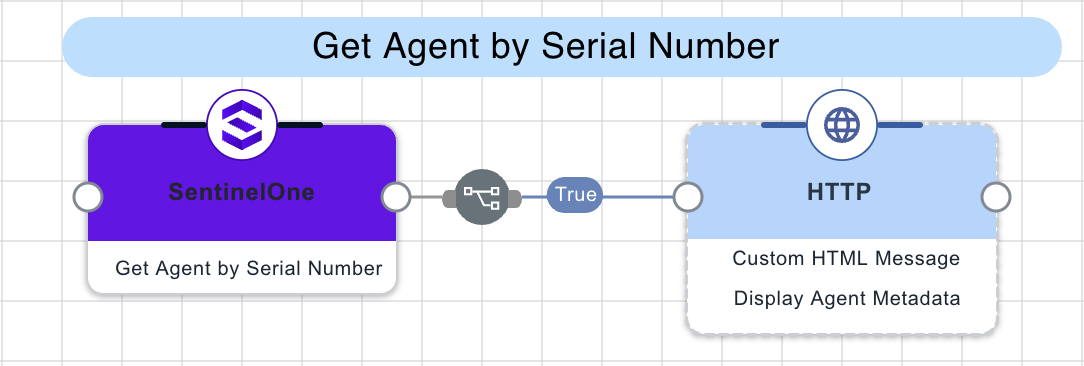
The connector queries the SentinelOne Agents API using the provided serial number to retrieve detailed device information, including its OS, agent version, active status, and network connectivity. An exact serial number match is required; partial serial numbers will not return an agent.
Test the flow by clicking Save, Deploy, and Try Flow.
Capabilities
Get Agent by Serial Number
Look up a SentinelOne agent by its hardware serial number and retrieve its security status, OS, and network details. Requires an exact serial number match.
Show details
-
Properties
-
Input Schema
-
Output Schema
- Serial Number textField required
-
The full hardware serial number of the device to look up. An exact match is required — partial serial numbers will not return an agent.
-
default object
-
serialNumber string
The full hardware serial number of the device to look up. An exact match is required — partial serial numbers will not return an agent.
-
Input Example
{
  "properties": {
    "serialNumber": "C02XK1ABJG5J"
  }
}-
output object
-
statusCode number
The HTTP status code returned by the API request.
-
agentFound boolean
True if an agent matching the serial number was found.
-
agentId string
The SentinelOne agent ID for the matched device.
-
computerName string
The hostname of the matched device.
-
uuid string
The UUID assigned to the agent.
-
serialNumber string
The hardware serial number of the matched device.
-
osType string
The operating system family of the device (e.g., macos, windows, linux).
-
osName string
The full operating system name and version.
-
agentVersion string
The installed SentinelOne agent version.
-
isActive boolean
Whether the agent is currently active and reporting to the SentinelOne console.
-
isDecommissioned boolean
Whether the agent has been decommissioned in SentinelOne and is no longer managed.
-
lastActiveDate string
The date and time the agent last communicated with the SentinelOne management console.
-
siteId string
The SentinelOne site ID the agent belongs to.
-
accountId string
The SentinelOne account ID the agent belongs to.
-
groupId string
The SentinelOne group ID the agent belongs to.
-
networkStatus string
The agent’s current network connection status as reported by SentinelOne (e.g., connected, disconnected, connecting).
-
totalItems number
The total number of agents in SentinelOne whose serial number contains the input value. If greater than 0 and agentFound is false, no agent with that exact serial number exists.
-
rawResponse object
The full, unmodified JSON object returned directly from the external API call.
-
Output Example
{
  "statusCode": 200,
  "agentFound": true,
  "agentId": "agent-1a2b3c4d",
  "computerName": "JDOE-MBP-2023",
  "uuid": "ff819e70af13be381993075eb0ce5f2f6de05be2",
  "serialNumber": "C02XK1ABJG5J",
  "osType": "macos",
  "osName": "macOS Sonoma 14.5",
  "agentVersion": "23.4.2.14",
  "isActive": true,
  "isDecommissioned": false,
  "lastActiveDate": "2024-05-15T18:23:11.000000Z",
  "siteId": "site-9f8e7d6c",
  "accountId": "acct-5b4a3c2d",
  "groupId": "group-7e6f5d4c",
  "networkStatus": "connected",
  "totalItems": 1,
  "rawResponse": {
    "pagination": {
      "totalItems": 1,
      "nextCursor": null
    },
    "data": [
      {
        "id": "agent-1a2b3c4d",
        "uuid": "ff819e70af13be381993075eb0ce5f2f6de05be2",
        "computerName": "JDOE-MBP-2023",
        "serialNumber": "C02XK1ABJG5J",
        "osType": "macos",
        "osName": "macOS Sonoma 14.5",
        "agentVersion": "23.4.2.14",
        "isActive": true,
        "isDecommissioned": false,
        "lastActiveDate": "2024-05-15T18:23:11.000000Z",
        "siteId": "site-9f8e7d6c",
        "accountId": "acct-5b4a3c2d",
        "groupId": "group-7e6f5d4c",
        "networkStatus": "connected"
      }
    ]
  }
}