Socure RiskOS Connector
The Socure RiskOS connector lets you run fraud and identity risk evaluations against Socure’s RiskOS platform directly from your PingOne DaVinci flows.
This connector provides the following capabilities for fraud and identity risk evaluation:
-
Run Risk Evaluation: Submit a new evaluation and receive an immediate risk decision with fraud, identity, and behavioral signals.
-
Get Evaluation: Retrieve the full result of a previously submitted evaluation, including enrichment data from each risk module.
-
Update Evaluation Decision: Update the decision, case status, notes, tags, or attachments on an existing evaluation.
-
Resubmit Evaluation Data: Supply corrected data on a paused evaluation to re-run it through the workflow.
-
Submit Evaluation Feedback: Record a fraud or non-fraud outcome on an evaluation to improve RiskOS model accuracy.
-
Download Evaluation Documents: Download all case attachments for an evaluation as a base64-encoded ZIP archive.
Setup
Resources
You can find more information and setup help in the following:
-
Socure documentation:
-
PingOne DaVinci documentation:
Requirements
To use the connector, you’ll need:
-
A Socure RiskOS license
-
A Socure RiskOS API key
-
The base URL for your RiskOS environment (production or sandbox)
Setting up Socure RiskOS
Getting your API key
-
Sign in to the RiskOS Dashboard.
-
Go to Developer Workbench > API & SDK Keys.
-
Copy your API key.
Getting your base URL
Use one of the following base URLs depending on your environment:
-
Production:
https://riskos.socure.com -
Sandbox:
https://riskos.sandbox.socure.com
Configuring the Socure RiskOS connector
Add the connector in PingOne DaVinci as shown in Adding a connector, then configure it as follows.
Connector configuration
Base URL
The RiskOS API base URL for your environment, such as https://riskos.socure.com. Do not include a trailing slash.
Get this URL from Getting your base URL.
API Key
Your Socure RiskOS API key. The connector sends it as a Bearer token in the Authorization header.
Get this key from Getting your API key.
Using the connector in a flow
Run Risk Evaluation
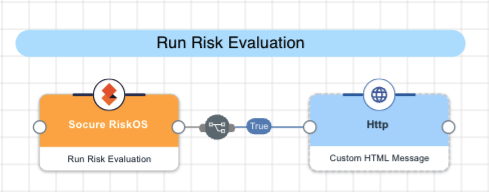
The connector submits an evaluation to the RiskOS Evaluation API.
-
Workflow: Must match an active workflow configured in your RiskOS Dashboard Developer Workbench.
-
Data: Accepts a JSON object whose structure depends on the workflow type.
The response includes an eval_id that you use in subsequent capabilities to retrieve, update, or resubmit the evaluation. Depending on workflow configuration, the API may return a decision immediately (eval_status: evaluation_completed) or pause the evaluation for manual review (eval_status: evaluation_paused).
Test the flow by clicking Save, Deploy, and Try Flow.
Get Evaluation
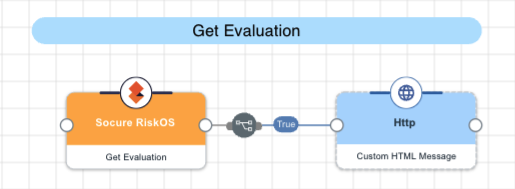
The connector queries the RiskOS Evaluation API using the provided evaluation ID to retrieve the full result of a previously submitted evaluation, including the decision, status, and enrichment data from each risk module.
Test the flow by clicking Save, Deploy, and Try Flow.
Resubmit Evaluation Data

The connector submits updated input data to the RiskOS Evaluation API to re-run a paused evaluation through the workflow. The evaluation must be in a paused state (eval_status: evaluation_paused) — completed evaluations cannot be resubmitted.
Test the flow by clicking Save, Deploy, and Try Flow.
Update Evaluation Decision
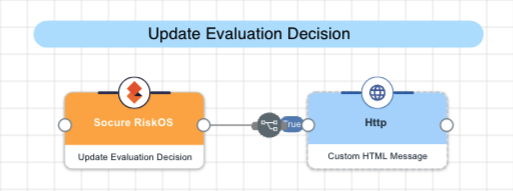
The connector submits a state update to the RiskOS Evaluation API to change the decision, case status, notes, tags, queue, or attachments on an evaluation.
Test the flow by clicking Save, Deploy, and Try Flow.
Submit Evaluation Feedback
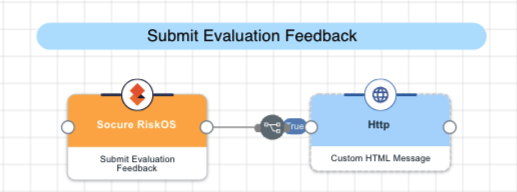
The connector submits a confirmed fraud or non-fraud outcome to the RiskOS Feedback API to improve RiskOS model accuracy. The Request ID field must match the id value provided in the original Run Risk Evaluation call — not the eval_id.
Test the flow by clicking Save, Deploy, and Try Flow.
Download Evaluation Documents
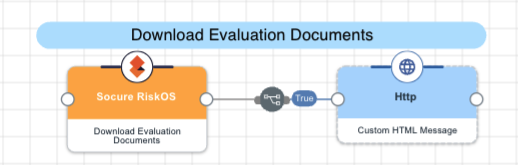
The connector retrieves all case attachments for an evaluation from the RiskOS Evaluation API and returns them as a base64-encoded ZIP archive. If no documents have been attached to the evaluation, the capability returns hasDocuments: false and a null base64Zip.
Test the flow by clicking Save, Deploy, and Try Flow.
Capabilities
Run Risk Evaluation
Submit a new RiskOS evaluation and receive an immediate risk decision with fraud, identity, and behavioral signals for a user or transaction.
Show details
-
Properties
-
Input Schema
-
Output Schema
- Workflow textField required
-
Environment-specific workflow identifier from the RiskOS Dashboard Developer Workbench.
- Request ID textField required
-
Customer-defined unique identifier for the request. Must be distinct per evaluation to avoid reprocessing.
- Timestamp textField
-
Evaluation initiation time in ISO 8601/RFC 3339 format (e.g. 2024-05-01T14:30:00Z). Defaults to the current time if not provided.
- Data textField required
-
Primary evaluation payload as a JSON object. Structure is determined by the selected workflow type.
- Customer Metadata textField
-
Optional opaque JSON object (max 200 chars serialized) echoed back unchanged in the response. Do not include PII or secrets.
-
default object
-
workflow string
Environment-specific workflow identifier from the RiskOS Dashboard Developer Workbench. Must be unique within your RiskOS environment.
-
id string
Customer-defined unique identifier for the request. Must be distinct per evaluation to avoid reprocessing.
-
timestamp string
Evaluation initiation time in ISO 8601/RFC 3339 format.
-
data object
Primary evaluation payload. Structure is determined by the selected workflow type.
-
customer_metadata string
Optional JSON object (max 200 chars serialized) echoed back unchanged in the response. Do not include PII or secrets.
-
Input Example
{
  "workflow": "consumer_onboarding",
  "id": "req-abc-12345",
  "timestamp": "2024-05-01T14:30:00Z",
  "data": {
    "individual": {
      "first_name": "Jane",
      "last_name": "Doe",
      "email": "jane.doe@example.com",
      "phone_number": "+12025550199"
    }
  }
}-
output object
-
eval_id string
System-generated unique evaluation ID. Use this in subsequent API calls.
-
id string
The customer-defined request identifier echoed back.
-
workflow string
The workflow identifier used for the evaluation.
-
workflow_id string
The internal workflow UUID.
-
workflow_version string
The version of the workflow used.
-
eval_source string
The source that initiated the evaluation (e.g. API).
-
eval_start_time string
ISO 8601 timestamp when the evaluation started.
-
eval_end_time string
ISO 8601 timestamp when the evaluation ended.
-
eval_status string
The evaluation processing status (e.g. evaluation_completed).
-
decision string
The evaluation decision (e.g. ACCEPT, REJECT, REVIEW).
-
decision_at string
ISO 8601 timestamp when the decision was made.
-
status string
The high-level evaluation status (e.g. OPEN, CLOSED, ON_HOLD).
-
sub_status string
The granular status descriptor.
-
tags array
Tags applied to the evaluation.
-
notes string
Reviewer notes attached to the evaluation.
-
review_queues array
Review queues the evaluation is assigned to.
-
environment_name string
The RiskOS environment name (e.g. Sandbox, Production).
-
customer_metadata object
The customer_metadata object echoed back unchanged.
-
riskLevel string
Overall risk level, if returned by the workflow.
-
score number
Numeric risk score, if returned by the workflow.
-
reasons array
Reason codes, if returned by the workflow.
-
statusCode number
HTTP status code returned by the API.
-
rawResponse object
The full, unmodified JSON response from the API.
-
Output Example
{
  "eval_id": "daa6be77-a219-4d20-af7a-4fed223cd1d3",
  "id": "req-abc-12345",
  "workflow": "consumer_onboarding",
  "workflow_id": "9cfc9bbe-9114-4b3d-83f5-978a9246a65b",
  "workflow_version": "1.0.0",
  "eval_source": "API",
  "eval_start_time": "2024-05-01T14:30:00Z",
  "eval_end_time": "2024-05-01T14:30:01Z",
  "eval_status": "evaluation_completed",
  "decision": "ACCEPT",
  "decision_at": "2024-05-01T14:30:01Z",
  "status": "CLOSED",
  "sub_status": "Accept",
  "tags": [],
  "notes": "",
  "review_queues": [],
  "environment_name": "Production",
  "statusCode": 200
}
Get Evaluation
Retrieve the full result of a previously submitted evaluation, including the decision, status, and enrichment data from each risk module.
Show details
-
Properties
-
Input Schema
-
Output Schema
- Evaluation ID textField required
-
The system-generated unique evaluation ID returned from the Run Risk Evaluation step.
-
default object
-
eval_id string
The system-generated unique evaluation ID returned from the Run Risk Evaluation step.
-
Input Example
{
  "eval_id": "daa6be77-a219-4d20-af7a-4fed223cd1d3"
}-
output object
-
eval_id string
The system-generated unique evaluation ID.
-
id string
The customer-defined request identifier.
-
workflow string
The workflow identifier used for the evaluation.
-
workflow_id string
The internal workflow UUID.
-
workflow_version string
The version of the workflow used.
-
eval_source string
The source that initiated the evaluation (e.g. API).
-
eval_start_time string
ISO 8601 timestamp when the evaluation started.
-
eval_end_time string
ISO 8601 timestamp when the evaluation ended.
-
eval_status string
The evaluation processing status (e.g. evaluation_completed).
-
decision string
The evaluation decision (e.g. ACCEPT, REJECT, REVIEW).
-
decision_at string
ISO 8601 timestamp when the decision was made.
-
status string
The high-level evaluation status (e.g. OPEN, CLOSED, ON_HOLD).
-
sub_status string
The granular status descriptor.
-
tags array
Tags applied to the evaluation.
-
notes string
Reviewer notes attached to the evaluation.
-
review_queues array
Review queues the evaluation is assigned to.
-
data_enrichments array
Array of results from each risk enrichment module (e.g. email risk, phone risk, KYC). Each entry includes the module name, status code, request, and response.
-
environment_name string
The RiskOS environment name (e.g. Sandbox, Production).
-
customer_metadata object
The customer_metadata object echoed back unchanged.
-
riskLevel string
Overall risk level, if returned by the workflow.
-
score number
Numeric risk score, if returned by the workflow.
-
reasons array
Reason codes, if returned by the workflow.
-
statusCode number
HTTP status code returned by the API.
-
rawResponse object
The full, unmodified JSON response from the API.
-
Output Example
{
  "eval_id": "6f9a3b65-e4db-44ac-92f2-cb6ab99256e3",
  "id": "test-001",
  "workflow": "consumer_onboarding",
  "workflow_id": "9cfc9bbe-9114-4b3d-83f5-978a9246a65b",
  "workflow_version": "1.0.0",
  "eval_source": "API",
  "eval_start_time": "2026-07-06T19:30:52.134730488Z",
  "eval_end_time": "2026-07-06T19:30:52.507795198Z",
  "eval_status": "evaluation_completed",
  "decision": "ACCEPT",
  "decision_at": "2026-07-06T19:30:52.507549275Z",
  "status": "CLOSED",
  "sub_status": "Accept",
  "tags": [
    "Digital Intelligence Error"
  ],
  "notes": "",
  "review_queues": null,
  "environment_name": "Sandbox",
  "statusCode": 200
}
Update Evaluation Decision
Update the decision, case status, notes, tags, or attachments on an existing evaluation. Decision and status cannot be updated in the same request — send them separately.
Show details
-
Properties
-
Input Schema
-
Output Schema
- Evaluation ID textField required
-
The system-generated unique evaluation ID returned from the Run Risk Evaluation step.
- Workflow textField required
-
Environment-specific workflow identifier from the RiskOS Dashboard Developer Workbench.
- Decision textField
-
New decision to apply. One of: ACCEPT, REJECT, REVIEW, RESUBMIT, or CANCEL.
- Status textField
-
New evaluation status. One of: OPEN, CLOSED, or ON_HOLD.
- Sub Status textField
-
Additional granular status detail for the evaluation.
- Tags textField
-
Comma-separated list of tags to apply to the evaluation.
- Queue textField
-
Review queue to assign the evaluation to.
- Notes textField
-
Contextual notes to attach to the evaluation.
- Attachments textField
-
JSON array of attachment objects, each with file_name (string) and file_data (base64-encoded string).
-
default object
-
eval_id string
The system-generated unique evaluation ID to update.
-
workflow string
The workflow identifier for this evaluation (e.g. consumer_onboarding).
-
decision string
New risk decision to apply. One of: ACCEPT, REJECT, REVIEW, RESUBMIT, or CANCEL. Cannot be sent in the same request as status.
-
status string
New case status. One of: OPEN, CLOSED, or ON_HOLD. Must be sent together with sub_status. Cannot be sent in the same request as decision. Only CLOSED with sub_status Accept or Reject is currently supported.
-
sub_status string
Required when setting status. Must be a valid value for the given status — for CLOSED use Accept or Reject.
-
tags string
A single tag string to apply to the evaluation (e.g. fraud_suspected). Must be combined with at least one other field such as notes.
-
queue string
Name of the review queue to assign the evaluation to. Must be combined with decision, status, notes, or attachments.
-
notes string
Free-text reviewer notes to attach to the evaluation.
-
attachments string
JSON array of file attachments. Each object must have file_name (string) and file_data (base64-encoded file bytes). Example: [{"file_name":"doc.pdf","file_data":"JVBERi0xLjQ…"}]
-
Input Example
{
  "eval_id": "f79b0c7b-94f6-4633-9241-00a87ee570bc",
  "workflow": "consumer_onboarding",
  "decision": "ACCEPT",
  "notes": "ID verified against secondary source."
}-
output object
-
evaluationId string
The evaluation ID that was updated.
-
message string
Confirmation message.
-
statusCode number
HTTP status code returned by the API (200 on success).
-
rawResponse object
The raw response body from the API. This endpoint returns an empty body on success.
-
Output Example
{
  "evaluationId": "f79b0c7b-94f6-4633-9241-00a87ee570bc",
  "message": "Evaluation decision updated successfully.",
  "statusCode": 200,
  "rawResponse": null
}
Resubmit Evaluation Data
Update the input data on a paused evaluation and re-run it through the workflow. The evaluation must be in a paused state — completed evaluations cannot be modified.
Show details
-
Properties
-
Input Schema
-
Output Schema
- Evaluation ID textField required
-
The system-generated unique evaluation ID returned from the Run Risk Evaluation step.
- Workflow textField required
-
Environment-specific workflow identifier from the RiskOS Dashboard Developer Workbench.
- Request ID textField required
-
Customer-defined unique identifier for the request. Must be distinct per evaluation to avoid reprocessing.
- Timestamp textField
-
Evaluation initiation time in ISO 8601/RFC 3339 format (e.g. 2024-05-01T14:30:00Z). Defaults to the current time if not provided.
- Data textField required
-
Primary evaluation payload as a JSON object. Structure is determined by the selected workflow type.
- Customer Metadata textField
-
Optional opaque JSON object (max 200 chars serialized) echoed back unchanged in the response. Do not include PII or secrets.
-
default object
-
eval_id string
The system-generated unique evaluation ID. The evaluation must currently be in a paused state.
-
workflow string
The workflow identifier for this evaluation (e.g. consumer_onboarding).
-
id string
Customer-defined unique identifier for this resubmission request.
-
timestamp string
Resubmission time in ISO 8601/RFC 3339 format (e.g. 2024-05-01T14:30:00Z).
-
data object
Updated evaluation input payload as a JSON object. Only the fields provided are updated — all other fields from the original submission remain unchanged. Structure matches the original workflow data schema.
-
customer_metadata string
Optional JSON object (max 200 chars serialized) echoed back unchanged in the response. Do not include PII or secrets.
-
Input Example
{
  "eval_id": "6dc8f39c-ecc3-4fe0-9283-fc8e5f99e816",
  "workflow": "consumer_onboarding",
  "id": "onb-12345-retry",
  "timestamp": "2024-12-02T10:35:00.000Z",
  "data": {
    "individual": {
      "email": "corrected.email@example.com",
      "phone_number": "+12025559999"
    }
  }
}-
output object
-
eval_id string
The system-generated evaluation ID.
-
id string
The customer-defined request identifier echoed back.
-
workflow string
The workflow identifier used for the evaluation.
-
workflow_id string
The internal workflow UUID.
-
workflow_version string
The version of the workflow used.
-
eval_source string
The source that initiated the evaluation (e.g. API).
-
eval_start_time string
ISO 8601 timestamp when the evaluation started.
-
eval_end_time string
ISO 8601 timestamp when the evaluation ended.
-
eval_status string
The evaluation processing status (e.g. evaluation_completed).
-
decision string
The evaluation decision after resubmission (e.g. ACCEPT, REJECT, REVIEW).
-
decision_at string
ISO 8601 timestamp when the decision was made.
-
status string
The high-level case status (e.g. OPEN, CLOSED, ON_HOLD).
-
sub_status string
The granular status descriptor.
-
tags array
Tags associated with the evaluation.
-
notes string
Reviewer notes attached to the evaluation.
-
review_queues array
Review queues the evaluation is assigned to.
-
environment_name string
The RiskOS environment name (e.g. Sandbox, Production).
-
customer_metadata object
The customer_metadata object echoed back unchanged.
-
riskLevel string
Overall risk level, if returned by the workflow.
-
score number
Numeric risk score, if returned by the workflow.
-
reasons array
Reason codes, if returned by the workflow.
-
statusCode number
HTTP status code returned by the API.
-
rawResponse object
The full, unmodified JSON response from the API.
-
Output Example
{
  "eval_id": "6dc8f39c-ecc3-4fe0-9283-fc8e5f99e816",
  "id": "onb-12345-retry",
  "workflow": "consumer_onboarding",
  "eval_status": "evaluation_completed",
  "decision": "ACCEPT",
  "status": "CLOSED",
  "sub_status": "Accept",
  "environment_name": "Production",
  "statusCode": 200
}
Submit Evaluation Feedback
Record a fraud or non-fraud outcome for an evaluation to improve RiskOS model accuracy. Links feedback to the original evaluation via the customer-defined request ID.
Show details
-
Properties
-
Input Schema
-
Output Schema
- Request ID textField required
-
Customer-defined unique identifier for the request. Must be distinct per evaluation to avoid reprocessing.
- Workflow textField required
-
Environment-specific workflow identifier from the RiskOS Dashboard Developer Workbench.
- Fraud Label textField required
-
Fraud classification. Must be either "fraud" or "non-fraud".
- Fraud Type textField
-
Optional fraud typology or category describing the nature of the fraud (e.g. identity_theft).
- Recorded At textField
-
Date the fraud was observed or confirmed in YYYY-MM-DD format. Defaults to today if omitted.
- Recorded By textField
-
Name or identifier of the person recording the fraud. Defaults to the authenticated user if omitted.
- Notes textField
-
Contextual notes to attach to the evaluation.
- Tags textField
-
Comma-separated list of tags to apply to the evaluation.
-
default object
-
id string
The customer-defined request ID from the original Run Risk Evaluation call (the id field, not eval_id). This is how RiskOS links the feedback to the evaluation.
-
workflow string
The workflow identifier used in the original evaluation (e.g. consumer_onboarding).
-
fraud_label string
Outcome classification. Must be exactly "fraud" or "non-fraud".
-
fraud_type string
Optional fraud category describing the nature of the fraud (e.g. identity_theft, account_takeover, synthetic_identity).
-
recorded_at string
Date the outcome was observed or confirmed, in YYYY-MM-DD format. Defaults to today if omitted.
-
recorded_by string
Identifier of the person or system recording the outcome. Defaults to the authenticated API user if omitted.
-
notes string
Optional free-text notes about the fraud case.
-
tags string
JSON array of tag strings for case categorization (e.g. ["manual_review", "chargeback"]).
-
Input Example
{
  "id": "test-001",
  "workflow": "consumer_onboarding",
  "fraud_label": "non-fraud"
}-
output object
-
message string
Confirmation message from the API (e.g. "Fraud feedback updated successfully : id=test-001, fraud_label=non-fraud").
-
customerId string
The customer-defined request ID the feedback was recorded against (echoed from input).
-
workflow string
The workflow identifier the feedback was recorded against (echoed from input).
-
statusCode number
HTTP status code returned by the API (200 on success).
-
rawResponse object
The full, unmodified JSON response from the API.
-
Output Example
{
  "message": "Fraud feedback updated successfully : id=test-001, fraud_label=non-fraud",
  "customerId": "test-001",
  "workflow": "consumer_onboarding",
  "statusCode": 200,
  "rawResponse": {
    "message": "Fraud feedback updated successfully : id=test-001, fraud_label=non-fraud"
  }
}
Download Evaluation Documents
Download all case attachments for an evaluation as a base64-encoded ZIP archive. Returns hasDocuments=false if no files have been attached.
Show details
-
Properties
-
Input Schema
-
Output Schema
- Evaluation ID textField required
-
The system-generated unique evaluation ID returned from the Run Risk Evaluation step.
-
default object
-
eval_id string
The system-generated unique evaluation ID returned from the Run Risk Evaluation step.
-
Input Example
{
  "eval_id": "f79b0c7b-94f6-4633-9241-00a87ee570bc"
}-
output object
-
eval_id string
The evaluation ID the documents belong to.
-
hasDocuments boolean
True if attachments exist and are returned in base64Zip. False if the evaluation has no attached documents (API returns 204).
-
base64Zip string
Base64-encoded ZIP archive of all case attachments. Null if hasDocuments is false. Decode this value to save or forward the ZIP file.
-
statusCode number
HTTP status code — 200 when documents are present, 204 when none exist.
-
Output Example
{
  "eval_id": "f79b0c7b-94f6-4633-9241-00a87ee570bc",
  "hasDocuments": true,
  "base64Zip": "UEsDBBQACAAIA...",
  "statusCode": 200
}