Akamai Account Protector node
The Akamai Account Protector node injects the Akamai risk score into your authentication journey. When the Akamai Account Protector feature is enabled for your application, the Akamai Edge service provides the risk score in an HTTP request header. Learn more in the Akamai Account Protector documentation.
Example
The following example inner journey uses the Akamai Account Protector node to parse the user risk score from the Akamai-User-Risk header and branch the journey based on the risk:
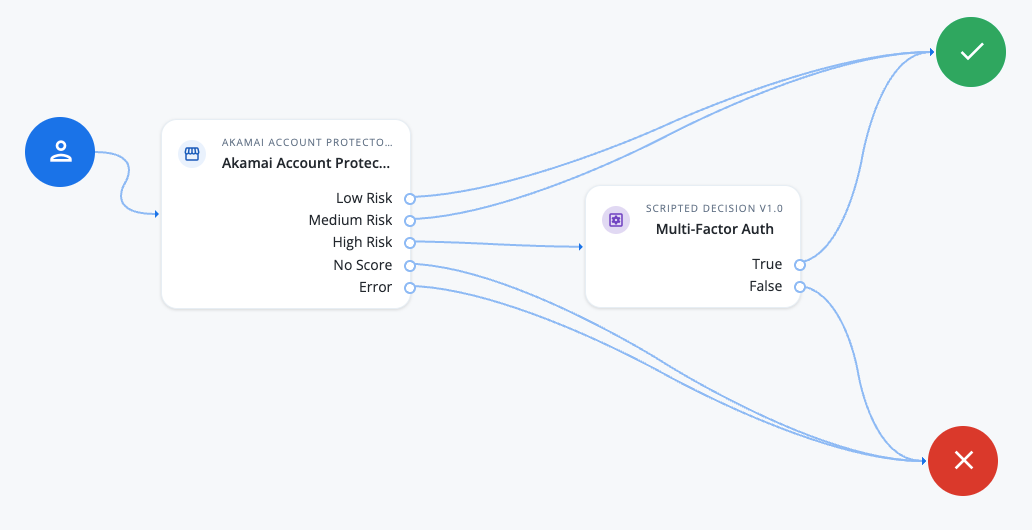
The inner journey in the example is contained in an outer journey that performs user authentication and collects the username. The Akamai Account Protector node parses the Akamai-User-Risk HTTP request header and extracts the user risk score. Based on the risk score, the journey progresses through the appropriate outcome.
Availability
| Product | Available? |
|---|---|
PingOne Advanced Identity Cloud |
Yes |
PingAM (self-managed) |
Yes (1) |
Ping Advanced Identity Software (self-managed) |
Yes (1) |
(1) For self-managed products, download the node from the Ping Identity Marketplace.
Inputs
This node retrieves user risk data from the Akamai-User-Risk HTTP request header. The header value contains semicolon-delimited key-value pairs, for example score=50.
Dependencies
You must set up Akamai Account Protector and enable it in your web application before using the Akamai Account Protector node.
Configure Akamai Account Protector
Akamai Account Protector detects malicious activity and assigns risk scores to requests. To inject the akamai-user-risk header, follow these steps:
Enable Account Protector on the Akamai Edge
-
Sign in to the Akamai Control Center.
-
Go to Security Configuration and select your existing security policy or create a new one.
-
Enable Account Protector under the bot management settings.
-
Ensure that risk scoring is enabled and that Akamai adds the
akamai-user-riskHTTP header.
Add the username parameter to Akamai Account Protector
-
In the Akamai Control Center, create an API definition pointing to your Advanced Identity Cloud hostname.
-
Add an API resource with the following details:
-
Name: Authenticate
-
Path:
/am/json/realms/root/realms/realm name/authenticate
-
-
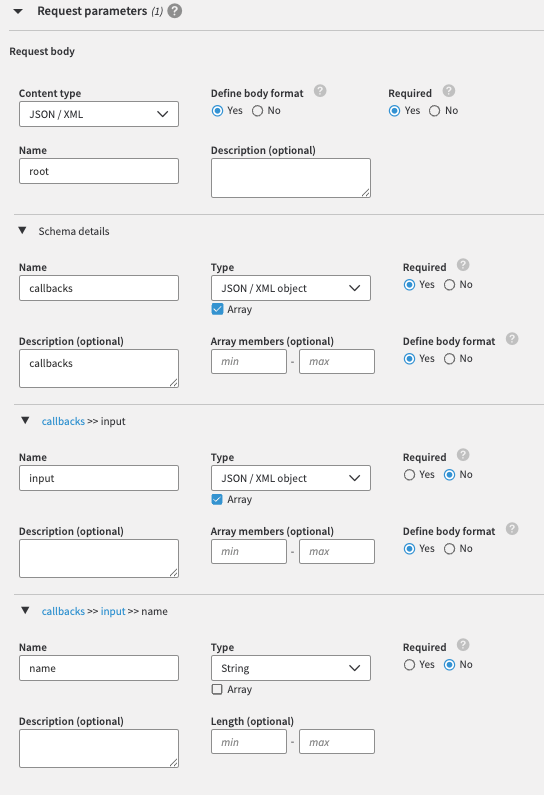
Select the
POSTmethod and set the request parameters.Example request parameters for the Authenticate API resource
-
Similarly, set the response parameters.
Example JSON/XML schema for the request and response parameters
{
  "requestBody": {
    "content": {
      "application/json": {
        "schema": {
          "type": "object",
          "required": [
            "callbacks"
          ],
          "properties": {
            "callbacks": {
              "type": "array",
              "items": {
                "type": "object",
                "properties": {
                  "input": {
                    "type": "array",
                    "items": {
                      "type": "object",
                      "properties": {
                        "name": {
                          "type": "string"
                        }
                      }
                    }
                  }
                }
              },
              "description": "callbacks"
            }
          }
        }
      },
      "application/xml": {
        "schema": {
          "type": "object",
          "required": [
            "callbacks"
          ],
          "properties": {
            "callbacks": {
              "type": "array",
              "items": {
                "type": "object",
                "properties": {
                  "input": {
                    "type": "array",
                    "items": {
                      "type": "object",
                      "properties": {
                        "name": {
                          "type": "array",
                          "items": {
                            "type": "string"
                          },
                          "maxItems": 1
                        }
                      }
                    }
                  }
                }
              },
              "description": "callbacks"
            }
          },
          "xml": {
            "name": "root"
          }
        }
      }
    },
    "required": true
  }
}
Configuration
| Property | Usage |
|---|---|
High Risk Threshold |
The maximum score for the Medium Risk outcome. Scores above this value receive the High Risk outcome. Default: |
Medium Risk Threshold |
The maximum score for the Low Risk outcome. Scores above this value and up to the High Risk Threshold receive the Medium Risk outcome. Default: |
Save Akamai Header to Shared State |
If selected, the node writes the Default: Not enabled |
Outputs
The node writes each key-value pair from the Akamai-User-Risk header, such as score, to the transient state.
If you select Save Akamai Header to Shared State, the node also writes the pairs to the shared state.
Outcomes
The node has the following outcomes:
Low Risk-
The overall score is less than or equal to the Medium Risk Threshold value.
Medium Risk-
The overall score is greater than the Medium Risk Threshold and less than or equal to the High Risk Threshold value.
High Risk-
The overall score is greater than the High Risk Threshold value.
No Score-
The
Akamai-User-Riskheader is empty. Error-
The node couldn’t parse the risk score; for example, the header doesn’t contain a
scorekey-value pair or the score isn’t an integer.