NuData Score node
The NuData Score node submits the collected behavioral data to the NuData risk-assessment service and returns the risk level and other risk-related details for the event.
Example
The following example shows how to use the NuData Score node to assess the risk of a sign-on attempt and route the journey based on the returned risk level:
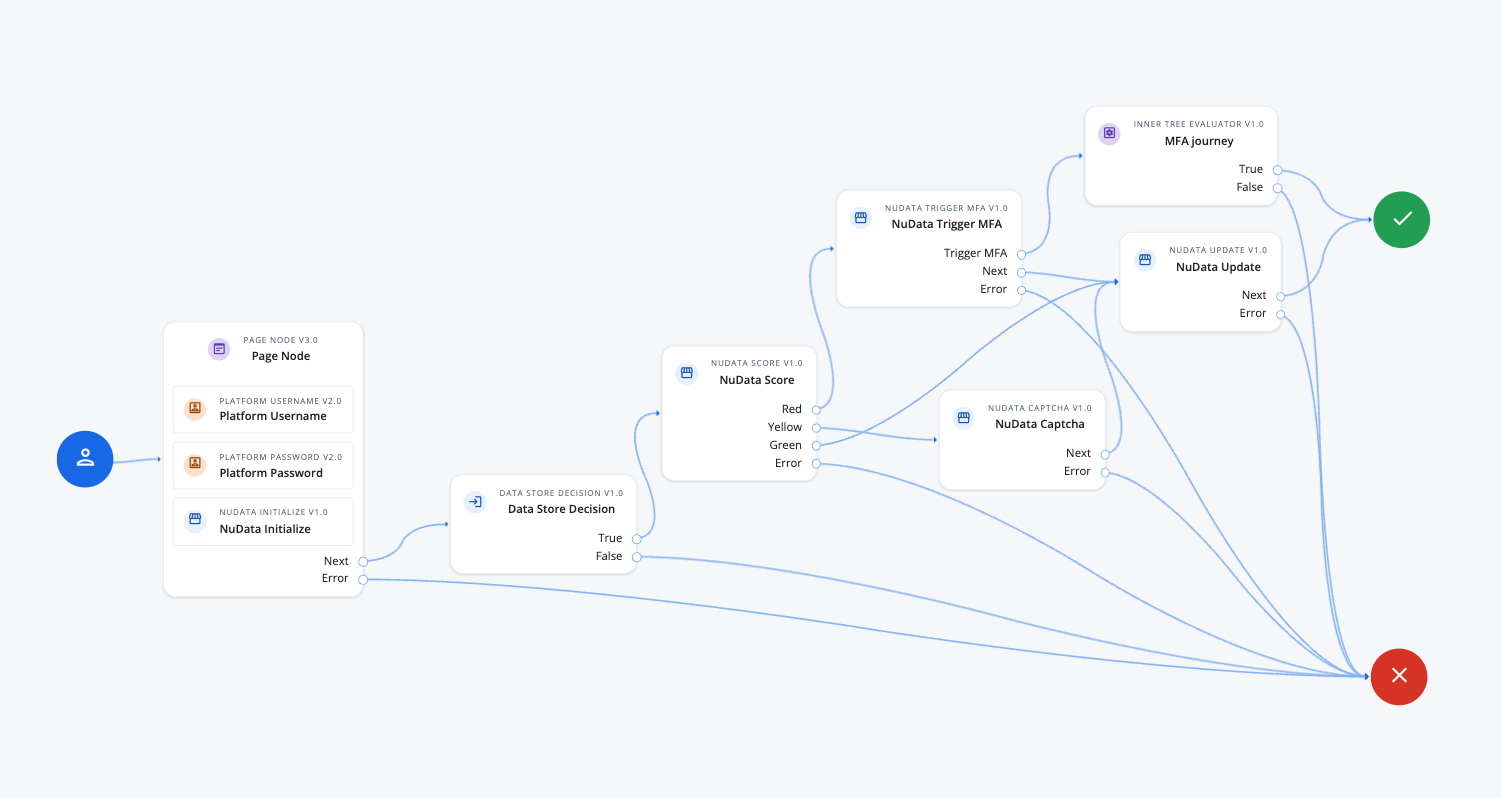
-
The Page node presents the sign-on fields and loads the NuData widget:
-
The Platform Username node collects the username and stores it in the shared state.
-
The Platform Password node collects the password and stores it in the shared state.
-
The NuData Initialize node loads the NuData SDK and starts collecting behavioral data.
-
-
The NuData Score node submits the collected behavioral data and returns the risk level.
-
A
Redscore outcome routes to the NuData Trigger MFA node. -
A
Yellowscore outcome routes to the NuData Captcha node. -
A
Greenscore outcome routes to the NuData Update node, which reports the placement outcome to NuData. -
An
Erroroutcome routes to the Failure node.
-
Availability
| Product | Available? |
|---|---|
PingOne Advanced Identity Cloud |
Yes |
PingAM (self-managed) |
Yes (1) |
Ping Advanced Identity Software (self-managed) |
Yes (1) |
(1) For self-managed products, download the node from the Ping Identity Marketplace.
Inputs
This node reads the following from the shared state:
-
nuDataWidgetData: the behavioral data collected by the NuData Initialize node.
Dependencies
The node requires a NuData account with API credentials.
The Client Name and Client Key properties come from that account.
Configuration
| Property | Usage |
|---|---|
Client Name |
The client name that NuData issued for your account. The node sends it with the score request to authenticate against the NuData API. |
SDK Version |
The version of the NuData SDK that collected the behavioral data. |
Client Key |
The client key that NuData issued for your account. The node uses it to authenticate the score request against the NuData API. |
Placement Name |
The name that identifies the specific widget placement in your NuData account. |
Placement Type |
The category of journey in which the behavioral data was collected. |
Page Placement Number |
The number that identifies the page on which the widget collected behavioral data, when a journey spans multiple pages. |
Placement Outcome |
The outcome of the journey branch that contains the widget placement. Possible outcomes are: The node reports this value to NuData alongside the score request. |
Report Segment |
Indicates the source of traffic. |
Placement Outcome |
The Placement Outcome of the branch in the Journey. |
Captcha |
Indicates whether a NuData captcha is included in the journey. Enable it when the journey presents a NuData Captcha node after the score result. |
Outputs
This node writes the following to the shared state:
-
nuDataScoreResponse: the NuData score and other risk analysis data.