Configure indexes
|
You configure indexes with the DS doesn’t automatically reindex existing data when you change an index configuration, however. "Automatic" index updates only happen when directory data changes. After configuring an index, you can manually rebuild the index to force DS to update indexes from the existing directory data. |
The dsconfig --help-database command lists subcommands
for creating, reading, updating, and deleting index configuration.
|
Indexes are per directory backend rather than per base DN. To maintain separate indexes for different base DNs on the same server, put the entries in different backends. |
Standard indexes
New index
The following example creates a new equality index for the description attribute:
$ dsconfig \
 create-backend-index \
 --hostname localhost \
 --port 4444 \
 --bindDN uid=admin \
 --bindPassword password \
 --backend-name dsEvaluation \
 --index-name description \
 --set index-type:equality \
 --trustStorePath /path/to/opendj/config/keystore \
 --trustStoreType PKCS12 \
 --trustStorePassword:file /path/to/opendj/config/keystore.pin \
 --no-prompt
Approximate index
The following example adds an approximate index for the sn (surname) attribute:
$ dsconfig \
 set-backend-index-prop \
 --hostname localhost \
 --port 4444 \
 --bindDN uid=admin \
 --bindPassword password \
 --backend-name dsEvaluation \
 --index-name sn \
 --add index-type:approximate \
 --trustStorePath /path/to/opendj/config/keystore \
 --trustStoreType PKCS12 \
 --trustStorePassword:file /path/to/opendj/config/keystore.pin \
 --no-prompt
Approximate indexes depend on the Double Metaphone matching rule.
Extensible match index
DS servers support matching rules defined in LDAP RFCs. They also define DS-specific extensible matching rules.
The following are DS-specific extensible matching rules:
- Name:
ds-mr-double-metaphone-approx -
Double Metaphone Approximate Match described at http://aspell.net/metaphone/. The DS implementation always produces a single value rather than one or possibly two values.
Configure approximate indexes as described in Approximate index.
Find an example using this matching rule in Approximate match.
- Name:
ds-mr-user-password-exact -
User password exact matching rule used to compare encoded bytes of two hashed password values for exact equality.
- Name:
ds-mr-user-password-equality -
User password matching rule implemented as the user password exact matching rule.
- Name:
partialDateAndTimeMatchingRule -
Partial date and time matching rule for matching parts of dates in time-based searches.
Find an example using this matching rule in Active accounts.
- Name:
relativeTimeOrderingMatch.gt -
Greater-than relative time matching rule for time-based searches.
Find an example using this matching rule in Active accounts.
- Name:
relativeTimeOrderingMatch.lt -
Less-than relative time matching rule for time-based searches.
Find an example using this matching rule in Active accounts.
The following example configures an extensible matching rule index
for "later than" and "earlier than" generalized time matching on the ds-last-login-time attribute:
$ dsconfig \
 create-backend-index \
 --hostname localhost \
 --port 4444 \
 --bindDN uid=admin \
 --bindPassword password \
 --backend-name dsEvaluation \
 --set index-type:extensible \
 --set index-extensible-matching-rule:1.3.6.1.4.1.26027.1.4.5 \
 --set index-extensible-matching-rule:1.3.6.1.4.1.26027.1.4.6 \
 --index-name ds-last-login-time \
 --trustStorePath /path/to/opendj/config/keystore \
 --trustStoreType PKCS12 \
 --trustStorePassword:file /path/to/opendj/config/keystore.pin \
 --no-prompt
Notice the index-extensible-matching-rule setting takes an OID, not the name of the matching rule.
Indexes for attributes with few unique values
Big indexes fit the case where many, many entries have the same attribute value.
The default DS evaluation profile generates 100,000 user entries with addresses in the United States,
so some st (state) attributes are shared by 4000 or more users.
With a regular equality index, searches for some states reach the index entry limit,
causing unindexed searches.
A big index avoids this problem.
The following commands configure an equality index for the state attribute, and then build the new index:
$ dsconfig \
 create-backend-index \
 --backend-name dsEvaluation \
 --index-name st \
 --set index-type:big-equality \
 --hostname localhost \
 --port 4444 \
 --bindDN uid=admin \
 --bindPassword password \
 --trustStorePath /path/to/opendj/config/keystore \
 --trustStoreType PKCS12 \
 --trustStorePassword:file /path/to/opendj/config/keystore.pin \
 --no-prompt
$ rebuild-index \
 --baseDn dc=example,dc=com \
 --index st \
 --hostname localhost \
 --port 4444 \
 --bindDn uid=admin \
 --bindPassword password \
 --trustStorePath /path/to/opendj/config/keystore \
 --trustStoreType PKCS12 \
 --trustStorePassword:file /path/to/opendj/config/keystore.pin
Once the index is ready, a client application can page through all the users in a state with an indexed search:
$ ldapsearch \
 --hostname localhost \
 --port 1636 \
 --useSsl \
 --trustStorePath /path/to/opendj/config/keystore \
 --trustStoreType PKCS12 \
 --trustStorePassword:file /path/to/opendj/config/keystore.pin \
 --bindDN uid=bjensen,ou=People,dc=example,dc=com \
 --bindPassword hifalutin \
 --baseDn dc=example,dc=com \
 --simplePageSize 5 \
 "(st=CA)" \
 cn
Show output
dn: uid=user.9,ou=People,dc=example,dc=com
cn: Abbe Abbate

dn: uid=user.123,ou=People,dc=example,dc=com
cn: Aili Aksel

dn: uid=user.124,ou=People,dc=example,dc=com
cn: Ailina Akyurekli

dn: uid=user.132,ou=People,dc=example,dc=com
cn: Ainslee Alary

dn: uid=user.264,ou=People,dc=example,dc=com
cn: Alphen Angell

Press RETURN to continue
When creating a big index that uses an extensible matching rule,
model your work on the example in Extensible match index.
Use the following options to set the index type and the matching rule.
You must set at least one big-index-extensible-matching-rule:
-
--set index-type:big-extensible -
--set big-index-extensible-matching-rule:OIDNotice the
big-index-extensible-matching-rulesetting takes an OID, not the name of the matching rule.The OID must specify an equality matching rule for big indexes. For example, to create a big index for the
sn(surname) attribute withcaseIgnoreMatch, use--set big-index-extensible-matching-rule:2.5.13.2. To create a big index for password storage schemes, use--set big-index-extensible-matching-rule:1.3.6.1.4.1.36733.2.1.4.14.
Custom indexes for JSON
DS servers support attributes containing JSON objects. JSON objects have their own structure and call for special index configuration.
The following schema excerpt defines a json attribute with case-insensitive matching:
attributeTypes: ( json-attribute-oid NAME 'json'
  SYNTAX 1.3.6.1.4.1.36733.2.1.3.1 EQUALITY caseIgnoreJsonQueryMatch
  X-ORIGIN 'DS Documentation Examples' )
When configuring indexes for JSON attributes, you can index individual JSON fields or the entire object. If the JSON objects have a unique identifier field, you can even index only the unique ID to optimize equality searches.
The more data you index, the more server resources DS uses to maintain the index:
-
When storing a JSON object in an LDAP attribute, avoid storing the same data in separate LDAP attributes.
DS can index both the JSON object and the separate LDAP attributes, but storing and indexing duplicate data wastes server resources.
-
By default, DS maintains index keys for each field of a JSON object. This can waste server resources.
When you know all the JSON fields applications' search filters use, index only those fields.
For JSON objects with a unique identifier field, index only that field for equality matching. In this case, DS can quickly check whether two objects match by comparing their identifiers.
-
Use single-valued JSON attributes unless applications require storing multiple objects.
When LDAP attributes have multiple values, DS indexes each value—each JSON object in this case. For equivalent index configurations, a single-valued LDAP attribute means less data to index than a multivalued version of the same LDAP attribute.
The LDAP schema determines whether a JSON attribute is single-valued.
Index JSON attributes
The examples that follow demonstrate these steps:
-
Use the schema definition and the information in the following table to configure a custom schema provider for the attribute’s matching rule where possible:
Matching rule in schema definition Fields in search filter Custom schema provider required? caseExactJsonQueryMatchcaseIgnoreJsonQueryMatchAny JSON field
No
Custom JSON query matching rule
Specific JSON field or fields
Yes
Custom JSON equality or ordering matching rule
Specific field(s)
Yes
A custom schema provider applies to all attributes using this matching rule.
-
Add the schema definition for the JSON attribute.
-
Configure the index for the JSON attribute.
-
Add the JSON attribute values in the directory data.
JSON query matching rule index
This example illustrates the steps in Index JSON attributes.
|
If you installed a directory server with the |
The following command configures a custom, case-insensitive JSON query matching rule.
This only maintains keys for the access_token and refresh_token fields:
$ dsconfig \
 create-schema-provider \
 --hostname localhost \
 --port 4444 \
 --bindDN uid=admin \
 --bindPassword password \
 --provider-name "Custom JSON Query Matching Rule" \
 --type json-query-equality-matching-rule \
 --set enabled:true \
 --set case-sensitive-strings:false \
 --set ignore-white-space:true \
 --set matching-rule-name:caseIgnoreOAuth2TokenQueryMatch \
 --set matching-rule-oid:1.3.6.1.4.1.36733.2.1.4.1.1 \
 --set indexed-field:access_token \
 --set indexed-field:refresh_token \
 --trustStorePath /path/to/opendj/config/keystore \
 --trustStoreType PKCS12 \
 --trustStorePassword:file /path/to/opendj/config/keystore.pin \
 --no-prompt
The following commands add schemas for an oauth2Token attribute that uses the matching rule:
$ ldapmodify \
 --hostname localhost \
 --port 1636 \
 --useSsl \
 --trustStorePath /path/to/opendj/config/keystore \
 --trustStoreType PKCS12 \
 --trustStorePassword:file /path/to/opendj/config/keystore.pin \
 --bindDN uid=admin \
 --bindPassword password << EOF
dn: cn=schema
changetype: modify
add: attributeTypes
attributeTypes: ( oauth2token-attribute-oid NAME 'oauth2Token'
  SYNTAX 1.3.6.1.4.1.36733.2.1.3.1 EQUALITY caseIgnoreOAuth2TokenQueryMatch
  SINGLE-VALUE X-ORIGIN 'DS Documentation Examples' )
-
add: objectClasses
objectClasses: ( oauth2token-attribute-oid NAME 'oauth2TokenObject' SUP top
  AUXILIARY MAY ( oauth2Token ) X-ORIGIN 'DS Documentation Examples' )
EOF
The following command configures an index using the custom matching rule implementation:
$ dsconfig \
 create-backend-index \
 --hostname localhost \
 --port 4444 \
 --bindDN uid=admin \
 --bindPassword password \
 --backend-name dsEvaluation \
 --index-name oauth2Token \
 --set index-type:equality \
 --trustStorePath /path/to/opendj/config/keystore \
 --trustStoreType PKCS12 \
 --trustStorePassword:file /path/to/opendj/config/keystore.pin \
 --no-prompt
Rebuild the index to populate the new index from existing directory data.
Find an example of how a client application could use this index in JSON query filters.
JSON equality matching rule index
This example illustrates the steps in Index JSON attributes.
|
If you installed a directory server with the |
The following command configures a custom, case-insensitive JSON equality matching rule, caseIgnoreJsonTokenIdMatch:
$ dsconfig \
 create-schema-provider \
 --hostname localhost \
 --port 4444 \
 --bindDN uid=admin \
 --bindPassword password \
 --provider-name "Custom JSON Token ID Matching Rule" \
 --type json-equality-matching-rule \
 --set enabled:true \
 --set case-sensitive-strings:false \
 --set ignore-white-space:true \
 --set matching-rule-name:caseIgnoreJsonTokenIDMatch \
 --set matching-rule-oid:1.3.6.1.4.1.36733.2.1.4.4.1 \
 --set json-keys:id \
 --trustStorePath /path/to/opendj/config/keystore \
 --trustStoreType PKCS12 \
 --trustStorePassword:file /path/to/opendj/config/keystore.pin \
 --no-prompt
Notice that this example defines a matching rule with OID 1.3.6.1.4.1.36733.2.1.4.4.1.
In production deployments, use a numeric OID allocated for your own organization.
The following commands add schemas for a jsonToken attribute,
where the unique identifier is in the "id" field of the JSON object:
$ ldapmodify \
 --hostname localhost \
 --port 1636 \
 --useSsl \
 --trustStorePath /path/to/opendj/config/keystore \
 --trustStoreType PKCS12 \
 --trustStorePassword:file /path/to/opendj/config/keystore.pin \
 --bindDN uid=admin \
 --bindPassword password << EOF
dn: cn=schema
changetype: modify
add: attributeTypes
attributeTypes: ( jsonToken-attribute-oid NAME 'jsonToken'
  SYNTAX 1.3.6.1.4.1.36733.2.1.3.1 EQUALITY caseIgnoreJsonTokenIDMatch
  SINGLE-VALUE X-ORIGIN 'DS Documentation Examples' )
-
add: objectClasses
objectClasses: ( json-token-object-class-oid NAME 'JsonTokenObject' SUP top
  AUXILIARY MAY ( jsonToken ) X-ORIGIN 'DS Documentation Examples' )
EOF
The following command configures an index using the custom matching rule implementation:
$ dsconfig \
 create-backend-index \
 --hostname localhost \
 --port 4444 \
 --bindDN uid=admin \
 --bindPassword password \
 --backend-name dsEvaluation \
 --index-name jsonToken \
 --set index-type:equality \
 --trustStorePath /path/to/opendj/config/keystore \
 --trustStoreType PKCS12 \
 --trustStorePassword:file /path/to/opendj/config/keystore.pin \
 --no-prompt
Rebuild the index to populate the new index from existing directory data.
Find an example of how a client application could use this index in JSON assertions.
Virtual list view index
The following example shows how to create a VLV index. This example applies where GUI users browse user accounts, sorting on surname then given name:
$ dsconfig \
 create-backend-vlv-index \
 --hostname localhost \
 --port 4444 \
 --bindDn uid=admin \
 --bindPassword password \
 --backend-name dsEvaluation \
 --index-name people-by-last-name \
 --set base-dn:ou=People,dc=example,dc=com \
 --set filter:"(|(givenName=*)(sn=*))" \
 --set scope:single-level \
 --set sort-order:"+sn +givenName" \
 --trustStorePath /path/to/opendj/config/keystore \
 --trustStoreType PKCS12 \
 --trustStorePassword:file /path/to/opendj/config/keystore.pin \
--no-prompt|
When referring to a VLV index after creation, you must add |
VLV for paged server-side sort
A special VLV index lets the server return sorted results. For example, users page through an entire directory database in a GUI. The user does not filter the data before displaying what is available.
The VLV index must have the following characteristics:
-
Its filter must be "always true,"
(&). -
Its scope must cover the search scope of the requests.
-
Its base DN must match or be a parent of the base DN of the search requests.
-
Its sort order must match the sort keys of the requests in the order they occur in the requests, starting with the first sort key used in the request.
For example, if the sort order of the VLV index is
+l +sn +cn, then it works with requests having the following sort orders:-
+l +sn +cn -
+l +sn -
+l -
Or none for single-level searches.
The VLV index sort order can include additional keys not present in a request.
-
The following example commands demonstrate creating and using a VLV index to sort paged results
by locality, surname, and then full name.
The l attribute is not indexed by default.
This example makes use of the rebuild-index command described below.
The directory superuser is not subject to resource limits on the LDAP search operation:
$ dsconfig \
 create-backend-vlv-index \
 --hostname localhost \
 --port 4444 \
 --bindDn uid=admin \
 --bindPassword password \
 --backend-name dsEvaluation \
 --index-name by-name \
 --set base-dn:ou=People,dc=example,dc=com \
 --set filter:"(&)" \
 --set scope:subordinate-subtree \
 --set sort-order:"+l +sn +cn" \
 --trustStorePath /path/to/opendj/config/keystore \
 --trustStoreType PKCS12 \
 --trustStorePassword:file /path/to/opendj/config/keystore.pin \
 --no-prompt
$ rebuild-index \
 --hostname localhost \
 --port 4444 \
 --bindDn uid=admin \
 --bindPassword password \
 --baseDn dc=example,dc=com \
 --index vlv.by-name \
 --trustStorePath /path/to/opendj/config/keystore \
 --trustStoreType PKCS12 \
 --trustStorePassword:file /path/to/opendj/config/keystore.pin
$ ldapsearch \
 --hostname localhost \
 --port 1636 \
 --useSsl \
 --trustStorePath /path/to/opendj/config/keystore \
 --trustStoreType PKCS12 \
 --trustStorePassword:file /path/to/opendj/config/keystore.pin \
 --bindDn uid=admin \
 --bindPassword password \
 --baseDn dc=example,dc=com \
 --sortOrder +l,+sn,+cn \
 --simplePageSize 5 \
 "(&)" \
 cn l sn
Show output
dn: uid=user.93953,ou=People,dc=example,dc=com
cn: Access Abedi
l: Abilene
sn: Abedi

dn: uid=user.40283,ou=People,dc=example,dc=com
cn: Achal Abernathy
l: Abilene
sn: Abernathy

dn: uid=user.67240,ou=People,dc=example,dc=com
cn: Alaine Alburger
l: Abilene
sn: Alburger

dn: uid=user.26994,ou=People,dc=example,dc=com
cn: Alastair Alexson
l: Abilene
sn: Alexson

dn: uid=user.53853,ou=People,dc=example,dc=com
cn: Alev Allen
l: Abilene
sn: Allen

Press RETURN to continue ^C
You can also list the results with HDAP:
$ curl \
 --get \
 --cacert ca-cert.pem \
 --user uid=admin:password \
 --data '_queryFilter=true' \
 --data '_fields=cn,l,sn' \
 --data '_sortKeys=l,sn,cn' \
 --data '_pageSize=5' \
 --data '_prettyPrint=true' \
 --data 'scope=sub' \
 'https://localhost:8443/hdap/dc=com/dc=example/ou=People'
Show output
{
  "result" : [ {
    "_id" : "dc=com/dc=example/ou=People/uid=user.93953",
    "_rev" : "<revision>",
    "cn" : [ "Access Abedi" ],
    "l" : [ "Abilene" ],
    "sn" : [ "Abedi" ]
  }, {
    "_id" : "dc=com/dc=example/ou=People/uid=user.40283",
    "_rev" : "<revision>",
    "cn" : [ "Achal Abernathy" ],
    "l" : [ "Abilene" ],
    "sn" : [ "Abernathy" ]
  }, {
    "_id" : "dc=com/dc=example/ou=People/uid=user.67240",
    "_rev" : "<revision>",
    "cn" : [ "Alaine Alburger" ],
    "l" : [ "Abilene" ],
    "sn" : [ "Alburger" ]
  }, {
    "_id" : "dc=com/dc=example/ou=People/uid=user.26994",
    "_rev" : "<revision>",
    "cn" : [ "Alastair Alexson" ],
    "l" : [ "Abilene" ],
    "sn" : [ "Alexson" ]
  }, {
    "_id" : "dc=com/dc=example/ou=People/uid=user.53853",
    "_rev" : "<revision>",
    "cn" : [ "Alev Allen" ],
    "l" : [ "Abilene" ],
    "sn" : [ "Allen" ]
  } ],
  "resultCount" : 5,
  "pagedResultsCookie" : "<cookie>",
  "totalPagedResultsPolicy" : "NONE",
  "totalPagedResults" : -1,
  "remainingPagedResults" : -1
}
Rebuild indexes
When you first import directory data, the directory server builds the indexes as part of the import process. DS servers maintain indexes automatically, updating them as directory data changes.
Only rebuild an index manually when it is necessary to do so. Rebuilding valid indexes wastes server resources, and is disruptive for client applications.
|
When you rebuild an index while the server is online, the index appears as untrusted and unavailable while the server rebuilds it. A search request that relies on an index in this state may temporarily fail as an unindexed search. |
However, you must manually intervene when you:
-
Create a new index for a new directory attribute.
-
Create a new index for an existing directory attribute.
-
Change the server configuration in a way that affects the index, for example, by changing Index entry limits.
-
Verify an existing index, and find that it has errors or is not in a valid state.
Automate index rebuilds
To automate the process of rebuilding indexes, use the --rebuildUntrusted option.
This rebuilds only untrusted indexes, and does not affect valid indexes:
$ rebuild-index \
 --hostname localhost \
 --port 4444 \
 --bindDN uid=admin \
 --bindPassword password \
 --baseDN dc=example,dc=com \
 --rebuildUntrusted \
 --trustStorePath /path/to/opendj/config/keystore \
 --trustStoreType PKCS12 \
 --trustStorePassword:file /path/to/opendj/config/keystore.pin
Rebuild an index
When you make a change that affects an index configuration, manually rebuild the index.
Individual indexes appear as untrusted and are unavailable while the server rebuilds them. A search request that relies on an index in this state may temporarily fail as an unindexed search.
The following example rebuilds an untrusted cn index immediately with the server online.
While the server is rebuilding the cn index, search requests that would normally succeed may fail:
$ rebuild-index \
 --hostname localhost \
 --port 4444 \
 --bindDN uid=admin \
 --bindPassword password \
 --baseDN dc=example,dc=com \
 --index cn \
 --trustStorePath /path/to/opendj/config/keystore \
 --trustStoreType PKCS12 \
 --trustStorePassword:file /path/to/opendj/config/keystore.pin
Avoid rebuilding all indexes at once
Rebuilding multiple trusted indexes at once is disruptive. Only do it when a change has affected all indexes.
If you use the --rebuildAll option, first take the backend offline, stop the server,
or, at minimum, make sure that no applications connect to the server while it is rebuilding indexes.
Index entry limits
An index is a tree of key-value pairs. The key is what the search is trying to match. The value is a list of entry IDs.
As the number of entries in the directory grows, the list of entry IDs for some keys can become very large.
For example, every entry in the directory has objectClass: top.
If the directory maintains a substring index for mail, the number of entries ending in .com could be huge.
A directory server therefore defines an index entry limit. When the number of entry IDs for a key exceeds the limit, the server stops maintaining a list of IDs for that key. The limit effectively means a search using only that key is unindexed. Searches using other keys in the same index are not affected.
The following figure shows a fragment from a substring index for the mail attribute.
The number of email addresses ending in com has exceeded the index entry limit.
For the other substring keys, the entry ID lists are still maintained.
To save space, the entry IDs are not shown in the figure.
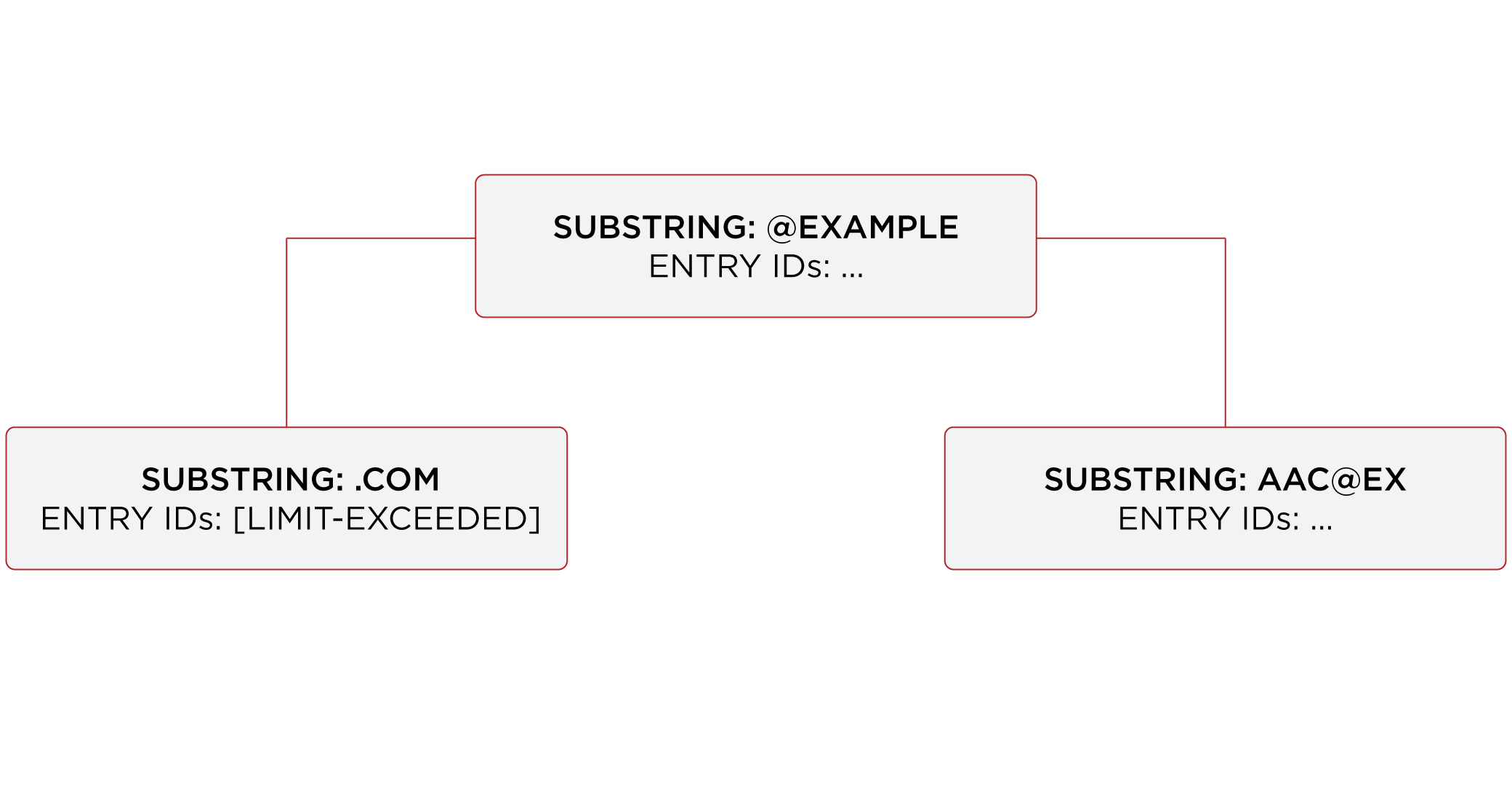
Ideally, the limit is set at the point where it becomes more expensive to maintain the entry ID list for a key, and to perform an indexed search than to perform an unindexed search. In practice, the limit is a tradeoff, with a default index entry limit value of 4000. Keep the default setting unless you have good reason to change it.
Check index entry limits
The following steps show how to get information about indexes where the index entry limit is exceeded for some keys. In this case, the directory server holds 100,000 user entries.
Use the backendstat show-index-status command:
-
(Optional) Stop DS servers before you use the
backendstatcommand:$ stop-ds -
Non-zero values in the Over column of the output table indicate the number of keys for which the
index-entry-limitsetting has been exceeded. The keys that are over the limit are then listed below the table:$ backendstat show-index-status --baseDN dc=example,dc=comShow output
  Index Name                                          ...Over  Entry Limit...
------------------------------------------------------...-----------------...
  ...                                                 ...
  cn.caseIgnoreSubstringsMatch:6                      ...  14         4000...
  ...                                                 ...
  givenName.caseIgnoreSubstringsMatch:6               ...   9         4000...
  ...                                                 ...
  mail.caseIgnoreIA5SubstringsMatch:6                 ...  31         4000...
  ...                                                 ...
  objectClass.objectIdentifierMatch                   ...   4         4000...
  ...                                                 ...
  sn.caseIgnoreSubstringsMatch:6                      ...  14         4000...
  ...                                                 ...
  telephoneNumber.telephoneNumberSubstringsMatch:6    ...  10         4000...
  ...

Index: mail.caseIgnoreIA5SubstringsMatch:6
Over index-entry-limit keys: [.com] [0@exam] ...

Index: cn.caseIgnoreSubstringsMatch:6
Over index-entry-limit keys: [a] [an] [e] [er] [i] [k] [l] [n] [o] [on] [r] [s] [t] [y]

Index: givenName.caseIgnoreSubstringsMatch:6
Over index-entry-limit keys: [a] [e] [i] [ie] [l] [n] [na] [ne] [y]

Index: telephoneNumber.telephoneNumberSubstringsMatch:6
Over index-entry-limit keys: [0] [1] [2] [3] [4] [5] [6] [7] [8] [9]

Index: sn.caseIgnoreSubstringsMatch:6
Over index-entry-limit keys: [a] [an] [e] [er] [i] [k] [l] [n] [o] [on] [r] [s] [t] [y]

Index: objectClass.objectIdentifierMatch
Over index-entry-limit keys: [inetorgperson] [organizationalperson] [person] [top]
For example, every user entry has the object classes listed, and every user entry has an email address ending in
.com, so those values are not specific enough to be used in search filters.A non-zero value in the Over column represents a tradeoff. As described above, this is usually a good tradeoff, not a problem to be solved.
Find a detailed explanation of each column of the output in backendstat show-index-status.
-
If you stopped the server, start it again:
$ start-ds
On over index-entry-limit keys
The settings for this directory server are a good tradeoff.
Unless you are observing many unindexed searches targeting keys in the Over index-entry-limit keys lists,
there’s no reason to change the index-entry-limit settings.
A search might be indexed even though some keys are over the limit.
For example, as shown above, the objectClass value inetorgperson is over the limit.
Yet, a search with a filter like (&(cn=Babs Jensen)(objectclass=inetOrgPerson)) is indexed:
$ ldapsearch \
 --hostname localhost \
 --port 1636 \
 --useSsl \
 --trustStorePath /path/to/opendj/config/keystore \
 --trustStoreType PKCS12 \
 --trustStorePassword:file /path/to/opendj/config/keystore.pin \
 --bindDN uid=user.1,ou=people,dc=example,dc=com \
 --bindPassword password \
 --baseDN dc=example,dc=com \
 "(&(cn=Babs Jensen)(objectclass=inetOrgPerson))" cn
Show output
dn: uid=bjensen,ou=People,dc=example,dc=com
cn: Barbara Jensen
cn: Babs Jensen
The search is indexed because the equality index for cn is not over the limit,
so the search term (cn=Babs Jensen) is enough for DS to find a match using that index.
If you look at the debugsearchindex output,
you observe how DS uses the cn index, and skips the objectclass index.
The overall search is clearly indexed:
$ ldapsearch \
 --hostname localhost \
 --port 1636 \
 --useSsl \
 --trustStorePath /path/to/opendj/config/keystore \
 --trustStoreType PKCS12 \
 --trustStorePassword:file /path/to/opendj/config/keystore.pin \
 --bindDN uid=admin \
 --bindPassword password \
 --baseDN dc=example,dc=com \
 "(&(cn=Babs Jensen)(objectclass=inetOrgPerson))" \
 debugsearchindex | sed -n -e "s/^debugsearchindex: //p"
Show debugsearchindex output
{
    "baseDn": "dc=example,dc=com",
    "scope": "sub",
    "filter": "(&(cn=Babs Jensen)(objectclass=inetOrgPerson))",
    "maxCandidateSize": 100000,
    "lookThroughLimit": 0,
    "strategies": [
        {
            "name": "BaseObjectSearchStrategy",
            "diagnostic": "not applicable",
            "lookedThrough": 0
        },
        {
            "name": "VlvSearchStrategy",
            "diagnostic": "not applicable",
            "lookedThrough": 0
        },
        {
            "name": "AttributeIndexSearchStrategy",
            "filter": {
                "query": "INTERSECTION",
                "rank": "EXACT_MATCH",
                "filter": "(&(cn=Babs Jensen)(objectclass=inetOrgPerson))",
                "subQueries": [
                    {
                        "query": "FIRST_OF",
                        "rank": "EXACT_MATCH",
                        "filter": "(cn=Babs Jensen)",
                        "subQueries": [
                            {
                                "query": "EXACT_MATCH",
                                "rank": "EXACT_MATCH",
                                "filter": "(cn=Babs Jensen)",
                                "index": "cn.caseIgnoreMatch",
                                "key": "babs jensen",
                                "diagnostic": "indexed",
                                "candidates": 1
                            },
                            {
                                "query": "MATCH_ALL",
                                "rank": "MATCH_ALL",
                                "filter": "(cn=Babs Jensen)",
                                "index": "cn.presence",
                                "diagnostic": "skipped"
                            }
                        ],
                        "diagnostic": "indexed",
                        "candidates": 1,
                        "retained": 1
                    },
                    {
                        "query": "FIRST_OF",
                        "rank": "OBJECT_CLASS_EQUALITY_MATCH",
                        "filter": "(objectclass=inetOrgPerson)",
                        "subQueries": [
                            {
                                "query": "OBJECT_CLASS_EQUALITY_MATCH",
                                "rank": "OBJECT_CLASS_EQUALITY_MATCH",
                                "filter": "(objectclass=inetOrgPerson)",
                                "subQueries": [
                                    {
                                        "query": "EXACT_MATCH",
                                        "rank": "EXACT_MATCH",
                                        "index": "objectClass.objectIdentifierMatch",
                                        "key": "inetorgperson",
                                        "diagnostic": "skipped"
                                    },
                                    {
                                        "query": "EXACT_MATCH",
                                        "rank": "EXACT_MATCH",
                                        "index": "objectClass.objectIdentifierMatch",
                                        "key": "2.16.840.1.113730.3.2.2",
                                        "diagnostic": "skipped"
                                    }
                                ],
                                "diagnostic": "skipped"
                            },
                            {
                                "query": "MATCH_ALL",
                                "rank": "MATCH_ALL",
                                "filter": "(objectclass=inetOrgPerson)",
                                "index": "objectClass.presence",
                                "diagnostic": "skipped"
                            }
                        ],
                        "diagnostic": "skipped"
                    }
                ],
                "diagnostic": "indexed",
                "candidates": 1
            },
            "diagnostic": "indexed",
            "candidates": 1,
            "lookedThrough": 1
        },
        {
            "name": "BigIndexSearchStrategy",
            "diagnostic": "skipped"
        },
        {
            "name": "UnindexedSearchStrategy",
            "diagnostic": "skipped"
        }
    ],
    "lookedThrough": 1,
    "final": 1
}
Index entry limit changes
In rare cases, the index entry limit might be too low for a certain key. This could manifest itself as a frequent, useful search becoming unindexed with no reasonable way to narrow the search.
You can change the index entry limit on a per-index basis. Do not do this in production unless you can explain and show why the benefits outweigh the costs.
|
Changing the index entry limit significantly can result in serious performance degradation. Be prepared to test performance thoroughly before you roll out an index entry limit change in production. |
To configure the index-entry-limit for an index or a backend:
-
Use the
dsconfig set-backend-index-propcommand to change the setting for a specific backend index. -
(Not recommended) Use the
dsconfig set-backend-propcommand to change the setting for all indexes in the backend.