IDM in a cluster
To ensure that your identity management service remains available in the event of system failure, you can deploy multiple IDM instances in a cluster. In a clustered environment, each instance points to the same external repository.
If one instance in a cluster shuts down or fails to check in with the cluster management service, a second instance will detect the failure. For example, if an instance named instance1 loses connectivity while executing a scheduled task, the cluster manager notifies the scheduler service that instance1 is not available. The scheduler service then attempts to clean up any jobs that instance1 was running at that time. Note that clustered instances claim scheduled tasks in a random order. For more information, refer to Scheduled tasks across a cluster.
Consistency and concurrency across cluster instances is ensured using multi-version concurrency control (MVCC). MVCC provides consistency because each instance updates only the particular revision of the object that was specified in the update.
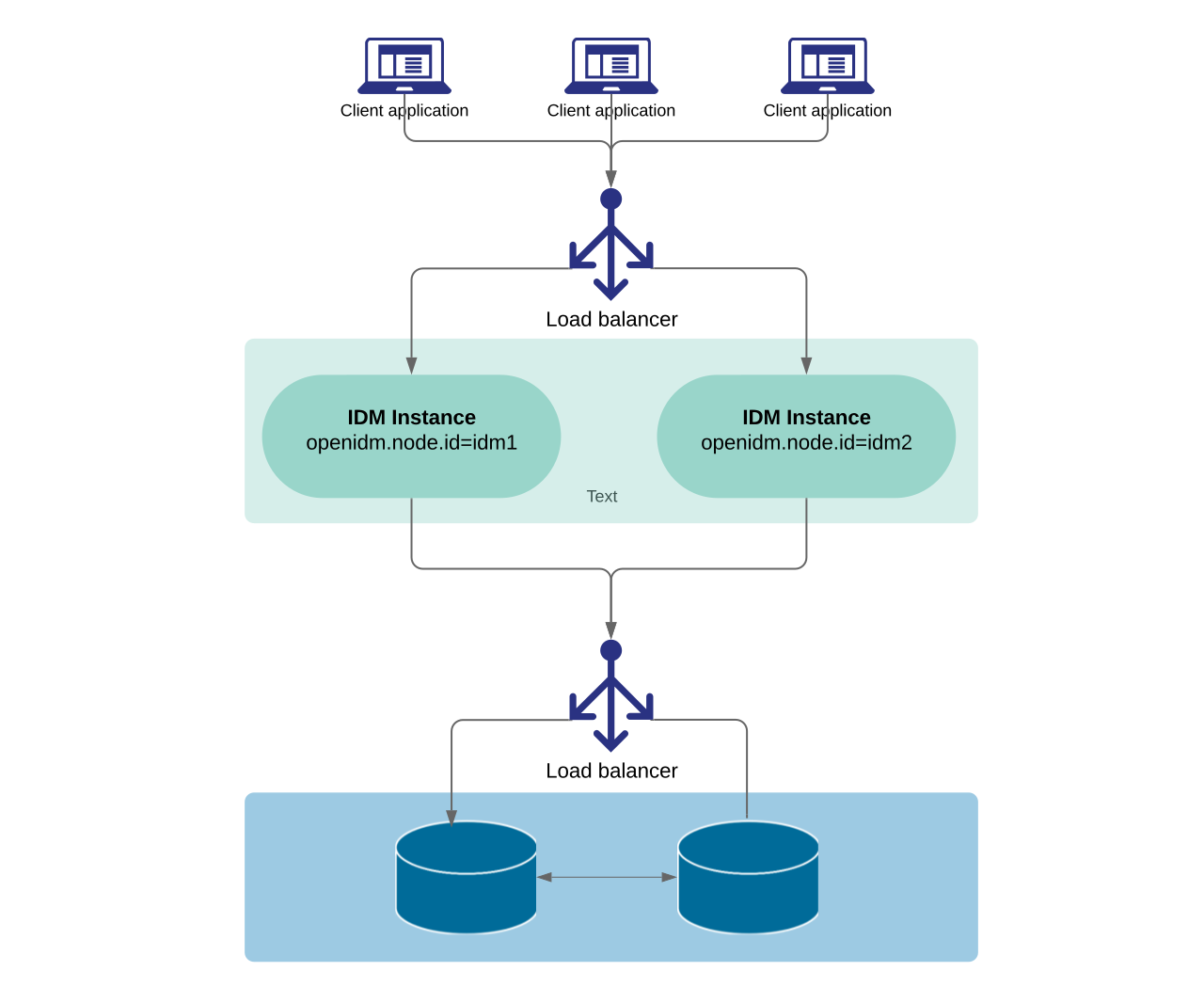
All instances in a cluster run simultaneously. When a clustered deployment is configured with a load balancer, the deployment works as an active-active high availability cluster. If the database is also clustered, IDM points to the database cluster as a single system.
IDM requires a single, consistent view of all the data it manages, including the user store, roles, schedules, and configuration. If you can guarantee this consistent view, the number and locations of IDM nodes in a cluster will be limited only by your network latency and other network factors that affect performance.
The following diagram shows an IDM deployment where both the IDM instances and the databases are clustered, and accessed through a load balancer:
Active-standby mode
In addition to an active-active deployment, you can segment IDM instances into active and standby groups. Active instances process schedules, clustered reconciliation, and queued sync. Standby instances don’t process these operations, functioning as hot spares that you can activate on demand using the openidm/cluster/active endpoint.
|
Standby mode controls whether a node processes schedules, clustered reconciliation, and queued sync. Standby nodes still respond to direct API requests. Configuring load balancing, database replication, and failover orchestration for an active-standby deployment is the responsibility of the deployer. |
Learn more in Cluster standby mode.
Considerations
The cluster subtopics don’t include instructions on configuring the various third-party load balancing options.
Clock synchronization
A clustered deployment relies on system heartbeats to assess the cluster state. For the heartbeat mechanism to work, you must synchronize the system clocks of all machines in the cluster using a time synchronization service that runs regularly.
The system clocks must be within one second of each other. For information on how you can achieve this using the Network Time Protocol (NTP) daemon, refer to the NTP RFC.
Virtual machine clocks can drift from the hypervisor host clock due to CPU scheduling, VM migration, or suspend and resume operations. To keep cluster heartbeats accurate, run a time synchronization service such as NTP independently on each VM, even if the hypervisor host is already synchronized.