Default attribute values in a mapping
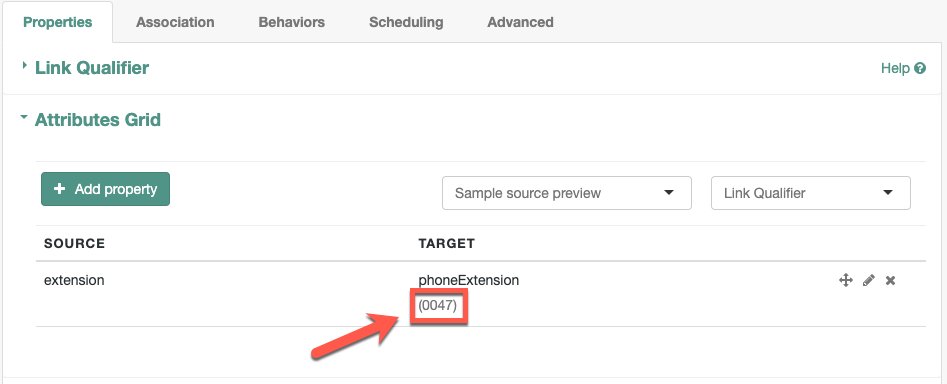
You can use a mapping to create attributes on the target resource. The following mapping excerpt creates a phoneExtension attribute with a default value of 0047 on the target object:
{
    "target": "phoneExtension",
    "default": "0047"
},
The default property specifies a value to assign to the attribute on the target object. Before IDM determines the value of the target attribute, it evaluates any applicable conditions, followed by any transformation scripts. If the source property and the transform script yield a null value, IDM applies the default value in the create and update actions. The default value overrides the target value, if one exists.
Configure default attribute values using the admin UI
|
Starting with IDM 8.1, the legacy admin UI is deprecated and is no longer bundled with IDM. New deployments should use the Platform admin UI, which is the replacement for the legacy admin UI. Both UIs are available as separate downloads from the Backstage download site:
|
Using the Platform admin UI
To configure a default attribute value using the Platform admin UI:
-
Open the Advanced Sync editor, and click the property to edit on the Mapping tab.
-
Click Show advanced settings, and select Apply a default if value is
null. -
From the Type list, select Javascript or Groovy.
-
Enter the default value in the code editor.
-
Click Save.
The default value is applied to the target attribute only if the result of the mapping (including any transformation script or conditional update) is
null.
Using the legacy admin UI
To configure a default attribute value using the legacy admin UI:
-
From the navigation bar, click Configure > Mappings, and click the mapping to edit.
-
Click the Properties tab.
-
Expand the Attributes Grid node, and click the Target property to edit.
-
In the Target Property: name window, click the Default Values tab, and add or edit the default values.
-
Click Save.
The default value displays in the Attributes Grid.