Prepare the server
The following example journey covers the "usernameless" authentication case. This is a simple prototype flow that does not cover all edge cases that might be present in a production environment. If WebAuthn authentication is not possible for any reason, the flow falls back to a normal login journey.
To access this configuration, you need to log in to PingOne Advanced Identity Cloud or PingAM as an administrator, and create a new journey.
-
In the editor drag the following nodes into the journey:
-
WebAuthn Registration node
-
WebAuthn Authentication node
-
Inner Tree Evaluator node
-
Two Choice Collector nodes
-
-
Connect the nodes similar to the following example:
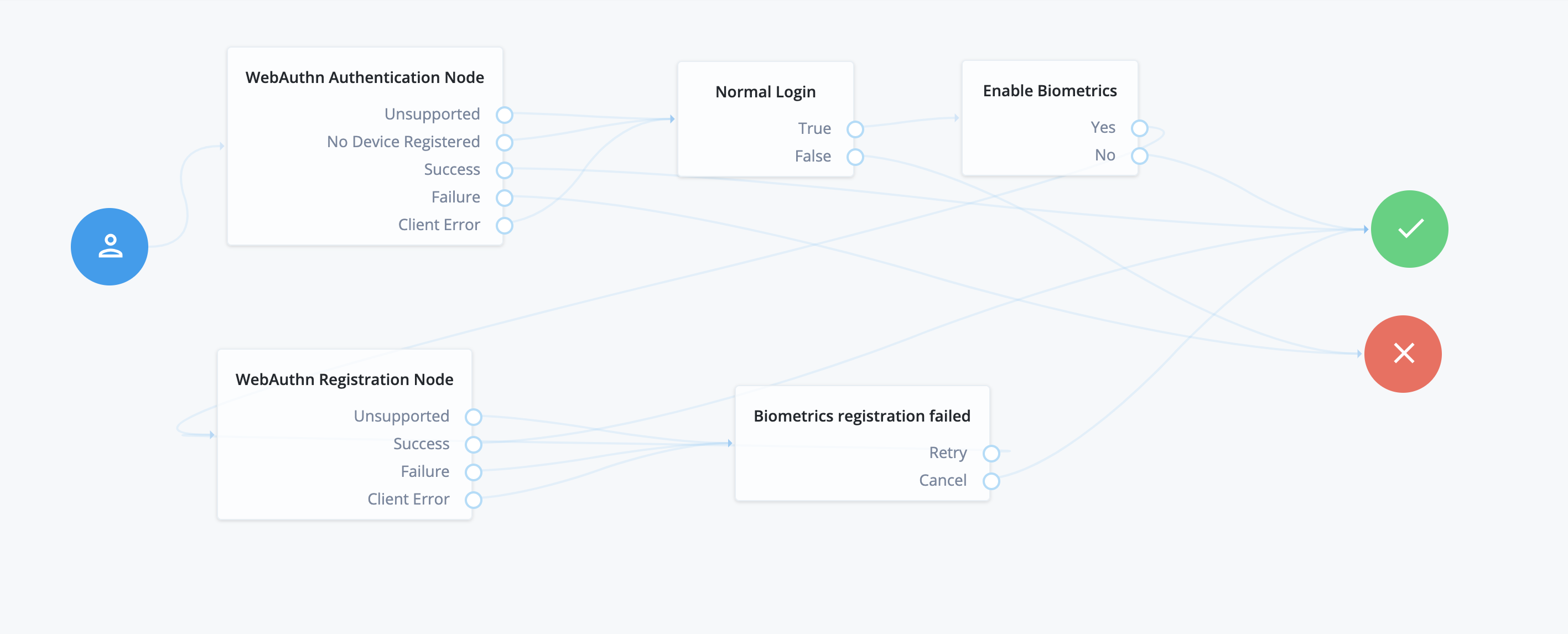
-
Configure the nodes:
-
In both the WebAuthn Registration and WebAuthn Authentication nodes, the
Return challenge as JavaScriptoption must be disabled. -
In the WebAuthn Registration node,
Authentication attachmentmust be eitherUNSPECIFIEDorPLATFORM. -
In the WebAuthn Registration node, enable the
Username to deviceoption. -
In the WebAuthn Authentication node, enable the
Username from deviceoption. -
Use Choice Collector nodes to handle the user input in case of registration failure, and to give users the option to enable biometrics for this journey.
-
Set the
Relying party identifierto the domain of your PingAM instance.For example:
openam.example.com.
-
If you want your users to provide a username, deactivate the Username from/to device options,
and add a Username Collector node before the WebAuthn Registration node and WebAuthn Authentication node.
Accessing WebAuthn authenticator information
The Ping (ForgeRock) SDKs send WebAuthn assertion or attestation information back to the server when they encounter a WebAuthn Authentication node or a WebAuthn Registration Node.
For example, whether the authenticator used is platform based, such as a built-in fingerprint reader, or is cross-platform, such as a USB security key that could be used on multiple clients.
The Ping (ForgeRock) SDKs also include a number of flags about the authenticator used, as defined in Web Authentication: An API for accessing Public Key Credentials Level 2.
The authentication nodes store this data in transient state, so that you can use the information to alter the course of the authentication journey, if required.
- WebAuthnRegistration node
-
Stores the attestation information in a
webauthnAttestationInfoobject in transient state:ExamplewebauthnAttestationInfoobject{ "authenticatorAttachment": "platform", "flags": { "UP": true, "UV": true, "ED": false, "AT": false, "BE": true, "BS": true } } - WebAuthnAuthentication node
-
Stores the assertion information in a
webauthnAttestationInfoobject in transient state:ExamplewebauthnAttestationInfoobject{ "authenticatorAttachment": "cross-platform", "flags": { "UP": true, "UV": true, "ED": false, "AT": false, "BE": false, "BS": false } }
Catching client errors
The WebAuthn Registration and WebAuthn Authentication nodes might result in a Client Error.
Client errors can happen for a number of reasons.
In order to parse the error and act upon it, make use of a Scripted Decision node
to access the shared state within the journey, and read the WebAuthenticationDOMException thrown.
For more information regarding the use of the Scripted Decision node, see Scripted Decision Node API Functionality in the PingAM documentation.