Preparing PingAuthorize for Kong Gateway integration
For Kong Gateway to use PingAuthorize as an external authorization policy runtime service, you must prepare PingAuthorize to receive authorization requests from Kong Gateway.
Before you begin
-
Install and start Kong Gateway. Learn more in the Kong Gateway documentation.
-
Install and start PingAuthorize. Learn more in Installing PingAuthorize.
Steps
-
In the PingAuthorize admin console, go to Configuration > Web Services and Applications > HTTP Servlet Extensions.
-
Click Sideband API.
-
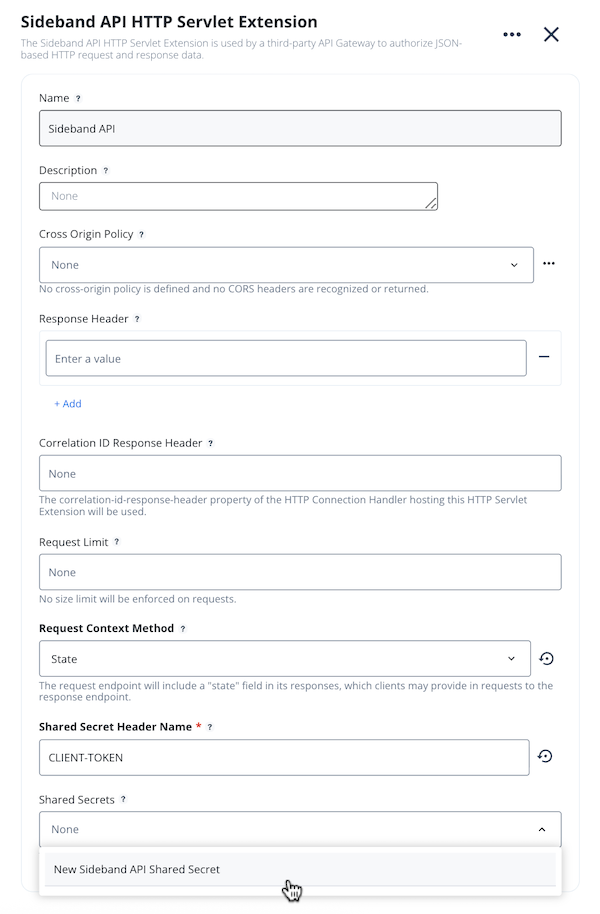
In the Request Context Method list, select State.
-
In the Shared Secret Header Name field, enter
CLIENT-TOKEN. -
To create a new shared secret, in the Shared Secret Header Name list, select New Sideband API Shared Secret.
The shared secret authenticates the
ping-authplugin to PingAuthorize. Version 1.2.0 of the plugin supports referenceable secrets. For security reasons, store the shared secret in a vault supported by Kong. Learn more in Secrets Management and Environment Variables Vault in the Kong documentation. -
In the New Sideband API Shared Secret modal, create a suitably long shared secret value, and then click Save.
-
Click Save.