Policy query request and response examples
The following examples highlight different policy query request and response formats supported by the JSON PDP API. Learn more about the structure of such requests and responses in JSON PDP API request and response flow.
Using a query attribute with no values specified
The following request asks which actions the specified user can perform on the accounts:
{
  "query": [
    {
      "attribute": "Action"
    },
    {
      "attribute": "Subject",
      "values": ["John Smith"]
    },
    {
      "attribute": "Resource",
      "values": ["account"]
    }
  ]
}
The response returns each action that produced a PERMIT decision, given the specified subject and resource:
{
  "requestId": "4da494e4-2f50-4165-b1b3-644981564196",
  "timeStamp": "2024-09-19T21:44:51.905443Z",
  "deploymentPackageId": "ed614a98-f4d0-483a-b9dd-574aa327ad11",
  "elapsedTime": 7,
  "result": [
     {
       "attribute": "Action",
       "value": "edit",
       "results": [
           {
               "attribute": "Subject",
               "value": "John Smith",
               "results": [
                   {
                       "attribute": "Resource",
                       "value": "account",
                       "decision": "PERMIT"
                   }
               ]
           }
       ]
     },
     {
       "attribute": "Action",
       "value": "view",
       "results": [
           {
               "attribute": "Subject",
               "value": "John Smith",
               "results": [
                   {
                       "attribute": "Resource",
                       "value": "account",
                       "decision": "PERMIT"
                   }
               ]
           }
       ]
     }
  ]
}
Using a query attribute with multiple values specified
The following request uses a request attribute with multiple values to ask whether the specified user can edit or view account information:
{
  "query": [
    {
      "attribute": "Action",
      "values": ["edit", "view"]
    },
    {
      "attribute": "Subject",
      "values": ["Tom Johnson"]
    },
    {
      "attribute": "Resource",
      "values": ["account"]
    }
  ]
}
The response returns each action that produced a PERMIT decision, given the specified subject and resource:
{
   "requestId": "af52d214-6dbb-4699-9fe1-74ec88ccebac",
   "timeStamp": "2024-09-20T01:40:04.381703Z",
   "deploymentPackageId": "292863fe-2cde-440f-9c7b-9aee4a8dc94e",
   "elapsedTime": 4,
   "results": [
      {
         "attribute": "Action",
         "value": "edit",
         "results": [
             {
                "attribute": "Subject",
                "value": "John Smith",
                "results": [
                    {
                       "attribute": "Resource",
                       "value": "account",
                       "decision": "PERMIT"
                    }
               ]
             }
         ]
      },
      {
        "attribute": "Action",
        "value": "view",
        "results": [
            {
               "attribute": "Subject",
               "value": "John Smith",
               "results": [
                   {
                     "attribute": "Resource",
                     "value": "account",
                     "decision": "PERMIT"
                   }
               ]
            }
        ]
      }
   ]
}
Using a query attribute with no values specified and a query attribute with multiple values specified
The following request asks which users can either edit or view bank accounts:
{
  "query": [
    {
      "attribute": "Subject"
    },
    {
      "attribute": "Action",
      "values": ["edit", "view"]
    },
    {
      "attribute": "Resource",
      "values": ["account"]
    }
  ]
}
The response returns each user that produced a PERMIT decision on either of the specified actions, given the specified resource:
{
   "requestId": "2d3fe162-7490-43a4-abdf-56c978a35abf",
   "timeStamp": "2024-09-20T01:53:06.102542Z",
   "deploymentPackageId": "292863fe-2cde-440f-9c7b-9aee4a8dc94e",
   "elapsedTime": 4,
   "results": [
      {
         "attribute": "Subject",
         "value": "John Smith",
         "results": [
             {
                "attribute": "Action",
                "value": "edit",
                "results": [
                    {
                       "attribute": "Resource",
                       "value": "account",
                       "decision": "PERMIT"
                    }
                ]
             },
             {
                "attribute": "Action",
                "value": "view",
                "results": [
                    {
                       "attribute": "Resource",
                       "value": "account",
                       "decision": "PERMIT"
                    }
                ]
             }
         ]
      },
      {
        "attribute": "Subject",
        "value": "Sally White",
        "results": [
            {
               "attribute": "Action",
               "value": "edit",
               "results": [
                   {
                     "attribute": "Resource",
                     "value": "account",
                     "decision": "PERMIT"
                   }
               ]
            }
        ]
      }
   ]
}
Using two query attributes with no values specified
The following request asks which users can perform which actions on the Checking account:
{
  "query": [
    {
      "attribute": "Subject"
    },
    {
      "attribute": "Action"
    },
    {
      "attribute": "Account",
      "values": ["Checking"]
    }
  ]
}
The response returns each subject-action combination that returns a PERMIT decision for the Checking account:
{
    "requestId": "ac48df7e-e29d-4d3d-bf82-ae8d1aaac0e1",
    "timeStamp": "2025-12-09T22:59:00.073056Z",
    "deploymentPackageId": "b093f420-de7c-4831-9788-d86979531008",
    "elapsedTime": 132,
    "results": [
        {
            "attribute": "Subject",
            "value": "{\"Name\":\"Adam\",\"Role\":\"Admin\"}",
            "results": [
                {
                    "attribute": "Action",
                    "value": "\"Withdraw\"",
                    "results": [
                        {
                            "attribute": "Account",
                            "value": "Checking",
                            "decision": "PERMIT"
                        }
                    ]
                }
            ]
        },
        {
            "attribute": "Subject",
            "value": "{\"Name\":\"Eve\",\"Role\":\"Employee\"}",
            "results": [
                {
                    "attribute": "Action",
                    "value": "\"Withdraw\"",
                    "results": [
                        {
                            "attribute": "Account",
                            "value": "Checking",
                            "decision": "PERMIT"
                        }
                    ]
                }
            ]
        },
        {
            "attribute": "Subject",
            "value": "{\"Name\":\"Jacob\",\"Role\":\"Intern\"}",
            "results": [
                {
                    "attribute": "Action",
                    "value": "\"Withdraw\"",
                    "results": [
                        {
                            "attribute": "Account",
                            "value": "Checking",
                            "decision": "PERMIT"
                        }
                    ]
                }
            ]
        }
    ]
}
Using query attributes to resolve other query attributes
When building the Trust Framework around your policy query use case, you can use resolvers to create chains of dependence between query attributes.
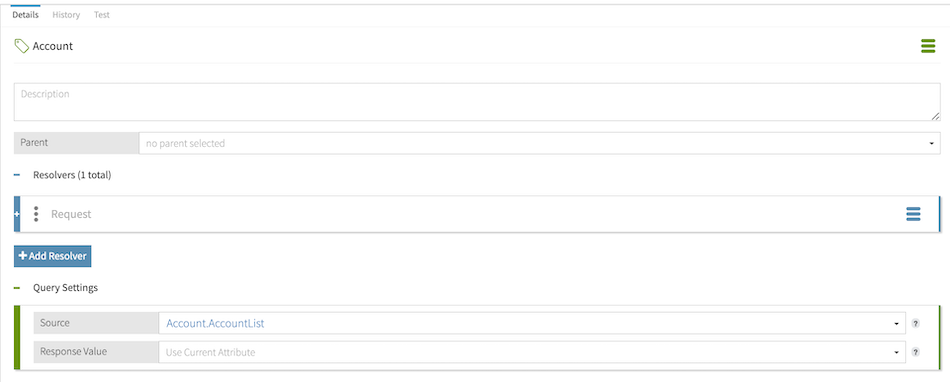
In this example, the Account attribute is configured with query settings to enable authorization questions, such as which accounts this user can update. The AccountList attribute is configured as the Account attribute’s source collection:
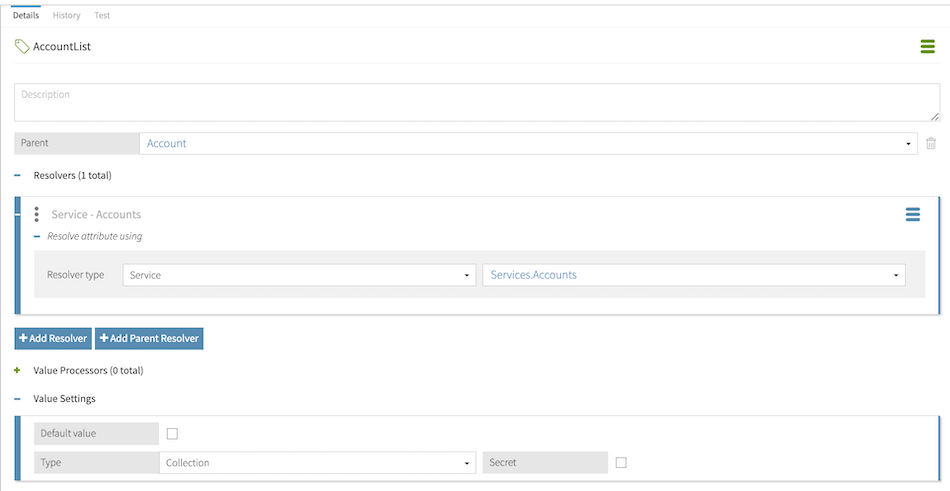
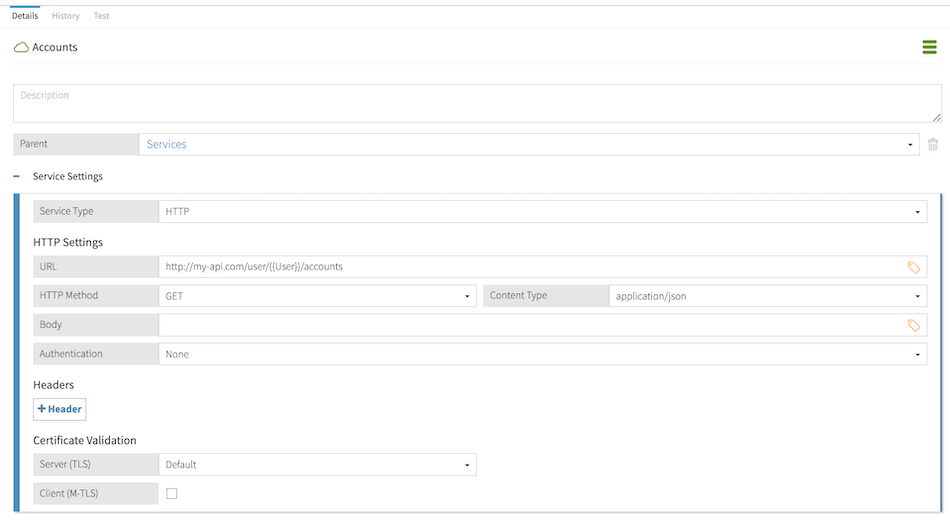
The AccountList attribute uses the Accounts service as its resolver, and this service interpolates the User attribute in its endpoint URL definition:
The following query requests asks which accounts John Smith can edit:
{
  "query": [
    {
      "attribute": "Account"
    },
    {
      "attribute": "Subject",
      "values": ["John Smith"]
    },
    {
      "attribute": "Action",
      "values": ["edit"]
    }
  ]
}
In resolving the Account attribute, the Accounts service uses the single-valued User attribute included in the request to make an HTTP call and retrieve a list of accounts. The response then returns an array of accounts that produced a PERMIT decision, given the specified user and action.
|
You can also use multivalued or unbounded query attributes to resolve other query attributes. |