Step-up authentication for APIs
Step-up authentication enables you to require users to provide stronger or more recent authentication when they access sensitive API resources or perform high-risk actions.
Also known as just-in-time authentication or route-based authentication, step-up authentication allows organizations to reduce friction during the authentication experience while ensuring that sensitive resources are protected. For example, a bank might require only a basic level of authentication when customers view available banking products, but require an additional authentication method when they view their account balance or transaction history.
Step-up authentication:
-
Balances a low-friction authentication experience with the need for increased security.
-
Reduces MFA fatigue by prompting for additional authentication only when necessary.
-
Protects critical assets or high-risk resources that only certain users need to access.
-
Reassures users that their sensitive data is safe.
When to use step-up authentication
Use step-up authentication when clients must present higher assurance or more recent authentication before accessing sensitive resources, such as salary information, health records, or premium content.
Before granting access, you can require that:
-
The user authenticated using a stronger authentication policy.
-
The user authenticated recently.
How it works
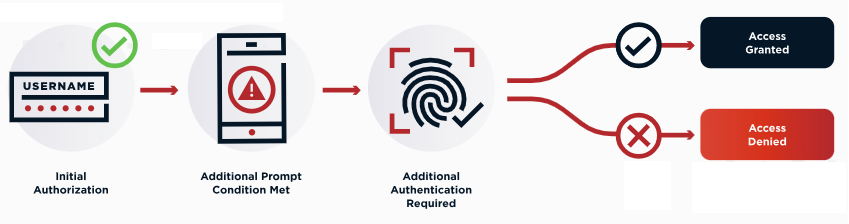
The following diagram and steps represent a typical step-up authentication flow:
-
A user accesses an application with a basic level of authentication.
The authorization server issues an access token that the client application uses when requesting protected resources. For example:
GET /secrets HTTP/1.1
Host: example.com
Authorization: Bearer eyJ0eX...
The access token includes claims related to authentication requirements:
-
acr: The name of the authentication policy used to satisfy the authentication event. -
auth_time: The timestamp of the authentication event in epoch seconds.
-
-
The user requests access to a resource that requires a higher authentication level or a more recent authentication.
The resource server checks the
acrandauth_timeclaims. If the token doesn’t satisfy the required authentication policy or recency, the resource server rejects the request with a challenge response. For example:HTTP/1.1 401 Unauthorized WWW-Authenticate: Bearer error="insufficient_user_authentication", error_description="A different authentication level is required", acr_values="strong_authentication_policy", max_age=300
The challenge response includes:
insufficient_user_authentication: Tells the client that the user needs to reauthenticate.acr_values: Specifies a list of acceptable authentication policies.max_age: Specifies the maximum allowable time since the user last authenticated. -
The user is prompted to reauthenticate with higher-level factors.
-
The client parses the challenge response. The error code indicates that the user needs to reauthenticate.
-
The client requests a new access token from the authorization server based on the
acr_valuesandmax_ageprovided in the challenge response. For example:GET /<envId>/as/authorize?client_id=<clientId>&scope=secret&response_type=code&redirect_uri=<redirectUri>&state=<state>&acr_values=strong_authentication_policy&max_age=300 Host: auth.pingone.com
-
The authorization server prompts the user to reauthenticate with the policy named in
acr_values.
-
-
The user reauthenticates.
If authentication is successful, the authorization server issues a new access token that includes updated
acrandauth_timeclaims. -
The client retries the protected resource request using the new token.
-
If the token satisfies the required
acr_valuesandmax_age, the resource server grants access. -
If the token doesn’t meet the requirements, the request is denied again.
-
Using PingAuthorize for step-up authentication
Step-up authentication relies on access control logic defined in the Policy Editor. When a client requests a sensitive resource, PingAuthorize evaluates claims in the access token to determine whether the user satisfies the required authentication level and recency.
When you use PingAuthorize for step-up authentication:
-
You must configure your authorization server to issue access tokens with the
acrandauth_timeclaims. -
PingAuthorize evaluates these claims on behalf of the resource server.
-
If the claims don’t meet the policy requirements, PingAuthorize returns a challenge response instructing the client to reauthenticate.
Learn more in Setting up step-up authentication for APIs.