Configuring the Decision Response View
Use the Decision Response View to increase or decrease the size of the policy decision response from the policy decision point (PDP).
When a client application makes a request for API resources, PingAuthorize Server returns a decision response payload that includes, at minimum, basic information about the server instance, the requested API resources, and the inbound and outbound flow of data. The payload also includes any views added to the Decision Response View. By default, no views are present. PingAuthorize then passes the full response payload to the Policy Decision logger.
Adding or removing views in the Decision Response View alters the verbosity of the response payload and the size of the policy-decision.log file.
|
You can add the following views to the Decision Response View:
| View | Description | ||
|---|---|---|---|
Request |
Includes the full decision request object.
|
||
Decision Tree |
Includes detailed output tracing the decision’s policy evaluation flow. |
||
Attributes |
Includes full details of attributes evaluated during policy decision evaluation. |
||
Services |
Includes full details of services invoked during policy evaluation. |
||
Evaluated Entities |
Includes attribute and service resolution details. This is equivalent to specifying both attributes and services. |
||
Evaluation Log |
Includes attribute and service resolution details. This is similar to specifying evaluated-entities, but the data are expressed in a flat format. |
||
Evaluation Log With Attribute Values |
Includes attribute and service resolution details. This is equivalent to specifying evaluation-log but also includes values and types for successful attribute resolutions. |
Use the admin console or dsconfig to configure the Decision Response View.
-
Admin console
-
dsconfig
Steps
-
Go to Configuration > Authorization and Policies > Policy Decision Service.
-
In the Policy Request Configuration section, under Decision Response View, select a response view.
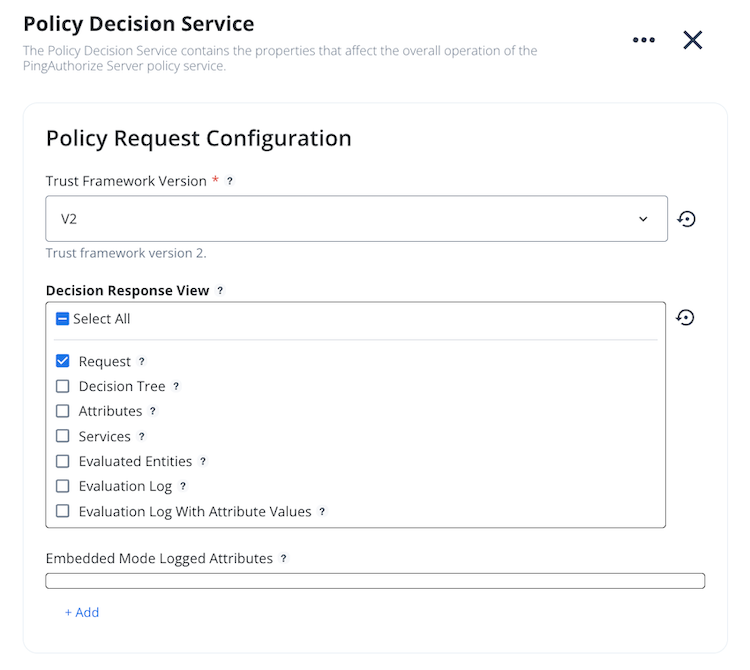
-
Click Save.
Steps
-
Run
dsconfigwith theset-policy-decision-service-propsubcommand.For example, the following command adds the
requestview to the Decision Response View:PingAuthorize/bin/dsconfig set-policy-decision-service-prop \ --no-prompt --port 5409 --useSSL --trustAll \ --bindDN "cn=directory manager" \ --bindPassword secret \ --add decision-response-view:request