JSON PDP API request and response flow
The JSON policy decision point (PDP) API provides an HTTP REST API for attribute-based access control based on policies configured in the PingAuthorize Server Policy Decision Service.
Client applications can use this API to request authorization decisions in individual, query, or batch modes. Each request type corresponds to a specific endpoint:
| Endpoint path | Method | Content-Type/Accept | Request body |
|---|---|---|---|
|
POST |
|
JSON |
|
POST |
|
JSON |
|
POST |
|
JSON |
All requests must include valid JSON bodies in the expected format and specify the appropriate HTTP headers:
Content-Type: application/json
Accept: application/json
Request and response flow
A successful JSON PDP API request goes through the following flow:
-
The client sends a JSON decision request to one of the PDP API endpoints.
-
The JSON PDP API forwards the request to the Policy Decision Service.
-
The Policy Decision Service evaluates the request according to the configured policies and returns a decision.
-
The JSON PDP API sends the decision response back to the client.
-
The policy enforcement point (PEP) applies any obligations or statements returned in the response.
Learn more about making JSON PDP API requests in the JSON PDP API Reference documentation.
JSON PDP API request format
Individual requests
A valid JSON PDP API request is a simple JSON object that a client application sends to the Policy Decision Service. Policies can match a decision request by service, domain, action, identityProvider, or other attributes.
The following table describes the fields in a valid JSON PDP API request:
| Field | Value type | Required | Trust Framework type | Example value |
|---|---|---|---|---|
|
String |
Optional |
Domain |
|
|
String |
Optional |
Action |
|
|
String |
Optional |
Service |
|
|
String |
Optional |
Identity Provider |
|
|
Map <String, String> |
Required |
Attribute map |
|
|
The |
{
  "domain": "Sales.Asia Pacific",
  "action": "Retrieve",
  "service": "Mobile.Landing page",
  "identityProvider": "Social Networks.Spacebook",
  "attributes": {
    "Prospect name": "B. Vo"
  }
}
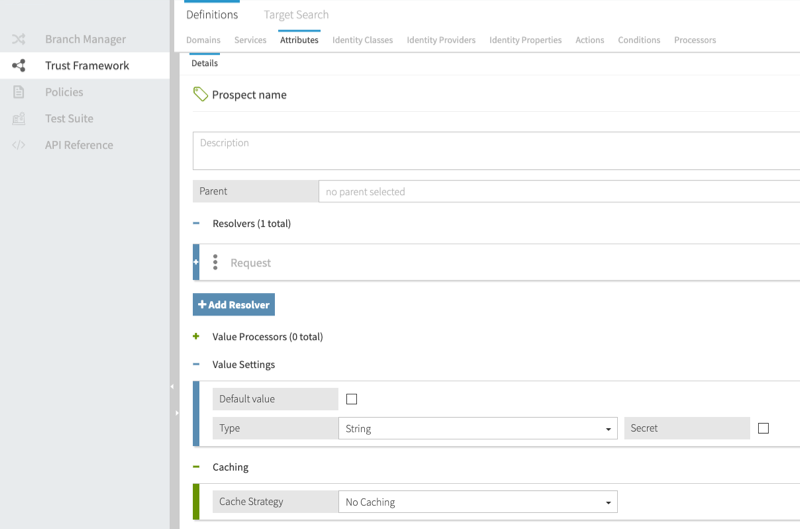
The following image shows how Prospect name from the example request is defined in the Policy Editor. In this example, the Prospect name attribute has a Request resolver and a Type of string.
|
The Trust Framework attribute name must match the key of the |
Batch requests
Batch requests consist of a requests array that contains individual JSON requests.
{
  "requests": [
    {
      "domain": "Sales.Asia Pacific",
      "action": "Retrieve",
      "service": "Mobile.Landing page",
      "identityProvider": "Social Networks.Spacebook",
      "attributes": {
        "Prospect name": "B. Vo"
      }
    },
    {
      "domain": "Sales.EMEA",
      "action": "Search",
      "service": "Mobile.Users search",
      "identityProvider": "Social Networks.Chirper",
      "attributes": {
        "Prospect name": "A. Mann"
      }
    }
  ]
}
Query requests
Query requests differ from individual and batch JSON requests in allowing the following types of attributes:
-
Unbounded: Attributes without specified values. Their values can be resolved at decision runtime by calling external services or referencing other query attributes.
You must enable and configure query settings for unbounded attributes. Learn more in Enabling query settings.
-
Multivalued: Attributes with multiple values specified.
A query request includes the following fields:
-
query: An array containing the following elements:-
attribute: The full name of an unbounded, multivalued, or standard authorization attribute.At most two attributes in the
queryarray can be unbounded. Up to three attributes can be multivalued. -
values(optional): An array defining the values of the attribute. If multiple values are included, the attribute is treated as multivalued. If the attribute is unbounded, omit this field.You can’t leave the
valuesarray empty in embedded policy decision point (PDP) mode. In external PDP mode, attributes with an emptyvaluesarray are treated as unbounded.
-
-
context(optional): A JSON object containing the same fields as a standard individual JSON request.
You can include single-valued attributes in either the query or context fields. When a single-valued attribute is included in query, it appears in each element of the results array in the response.
The following request asks which actions Joe can perform on the account:
{
  "query": [
    {
      "attribute": "Action"
    },
    {
      "attribute": "Subject",
      "values": ["{\"id\": 23, \"name\":\"Joe\"}"]
    },
    {
      "attribute": "Resource",
      "values": ["account"]
    }
  ]
}
JSON PDP API response format
After the Policy Decision Service makes a decision, it returns the decision to the JSON PDP API, which then forwards the decision response to the client. JSON PDP API responses include decisions, such as PERMIT or DENY, and any obligations or statements that were matched during policy evaluation.
Individual responses
The following example shows a response to an individual JSON request:
{
  "id": "12345678-90ab-cdef-1234-567890abcdef",
  "deploymentPackageId": "12345678-90ab-cdef-1234-567890abcdef",
  "timestamp": "2021-06-11T03:12:19.720485Z",
  "elapsedTime": 184024,
  "decision": "PERMIT",
  "authorized": true,
  "statements": [
    {
      "id": "12345678-90ab-cdef-1234-567890abcdef",
      "name": "Statement Name",
      "code": "statement-code",
      "payload": "{\"data\": \"some data\"}",
      "obligatory": true,
      "fulfilled": false,
      "attributes": {}
    }
  ],
  "status": {
    "code": "OKAY",
    "messages": [],
    "errors": []
  }
}
The decision and authorized values identify whether the policies authorize the request, and the statements array contains statements to be applied by the PEP. The elapsedTime value shows evaluation duration in microseconds.
Batch responses
Batch responses are returned as a responses array that contains individual JSON responses. The order of the responses matches the order of the original requests, meaning the first response in the responses array corresponds to the first request in the batch, the second response to the second request, and so on.
The following example shows a response to a batch JSON request:
{
  "responses": [
    {
      "id": "12345678-90ab-cdef-1234-567890abcdef",
      "deploymentPackageId": "12345678-90ab-cdef-1234-567890abcdef",
      "timestamp": "2021-06-11T04:18:32.820482Z",
      "elapsedTime": 830492,
      "decision": "PERMIT",
      "authorized": true,
      "statements": [
        {
          "id": "12345678-90ab-cdef-1234-567890abcdef",
          "name": "Advice Name",
          "code": "advice-code",
          "payload": "{\"data\": \"some data\"}",
          "obligatory": true,
          "fulfilled": false,
          "attributes": {}
        }
      ],
      "status": {
        "code": "OKAY",
        "messages": [],
        "errors": []
      }
    },
    {
      "id": "fedcba09-8765-4321-fedcba098765",
      "deploymentPackageId": "fedcba09-8765-4321-fedcba098765",
      "timestamp": "2021-06-11T04:18:33.650974Z",
      "elapsedTime": 492048,
      "decision": "PERMIT",
      "authorized": true,
      "statements": [
        {
          "id": "fedcba09-8765-4321-fedcba098765",
          "name": "Different Advice",
          "code": "advice-code",
          "payload": "{\"data\": \"other data\"}",
          "obligatory": false,
          "fulfilled": false,
          "attributes": {}
        }
      ],
      "status": {
        "code": "OKAY",
        "messages": [],
        "errors": []
      }
    }
  ]
}
Query responses
The following example shows a response to a query request:
{
  "requestId": "8245be35-ec9e-40f1-a79a-80890041f4b0",
  "timeStamp": "2023-11-14T03:21:47.734842Z",
  "elapsedTime": 22,
  "results": [
    {
      "attribute": "action",
      "value": "delete",
      "decision": "PERMIT"
    }
  ]
}
The results array contains a list of query attribute values that either produced a PERMIT decision or a DENY decision, along with any obligations or statements that were matched.
Configuring response timestamp precision
The PingAuthorize Server returns timestamps in each JSON PDP API response to identify when policy decisions were produced. By default, PingAuthorize uses the highest timestamp precision supported by the host operating system and CPU. On hosts that support nanosecond timestamps, responses include nanosecond-precision values. On systems that provide lower precision, such as microsecond-level timestamps, PingAuthorize uses that precision instead.
You can enforce microsecond-precision timestamps to maintain compatibility with clients that expect legacy formats. To enable this behavior, set the Policy Decision Service property use-microseconds-timestamp to true.
For example:
dsconfig set-policy-decision-service-prop \
  --set use-microseconds-timestamp:true
To revert to nanosecond precision:
dsconfig set-policy-decision-service-prop \
  --reset use-microseconds-timestamp
|
This setting affects the API response body only. |