Migrate authentication modules and chains to trees
Modules and chains were removed in AM 8.0. If you’re still using modules and chains for authentication, you must migrate to nodes and trees as soon as possible.
The high-level steps for migrating are:
-
Analyze your existing configuration
Review existing modules, chains, and post-authentication plugins (PAP) to understand their functionality and what needs to be migrated. Determine what you can replace with existing nodes and hooks, and what requires custom node development.
-
Design your new trees
Map the functionality of your old modules and chains to new authentication journeys. Learn more in Map module and chain functionality to trees and Configure trees.
-
Create your trees
Create the new trees. Use existing nodes where possible and add custom nodes where necessary.
-
Test and deploy
Test the new trees to make sure they work as expected. When you’re satisfied, deploy them to your production environment to complete the migration.
Key conceptual changes
Before designing your new trees, it’s important to understand their key improvements and differences compared to legacy modules and chains.
Authentication trees
Authentication trees (also referred to as journeys) provide fine-grained authentication by allowing multiple paths and decision points throughout the authentication flow. Use them to build complex authorization scenarios, while offering users a streamlined sign-on experience.
Trees are made up of authentication nodes, which define actions taken during authentication. Each node performs a single task during authentication, such as, collecting a username or making a simple decision based on a cookie.
Nodes can have multiple outcomes rather than just success or failure. This lets you create complex yet end user-friendly authentication experiences by linking nodes together, creating loops, branching the tree for different authentication scenarios, and nesting nodes within a tree:
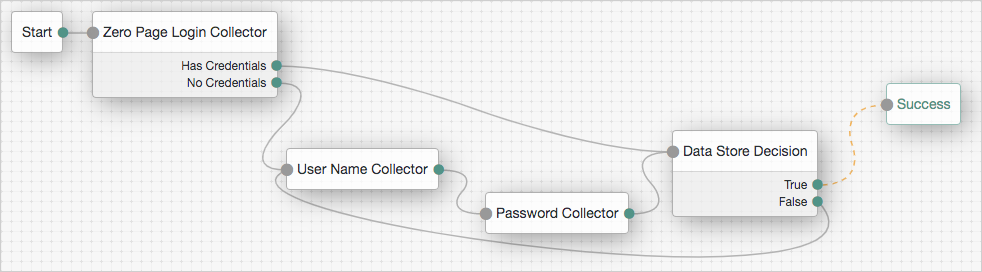
Default trees
AM provides the following default trees, which are direct replacements for the corresponding default modules and chains:
-
ldapService: replaces theldapServicechain. -
Agent: replaces theApplicationmodule. -
amsterService: replaces theamsterServicechain.
Learn more in Default trees.
Node types
There are five types of node you can use in your journeys:
- Collector Nodes
-
A collector node provides a callback mechanism where input is collected. For example, the Username Collector node, which provides a single text-based callback.
- Decision Nodes
-
A decision node analyzes information received from previous nodes and determines the appropriate outcome as a result.
- Single Outcome Nodes
-
A single outcome node provides processing logic and has one possible outcome.
- Multiple Outcome Nodes
-
A node can have multiple outcomes. Some nodes, such as the Data Store Decision node have simple boolean outcomes (
True,False). Others have more specific outcomes. For example, the MFA Registration Options node has outcomes such asRegister,Get AppandOpt-out. - Utility Nodes
-
Utility nodes abstract a lot of the generic logic processing that was previously embedded within a module. Utility nodes are generic and can be used multiple times in a tree.
Examples of utility nodes include:
-
Trees often include numerous nodes. To manage the complexity and allow for reuse of certain node combinations, the Inner Tree Evaluator node lets you embed trees within other trees.
Stateless and distributed journeys
Trees provide the ability to perform stateless login, also known as distributed login. Any AM instance within a cluster can start, continue, or end an authentication journey, regardless of the end user’s location in the tree. This provides a more resilient way of handling the login process. If an end user is load balanced across AM instances, or if an existing AM instance is taken down, the login journey can continue on any other available AM instance.
This functionality isn’t available with modules and chains. If a custom module contains stateful logic, you must consider this when designing a corresponding tree and how any custom nodes will handle that state.
Expanded shared state
Nodes use the shared state of the tree to store and pass information. This is similar to how modules could store user credentials in a shared state, but nodes can access and store a wider variety of data. For example, the Device Profile Collector node writes the device metadata to the shared state for subsequent nodes to use.
There are three types of state:
- Shared
-
Non-sensitive state.
- Transient
-
Sensitive state.
Transient state data is never sent back to the user’s browser in a callback so doesn’t need to be encrypted. The transient state is for sensitive data and for data not required after the next callback.
- Secure
-
Encrypted sensitive state.
Secure state data is sent back to the user’s browser encrypted as part of the shared state object.
Transient state data is promoted to secure state data when:
-
A callback to the user is about to occur.
-
A downstream node is detected in the journey, requesting data in the transient state as script input.
Hooks for post-authentication logic
Hooks provide a way to extend the functionality of trees, similar to the functionality of PAP, without modifying the core tree structure.
There are two types of hooks available:
- Webhooks
-
Use webhooks to send contextual information about authenticated sessions on predefined events, for example, logging out.
- Tree hooks
-
Use tree hooks to perform post-authentication tasks, like setting persistent cookies or logging detailed audit events.