Configuring condition short-circuiting in the Policy Editor
By default, the Policy Editor stops evaluating a condition group as soon as a final outcome is determined. This is called short-circuiting.
For example, consider an All condition group that contains three conditions. Because All requires every condition to be true, a single false result determines the outcome.
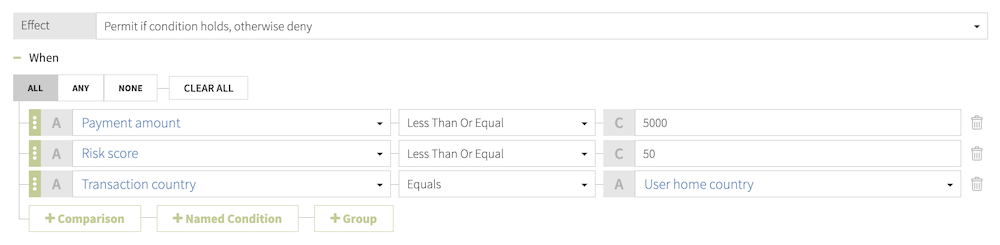
-
With short-circuiting enabled, evaluation ends immediately if either the Payment amount or Risk score condition evaluates to
false. -
With short-circuiting disabled, the Policy Editor evaluates every condition in the group, regardless of intermediate results.
To ensure a comprehensive audit trail of all condition evaluations in external policy decision point (PDP) mode, you can disable condition short-circuiting. This is useful for debugging complex policy failures.
Steps
-
Make a copy of the default
options.ymlfile:cp
<PingAuthorize-PAP>/config/options.yml my-options.yml -
In the new options file, under the
coresection, add theDecisionPoint.EnableShortcircuitingconfiguration property:core: DecisionPoint.EnableShortcircuiting: false
Allowed values are
trueandfalse. -
Stop the Policy Editor:
bin/stop-server -
Run
setupand use the--optionsFileargument to specify the new options file. Customize all other options according to your requirements.bin/setup demo \ --adminUsername admin \ --generateSelfSignedCertificate \ --decisionPointSharedSecret pingauthorize \ --hostname <PAP-hostname> \ --port <PAP-port> \ --adminPort <admin-port> \ --licenseKeyFile <path-to-license> \ --optionsFile my-options.yml -
Start the Policy Editor:
bin/start-server