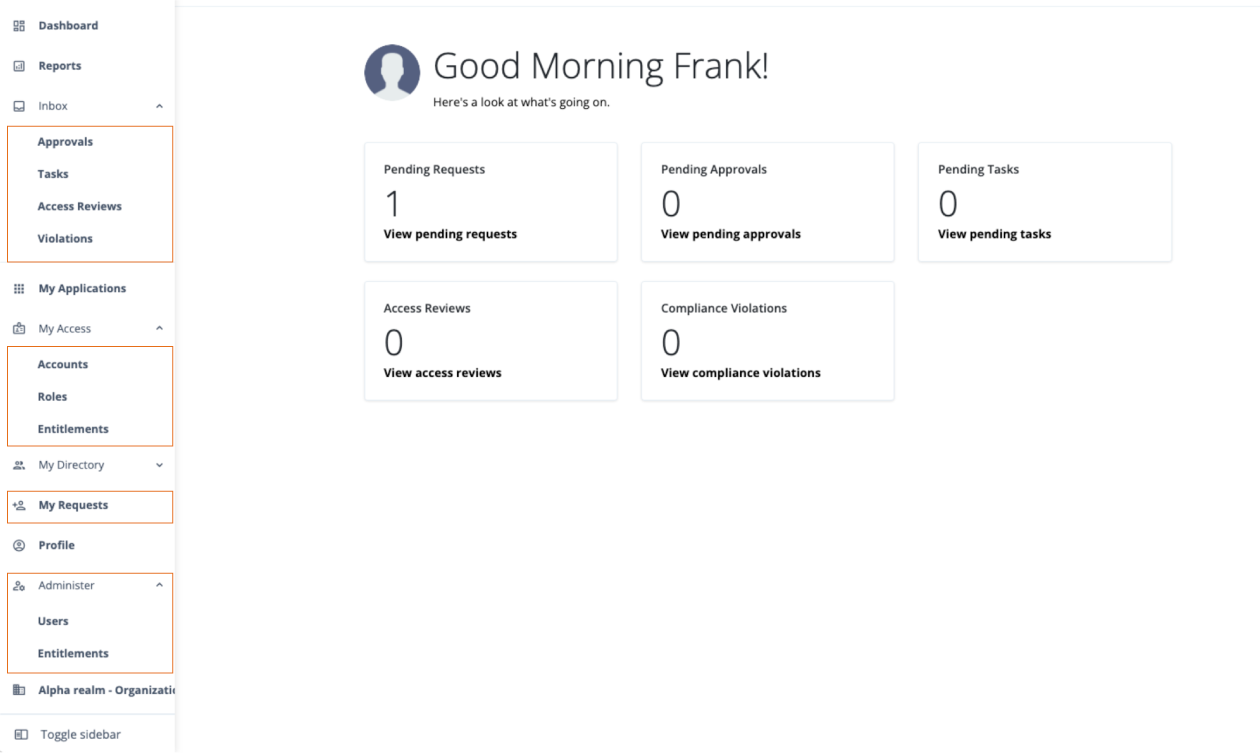
Hosted account dashboard
In the end-user dashboard, new self-service options empower users to manage their own access through an intuitive interface. The UI provides several key sections that allow users to view, request, and manage permissions.
-
Inbox: Users, such as managers or application owners, can review and act on pending access requests. From the inbox, they approve or deny requests submitted by their team members or for applications they own.
-
My Applications: Users can view a complete list of their current application access and permissions. This gives them full visibility into what resources (accounts, roles, and entitlements) they are authorized to use.
-
My Directory: Users can view and manage their direct reports, giving them a clear overview of their team’s access.
-
My Requests: Users can track the status of access requests they have submitted. This section shows whether a request is pending, has been approved, or was denied.
-
Profile: Users can view and manage their own profile information, such as their job title, department, and contact details.
-
Administer: Designated users, who are not tenant administrators, can manage the lifecycle (create, update, and delete) of other users and entitlements. This delegates administrative tasks to the appropriate people without granting them full admin rights.
This intuitive interface helps users get the resources they need quickly while ensuring all requests follow your organization’s defined approval processes.