Remote consent
Advanced Identity Cloud supports OAuth 2.0 remote consent, which hands off the consent-gathering part of an OAuth 2.0 flow to a separate service.
A remote consent service gathers resource owner consent separately from the authorization server (Advanced Identity Cloud). The consent service renders a consent page, gathers the result, signs and encrypts the result, and returns it to the authorization server.
|
Advanced Identity Cloud provides an example consent service that you can use to demonstrate and test remote consent. The example consent service isn’t intended for use in production environments because you can’t configure the encryption and signing algorithms. Find information about the example consent service in Remote consent service. |
Choose a consent request channel
When Advanced Identity Cloud needs to gather consent, it sends a consent request JWT to the consent service. You can choose how to deliver this JWT:
- Front channel
-
Advanced Identity Cloud redirects the resource owner’s browser to the consent service, passing the consent request JWT as a URL parameter. This is the default behavior when no Pushed Consent Request URL is configured on the remote consent agent.
- Backchannel (pushed consent)
-
Advanced Identity Cloud sends the consent request JWT directly to the consent service over a server-to-server HTTP POST (backchannel), before redirecting the resource owner. The consent service stores the request and returns an opaque
consent_request_uritoken. Advanced Identity Cloud then redirects the resource owner to the consent service using this token instead of the full JWT.This approach keeps the consent request JWT out of the browser and reduces exposure in URL logs. Configure the Pushed Consent Request URL on the remote consent agent to enable this option.
Remote consent flows
Front channel
The front channel flow is the default. It’s used when the Pushed Consent Request URL is not configured on the remote consent agent.
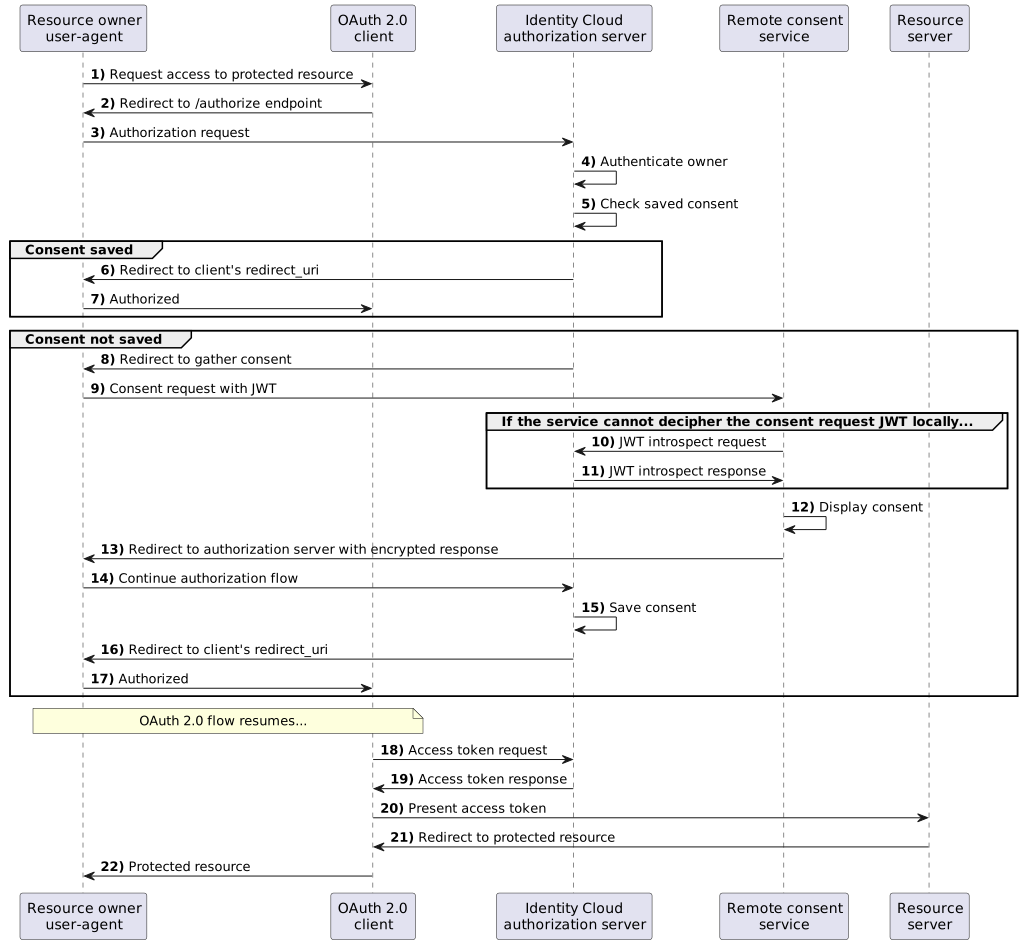
The consent request
During an OAuth 2.0 flow that requires user consent:
-
Advanced Identity Cloud creates a consent request JSON Web Token (JWT).
The JWT contains the necessary information to render a consent gathering page.
Example request body
{
  "clientId": "myClient",
  "iss": "https://<tenant-env-fqdn>/am/oauth2/realms/root/realms/alpha",
  "csrf": "opaque csrf string",
  "resourceOwnerSessionProperties": {
     "myProperty": "myValue"
  },
  "client_description": "optional description",
  "clientUri": "https://example.com/app",
  "logoUri": "https://example.com/logo.png",
  "policyUri": "https://example.com/privacy",
  "tosUri": "https://example.com/terms",
  "aud": "consent-service",
  "save_consent_enabled": true,
  "authorization_details": [{
      "type": "account_information",
      "actions": [
         "list_accounts",
         "read_balances",
         "read_transactions"
      ],
      "locations": []
  }],
  "claims": {},
  "scopes": {
      "write": null
  },
  "exp": 1678800541,
  "iat": 1678800361,
  "client_name": "My Client",
  "consentApprovalRedirectUri": "https://<tenant-env-fqdn>/am/oauth2/realms/root/realms/alpha/authorizeWithConsent?client_id=myClient&response_type=code&redirect_uri=redirect-uri&scope=write&state=1234zy",
  "username": "a0325ea4-9d9b-4056-931b-ab64704cc3da"
}
The consent request body includes these fields:
clientId-
The ID of the OAuth 2.0 client making the request.
iss-
The name of the issuer, configured in the Configure Advanced Identity Cloud as an authorization server.
csrf-
A unique string that must be returned in the response to help prevent cross-site request forgery (CSRF) attacks.
Advanced Identity Cloud generates this string from a hash of the user’s session ID.
resourceOwnerSessionProperties-
Custom properties from the resource owner’s session to include in the remote consent request. To configure the properties to send, map session properties in the Resource Owner Session Properties field in the consent service agent configuration.
client_description-
A description of the OAuth 2.0 client making the request.
clientUri-
The URI of the OAuth 2.0 client making the request.
logoUri-
The URI of the logo for the OAuth 2.0 client making the request.
policyUri-
The URI of the privacy policy for the OAuth 2.0 client making the request.
tosUri-
The URI of the terms of service for the OAuth 2.0 client making the request.
aud-
The name of the expected recipient of the JWT, in this case, the consent service.
save_consent_enabled-
Whether to give the user the option to save their consent decision.
If set to false, the value of thesave_consentproperty in the consent response from the consent service must also befalse. authorization_details-
Additional fine-grained authorization requirements, as specified in RFC 9396: OAuth 2.0 Rich Authorization Requests.
Find more information in authorization_details.
claims-
The claims the request makes.
Use the
claimsfield for additional information to display on the remote consent page. This information can help the user determine if they should grant consent. For example, Open Banking OAuth 2.0 flows might include identifiers for a money transaction. scopes-
The requested scopes.
exp-
The expiration time of the JWT. Use short expiration times such as 180 seconds. The JWT is intended for machine-to-machine interactions.
iat-
Creation time of the JWT.
client_name-
The display name of the OAuth 2.0 client making the request.
consentApprovalRedirectUri-
The URI to which Advanced Identity Cloud directs the resource owner after they’ve provided consent. The response JWT must be sent as a
consent_responseform parameter in a POST request to this URI. username-
The authenticated resource owner’s identifier. Encrypt the JWT if the username is considered personally identifiable information.
-
Acting as the authorization server, Advanced Identity Cloud signs and encrypts the JWT.
-
The consent service does the following:
-
Decrypts the JWT.
-
Verifies the signature and other details, such as the validity of the
aud,iss, andexpproperties, and any specifiedauthorization_details. -
Renders the consent page to the resource owner.
-
Gathers the user’s consent.
-
The consent response
After the consent service gathers the resource owner’s consent, it creates a consent response JWT.
The consent service encrypts and signs the consent response JWT and returns it to Advanced Identity Cloud.
Example response body
{
  "clientId": "myClient",
  "iss": "consent-service",
  "csrf": "opaque csrf string",
  "client_description": "optional description",
  "aud": "https://<tenant-env-fqdn>/am/oauth2/realms/root/realms/alpha",
  "save_consent": true,
  "authorization_details": [
    {
      "type": "account_information",
      "actions": [
        "list_accounts",
        "read_balances",
        "read_transactions"
      ],
      "locations": [
        "https://example.com/accounts"
      ]
    }
  ],
  "claims": {},
  "scopes": ["write"],
  "exp": 1678810581,
  "iat": 1678810401,
  "client_name": "My Client",
  "consentApprovalRedirectUri": "https://<tenant-env-fqdn>/am/oauth2/realms/root/realms/alpha/authorizeWithConsent?client_id=myClient&response_type=code&redirect_uri=redirect-uri&scope=write&state=1234zy",
  "username": "a0325ea4-9d9b-4056-931b-ab64704cc3da",
  "decision": true
}
The consent response body includes these fields:
clientId-
The ID of the OAuth 2.0 client making the request, matching the value provided in the request.
iss-
The name of the consent service.
Must match the value of the
audproperty received from Advanced Identity Cloud. csrf-
The CSRF token received in the consent request.
Must match the value of the
csrfproperty in the request. client_description-
A description of the OAuth 2.0 client making the request.
aud-
The name of the expected recipient of the JWT, in this case, Advanced Identity Cloud acting as the authorization server.
Must match the value of the
issproperty received from Advanced Identity Cloud. save_consent-
trueif the user chose to save their consent decision, orfalseif they didn’t.If
save_consent_enabledwas set tofalsein the request,save_consentmust also befalse. authorization_details-
The consented
authorization_detailsreturned by the consent service. Use this to enrich theauthorization_detailsthe client requested.-
The consent service enriches the
locationsfield in the example consent response. -
Advanced Identity Cloud only authorizes returned authorization detail objects whose
typematches a type in the original request. Advanced Identity Cloud ignores any returned object with atypethat wasn’t requested. -
If the client didn’t request
authorization_details, Advanced Identity Cloud ignores the entireauthorization_detailsarray returned by the RCS, regardless of validity. -
If the client requested
authorization_detailsbut the RCS returns no matching types, Advanced Identity Cloud issues an access token with an emptyauthorization_detailsarray. -
Advanced Identity Cloud issues the same
authorization_detailsin any refresh token issued alongside the access token.-
If the client requested
authorization_details, and the consent service response is malformed, Advanced Identity Cloud returns an HTTP 500 Internal Server Error. This occurs when the returned authorization details:-
Aren’t valid JSON.
-
Are missing the
typefield.
-
-
If the authorization details are invalid, the consent service can return an
invalid_authorization_detailserror as part of the consent response JWT. Advanced Identity Cloud forwards this error, along with the providederror_descriptionanderror_uri, to the client. For example:{ "iss": "consent-service", "aud": "https://<tenant-env-fqdn>/am/oauth2", "exp": 1739181167, … "error": "invalid_authorization_details", "error_description": "The authorization details are invalid.", "error_uri": "https://docs.example.com/errors/invalid_authorization_details", "state": "xyz123" }For Advanced Identity Cloud to forward the error:
-
There must be an
errorparameter and its value must beinvalid_authorization_details. -
The
error_descriptionanderror_uriparameters are optional. If included, their values must conform with RFC 6749: The OAuth 2.0 Authorization Framework. -
If the value of
erroris notinvalid_authorization_details, Advanced Identity Cloud ignores theerror_descriptionanderror_uriproperties.
-
-
-
claims-
The claims returned with the consent response.
The consent service can return the claims it received in the consent request, or modify and enrich them before returning them to Advanced Identity Cloud.
scopes-
An array of allowed scopes.
Must be equal to, or a subset of, the array of scopes in the request.
exp-
The expiration time of the JWT.
The JWT is intended for use in machine-to-machine interactions. Use short expiration times, for example, 180 seconds.
iat-
Creation time of the JWT.
client_name-
The display name of the OAuth 2.0 client making the request.
consentApprovalRedirectUri-
The URI to which Advanced Identity Cloud returns the resource owner after they’ve provided consent.
username-
The username of the authenticated user, matching the value provided in the request.
decision-
trueif consent was provided, orfalseif consent was withheld.
When it receives the response, Advanced Identity Cloud:
-
Decrypts the JWT.
-
Verifies the signature.
-
Verifies the validity of the
aud,issandexpfields. -
Processes the response, for example, to save the resource owner’s consent.
| Advanced Identity Cloud rejects compressed response JWTs whose expanded size is larger than 32 KiB (32768 bytes). |
Backchannel
The backchannel flow applies when a Pushed Consent Request URL is configured on the remote consent agent. Use it to keep the consent request JWT out of the browser and reduce exposure in URL logs.
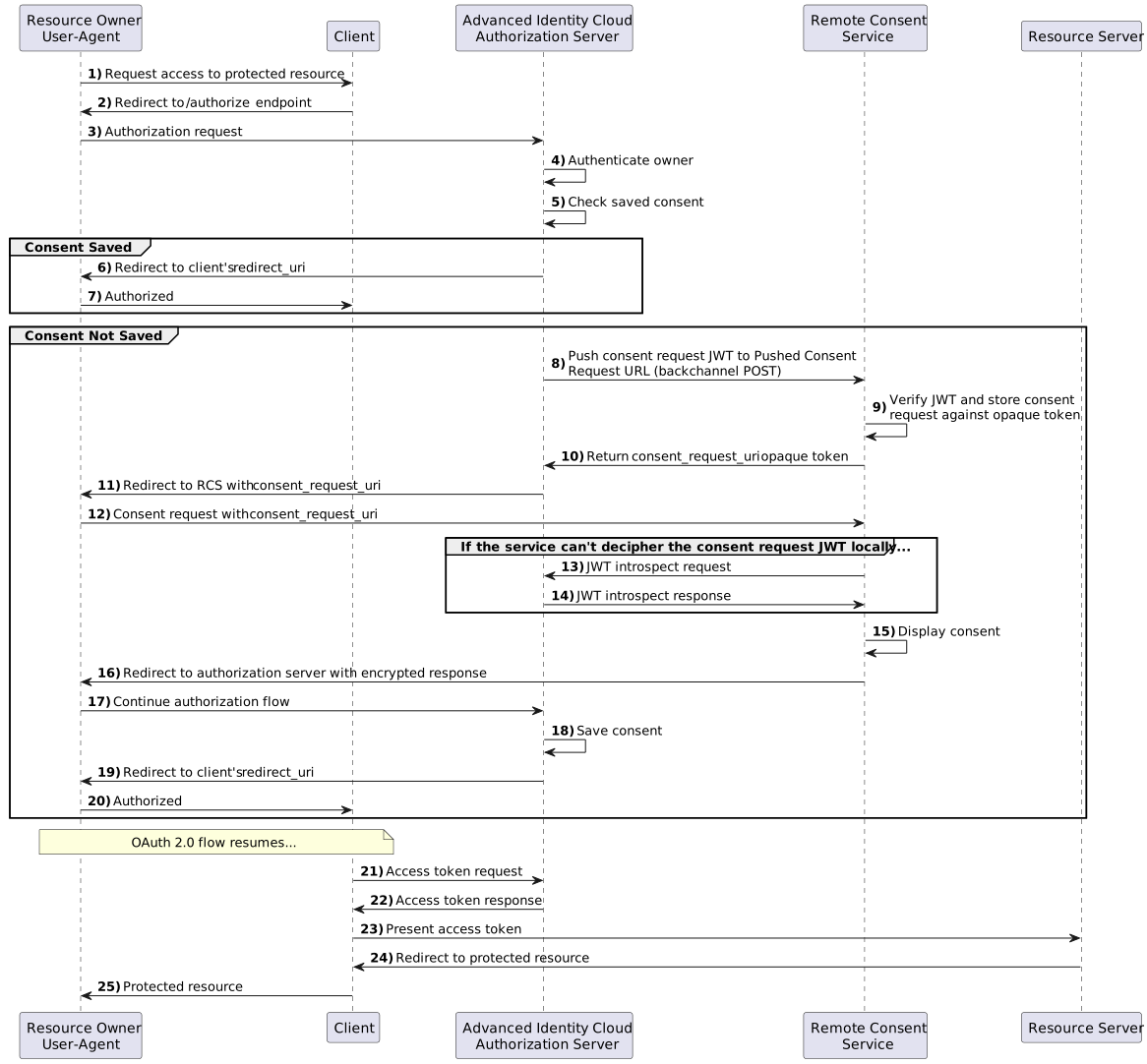
The consent request
During an OAuth 2.0 flow that requires user consent, the backchannel flow proceeds as follows:
-
Advanced Identity Cloud creates a consent request JWT and signs and encrypts it, as in the front channel flow.
-
Instead of passing the JWT to the resource owner’s browser, Advanced Identity Cloud sends it directly to the consent service in a POST request to the Pushed Consent Request URL.
-
The consent service verifies the JWT and stores the details of the consent request against an opaque token. It returns the opaque token to Advanced Identity Cloud in a
consent_request_uriparameter, for example:{ "consent_request_uri": "consent-FVaTaZTWuQGZkQX" }This response has an HTTP 201 status code.
-
Advanced Identity Cloud redirects the resource owner’s browser to the consent service, passing the
consent_request_uritoken instead of the consent request JWT. -
The consent service does the following:
-
Retrieves the stored consent request using the token.
-
Decrypts the consent request JWT if it was encrypted.
-
Renders the consent page to the resource owner.
-
Gathers the user’s consent.
-
The consent response
After the consent service gathers the resource owner’s consent, it creates a consent response JWT.
The consent service encrypts and signs the consent response JWT and returns it to Advanced Identity Cloud.
When it receives the response, Advanced Identity Cloud:
-
Decrypts the JWT.
-
Verifies the signature.
-
Verifies the validity of the
aud,issandexpfields. -
Processes the response, for example, to save the resource owner’s consent.
Find information on configuring this flow in Use backchannel pushed consent requests.
Configuration
For asymmetric (public key/private key) encryption, Advanced Identity Cloud and the consent service supply their public keys as JSON Web Keys (JWKs). This lets each of them verify signatures and decrypt JWTs.
Complete these tasks to configure Advanced Identity Cloud to use a consent service:
-
Add the details of the consent service to an application profile (under Native Consoles > Access Management).
Each realm can have a single consent service, configured as a remote consent agent profile.
Find more information in Remote consent agent profile.
-
Enable remote consent and specify the profile in the OAuth 2.0 provider service for the realm.
Find more information in Use the profile.
-
Configure the consent service to access the Advanced Identity Cloud
jwk_uri.
Remote consent agent profile
-
Under Native Consoles > Access Management, go to Realms > realm name > Applications > OAuth 2.0 > Remote Consent and click Add Remote Consent Agent.
-
Set the Agent ID, such as
myRemoteConsentAgent. -
If the consent service uses an HMAC algorithm to sign JWTs, set Remote Consent Service secret to the shared symmetric key.
-
Click Create.
-
Configure the profile settings as required and save your work.
The remote consent agent profile has the following settings:
- Group
-
Configure several remote consent agent profiles by assigning them to a group.
Default: Unassigned
- Remote Consent Service secret
-
The shared secret for the consent service. This value is used as the symmetric key when you select HMAC signing or symmetric encryption for consent JWTs, or as the HTTP Basic password when pushed consent authentication is set to
Basic. - Redirect URL
-
Redirect the resource owner user-agent here to gather consent.
- Pushed Consent Request URL
-
The consent service URL to which Advanced Identity Cloud sends pushed consent requests.
Advanced Identity Cloud sends a POST request to this endpoint containing the remote consent request JWT, for example:
{
    "consent_request":"request JWT"
}
The consent service verifies the consent request JWT and stores the details of the consent request against an opaque token. It returns the opaque token to Advanced Identity Cloud in a
consent_request_uriparameter as a response to the request. For example:{ "consent_request_uri":"consent-FVaTaZTWuQGZkQX" }Advanced Identity Cloud proceeds with the usual remote consent flow, but the OAuth 2.0 client is redirected to the consent service with the
consent_request_uriparameter instead of the remote consent request JWT.For security reasons, the
consent_request_uri:-
Should contain a random element that can’t be guessed.
-
Should have a short expiry time, for example, two minutes.
-
Must be used only once.
-
- Pushed Consent Authentication Method
-
The authentication method, which determines whether to send credentials to the consent service for pushed consent requests.
Options are:
-
None(default): Advanced Identity Cloud sends no client credentials with the pushed consent request. -
Basic: Advanced Identity Cloud sends client credentials in an HTTP Basic authentication header with the pushed consent request.The Basic authentication header exposes the agent’s credentials in an unencrypted form. If you select this option, make sure your Pushed Consent Request URL uses HTTPS to avoid exposing unencrypted credentials over insecure network channels.
-
- Metadata URL
-
The URL from which the authorization server retrieves the consent service’s metadata.
This URL must return an HTTP 200 status code and a JSON array of supported authorization detail types in the metadata parameter
authorization_details_types_supported. For example:{ "authorization_details_types_supported":[ "payment_initiation", "account_information" ] }The consent service must ensure that the returned authorization_details_types_supportedarray accurately reflects the authorization detail types it supports. - Enable consent request Encryption
-
Whether to encrypt the consent request JWT.
Default: Enabled
- Consent request Encryption Algorithm
-
The algorithm to encrypt the consent request JWT:
-
A128KW: AES Key Wrapping with 128-bit key derived from the client secret. -
A192KW: AES Key Wrapping with 192-bit key derived from the client secret. -
A256KW: AES Key Wrapping with 256-bit key derived from the client secret. -
RSA-OAEP: RSA with Optimal Asymmetric Encryption Padding (OAEP) with SHA-1 and MGF-1. -
RSA-OAEP-256: RSA with OAEP with SHA-256 and MGF-1. -
RSA1_5: RSA with PKCS#1 v1.5 padding. -
dir: Direct encryption with AES using the hashed client secret.
Default:
RSA-OAEP-256 -
- Consent request Encryption Method
-
The method to encrypt the consent request JWT:
-
A128GCM,A192GCM, andA256GCM: AES in Galois Counter Mode (GCM) authenticated encryption mode. -
A128CBC-HS256,A192CBC-HS384, andA256CBC-HS512: AES encryption in CBC mode with HMAC-SHA-2 for integrity.
Default:
A128GCM -
- Consent response signing algorithm
-
The JSON Web Algorithm (JWA) to verify a signed consent response JWT:
-
ES256: ECDSA with SHA-256 and NIST standard P-256 elliptic curve. -
ES384: ECDSA with SHA-384 and NIST standard P-384 elliptic curve. -
ES512: ECDSA with SHA-512 and NIST standard P-521 elliptic curve. -
HS256: HMAC with SHA-256. -
HS384: HMAC with SHA-384. -
HS512: HMAC with SHA-512. -
RS256: RSASSA-PKCS-v1_5 using SHA-256.
Default:
RS256 -
- Consent response encryption algorithm
-
The algorithm to decrypt the consent response JWT:
-
A128KW: AES Key Wrapping with 128-bit key derived from the client secret. -
A192KW: AES Key Wrapping with 192-bit key derived from the client secret. -
A256KW: AES Key Wrapping with 256-bit key derived from the client secret. -
RSA-OAEP-256: RSA with OAEP with SHA-256 and MGF-1. -
dir: Direct encryption with AES using the hashed client secret.
The decryption key depends on the algorithm:
-
For
RSA-OAEP-256, Advanced Identity Cloud uses the key mapped to theam.services.oauth2.remote.consent.response.decryptionsecret label. -
For the other (symmetric encryption) options, Advanced Identity Cloud uses the consent service secret.
Default:
RSA-OAEP-256 -
- Consent Request Signing Algorithm
-
The algorithm to sign the consent request JWT:
The signing key depends on the algorithm:
-
For asymmetric options, Advanced Identity Cloud uses the key mapped to the secret labels shown in the following table:
Secret label Algorithms am.applications.agents.remote.consent.request.signing.ES256ES256
am.applications.agents.remote.consent.request.signing.ES384ES384
am.applications.agents.remote.consent.request.signing.ES512ES512
am.applications.agents.remote.consent.request.signing.RSAPS256
PS384
PS512
RS256
RS384
RS512 -
For symmetric options, Advanced Identity Cloud uses the consent service secret.
As Advanced Identity Cloud and the remote consent client share the HMAC secret, a malicious actor with the secret could potentially create trusted JWTs. To protect against misuse, Advanced Identity Cloud also signs the JWT with the non-shared signing key mapped to the
am.services.oauth2.jwt.authenticity.signingsecret label.
Default:
RS256 -
- Consent response encryption method
-
The method to decrypt the consent response JWT:
-
A128GCM,A192GCM, andA256GCM: AES in Galois Counter Mode (GCM) authenticated encryption mode. -
A128CBC-HS256,A192CBC-HS384, andA256CBC-HS512: AES encryption in CBC mode with HMAC-SHA-2 for integrity.
Default:
A128GCM -
- Public key selector
-
How the consent service provides its public keys:
-
JWKs_URI: published online -
JWKs: provided as JWKs
Default:
JWKs_URI -
- Json Web Key URI
-
The URI for the consent service JWKs.
- JWKs URI content cache timeout in ms
-
The duration to cache the JWKs after reading them from the URI.
Default:
3600000(milliseconds) - JWKs URI content cache miss cache time
-
The duration to wait to fetch the JWKs again when a key ID (
kid) is missing in the cached JWKs.Use this property as a rate limit to prevent denial-of-service attacks against the URI. Advanced Identity Cloud rejects responses requiring unknown key IDs newer than the configured duration.
Default:
60000(milliseconds) - Json Web Key
-
The consent service keys; for example:
{ "keys": [{ "kty": "RSA", "kid": "RemA6Gw0...LzsJ5zG3E=", "use": "enc", "alg": "RSA-OAEP-256", "n": "AL4kjz74rDo3VQ3Wx...nhch4qJRGt2QnCF7M0", "e": "AQAB" }, { "kty": "RSA", "kid": "wUy3ifIIaL...eM1rP1QM=", "use": "sig", "alg": "RS256", "n": "ANdIhkOZeSHagT9Ze...ciOACVuGUoNTzztlCUk", "e": "AQAB" }] } - Consent Request Time Limit
-
A consent request JWT expires after this duration.
Default:
180(seconds)
- Resource Owner Session Properties
-
Properties to include in the remote consent request, if available in the resource owner’s session. Each entry maps a session property name to the name of the claim for that property in the request.
Keyis the name of the property in the session andValueis the name of the property in the consent service JWT.Properties appear in the remote consent request JWT nested under the
resourceOwnerSessionPropertiesfield. If you don’t configure any mappings here, the remote consent request JWT won’t contain aresourceOwnerSessionPropertiesfield.
Use the profile
To use the consent service for all OAuth 2.0 flows and client applications in the realm:
-
In the Advanced Identity Cloud admin console, go to Authorization > OAuth2 Provider and switch to the Consent tab.
-
Select Enable Remote Consent.
-
Select the profile in the Remote Consent Service ID list.
-
If necessary, update the settings for signing and encryption.
-
Save your work.
To use the consent service for a single OAuth 2.0 client application:
-
Under Native Consoles > Access Management, go to Realms > Realm Name > Applications > OAuth 2.0 > Clients > Client ID and switch to the OAuth2 Provider Overrides tab.
-
Select Enable OAuth2 Provider Overrides.
-
Select Enable Remote Consent.
-
Select the profile in the Remote Consent Service ID list.
-
Save your work.
Additional use cases
The following use cases build on the Front channel.
Pass session context to the consent service
Advanced Identity Cloud can send additional runtime context to the consent service from the resource owner’s session to render a better consent experience or apply consent policy. This additional runtime context can include the Advanced Identity Cloud tenant URL, organization, risk level, or authentication context.
You might want to send additional runtime context if you need to do any of the following:
-
Provide the consent service with additional context about the current user’s session.
-
Customize consent screens for different organizations, brands, or user populations.
-
Let the consent service make consent decisions without making extra runtime calls back to Advanced Identity Cloud.
-
Reduce custom integration work by having Advanced Identity Cloud send a selected set of session values automatically.
-
Keep consent decisions aligned with the session that was used for authentication.
This capability is especially useful when the consent experience depends on information that already exists in the session, but is not otherwise present in scopes, claims, or authorization_details.
How it works
When Advanced Identity Cloud determines that remote consent is required, it builds a consent_request JWT for the consent service.
If you configure Resource Owner Session Properties on the remote consent agent,
Advanced Identity Cloud reads the configured session property mappings, looks up matching values in the authenticated user’s session,
and includes them in the resourceOwnerSessionProperties claim of the consent_request.
Only properties that exist in the current session are included.
If none of the configured properties are present, Advanced Identity Cloud omits the claim.
Configure sending session context to the consent service
-
Make sure the relevant session properties are available in the authenticated user’s session.
If you use custom session properties, you must expose them at runtime. To do this, configure the session property allowlist and specify any properties to be included in a query response.
-
Under Native Consoles > Access Management, go to Realms > realm name > Services, and click Add a Service.
-
Select
Session Property Whitelist Serviceand click Create. -
In the Allowlisted Session Property Names, enter the session properties you want to obtain.
-
Click Save Changes.
-
-
In the remote consent agent configuration, add entries to the Resource Owner Session Properties field.
Each entry maps a session property name (key) to the claim name used in the
consent_requestJWT (value).Example mapping Session property in Advanced Identity Cloud Claim name in consent_requesttenanttenantauthLevelauthentication_levelbrandbrand -
Save your changes.
Advanced Identity Cloud now includes the configured session properties in the resourceOwnerSessionProperties claim when it builds the consent request. For example:
{
  "resourceOwnerSessionProperties": {
    "tenant": "alpha",
    "authentication_level": "2",
    "brand": "banking"
  }
}
The consent service can read these values from the incoming consent_request to tailor the consent experience,
for example, by selecting the correct branding, displaying organization-specific text,
or applying consent policy based on session context.
|
Use data minimization. Configure only the session properties the consent service actually needs. Avoid exposing sensitive session data unless it’s required for the consent use case. |
Pass request context to the consent service
If the client includes request-specific context in the authorization request, Advanced Identity Cloud can send that context to the consent service in the claims field of the consent_request JWT.
The consent service can use those values to render context-aware consent, then return the claims unchanged or with additional values in the consent_response JWT.
For example, a client might request specific claims that the consent service should display on the consent page. This additional context can help the user decide whether to grant consent.
To allow clients to use the claims request parameter, set the Enable "claims_parameter_supported" property. To do this, go to Authorization > OAuth2 Provider > Advanced OpenID Connect in the Advanced Identity Cloud admin console.
|
Claims from the client to the consent service
When the client includes a claims parameter in the authorization request, Advanced Identity Cloud parses that value and includes it in the claims field of the consent_request JWT sent to the consent service. If the client doesn’t include a claims parameter, the claims field is still present in the consent_request JWT, but as an empty object.
For example, a client might include phone_number as an essential claim:
GET /oauth2/authorize?
  response_type=code
  &client_id=myClient
  &scope=openid
  &claims=%7B%22userinfo%22%3A%7B%22phone_number%22%3A%7B%22essential%22%3Atrue%7D%7D%7D
  &...
Claims are URL-encoded in the authorization request.
The decoded value of this claims parameter is:
{
  "userinfo": {
    "phone_number": {
      "essential": true
    }
  }
}
Advanced Identity Cloud then includes the claim in the consent_request JWT that it sends to the consent service:
{
  "clientId": "myClient",
  "claims": {
    "userinfo": {
      "phone_number": {
        "essential": true
      }
    }
  },
  "scopes": {
    "openid": null
  },
  ...
}
The consent service can read claims.userinfo.phone_number to inform the user that the client is requesting their phone number.
Claims from the consent service to Advanced Identity Cloud
When the consent service builds the consent_response JWT, it can return claims to Advanced Identity Cloud in the claims field, either using the values it received or adding new values.
For example:
{
  "iss": "consent-service",
  "aud": "https://[.var]##_<tenant-env-fqdn>_##/am/oauth2",
  "csrf": "gjeH2C43nFJwW+Ir1zL3hl8kux9oatSZRso7aCzI0vk=",
  "claims": {
    "userinfo": {
      "phone_number": { "essential": true }
    }
  },
  "scopes": ["openid"],
  "decision": true,
  "save_consent": false,
  ...
}
Claims enrichment happens in the consent service implementation when it constructs the consent_response JWT.
Use backchannel pushed consent requests
If the authorization request includes rich or verbose data, such as detailed authorization_details, many requested claims, or extensive scope metadata, the consent_request sent to the consent service can become too large for a browser redirect.
You might also want to reduce the amount of consent data exposed through the front channel.
With backchannel pushed consent requests, instead of passing the full consent request JWT to the resource owner’s browser,
Advanced Identity Cloud sends it directly to the consent service over a server-to-server HTTP POST before redirecting the resource owner.
The consent service stores the request and returns an opaque consent_request_uri.
Advanced Identity Cloud then redirects the resource owner to the consent service with only this token.
Configure backchannel pushed consent requests
-
Make sure your consent service exposes a backchannel endpoint that does the following:
-
Accepts an HTTP POST with a JSON body containing
consent_request. -
Validates the incoming JWT.
-
Returns
201 Createdwith a JSON body containingconsent_request_uri.
Example pushed consent requestPOST /pcr Content-Type: application/json Authorization: Basic credentials { "consent_request": "jwt" }Example successful response{ "consent_request_uri": "consent-FVaTaZTWuQGZkQX" }For security reasons, the
consent_request_uri:-
Should contain a random element that can’t be guessed.
-
Should have a short expiry time, for example, two minutes.
-
Must be used only once.
-
-
In the remote consent agent configuration:
-
Set the Pushed Consent Request URL to the backchannel endpoint on the consent service.
-
Set the Pushed Consent Authentication Method to the authentication method required by your consent service endpoint.
If you select
Basic, make sure the Pushed Consent Request URL uses HTTPS.
-
-
Save your changes.
Advanced Identity Cloud now sends the consent request JWT directly to the consent service before redirecting the resource owner.
The resource owner’s browser receives only the opaque consent_request_uri. For example:
https://consent.example.com/consent?consent_request_uri=consent-FVaTaZTWuQGZkQX