Token exchange
Advanced Identity Cloud supports RFC 8693, OAuth 2.0 Token Exchange for OAuth 2.0 and OpenID Connect tokens:
| From/to | Access token | ID token | Refresh tokens1 | SAML assertion |
|---|---|---|---|---|
Access token |
|
|
|
|
ID token |
|
|
|
|
1 You can’t exchange a token directly for a refresh token. When Advanced Identity Cloud issues refresh tokens (default), it also issues them on token exchange.
|
Clients can exchange tokens only at the OAuth 2.0 provider that issued them. This restriction applies to Advanced Identity Cloud domains and to realms.
For example, a token issued by |
Differences with normal token issuance:
-
Advanced Identity Cloud copies claims and values that must not change, such as subject and issuer claims, from the subject token to the new token.
Advanced Identity Cloud ignores irrelevant claims, such as those missing from the resulting token type, and claims that cannot be inferred from the subject token, such as those present in the resulting token, but not in the subject token.
-
Advanced Identity Cloud doesn’t copy scopes, but derives them from the scope implementation.
For details, refer to Scopes.
-
Advanced Identity Cloud adds the
actandmay_actclaims when relevant. -
Optionally, Advanced Identity Cloud validates the audience parameter (
audclaim) values against a predefined list of allowed values.This lets you restrict the downstream resource server or servers against which the exchanged token can be used.
Learn more in The
audclaim. -
Token exchange involves no end user interaction.
There is no way to request consent for expanded scopes or claims. The client application must ensure end user consent beforehand or must ensure an expanded scope or claim is unrelated to the end user’s resources.
Use cases
OAuth2.0 clients exchange tokens for impersonation or delegation.
Impersonation
To impersonate means to pretend you are someone else when performing a job or duty.
Use impersonation for token exchange when it is not necessary to maintain separation between the end user and the client.
The client obtains a subject token with the end user’s authorization. It exchanges this token for a new token it can use directly to access a protected resource. Due to the risk of identity theft, allow token impersonation across trusted systems only.
| To try token exchange with impersonation, refer to Demonstrate impersonation. |
Example with an access token
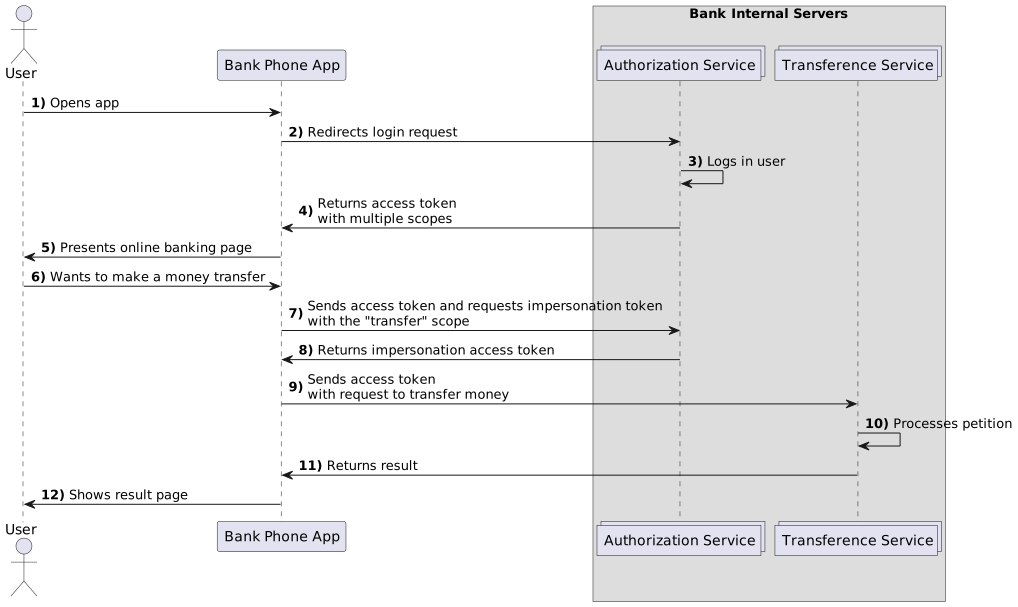
An end user chooses to transfer money using their bank application, an OAuth 2.0 client.
The end user authenticates to the application and trusts the application to act on their behalf
when accessing the internal banking system to perform transactions.
When the end user authenticates, the application gets an access token
with change_data, create_accounts, read_accounts, and transfer scopes.
The scopes represent all banking services available through the application.
The end user chooses to transfer money, which requires only the transfer scope.
To reduce the security risk, the application exchanges the broad-scope access token
for a restricted access token with only the transfer scope, which it uses to access the transfer service:
Example with an ID token
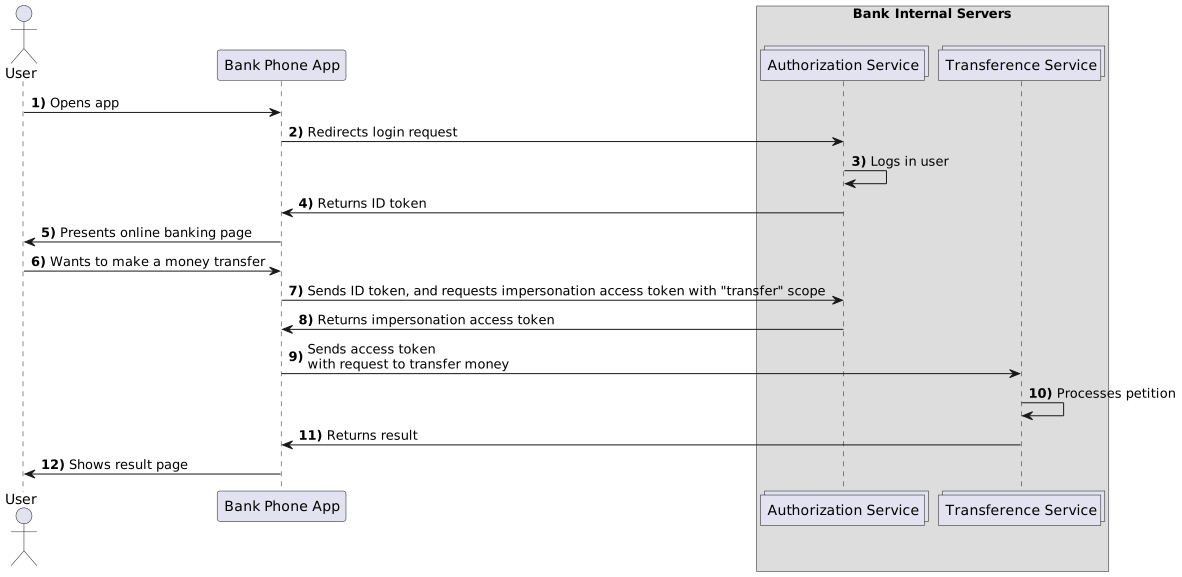
The client could request an ID token instead of an access token.
When the end user authenticates, the application gets an ID token as the subject token.
The ID token attests to the user’s identity and authorization, but doesn’t include scopes to access banking services.
The end user chooses to transfer money, and the application exchanges the ID token
for an expanded access token with the transfer scope, which it uses to access the transfer service:
Delegation
To delegate means to give a job or duty to someone else who performs the job on your behalf.
Use delegation for token exchange when maintaining separation between the end user and the client is important. This approach is more secure when the token must traverse third-party systems.
| To try token exchange with delegation, refer to Demonstrate delegation. |
In delegation, the client has two tokens:
-
A subject token obtained with the end user’s authorization.
-
An actor token obtained for itself or the end user it represents.
The client exchanges both tokens for a new token it can use to access the protected resource.
The new token has an act (actor) claim.
The act claim, visible on introspection,
signals to the resource server that the client using the token is not the end user.
A resource server can adapt its behavior as necessary.
The following example shows the act claim field of an access token:
"act": {
  "sub": "delegateClient"
}
The sub field specifies the subject of the actor token.
Example with an actor access token
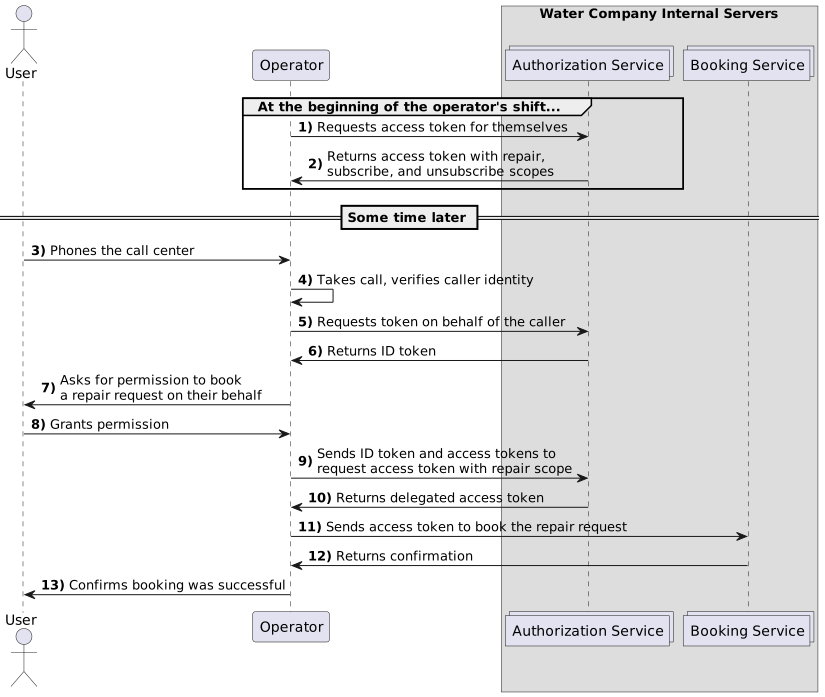
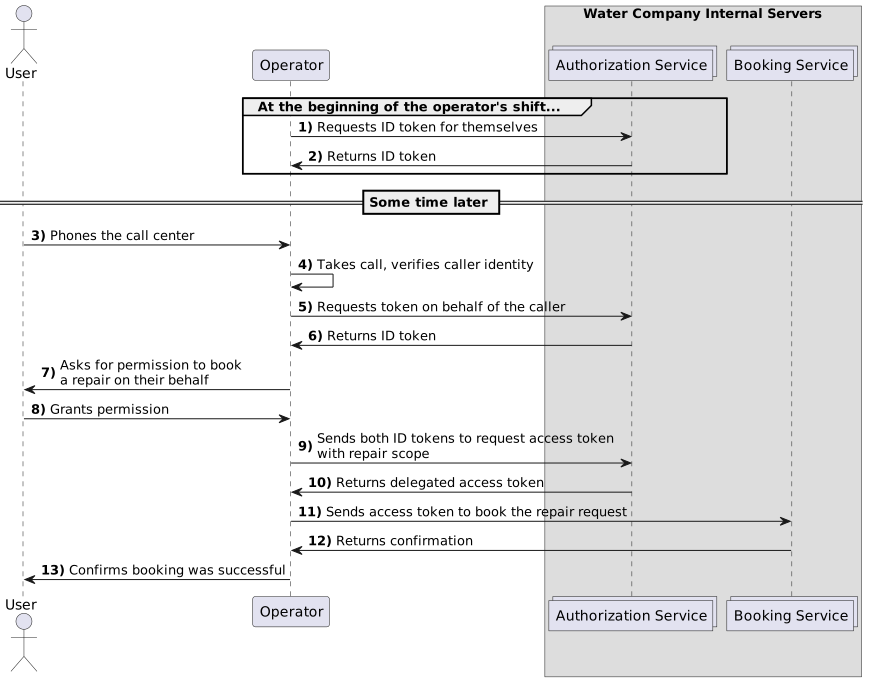
An end user phones a call center about a problem with their water supply. The operator who responds verifies the user’s identity and creates an ID token as the subject token. The operator also creates an access token as the actor token for themselves.
The operator exchanges both tokens for an access token with the repair scope restricted to booking a repair.
The operator would need a different token to end the user’s contract, for example.
When they book a repair for the user, both the operator and the end user are reflected in the repair request:
Terminology
- Act claim
-
Token claim identifying a delegate acting on behalf of another identity.
Advanced Identity Cloud automatically adds this claim as needed when issuing a token.
- Actor token
-
The access or ID token representing a delegate acting on behalf of another identity.
- Exchanged token
-
The new access or ID token resulting from token exchange.
Exchanged tokens do not expire at the same time as their subject tokens. They expire after the amount of time specified in the Access Token Lifetime (seconds) or the OpenID Connect JWT Token Lifetime (seconds) settings of the OAuth 2.0 provider service or client configuration.
- Expanded token
-
An access token with scopes or claims not present in the subject token.
An exchanged token can have different scopes and claims from the subject token. Expanded tokens work well when exchanging ID tokens for access tokens, for example, where scopes and claims differ.
- May act claim
-
Token claim specifying who is allowed to act for the identity on behalf of whom the request is made.
Only the identity specified in the
may_actclaim can exchange tokens for another token.You must write a script to add this claim as needed when issuing a token. For details, refer to Authorize exchange.
- Restricted token
-
An access token with narrower scopes or claims than those of the subject token.
Instead of gathering consent for different sets of scopes and claims, clients gather consent for a broad range initially and then restrict scope during token exchange.
- Subject token
-
The access or ID token representing the identity on behalf of whom the request is made.
The client can obtain the subject token with any supported OAuth 2.0 or OpenID Connect flow.
Configuration
Token exchange configuration requires:
-
A script to authorize exchange.
-
Settings in the OAuth 2.0 provider or the OAuth 2.0 client application configuration.
Authorize exchange
A claim on the original token authorizes specified clients and actors to perform the exchange.
You write a script Advanced Identity Cloud runs when issuing tokens to set the claim.
The may_act claim
The may_act claim on a token identifies the authorized actor who can exchange the token.
Advanced Identity Cloud sets this claim when issuing the original token.
-
For impersonation, the
may_actclaim must specify the client ID of the authorized actor. -
For delegation, the
may_actclaim must specify the client ID and thesub(subject) of the actor token.
Advanced Identity Cloud rejects token exchange requests from clients or actors who are not authorized by the may_act claim.
The following example claim allows:
-
An
impersonationClientto exchange the token and impersonate the end user. -
A
delegateClientto exchange the token to act on the end user’s behalf using the original token and an actor token issued directly to the client with the client credentials grant.
"may_act": {
  // String or array of client IDs who can exchange the token:
  "client_id": ["impersonationClient", "delegateClient"],
  // String or array identifying the actor token subject(s) for delegation:
  "sub": "delegateClient"
}
May act scripts
Advanced Identity Cloud has no default functionality to authorize token exchange for specific clients.
Instead, create an OAuth2 May Act script for Advanced Identity Cloud to run when issuing a token.
The following example JavaScript produces the previous example claim without the comments:
-
Legacy
-
Next-generation
(function () {
    var frJava = JavaImporter(
        org.forgerock.json.JsonValue
    );

    var mayAct = frJava.JsonValue.json(frJava.JsonValue.object())
    mayAct.put('client_id', ['impersonationClient', 'delegateClient'])
    mayAct.put('sub', 'delegateClient')
    token.setMayAct(mayAct)
}());
(function () {
var mayAct = {
'client_id': ['impersonationClient', 'delegateClient'],
'sub': 'delegateClient'
};
token.setMayAct(mayAct);
}());Find a commented example in the sample legacy may act script.
Advanced Identity Cloud doesn’t support wildcards in the client_id and sub fields.
Your scripts must enumerate clients and actors.
The script doesn’t specify the token type. The client requesting an exchange token optionally specifies the token type.
Learn about the next-generation and legacy may act script bindings in the API.
The aud claim
The aud claim lists the target service or services where the client intends to use the exchanged token. By default, Advanced Identity Cloud doesn’t validate the aud claim.
To configure Advanced Identity Cloud to validate audience parameter values, set the following properties:
-
On the client, list the target resource server or servers in the Allowed Resource Server Audience Values property.
-
On the OAuth 2.0 provider, enable the Accept Audience Parameters in Token Exchange Requests property.
If Accept Audience Parameters in Token Exchange Requests is enabled:
-
Advanced Identity Cloud validates audience parameter values in token exchange requests against the values defined in Allowed Resource Server Audience Values on the client.
If validation fails, the token exchange request is rejected.
-
If the requested values are included in the Allowed Resource Server Audience Values property, Advanced Identity Cloud stores the audience values in the resulting access or ID token.
-
For client-side access tokens, if you’ve enabled Include Client ID Claim In Stateless Access & Refresh Tokens, the client ID is included as the first audience value.
-
For client-side ID tokens, the client ID is always included as the first audience value.
-
If you use an access token modification script to override the audience values, Advanced Identity Cloud stores the modified values in the resulting access token.
If Accept Audience Parameters in Token Exchange Requests is not enabled (the default):
-
Advanced Identity Cloud ignores audience parameter values in token exchange requests.
-
For client-side tokens, if you’ve enabled Include Client ID Claim In Stateless Access & Refresh Tokens, a single audience value is included that contains the client ID.
-
If you use an access token modification script to override the audience value, Advanced Identity Cloud stores the modified values in the resulting access token.
For client-side tokens, the audience value is available when examining the contents of the JWT.
For server-side tokens, you can introspect the JWT to obtain the audience value.
The aud claim and token introspection
The contents of the aud claim in a token introspection response depend on the token type and the requested response type:
-
If you ask the server to check a token, the
audvalue depends on the format of the answer you requested:-
If you request a JWT response (signed or signed and encrypted), the
audclaim will always be the Client ID of the application performing the introspection. -
If you request a JSON response, the
audclaim is only included if the token is server-side and already had an audience inside it. -
For client-side macaroon tokens, the response always includes an
audclaim, but it might not perfectly match the original value.
-
-
userinfoendpoint:This endpoint is specifically for getting user profile details. The
audbehavior here is slightly different:-
If the token already has an
aud, it is returned regardless of whether you choose JSON or JWT. -
If the token doesn’t have an
aud:-
JWT Responses: The server adds an
audcontaining the client ID. -
JSON Responses: No
audis added. It remains missing.
-
-
-
tokeninfoendpoint:If the token has an
audclaim, the JSON response will show it. If it doesn’t have one, it won’t.
These differences are summarized in the following table:
| Request Method | Response Format | What is in the aud claim? |
|---|---|---|
|
JWT (Signed/Encrypted) |
The Client ID (The "receiver" of the response) |
|
JSON |
The original audience from the token (server-side only). |
|
JWT |
The token’s audience (or client ID if empty). |
|
JSON |
The token’s audience (or nothing if empty). |
|
JSON |
The token’s audience (if it exists). |
OAuth 2.0 provider settings
The OAuth 2.0 provider settings govern token exchange behavior for all clients in the realm. In the Advanced Identity Cloud admin console, go to Authorization > OAuth2 Provider.
The relevant settings are:
- Core tab
-
-
OAuth2 Access Token May Act Script: Use the selected script to set the
may_actclaim on all access tokens. -
OIDC ID Token May Act Script: Use the selected script to set the
may_actclaim on all ID tokens.
Choose
--- Select a script ---to prevent Advanced Identity Cloud from setting the claim. -
- Advanced tab
-
-
Grant Types: Add the
Token Exchangetype to permit token exchange requests. -
Token Exchanger Plugins: Remove any token exchange combinations you do not want to allow.
-
Token Validator Plugins: If necessary, remove validations that tokens meet the criteria for exchange.
-
Client settings
Individual OAuth 2.0 client settings govern authentication levels granted to exchanged tokens and can override OAuth 2.0 provider settings. To access these settings, go to Native Consoles > Access Management > Realms > Realm Name > Applications > OAuth 2.0 > Clients > Client ID.
The relevant settings are:
- Advanced tab
-
-
Token Exchange Auth Level: The authentication level granted to exchanged tokens when the subject token had no
auth_levelclaim. This setting always applies to exchanged ID tokens. -
Grant Types: Add the
Token Exchangetype to permit token exchange requests.
-
- OAuth2 Provider Overrides tab
-
-
Enable OAuth2 Provider Overrides: Use these settings instead of those on the OAuth2 Provider service.
-
OAuth2 Access Token May Act Script: Use the selected script to set the
may_actclaim on access tokens. -
OIDC ID Token May Act Script: Use the selected script to set the
may_actclaim on ID tokens.
For the may act script settings, choose
--- Select a script ---to prevent Advanced Identity Cloud from setting the claim. -
Request parameters
Token exchange requests target the /oauth2/access_token endpoint. The requests use the following specific parameters:
| Parameter | Description |
|---|---|
|
Required. Use |
|
Required. The original token to exchange. Example: |
|
Required. The type of subject token, either access token or ID token. One of:
|
|
Required for delegation. The token representing the delegate. Example: |
|
Required for delegation. The type of actor token, either access token or ID token. One of:
|
|
Optional. The type of requested exchanged token, either access token or ID token. One of:
|