Link identities for authentication
IdPs and SPs must be able to communicate about users.
In some cases, the IdP chooses to communicate a minimum of information about an authenticated user;
for example, a generated, opaque NameID that cannot directly be used
to locate to an identity in the SP identity store.
Advanced Identity Cloud can use these pseudonym identifiers for establishing links between otherwise unrelated accounts, by requiring that the user authenticates to the SP using a linking authentication mechanism.
First authentication to the SP
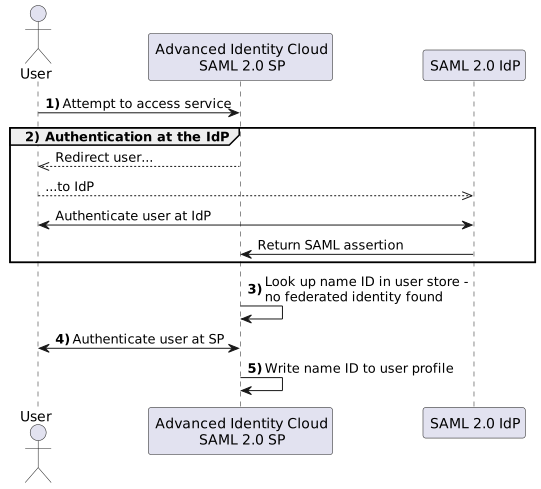
The following flow shows the sequence of events that occurs when a user first attempts to authenticate to the Advanced Identity Cloud SP:
-
Accessing the SP
A user attempts to access a service and is redirected to Advanced Identity Cloud which acts as the SP, specifying the SAML 2.0 service in the login URL.
For example, a journey containing the SAML2 Authentication node:
https://<tenant-env-sp-fqdn>/am/XUI/#login/&service=spSAMLJourney -
Authentication at the IdP
Advanced Identity Cloud redirects the user to the IdP. The user authenticates successfully to the IdP. The IdP returns a SAML assertion to Advanced Identity Cloud.
-
SP attempts to access a federated identity
Advanced Identity Cloud attempts to locate the identity in its user store but finds no link between the IdP identity and a local identity.
-
Invocation of the linking authentication node(s)
Because no link is found, Advanced Identity Cloud uses the configured authentication journey to authenticate the user.
-
Identity federation
After successfully authenticating the user, Advanced Identity Cloud writes the name ID from the assertion into the user’s local profile, creating a permanent link between the two identities.
For more information on creating permanent links between identities, refer to Enable persistent federation.
Find an example of a journey that links identities in Create accounts dynamically during federation.
Subsequent authentications to the SP
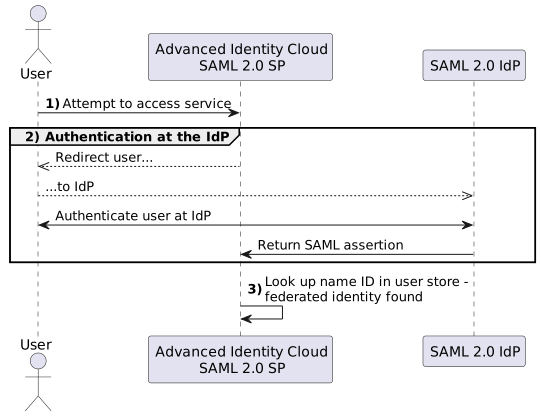
The following flow shows the sequence of events that occurs during subsequent authentication attempts after the user’s identities on the IdP and SP have been federated:
-
Accessing the SP
A returning user attempts to access their service and is redirected to Advanced Identity Cloud, which acts as the SP. Their login URL specifies the SAML 2.0 login service.
For example, a journey containing the SAML2 Authentication node and the Write Federation Information node:
https://<tenant-env-sp-fqdn>/am/XUI/#login/&service=spSAMLJourney. -
Authentication at the IdP
Advanced Identity Cloud redirects the user to the IdP, and the user authenticates successfully at the IdP. The IdP returns a SAML assertion to Advanced Identity Cloud.
-
SP attempts to access a federated identity
Advanced Identity Cloud attempts to locate the name ID in its user store. The search for the name ID succeeds.
Because there’s a match, the user doesn’t need to authenticate to Advanced Identity Cloud and can access the service.
Link accounts persistently
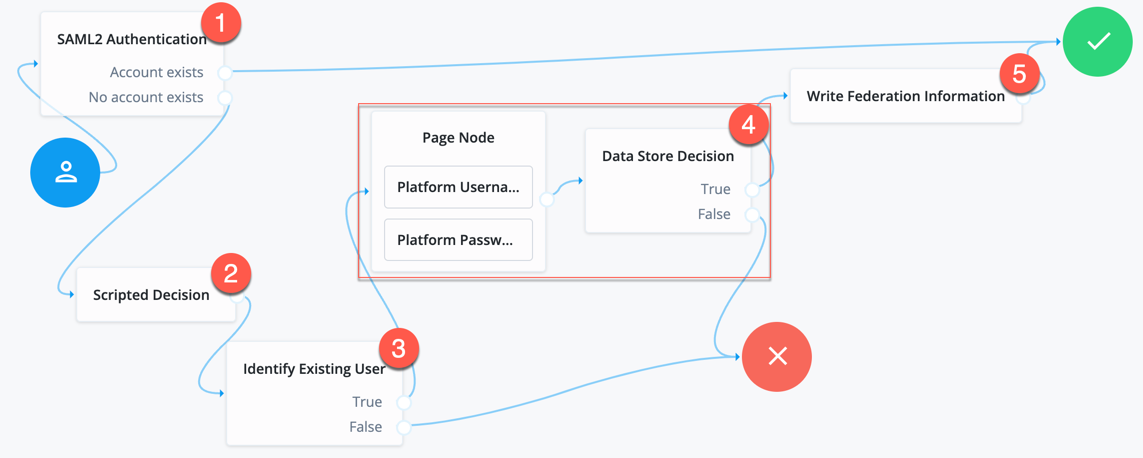
If you’re not using auto-federation, perform the steps in this procedure to configure a journey, similar to the following, to link accounts persistently.
|
This procedure relies on integrated mode SSO. SLO is not supported for this procedure. |
-
Add a SAML2 Authentication node.
Ensure the NameID Format specified is
persistent.The node processes the assertion, makes its contents available to the journey’s shared state in the
userInfoobject, and tries to map the assertion’s nameID using theuidmapping in the SP’s assertion map.If the node finds a match, the journey continues through the
Account Existsoutput. Otherwise, the journey continues through theNo Account Existsoutput.The attribute the node uses to map the nameID is not configurable, and this example adds nodes to process the
userInfoobject and match its contents to the managed user’s schema instead. -
Add a Scripted Decision node to copy the information from the assertion to the journey’s shared state.
Example script
-
Next-generation
-
Legacy
if (nodeState.get("userInfo")) {
  if (nodeState.get("objectAttributes")) {
    nodeState.remove("objectAttributes");
  }
  var userName=null,sn=null,mail=null;

  try {
    var attribs = nodeState.get("userInfo")["attributes"];

    userName=attribs["uid"][0];
    sn=attribs["sn"][0];
    mail=attribs["mail"][0];

  } catch (e) {
    logger.error("Error getting userInfo: " + e);
  }
  nodeState.putShared("username", userName);
  nodeState.putShared("objectAttributes", {"userName":userName,"sn":sn,"mail":mail, "givenName": userName});
}
action.goTo("true");
var fr = JavaImporter(org.forgerock.openam.auth.node.api.Action); if (nodeState.get("userInfo")) { if (nodeState.get("objectAttributes")) { nodeState.remove("objectAttributes"); } var userName=null,sn=null,mail=null; try { var attribs = nodeState.get("userInfo").get("attributes"); userName=attribs.get("uid").get(0).asString(); sn=attribs.get("sn").get(0).asString(); mail=attribs.get("mail").get(0).asString(); } catch (e) { logger.error("Error getting userInfo: " + e); } nodeState.putShared("username", userName); nodeState.putShared("objectAttributes", {"userName":userName,"sn":sn,"mail":mail, "givenName": userName}); } action = fr.Action.goTo("true").build();You can also query the
samlApplicationbinding on the SP side to get the assertion.Learn more in the Scripted Decision node API.
-
-
Add an Identify Existing User node to search the user with the appropriate attribute.
For example,
userName. -
Authenticate the user to the SP.
-
Add the Write Federation Information node to the successful outcome of the authentication process to create the link between the accounts.
If a transient link exists, it is converted into a persistent one.