Modify default workflow email templates
Identity Governance creates default email templates for access request-related features such as approvals, reminders, and escalations. For example, the Approval node references the default access request email templates. Modify these templates to change notification wording, include request-specific details, or adapt the content to your organization’s communication style.
|
Advanced Identity Cloud upgrades replace email templates with the default templates. To preserve your email template modifications, duplicate a template before you edit it, and then use the duplicate in your workflows. |
The following table lists the default email templates available for customization:
| Email template name | Description |
|---|---|
|
Email to the individual assigned as the owner of a new certification task. |
|
Email to an individual assigned as the escalation point of contact for a certification. |
|
Email to the approvers when a certification expires without completion. |
|
Email to the new owner when a certification is reassigned. |
|
Reminder email sent to reviewers for an active certification review. |
|
Email when a delegation task is assigned. |
|
Email when a delegation is removed. |
|
Email sent when a user requests their username to be recovered. |
|
Confirmation email sent when a new user registers. |
|
Initial email to the approvers of a resource when an end user submits an access request. |
|
Email to an individual assigned as the escalation point of contact. |
|
Email to the approvers when a request item expires. The end user defines the expiration of the access request when they submit the access request. |
|
Email to the new assignee when an approver forwards a request item. |
|
Email to the approvers as a reminder that they have a request item to act on. |
|
Email to the user when requesting to reset their password. |
|
Email to the user when updating their password. |
|
Email to the individual assigned to address a segregation of duties violation. |
|
Email to the escalation point of contact when a violation is escalated. |
|
Email when a violation expires without resolution. |
|
Email to the new assignee when a violation is reassigned. |
|
Email reminder to the violation assignee about an unresolved violation. |
|
Welcome email sent to newly created users. |
Customize an email template
To customize a template:
-
In the Advanced Identity Cloud admin console, go to User Experience > Email Templates.
-
For each email template you want to customize:
-
Click the desired template to view its contents.
-
Select the Ellipsis icon (
), and click Duplicate. -
In the Duplicate Template modal, enter the following:
-
Template Name: Enter a unique name for the duplicated template.
-
From Address: Enter the email address that appears as the sender.
-
From Name: Enter the name that appears as the sender.
-
Description: (Optional) Add a description for the template.
-
-
-
Click Save.
-
After you save the duplicate template, assign the duplicate to your workflow. Your workflow then uses the customized version instead of the default template.
-
To confirm the change, open the workflow and verify that the Email node references your duplicate template name.
After you create a duplicate template, you can add dynamic data to the message body using Handlebars variables. The following sections describe the variables available and how to configure your workflow to pass the required data to the template. Learn more about customizing email templates in Email templates.
Use variables in Identity Governance email templates
Advanced Identity Cloud email templates use Handlebars expressions, double curly brace syntax ({{…}}),
to insert object data into the template at send time.
For example, to reference a user property in the data object, use syntax similar to {{object.userName}}.
|
In Identity Governance workflows, the data available to an email template depends on the workflow and on the object passed into the Email node. |
To see the properties available for a template in your tenant:
-
In the Advanced Identity Cloud admin console, go to User Experience > Email Templates.
-
Open a template, and click the Variables tab. Select any of the categories to view its available variables that you can use in an email template.
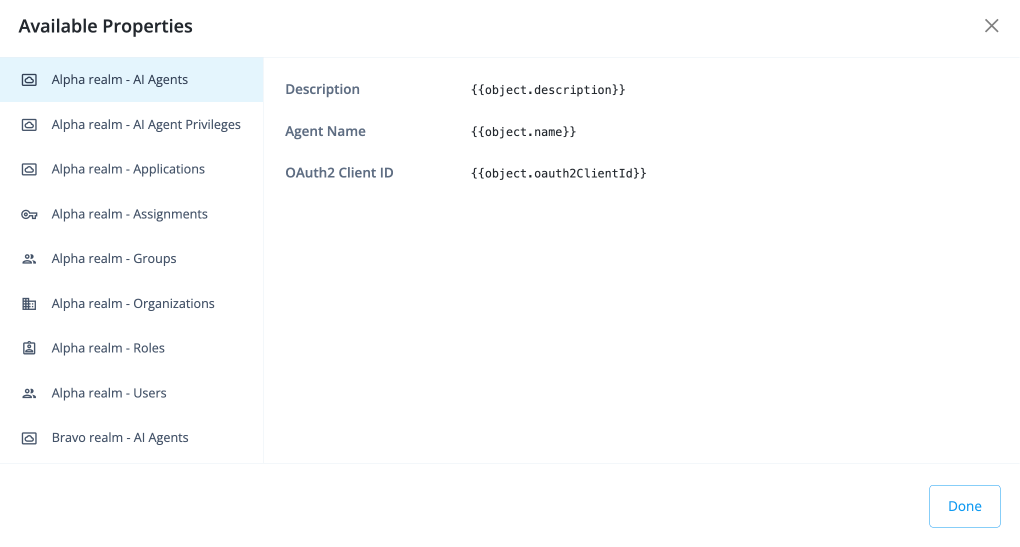
Add the variables in your email template:
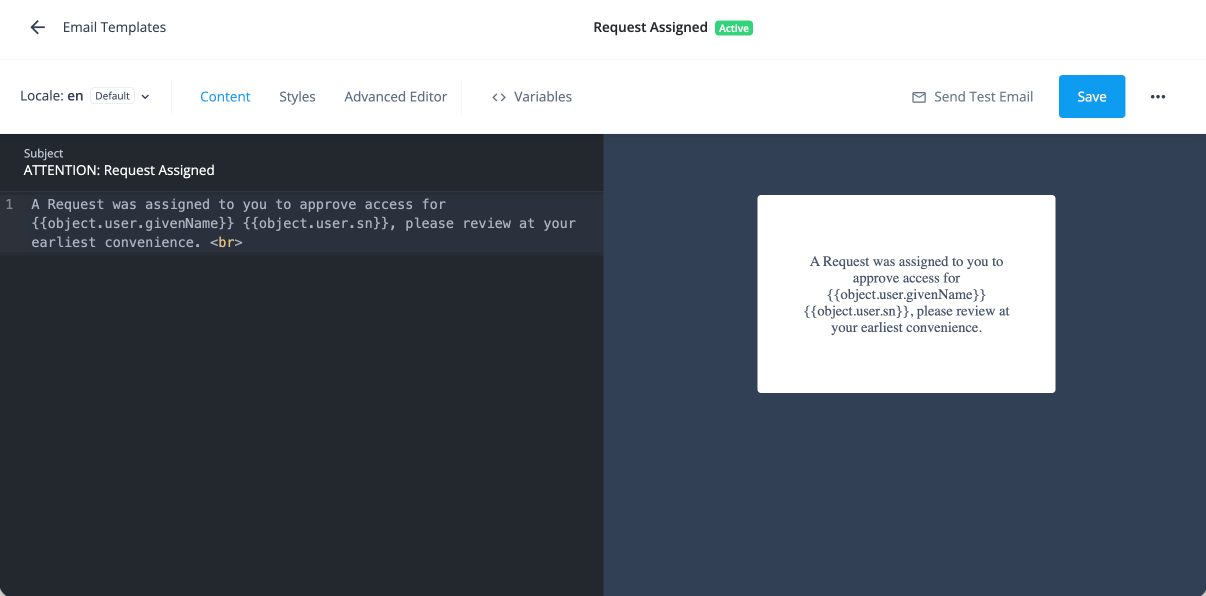
Configure the Email node to pass request variables
For access request notifications, configure the Email node
in your workflow to pass the request data object to the template. In the Email node’s configuration, open the Message substitution field
and supply the request object as a JSON key named request. The template can then
access it as object.request.
After the request object is available, reference its properties with Handlebars syntax under object.request.
To pass the request object to an email template:
-
In your workflow, open the Email node configuration.
-
In the Message substitution field, enter a JSON object that maps
requestto the request data object your workflow produces. -
Save the node.
When the node runs, the template can access the request data under
object.request. For example, you can use the following variables in your email template:-
{{object.user.givenName}} -
{{object.user.sn}} -
{{object.request.id}} -
{{object.request.requester.givenName}} -
{{object.request.requester.sn}} -
{{object.request.requester.userName}} -
{{object.request.request.common.priority}} -
{{object.request.decision.phases.[0].displayName}} -
{{object.request.metadata.createdDate}} -
{{object.request.decision.phases.[0].events.expiration.date}}In your email template, reference the variables using double curly braces:
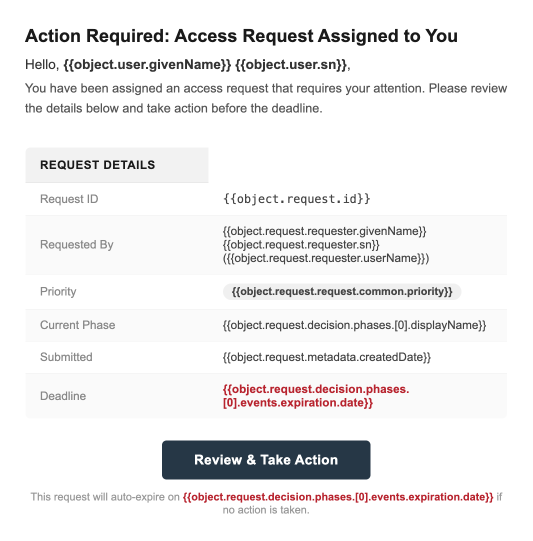
To test the template without running a real workflow, enter sample values as a JSON object in the Message substitution field. For example, enter the following JSON to preview how the template renders with example request data:
{
  "user": {
    "givenName": "Babs",
    "sn": "Jensen"
  },
  "request": {
    "id": "request-12345",
    "requester": {
      "givenName": "John",
      "sn": "Doe",
      "userName": "jdoe"
    },
    "request": {
      "common": {
        "priority": "High"
      }
    },
    "decision": {
      "phases": [
        {
          "displayName": "Manager approval",
          "events": {
            "expiration": {
              "date": "2026-08-20"
            }
          }
        }
      ]
    },
    "metadata": {
      "createdDate": "2026-08-17T16:22:34Z"
    }
  }
}
-
After you configure the Email node to pass the request object, save the workflow and trigger a test access request. The notification email should populate the variable placeholders with the values from the request object.
Reference request variables in request notifications
Use the request object for notifications related to access requests, such as assignment,
reassignment, escalation, reminder, and expiration. Identity Governance provides default templates
for these request-related notifications, and you can duplicate and customize them for your workflows.
When you customize a request notification template, use the request object
to insert values that help reviewers understand what action is required.
For example, you can reference the requester, request identifier, target user,
or custom request metadata if that data is included in the object passed to the template.
The following syntax accesses user properties submitted as part of the request:
object.request.requester.attribute
For example, common request variable examples include:
-
object.request.requester.userName: The requester’s username. -
object.request.requester.givenName: The requester’s first name. -
object.request.requester.sn: The requester’s last name. -
object.request.requester.mail: The requester’s email address.
To access request context metadata, use the object.request.request.common namespace:
-
object.request.request.common.context.type: The context type of the request.
Reference certification variables in certification notifications
For certification notifications, use the certification object to reference
campaign-specific data in the email template. Each notification requires an associated email template,
and Identity Governance provides preset certification templates that you can duplicate and customize.
Certification templates use a slightly different variable structure from request templates.
User and manager attributes are accessed directly on the object, one level shallower
than the object.request path used in request templates.
For example, user attributes follow the pattern object.user.attribute,
and manager attributes follow the pattern object.manager.attribute.
If your certification workflow passes a certification object to the template,
reference those values with Handlebars syntax under object.certification. For example:
-
{{object.certification.name}} -
{{object.certification.id}}
The exact properties available depend on your template and tenant configuration.
The following table shows the available namespaces and example attributes for certification templates:
| Namespace | Description | Example attributes |
|---|---|---|
|
Attributes of the user being certified. |
|
|
Attributes of the user’s manager. |
|
|
Attributes of the certification campaign. |
|
|
If the manager is the certifier type in the Who will Certify section,
use the same attribute names under |
Custom data variables in request notifications
If your workflow adds properties to the request object beyond the standard fields, you can reference them in email templates the same way you reference built-in request properties.
For example, if the workflow adds custom properties to the request object, you can reference them like this:
-
{{object.request.applicationName}} -
{{object.request.justificationSummary}} -
{{object.request.reviewByDate}}
To avoid broken templates, verify that the workflow passes each custom property in the object before you reference that property in the template.
If you’ve defined a custom request type, custom fields are available in email templates under the request.custom namespace:
{{object.request.custom.fieldName}}
For example, if your custom request type defines fields such as userName, givenName, and mail, you can reference them as:
-
{{object.request.custom.userName}} -
{{object.request.custom.givenName}} -
{{object.request.custom.mail}}
Learn more in Workflow using custom request type and form.
Best practices
Follow these practices to avoid losing your customizations and to keep your workflows running correctly after upgrades.
-
Use Markdown for standard template authoring. The Advanced Editor lets you write full HTML or reference environment secrets and variables (ESVs), values stored securely in your tenant for use across services. If you switch to the Advanced Editor, you can’t switch back to Markdown for that template. Learn more in Environment, service, and variable secrets.
-
If you localize the template, keep the same variable placeholders in each locale variant.