Use PingOne Verify for identity verification and proofing capabilities
Integrate your Advanced Identity Cloud tenant environments with PingOne Verify to add identity verification and proofing to your user journeys.
PingOne Verify reduces fraud by letting you securely and conveniently confirm an end user’s identity. You can use it to verify identities during high-risk transactions, new user registrations, or any other scenario where identity proofing is required.
Why use PingOne Verify?
-
Streamlined onboarding: Accelerates and secures the new user onboarding process by enabling real-time identity verification (for example, document scanning, facial biometrics) directly within the Advanced Identity Cloud registration flows.
-
Fraud prevention at inception: Prevents fraudulent accounts from being created in the first place by accurately confirming user identities, reducing the long-term risk of synthetic identities or account abuse.
-
Compliance and trust: Helps meet regulatory requirements for "Know Your Customer" (KYC) and anti-money laundering (AML) by providing auditable proof of identity, building greater trust with users.
-
Reduced manual effort: Automates what would otherwise be a manual and time-consuming identity verification process, freeing up support staff.
How to integrate with PingOne Verify
To integrate with PingOne Verify:
-
Set up PingOne integration:
You only need to perform this setup for the first PingOne product you integrate with Advanced Identity Cloud. -
Set up mapped PingOne environments for each of your tenant environments.
-
Set up PingOne product connections in each of your tenant environments.
-
-
Set up an authentication journey in your development environment using the PingOne Verify authentication nodes:
Learn more in How to set up a PingOne Verify authentication journey.
-
Promote the authentication journey to your other tenant environments.
How to load test PingOne Verify
When you plan to load test your integration with PingOne Verify, select the Performance/Load Test Request - Verify Integration option in the support case submission wizard when submitting your plan. This ensures that PingOne Verify can be scaled appropriately to handle the expected load during your test.
Learn more in Create a test plan.
How to set up a PingOne Verify authentication journey
Advanced Identity Cloud provides the following nodes to integrate PingOne Verify into your authentication journeys:
- PingOne Verify Completion Decision node
-
The PingOne Verify Completion Decision node determines the completion status of the most recent identity verification transaction for a PingOne user.
The node checks the previous identity verification transaction for the user and returns an outcome based on the verification status.
You can use this node to prevent users from repeatedly having to verify their identity by checking their most recent verification transaction. You can also determine if a transaction is already in progress, to prevent multiple ongoing transactions.
- PingOne Verify Evaluation node
-
The PingOne Verify Evaluation node uses the PingOne Verify service to initiate a new or continue an existing verification transaction. It offers a range of delivery methods, such as a QR code, email, or SMS to start the identity verification process.
Create a journey using these nodes to integrate PingOne Verify into your authentication flow. For example:
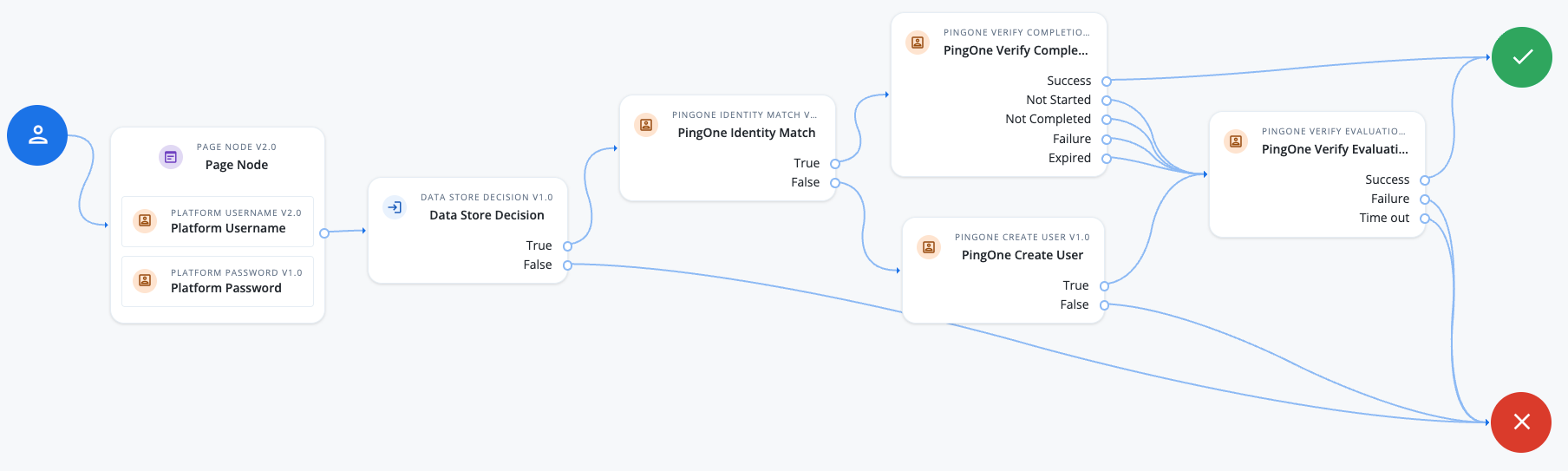
Learn more in the PingOne Verify example.