Client application registration
OAuth 2.0 or OIDC client applications must register with Advanced Identity Cloud before they can connect.
Registration involves setting up a client application profile in one of the following ways:
-
Using the Advanced Identity Cloud admin console.
For details, refer to Application management.
-
Programmatically.
For details, refer to Dynamic client registration.
|
To configure large numbers of short-lived clients at runtime, such as AI agents in Model Context Protocol (MCP) flows, use the client ID metadata document (CIMD) feature. |
Shared application settings
To define shared settings for multiple client application profiles, you have these alternatives:
-
Configure default settings for all clients in the realm.
Client applications inherit their default settings from the OAuth 2.0 provider service. Configure these settings in the Advanced Identity Cloud admin console, under Authorization > OAuth2 Provider.
-
Create an OAuth 2.0 client profile group.
Client applications that belong to the group can inherit its settings.
Create group settings
-
Under Native Consoles > Access Management, go to Realms > Realm Name > Applications > OAuth 2.0 > Clients.
-
On the Groups tab, click + Add Group, and click Create.
-
Adjust the configuration as needed, saving changes on each tab.
Inherit group settings
-
Under Native Consoles > Access Management, go to Realms > Realm Name > Applications > OAuth 2.0 > Clients > Client ID.
-
On the Core tab, select the Group in the drop-down.
-
Save your work.
Selecting a group refreshes the client configuration, discarding any other unsaved settings.
Inheritance icons appear next to inherited group settings. Not all properties can inherit their value; for example, the Client secret property is specific to each client application.
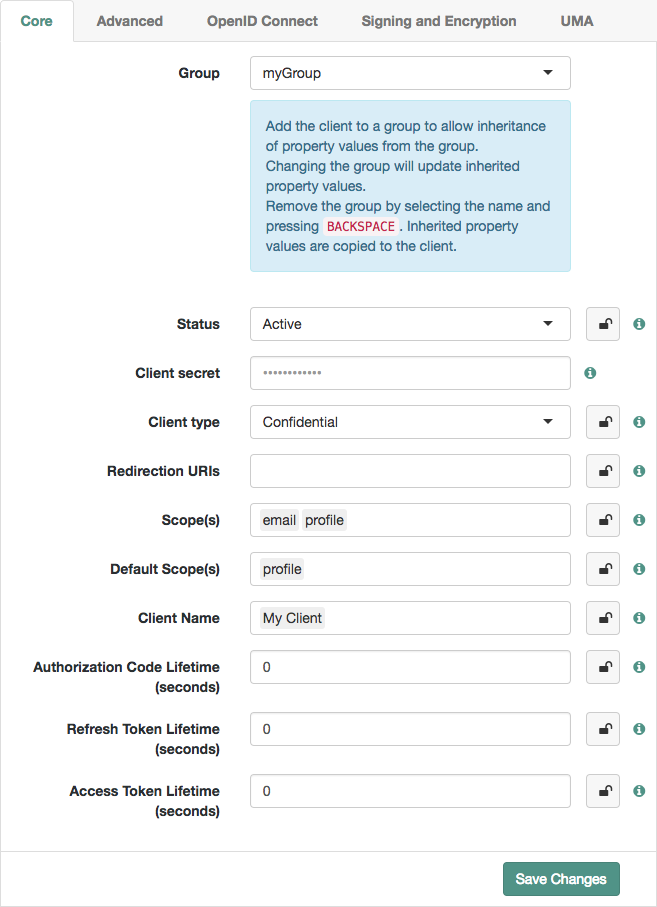 Figure 1. Inheriting group settings
 -
Inherit settings by clicking their inheritance icons .
The icon changes to , indicating the setting is inherited.
-
Save your work.
Configuration changes have the following effects:
-
When you change inherited settings in the group, the client applications get them automatically.
-
When you change a client application’s Group, locked settings inherit from the new group.
-
When you remove or delete a group, Advanced Identity Cloud writes inherited settings to the client profile, which you can edit independently.
Client application journeys
You can configure OAuth 2.0 / OIDC client applications to redirect authentication requests to a specified journey.
Learn about configuring application journeys in Application journeys.