Single sign-on with the admin console
The OpenID Connect (OIDC) protocol enables single sign-on (SSO) with the PingDirectory server admin console using either PingOne, PingFederate, or a custom authorization server.
Overview of OpenID Connect
OIDC is a protocol that allows a client application called a relying party (RP) to confirm that a user is who they say they’re by contacting an authorization server called an OpenID Provider (OP).
The authorization code flow
The PingDirectory server admin console uses the authorization code flow implementation of the protocol.
|
References to step numbers throughout this topic correspond to the numbered steps in the following authorization code flow. |
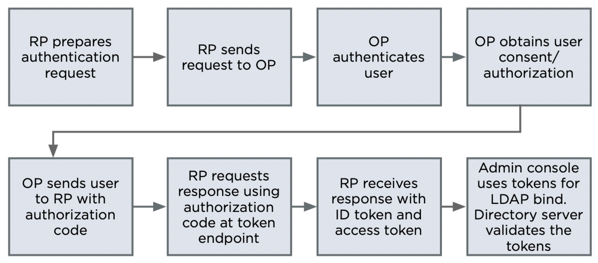
The following diagram shows the basic authorization code flow, where the PingDirectory server admin console acts as the RP in steps 1 - 7, the managed server acts as the RP in step 8, and PingOne, PingFederate, or your custom authorization server acts as the OP.
-
The PingDirectory server admin console (RP) prepares an authentication request containing the desired request parameters.
-
The admin console (RP) sends the request to the authorization server.
-
The authorization server (OP) authenticates the user.
-
The authorization server (OP) obtains user consent/authorization.
-
The authorization server (OP) sends the user back to the admin console with an authorization code.
-
The admin console (RP) requests a response using the authorization code at the token endpoint.
-
The admin console (RP) receives a response that contains an ID token and access token in the response body.
-
The admin console attempts to use the tokens to perform an Lightweight Directory Access Protocol (LDAP) bind with the server (RP) through the OAUTHBEARER SASL mechanism. While establishing this LDAP bind, the server (RP) validates the tokens.
Configuring OIDC with the PingDirectory server admin console
You must configure the authorization server with the following settings:
| Configuration requirement | Description | ||
|---|---|---|---|
An OIDC client with a client ID, client secret, and a Redirection URI. |
The client ID and client secret are used by the authorization server to confirm that the authentication and token requests are coming from a valid source. Set the redirection URI value to
|
||
The authorization server must be able to return an ID token that maps to a user on the managed PingDirectory server. |
The |
You must configure the PingDirectory server admin console with the following settings in the console’s web application extension, as follows:
Steps
-
Run
bin/dsconfig. -
Enter the number for the Web Application Extension configuration.
This option is only shown for the Advanced objects configuration menu. If needed, enter option o and change the configuration menu level.
-
To show existing web application extensions, enter
3. -
To edit the Console web application extension, press enter.
-
Configure the following settings:
Property Embedded console setting name Settings required sso-enabled
SSO Enabled
true. Necessary for the console to start the OIDC login flow.If SSO Enabled is set to
false, the console asks for a username and password.oidc-issuer-url
OIDC Issuer URI
Allows the client to use OIDC discovery to determine the correct addresses to send the authentication request to in step 2 and the token request in step 6.
oidc-client-id
OIDC Client ID
Value obtained from the authorization server. This is sent in the authentication request in step 2.
oidc-client-secret
OIDC Client Secret
Value obtained from the authorization server. This is sent in the token request in step 6.
ldap-server
LDAP Server
Set to the managed PingDirectory server’s hostname and LDAPS port.
Used in step 8 when the admin console attempts to perform an LDAP bind to the managed PingDirectory server using the OAUTHBEARER SASL mechanism.
You must also configure the managed PingDirectory server with the ability to accept LDAPS connections and with the following additional configuration properties:
| Configuration requirement | Description | ||
|---|---|---|---|
A configured ID token validator |
|
||
A configured OAUTHBEARER SASL mechanism |
Set the mechanism’s ID token validator configuration property to the previously configured OIDC ID token validator.
|
Setting up SSO to the PingDirectory admin console
-
To set up SSO using PingOne, refer to Setting up SSO to PingDirectory from PingOne.
-
To set up SSO using PingFederate, refer to Setting up SSO to PingDirectory from PingFederate.
-
To set up SSO using a generic OP, refer to Setting up SSO to PingDirectory from a generic OpenID Connect provider.