SSH
About this task
The SSH Properties file provides a limited subset of permissions that enable users to perform authentication while preventing them from performing management actions (such as enrollment and device management).
The PingID SSH Properties file contains sensitive information including the secret encryption key. It should only be handled by administrators, and should not be distributed more than is necessary.
|
The outcome of a login attempt by this user can differ if SSH was installed with full permissions as against restricted permissions. Under full permissions, if valid user To avoid ad hoc enrollments, the admin should always install SSH using the restricted permissions properties file. |
To download the PingID properties file to integrate with SSH:
Steps
-
In the PingOne admin portal, select Setup → PingID → CLIENT INTEGRATION.
Result:
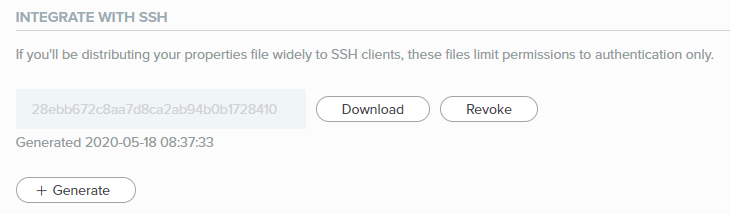
The INTEGRATE WITH SSH area is displayed.
-
To generate a new SSH PingID properties file, click Generate and then click Save.
You can have a maximum of three active PingID properties files. If you have three active files and want to generate a new one, you must first revoke one of your existing files.
Result:
A new entry is added to the Properties file list showing the new PingID Properties file.
-
In the relevant row, click Download, and then save the file to the desired location using a meaningful name.
|
PingID verifies that the copy of the PingID properties file on your computer has 644 file permissions (write access only for the file owner). If you encounter problems with the integration with SSH, check that the permissions for this file conform with this requirement. |