PingID Administration Guide

Policy event examples

The following examples illustrate common policy event scenarios.

Authentication not requested because the user recently authenticated successfully

When performing an action that normally requires authentication, a user is not requested to authenticate (Action:Approve) because they already authenticated within the time stated in the policy (Rule Met: "Time since user’s last authentication: 2 minutes".
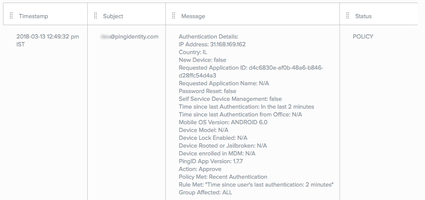
Screen capture of the PingID report showing how authentication is not requested.

Authentication unsuccessful

The policy does not support the specific mobile device. Authentication is denied to a user attempting to sign on using a device that is no longer supported (Device Model: Moto E with 4G LTE (2nd Gen); Authentication Successful: No; Policies not Met: Device model not supported).
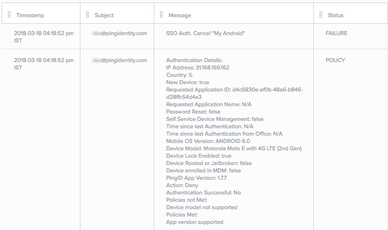
Screen capture of the PingID report showing an unsuccessful authentication due to the device not being supported.

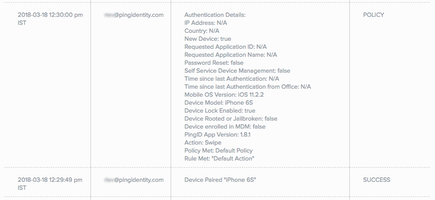
Pairing successful

When pairing a device, an authentication action policy event entry is displayed after the pairing attempt entry. Pairing event shows successful pairing of an iPhone 6S (Device Paired "iPhone 6S" Status=SUCCESS. Authentication event shows New Device: true).

Screen capture of the PingID report showing the successful pairing of an iPhone 6s.

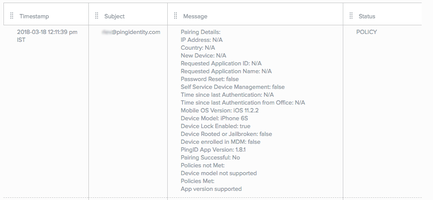
Pairing denied

A user’s attempt to pair with an iPhone 6 fails, because the device is not supported. The event type (Pairing Details) indicates Device Model: iPhone 6S, Policies not Met: Device model not supported.Screen capture of the PingID report showing how the pairing of an iPhone 6 is denied due to not being supported.