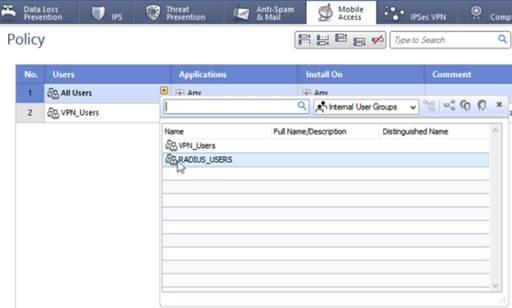
Defining a Mobile Access rule
The Mobile Access rule triggers when the authentication process approves a user’s credentials. It defines the landing page that the user sees when they sign on.
Steps
-
In the Checkpoint toolbar, click the Mobile Access tab.
-
In the upper left-hand tree, click Policy.
Result:
The existing policy is listed.
-
Right-click the No. column and select New Rule.
Result:
A new row is added to the list of rules.
-
In the Users column, click the Plus icon (
 ) and select the Radius Users group that you previously created.
For more information, see Configure a RADIUS user profile.