MFA: Push authentication
You can use push notifications as part of the authentication process in AM.
At a high level, push authentication works as follows:
-
End users register an Android or iOS device with AM.
-
When the user attempts to authenticate to AM, AM sends a push notification to the device.
-
The push notification is accepted by a registered authenticator app.
-
The user accesses the app and allows or denies the request that generated the push notification.
-
The app returns the response to AM.
About push
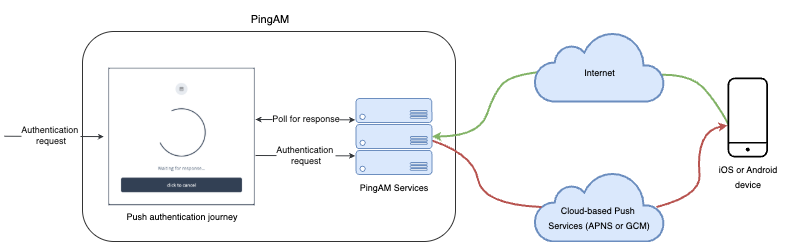
The following steps occur as an end user completes a push notification journey:
-
The user provides credentials to enable AM to locate the user profile and determine if they have a registered mobile device.
-
AM prompts the user to register a mobile device if they haven’t done so already.
The user registers their device through an authenticator app, such as the PingID mobile app. The app supports a variety of methods to respond to push notifications from tapping a button to biometrics if the device supports them.
Registering a device stores device metadata in the user profile that’s required for push notifications. AM uses the configured ForgeRock Authenticator (Push) service, which supports encrypting the metadata.
Learn more in Manage devices for MFA.
-
When the user has a registered device, AM creates a push message specific to the device.
The message has a unique ID that AM stores while waiting for the response.
AM writes a pending record with the same message ID to the CTS store for redundancy should an individual server go offline during the authentication process.
-
AM sends the push message to the registered device.
AM delivers the message through the configured push notification service.
Depending on the registered device, AM uses either Apple Push Notification Services (APNS) or Google Cloud Messaging (GCM) to deliver the message.
AM begins to poll the CTS for an accepted response from the registered device.
-
The user responds to the notification through the authenticator app on the device, approving or rejecting the notification.
The app responds to the push notification message with the user’s choice.
-
AM verifies that the message is from the correct registered device and hasn’t been tampered with, and marks the pending record as accepted if valid.
AM detects the accepted record and redirects the user to their profile page, completing the authentication.
Implement push
The following table summarizes the tasks to perform to implement push authentication in your environment:
| Task | Resources |
|---|---|
Configure authentication If you’re planning to implement passwordless push authentication, also read Limitations when using passwordless push authentication. |
|
Test push authentication After configuring AM, download and register an authenticator app to test your configuration. |