AI agent on behalf of a user
This example describes how to configure an AI agent to get a delegation token on behalf of a user using token exchange.
- Use case
-
An employee wants to use an HR digital assistant to update their health plan in a third-party HR system that’s protected by AM.
- Prerequisites
-
-
An employee user profile, for example,
bjensen.
- Steps
-
-
Create the may act script for the HR agent to act on behalf of the employee.
-
Configure the OAuth 2.0 client, for example,
hr-client. -
Register the AI agent, for example,
hr-agent.
-
Create the may act script
-
Write a may act script that adds the AI agent,
hr-agent, to themay_actclaim in the subject token:-
Next-generation
-
Legacy
(function () {
    var mayAct = {
        "client_id": "hr-agent",
        "sub": "(age!hr-agent)"
    };
    token.setMayAct(mayAct);
}());
(function () { var frJava = JavaImporter( org.forgerock.json.JsonValue); var mayAct = frJava.JsonValue.json(frJava.JsonValue.object()); // the client ID that can exchange the token mayAct.put('client_id', 'hr-agent'); // the subject claim for the agent / OAuth 2.0 client application mayAct.put('sub', '(age!hr-agent)'); token.setMayAct(mayAct); }()); -
-
Save your changes.
Configure the OAuth 2.0 client
Create a client application that overrides the OAuth 2.0 provider settings. This is the client that the employee uses to log in and get an access token from.
-
In the AM admin UI, go to Realms > realm name > Applications > OAuth 2.0 > Clients and register a confidential OAuth 2.0 client in the same realm as the provider and user journeys.
Provide the following values and click Create:
- Client ID
-
hr-client - Client secret
-
mySecret - Redirection URIs
-
https://www.example.com:443/callback - Scope(s)
-
readwritedelete
-
On the Advanced tab, verify the following settings:
- Grant Types
-
Authorization Code - Token Endpoint Authentication Method
-
client_secret_basic
-
On the OAuth2 Provider Overrides tab, save these settings:
- Enable OAuth2 Provider Overrides
-
enabled
- OAuth2 Access Token May Act Script
-
may act script name
Register the AI agent
Create an OAuth 2.0 AI agent to act as the HR agent that gets a delegation token to act on behalf of the employee.
-
In the AM admin UI, go to Realms > realm name > Applications > OAuth 2.0 > AI Agents and register an AI agent.
Provide the following values and click Create:
- Client ID
-
hr-agent - Client secret
-
mySecret - Redirection URIs
-
https://www.example.com:443/callback - Scope(s)
-
readwritedelete
The token exchange flow
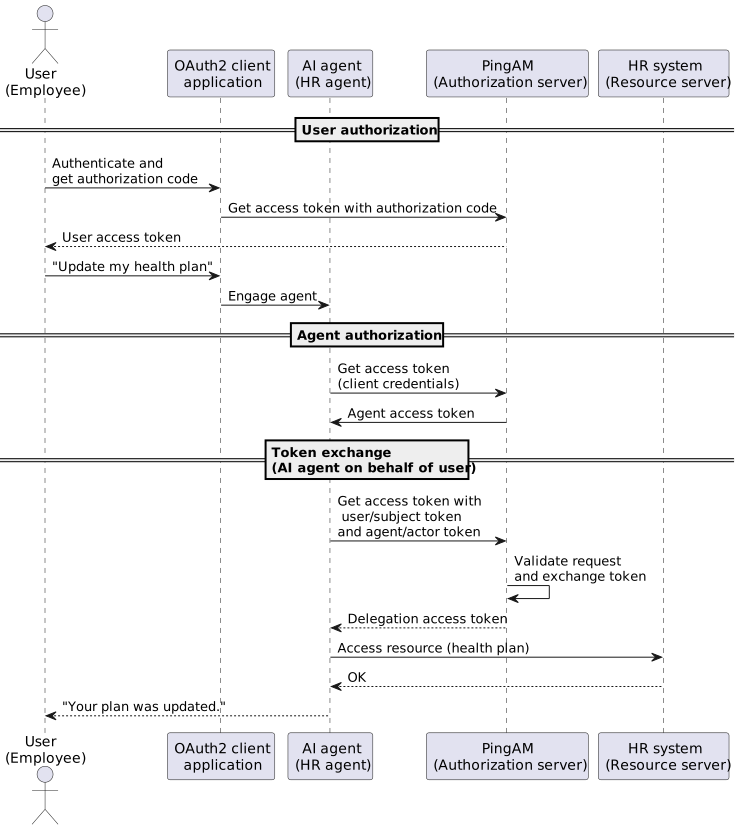
Example token exchange
-
Authenticate as the employee,
bjensen, for example:$ curl \ --request POST \ --header "X-OpenAM-Username: bjensen" \ --header "X-OpenAM-Password: Ch4ng31t" \ --header 'Accept-API-Version: resource=2.0, protocol=1.0' \ 'https://am.example.com:8443/am/json/realms/root/realms/alpha/authenticate' { "tokenId":"user-token", "successUrl":"/am/console", "realm":"/alpha" } -
Request an authorization code with the user token:
$ curl \ --dump-header - \ --request POST \ --cookie 'iPlanetDirectoryPro=user-token' \ --data 'scope=read' \ --data 'response_type=code' \ --data 'client_id=hr-client' \ --data 'csrf=user-token' \ --data 'redirect_uri=https://www.example.com:443/callback' \ --data 'decision=allow' \ 'https://am.example.com:8443/am/oauth2/realms/root/realms/alpha/authorize' … location: https://www.example.com:443/callback?code=authorization-code&iss=https%3A%2F%2F… … -
Get a user access token with the authorization code:
$ curl \ --request POST \ --data 'grant_type=authorization_code' \ --data 'client_id=hr-client' \ --data 'client_secret=mySecret' \ --data 'code=authorization-code' \ --data 'redirect_uri=https://www.example.com:443/callback' \ --data 'scope=read' \ 'https://am.example.com:8443/am/oauth2/realms/root/realms/alpha/access_token' { "access_token": "user-access-token", "refresh_token": "refresh-token", "scope": "read", "token_type": "Bearer", "expires_in": 3599 } -
Get an agent access token for
hr-agentusing the client credentials flow:$ curl \ --request POST \ --data 'grant_type=client_credentials' \ --data 'client_id=hr-agent' \ --data 'client_secret=mySecret' \ --data 'scope=read' \ 'https://am.example.com:8443/am/oauth2/realms/root/realms/alpha/access_token' { "access_token":"agent-access-token", "scope":"read", "token_type":"Bearer", "expires_in":3599 } -
Exchange the two access tokens to allow the HR agent to act on behalf of
bjensen, with scopes managed by AM:$ curl \ --request POST \ --data 'client_id=hr-agent' \ --data 'client_secret=mySecret' \ --data 'grant_type=urn:ietf:params:oauth:grant-type:token-exchange' \ --data 'scope=read write delete' \ --data 'subject_token=user-access-token' \ --data 'subject_token_type=urn:ietf:params:oauth:token-type:access_token' \ --data 'actor_token=agent-access-token' \ --data 'actor_token_type=urn:ietf:params:oauth:token-type:access_token' \ 'https://am.example.com:8443/am/oauth2/realms/root/realms/alpha/access_token' { "access_token": "exchanged-id-token", "refresh_token": "new-refresh-token," "issued_token_type": "urn:ietf:params:oauth:token-type:access_token", "scope": "read write delete", "token_type": "Bearer", "expires_in": 3599 }The
issued_token_typeshows this is an exchanged token.