AI agent acting autonomously
This example describes how to use dynamic client registration (DCR) to create an autonomous AI agent.
- Use case
-
An automatic software update AI agent is installed on a laptop or a server, registers itself dynamically with AM, and gets its own access token with a read-only scope to check for critical updates.
If an update is required, the agent performs a token exchange to get an access token with greater privileges so that it can install the software.
- Prerequisites
- Steps
-
-
Create the may act script for the software agent to act autonomously.
-
Create the DCR script to ensure the agent runs the may act script.
-
Configure the OAuth 2.0 provider for DCR.
-
Register the AI agent using DCR.
-
Create the may act script
-
Create a may act script named
Software agent may act scriptthat adds the software agent to themay_actclaim in the subject token:-
Next-generation
-
Legacy
(function () {
    var mayAct = {
        client_id: clientProperties.clientId,
        sub: `(age!${clientProperties.clientId})`
  };
    token.setMayAct(mayAct);
}());
(function () { var frJava = JavaImporter( org.forgerock.json.JsonValue); var mayAct = frJava.JsonValue.json(frJava.JsonValue.object()); // the client ID that can exchange the token mayAct.put('client_id', clientProperties.clientId); // the subject of the token that can exchange the token mayAct.put('sub', '(age!' + clientProperties.clientId + ')'); token.setMayAct(mayAct); }());age: Stands for agent. It tells the system that the identity following the exclamation mark is an automated agent or a service account, rather than a human user. -
-
Save your changes.
-
Make a note of the script
_id, for example,4478ca08-5a2a-4b1a-adee-d57c5c032d72. When you create the DCR script, use this ID to make sure the software agent runs the may act script.You can find the script ID by calling the /scriptsREST endpoint and checking the JSON output for your script name.
Create the DCR script
-
Create a DCR script named
Software agent DCR scriptthat overrides the default behavior of the OAuth 2.0 provider to set the following attributes:- Enable OAuth2 Provider Overrides
-
enabled
- OAuth2 Access Token May Act Script
-
may-act-script-id
- Use Client-Side Access & Refresh Tokens
-
enabled
For example:
-
Next-generation
-
Legacy
if (operation === "CREATE" && clientIdentity.isAIAgent()) {
    clientIdentity.setAttribute("providerOverridesEnabled", ["true"]);
    clientIdentity.setAttribute("accessTokenMayActScript",["4478ca08-5a2a-4b1a-adee-d57c5c032d72"]);
    clientIdentity.setAttribute("statelessTokensEnabled", ["true"]);
    clientIdentity.store();
};
Not available
-
Save your changes.
Configure the OAuth 2.0 provider
-
Complete the steps to enable DCR in the provider.
-
Configure the provider to use your DCR script:
-
In the AM admin UI, go to Realms > realm name > Services > OAuth2 Provider > Client Dynamic Registration.
-
Set Dynamic Client Registration Script to
Software agent DCR script. -
Save your changes.
-
Register the AI agent
Use the AI agent endpoint to register an agent dynamically.
-
Post a DCR request to the AI agent endpoint with the following JSON body, for example:
$ curl \
--request POST \
--header "Content-Type: application/json" \
--data '{
  "grant_types": ["client_credentials", "urn:ietf:params:oauth:grant-type:token-exchange"],
  "client_name": "software agent",
  "response_types": ["token"],
  "redirect_uris": ["https://www.example.com:443/callback"],
  "scopes": ["read", "write"]
}' \
"https://am.example.com:8443/am/oauth2/realms/root/realms/alpha/aiagent/register"
Show the response
{
  "authorization_signed_response_alg": "RS256",
  "request_object_encryption_alg": "",
  "introspection_encrypted_response_alg": "RSA-OAEP-256",
  "default_max_age": 0,
  "application_type": "web",
  "introspection_encrypted_response_enc": "A128CBC-HS256",
  "introspection_signed_response_alg": "RS256",
  "providerOverridesEnabled": true,
  "userinfo_encrypted_response_enc": "",
  "registration_client_uri": "https://am.example.com:8443/am/oauth2/realms/root/realms/alpha/aiagent/register?client_id=software-agent-client_id",
  "client_type": "Confidential",
  "userinfo_encrypted_response_alg": "",
  "registration_access_token": "nAn6REdGvAthrKK6EhMo_eT2Rzw",
  "token_endpoint_auth_method": "client_secret_basic",
  "userinfo_signed_response_alg": "",
  "client_id": "software-agent-client_id",
  "enableApplicationContext": false,
  "public_key_selector": "x509",
  "scope": "read write",
  "require_pushed_authorization_requests": false,
  "authorization_code_lifetime": 0,
  "client_secret": "software-agent-client_secret",
  "user_info_response_format_selector": "JSON",
  "tls_client_certificate_bound_access_tokens": false,
  "backchannel_logout_session_required": false,
  "client_name": "Software Agent",
  "grant_types": [
    "client_credentials",
    "urn:ietf:params:oauth:grant-type:token-exchange"
  ],
  "jwt_token_lifetime": 0,
  "id_token_encryption_enabled": false,
  "redirect_uris": [
    "https://www.example.com:443/callback"
  ],
  "jwks_cache_miss_cache_time": 60000,
  "jwks_cache_timeout": 3600000,
  "id_token_encrypted_response_alg": "RSA-OAEP-256",
  "id_token_encrypted_response_enc": "A128CBC-HS256",
  "client_secret_expires_at": 0,
  "access_token_lifetime": 0,
  "refresh_token_lifetime": 0,
  "scopes": [
    "read",
    "write"
  ],
  "request_object_signing_alg": "",
  "response_types": [
    "token"
  ]
}
The software agent is now registered and can operate autonomously. The client ID and client secret are automatically generated.
When the agent performs a token exchange, the may act script adds the software agent DCR client to the
may_actclaim in the subject token, allowing it to act on behalf of itself.
The token exchange flow
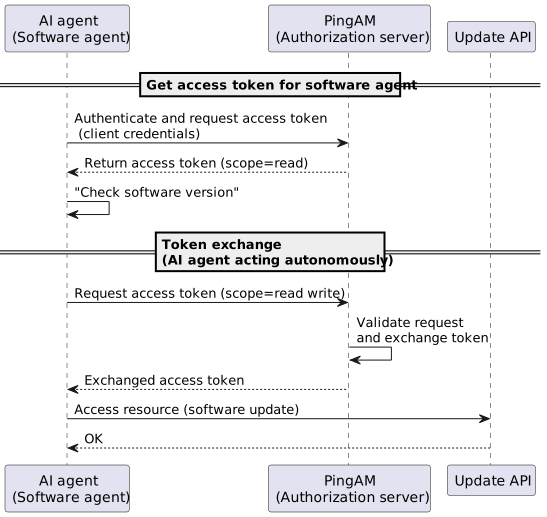
Example token exchange
-
Get an agent access token for the software agent using the client credentials flow:
$ curl \
--request POST \
--data 'grant_type=client_credentials' \
--data 'client_id=software-agent-client_id' \
--data 'client_secret=software-agent-client_secret' \
--data 'scope=read' \
'https://am.example.com:8443/am/oauth2/realms/root/realms/alpha/access_token'
{
  "access_token":"software-agent-access-token",
  "scope":"read",
  "token_type":"Bearer",
  "expires_in":3599
}
The access token gives the software agent read access to protected resources so that it can check software versions.
-
The software agent detects that the software is out of date and needs to be updated.
The agent performs a token exchange to get the increased permissions (
scope=read write) required to run a software update:$ curl \ --request POST \ --data 'client_id=software-agent-client_id' \ --data 'client_secret=software-agent-client_secret' \ --data 'grant_type=urn:ietf:params:oauth:grant-type:token-exchange' \ --data 'scope=read write' \ --data 'subject_token=software-agent-access-token' \ --data 'subject_token_type=urn:ietf:params:oauth:token-type:access_token' \ 'https://am.example.com:8443/am/oauth2/realms/root/realms/alpha/access_token' { "access_token": "exchanged-id-token", "refresh_token": "new-refresh-token," "issued_token_type": "urn:ietf:params:oauth:token-type:access_token", "scope": "read write", "token_type": "Bearer", "expires_in": 3599 }The
issued_token_typeshows this is an exchanged token.