Manage deployment configuration
Under Deployment, you can manage different configurations for AM server instances, and site configurations when using multiple AM server instances.
Configure servers
AM server properties reside in two places:
-
The default configuration, under Configure > Server Defaults.
-
Per-server basis configuration, under Deployment > Servers > server name.
Default server properties are applied to all server instances, and can be overridden on a per-server basis. Changes to the value of a default server property are applied to all servers that are not overriding that property. The ability to set default properties and override them for an individual server lets you keep a set of properties with identical configuration across the environment, while providing the flexibility to change properties on specific servers when required.
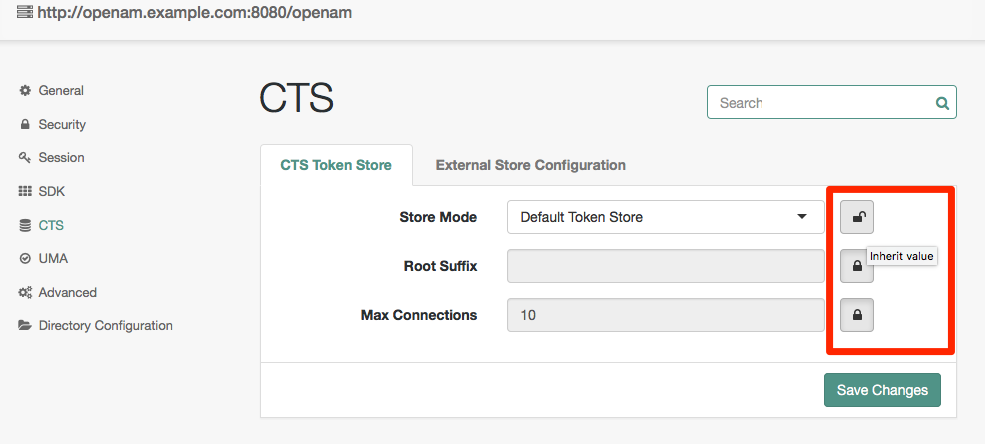
-
A closed lock means the property is inherited from the defaults. To change an inherited value click on the lock, and the property will become localized for that server.
-
An open lock means the property is localized for this server. To return to the inherited values, click on the lock.
The Advanced section also takes values from the defaults, but the properties do not have locks for inheritance. Instead, if you want to override a particular advanced property value on a per-server basis, you need to add that property with its new value under Deployment > Servers > server name > Advanced.
|
After changing server configurations, restart AM or the web application container where AM runs for the changes to take effect unless otherwise noted. |
Configure sites
Sites involve multiple AM servers working together to provide services. You can use sites with load balancers and session high availability to configure pools of servers capable of responding to client requests in highly available fashion.
- Name
-
Sets the name of the site.
- Primary URL
-
Sets the primary entry point to the site, such as the URL, to the load balancer for the site configuration.
- Secondary URLs
-
Sets alternate entry points to the site.