Reset forgotten passwords
The AM UI includes pages for users to reset their forgotten passwords. You can, however, create a RESTful application to leverage the user self-service features.
When performing user self-service functions, you can enable one or more security methods such as email validation, CAPTCHA, or security questions. Each configured security method requires particular security data that AM requests from the client for verification.
A unique token is provided in the second response to the client that must be used in any subsequent requests, so that AM can maintain the state of the user self-service process.
Password reset recovers access to an existing account. Make sure its controls are at least as strong as the account’s weakest sign-on method. Learn more in Common use cases for forgotten password reset.
The following diagram illustrates a forgotten password flow.
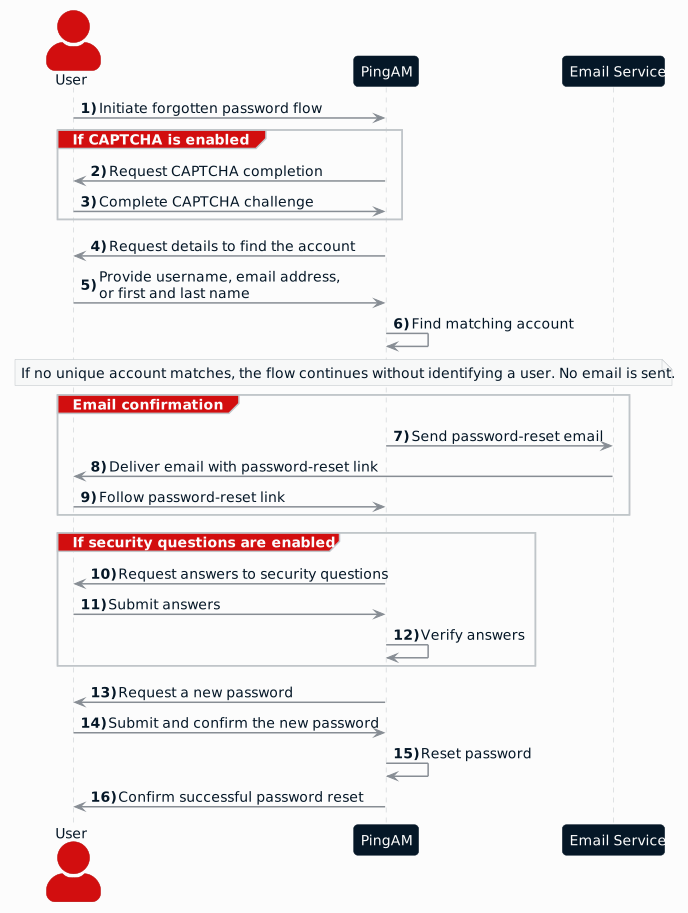
Reset a forgotten password over REST
-
Send a GET request to the
/selfservice/forgottenPasswordendpoint.The request doesn’t require any form of authentication:
$ curl \ --header "Accept-API-Version: resource=1.0" \ "https://am.example.com:8443/am/json/realms/root/selfservice/forgottenPassword" { "type": "captcha", "tag": "initial", "requirements": { "$schema": "http://json-schema.org/draft-04/schema#", "description": "Captcha stage", "type": "object", "required": [ "response" ], "properties": { "response": { "recaptchaSiteKey": "6Lfr1…cIqbd", "description": "Captcha response", "type": "string" } } } }In this example, the Google reCAPTCHA plugin is enabled, so the first required item of security data is of the
captchatype. -
Send a POST request to the
/selfservice/forgottenPasswordendpoint with a query string containing_action=submitRequirements. In the POST data, include aninputelement in the JSON structure, which should contain values for each element in therequiredarray of the response.In this example, the
responsevalue required is the user input provided after completing the Google reCAPTCHA challenge:$ curl \ --header "Accept-API-Version: resource=1.0" \ --request POST \ --header "Content-Type: application/json" \ --data \ '{ "input": { "response": "03AHJ…qiE1x4" } }' \ "https://am.example.com:8443/am/json/realms/root/selfservice/forgottenPassword?_action=submitRequirements" { "type": "userQuery", "tag": "initial", "requirements": { "$schema": "http://json-schema.org/draft-04/schema#", "description": "Find your account", "type": "object", "required": [ "queryFilter" ], "properties": { "queryFilter": { "description": "filter string to find account", "type": "string" } } }, "token": "eyAicHis…PIF-lN4s" }If the input value was accepted, AM continues with the password reset process and specifies the information required next. In this example, the Google reCAPTCHA was verified and AM is requesting details about the account for the password reset, which must be provided in a
queryFilterelement.The value of the
tokenelement should be included in this and all subsequent requests to AM for this reset process. -
Send a POST request to AM with a
queryFiltervalue in the POST data containing the username of the subject with the password to replace.Find more information on query filters in Query.
$ curl \ --request POST \ --header "Content-Type: application/json" \ --data \ '{ "input": { "queryFilter": "uid eq \"bjensen\"" }, "token": "eyAicHis…PIF-lN4s" }' \ "https://am.example.com:8443/am/json/realms/root/selfservice/forgottenPassword?_action=submitRequirements" { "type": "kbaSecurityAnswerVerificationStage", "tag": "initial", "requirements": { "$schema": "http://json-schema.org/draft-04/schema#", "description": "Answer security questions", "type": "object", "required": [ "answer1" ], "properties": { "answer1": { "systemQuestion": { "en": "What was the model of your first car?" }, "type": "string" } } }, "token": "eyAicHis…PIF-lN4s" }If a single subject is located that matches the provided query filter, the password reset process continues.
When no unique subject matches the query filter, the process continues without identifying a user. In that case, the security questions shown are the configured ones, not those registered on an account. Submitting answers when no user is identified returns an HTTP 400 Bad Request status:
{ "code": 400, "reason": "Bad Request", "message": "Security question answers do not match" } -
Continue sending POST data to AM containing the requested information, in the format specified in the response.
Also return the
tokenvalue in the POST data, so that AM can track the stages of the password reset process.$ curl \ --request POST \ --header "Content-Type: application/json" \ --data \ '{ "input": { "answer1": "Mustang" }, "token": "eyAicHis…PIF-lN4s" }' \ "https://am.example.com:8443/am/json/realms/root/selfservice/forgottenPassword?_action=submitRequirements" { "type": "resetStage", "tag": "initial", "requirements": { "$schema": "http://json-schema.org/draft-04/schema#", "description": "Reset password", "type": "object", "required": [ "password" ], "properties": { "password": { "description": "Password", "type": "string" } } "code": "cf88bb63-b59c-4792-8fdf-2bcc00b0ab06" }, "token": "eyAicHis…PIF-lN4s" } -
When AM has received all the requested information, it sets
typetoresetStageand returns a uniquecodevalue in the response. You can now specify a new password in the POST data, along with both thecodeandtokenvalues:$ curl \ --request POST \ --header "Content-Type: application/json" \ --data \ '{ "input": { "password": "5tr0ng~P4s5worD!" }, "code": "cf88bb63-b59c-4792-8fdf-2bcc00b0ab06", "token": "eyAicHis…PIF-lN4s" }' \ "https://am.example.com:8443/am/json/realms/root/selfservice/forgottenPassword?_action=submitRequirements" { "type": "activityAuditStage", "tag": "end", "status": { "success": true }, "additions": {} }When the process is complete, the
tagelement has a value ofend. If thesuccesselement instatushas a value oftrue, the password reset is complete and the new password is now active.If the password is not accepted, an HTTP 400 Bad Request status is returned along with an error message:
{
    "code": 400,
    "reason": "Bad Request",
    "message": "Minimum password length is 8."
}