Configure authentication trees
You configure authentication trees over REST by sending PUT requests to update the tree configuration. You must include the tree ID and all the nodes in the tree in the request. You can find information on the required parameters in the online REST API reference.
This table outlines the high-level tasks for configuring authentication trees:
| Task | Description |
|---|---|
Disable trees during development or when they aren’t in use to enhance security. |
|
Prevent an inner tree from being called directly, ensuring it’s only used within its parent journey. |
|
Specify the identity object a tree should use when integrated with IDM, if it’s not the default |
|
Force a tree to execute on every authentication attempt, even if a valid session already exists. |
|
Create a journey that completes successfully without creating an authenticated session, ideal for tasks like delegated administration. |
|
Indicate a tree can only be used for transactional authentication purposes, including backchannel authentication, OAuth 2.0 app trees, SAML 2.0 app trees, and transactional authorization. |
|
Override the maximum duration of the journey session for a specific tree, for example, to allow more time for an email verification step. |
|
Set custom session idle and maximum timeout values for authenticated sessions created by a specific tree. |
Enable and disable an authentication tree
Custom authentication trees are enabled by default when you save them. For security purposes, you can disable custom authentication trees during development and testing to prevent accidentally allowing access through these trees. Rather than having unused authentication trees enabled, you should disable the default authentication trees until you need them.
When a user attempts to authenticate through a disabled tree, AM returns a No configuration found error.
To enable or disable an authentication tree, send a PUT request to update the tree configuration. Include the tree ID
and all the nodes in the tree, and set the enabled property.
Example
$ curl \
--request PUT \
--header "iPlanetDirectoryPro: AQIC5wM…TU3OQ*" \
--header "Content-Type: application/json" \
--header "Accept-API-Version: protocol=2.1,resource=3.0" \
--data '{
"entryNodeId": "c11e9cf8-ef48-4740-876f-6300e2f46aef",
"nodes": {
...
},
"enabled": false
}' \
"https://am.example.com:8443/am/json/realms/root/realms/alpha/realm-config/authentication/authenticationtrees/trees/myAuthTree"
{
"_id": "myAuthTree",
"_rev": "2070284866",
"entryNodeId": "c11e9cf8-ef48-4740-876f-6300e2f46aef",
"innerTreeOnly": false,
"noSession": false,
"mustRun": false,
"enabled": false,
"transactionalOnly": false,
"uiConfig": {},
"nodes": {
...
}
}Disable direct access through an inner tree
An inner tree or child tree lets you nest authentication logic. There is no limit to the depth of nesting.
You configure an inner tree like any other tree then call it from a parent tree using an Inner Tree Evaluator node.
You could want to hide inner trees as complete services. In other words, you could want to prevent users from authenticating directly through an inner tree, either for security reasons or because the inner tree is insufficient as a complete authentication service. Additionally, inner trees can’t be used as transactional authentication trees.
To prevent a tree from being used outside of its parent tree, set the innerTreeOnly property to true in the tree
configuration. Send a PUT request to update the tree configuration, including the tree ID and all the nodes in the tree.
Example
$ curl \
--request PUT \
--header "iPlanetDirectoryPro: AQIC5wM…TU3OQ*" \
--header "Content-Type: application/json" \
--header "Accept-API-Version: protocol=2.1,resource=3.0" \
--data '{
"entryNodeId": "c11e9cf8-ef48-4740-876f-6300e2f46aef",
"nodes": {
...
},
"innerTreeOnly": true
}' \
"https://am.example.com:8443/am/json/realms/root/realms/alpha/realm-config/authentication/authenticationtrees/trees/myAuthTree"
{
"_id": "myAuthTree",
"_rev": "1081620278",
"entryNodeId": "c11e9cf8-ef48-4740-876f-6300e2f46aef",
"innerTreeOnly": true,
"noSession": false,
"mustRun": false,
"enabled": true,
"transactionalOnly": false,
"uiConfig": {},
"nodes": {
...
}
}|
To find out if the current tree is configured as an inner tree only, include a Scripted Decision node with a script that calls Learn more in Get journey details. |
Specify IDM identity resources in trees
When running AM as part of an integrated platform with IDM, trees configured to use the Ping Advanced Identity Software need to identify the type of identity resource or object the tree is working with.
To do this, set the identityResource property to the required identity resource or object in the tree
configuration. Send a PUT request to update the tree configuration, including the tree ID and all the nodes in the tree.
If the property isn’t included in the tree configuration, it defaults to managed/user.
Example
The following example sets identityResource to use a managed object in IDM called newObjectType:
$ curl \
--request PUT \
--header "iPlanetDirectoryPro: AQIC5wM…TU3OQ*" \
--header "Content-Type: application/json" \
--header "Accept-API-Version: protocol=2.1,resource=3.0" \
--data '{
"entryNodeId":"e301438c-0bd0-429c-ab0c-66126501069a",
"nodes": {
...
},
"description":"Example tree description",
"identityResource":"managed/newObjectType"
}' \
"https://am.example.com:8443/am/json/realms/root/realm-config/authentication/authenticationtrees/trees/myAuthTree"Configure an authentication tree to always run
You can configure a tree to always run, whether a user authenticated successfully and a session exists or not. If enabled, the tree runs even when the session was created through a different tree and irrespective of the value of the ForceAuth parameter.
|
If a user successfully signs on using a specific authentication tree and then tries to reauthenticate to the same tree while the session is still valid, the default behavior is for the authentication flow to skip the processing of the tree. For example, the Set Session Properties node is never run in this scenario:
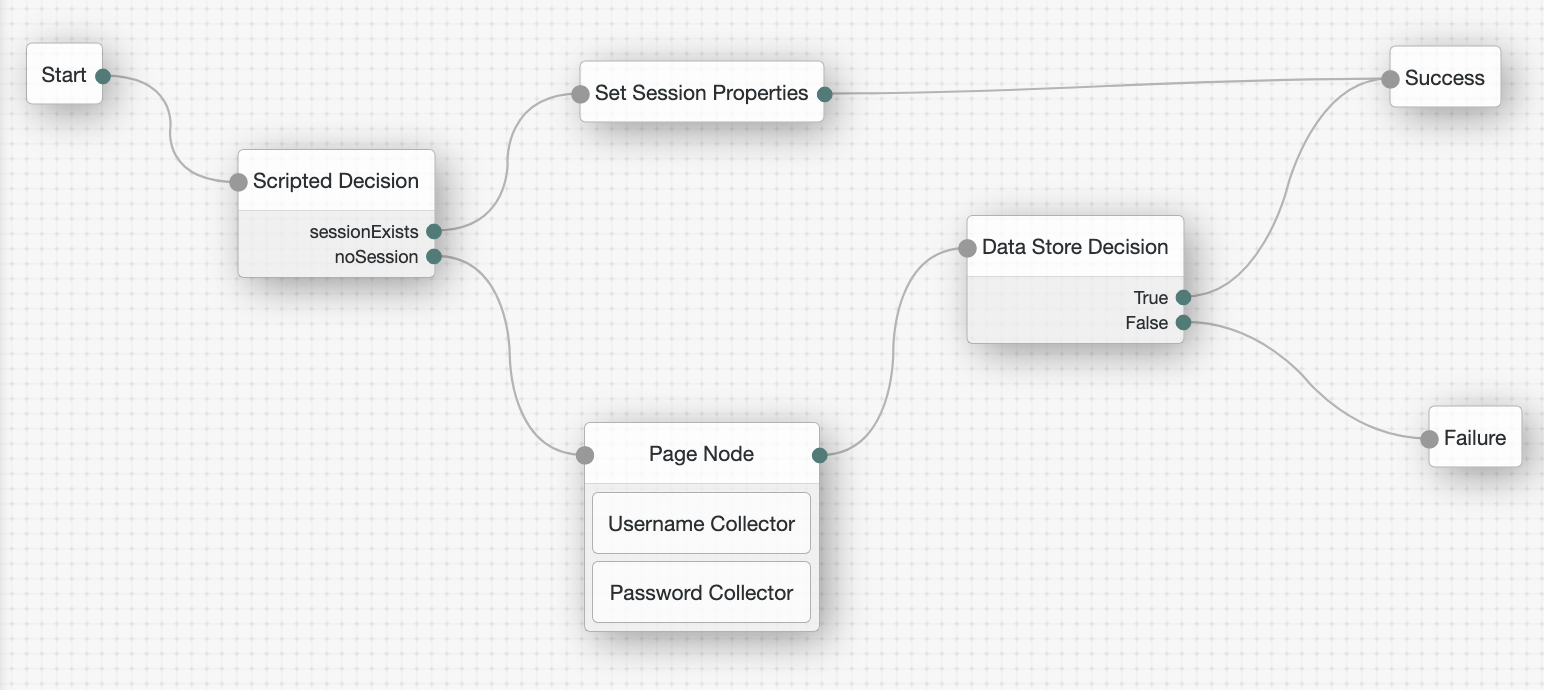
However, to make sure the tree always runs and sets the session property even when a valid authenticated session exists,
set the mustRun property to true in the tree configuration.
To do this, send a PUT request to update the tree configuration including the tree ID and all the nodes in the tree.
Example
$ curl \
--request PUT \
--header "iPlanetDirectoryPro: AQIC5wM…TU3OQ*" \
--header "Content-Type: application/json" \
--header "Accept-API-Version: protocol=2.1,resource=3.0" \
--data '{
"entryNodeId": "83fa0ce2-1b0f-4f8f-83fb-0d2648339797",
"nodes": {
...
},
"mustRun": true
}' \
"https://am.example.com:8443/am/json/realms/root/realms/alpha/realm-config/authentication/authenticationtrees/trees/myAuthTree"
{
"_id": "myAuthTree",
"_rev": "71943491",
"entryNodeId": "83fa0ce2-1b0f-4f8f-83fb-0d2648339797",
"innerTreeOnly": false,
"noSession": false,
"mustRun": true,
"enabled": true,
"transactionalOnly": false,
"uiConfig": {},
"nodes": {
...
}
}|
To find out if the current tree is configured to always run, include a Scripted Decision node with a script that calls Learn more in Get journey details. |
Configure a no session tree
A no session tree doesn’t result in an authenticated session when it successfully completes.
A common use case for a no session tree is a delegated admin task, such as an administrator changing a user’s password. In this scenario, you don’t want an authenticated session to be created when the administrator enters the credentials of the user whose password they are changing.
|
This can also be achieved by setting the If the |
To configure a no session tree, set the noSession property to true in the tree configuration.
Send a PUT request to update the tree configuration, including the tree ID and all the nodes in the tree.
Example
$ curl \
--request PUT \
--header "iPlanetDirectoryPro: AQIC5wM…TU3OQ*" \
--header "Content-Type: application/json" \
--header "Accept-API-Version: protocol=2.1,resource=3.0" \
--data '{
"entryNodeId": "c11e9cf8-ef48-4740-876f-6300e2f46aef",
"nodes": {
...
},
"noSession": true
}' \
"https://am.example.com:8443/am/json/realms/root/realms/alpha/realm-config/authentication/authenticationtrees/trees/myAuthTree"
{
"_id": "myAuthTree",
"_rev": "1081620278",
"uiConfig": {},
"entryNodeId": "c11e9cf8-ef48-4740-876f-6300e2f46aef",
"innerTreeOnly": false,
"noSession": true,
"mustRun": false,
"enabled": true,
"transactionalOnly": false,
"uiConfig": {},
"nodes": {
...
}
}Configure a transactional authentication tree
In AM, certain advanced authentication flows initiate a temporary, secure process known as a transaction to handle a specific authentication or authorization event.
You can configure trees for these flows as transactional authentication trees to manage the user interaction required to complete the transaction. This prevents users from authenticating directly through the tree, either for security reasons or because the transactional tree is insufficient as a complete authentication service. Additionally, transactional authentication trees can’t be used as inner trees.
|
You don’t have to configure the tree used in a transactional flow as a transactional authentication tree. |
A transactional authentication tree only runs when AM starts a transaction, which happens when AM does one of the following:
-
Initializes backchannel authentication using either the
/authenticate/backchannel/initializeendpoint or the Backchannel Initialize node. -
Runs a SAML 2.0 app tree for a remote SP.
-
Runs an OAuth 2.0 app tree when AM is acting as an authorization server.
-
Enforces a transactional authorization policy.
To configure a transactional authentication tree, set the transactionalOnly property to true in the tree configuration.
Send a PUT request to update the tree configuration, including the tree ID and all the nodes in the tree.
Example
$ curl \
--request PUT \
--header "iPlanetDirectoryPro: AQIC5wM…TU3OQ*" \
--header "Content-Type: application/json" \
--header "Accept-API-Version: protocol=2.1,resource=3.0" \
--data '{
"entryNodeId": "c11e9cf8-ef48-4740-876f-6300e2f46aef",
"nodes": {
...
},
"transactionalOnly": true
}' \
"https://am.example.com:8443/am/json/realms/root/realms/alpha/realm-config/authentication/authenticationtrees/trees/myAuthTree"
{
"_id": "myAuthTree",
"_rev": "1081620278",
"uiConfig": {},
"entryNodeId": "c11e9cf8-ef48-4740-876f-6300e2f46aef",
"innerTreeOnly": false,
"noSession": false,
"mustRun": false,
"enabled": true,
"transactionalOnly": true,
"uiConfig": {},
"nodes": {
...
}
}Configure journey session duration in a tree
The maximum duration of a journey session is derived by AM as described in Maximum duration.
You can override global and realm level duration values in an individual tree if required. For example, a tree that requires email verification could have a longer duration than a simple tree that authenticates users with a username and password.
|
Duration values set in a tree can be overridden at the node level. Learn more in Maximum duration. Additionally, duration values set on inner trees are ignored. |
Learn more in Suspend journey progress.
To change the authentication tree duration, set the treeTimeout property to the required number of minutes in the tree configuration.
Send a PUT request to update the tree configuration, including the tree ID and all the nodes in the tree.
Example
$ curl \
--request PUT \
--header "iPlanetDirectoryPro: AQIC5wM…TU3OQ*" \
--header "Content-Type: application/json" \
--header "Accept-API-Version: protocol=2.1,resource=3.0" \
--data '{
"entryNodeId": "c11e9cf8-ef48-4740-876f-6300e2f46aef",
"nodes": {
...
},
"treeTimeout": 10
}' \
"https://am.example.com:8443/am/json/realms/root/realms/alpha/realm-config/authentication/authenticationtrees/trees/myAuthTree"
{
"_id": "myAuthTree",
"_rev": "1081620278",
"entryNodeId": "c11e9cf8-ef48-4740-876f-6300e2f46aef",
"innerTreeOnly": false,
"noSession": false,
"mustRun": false,
"treeTimeout": 10,
"enabled": true,
"transactionalOnly": false,
"uiConfig": {},
"nodes": {
...
}
}Configure authenticated session timeouts in a tree
Timeout settings for an authenticated session are derived by AM as described in Configure authenticated session timeout settings.
You can override global and realm level timeout values in an individual tree if required. For example, a tree that implements MFA could have a longer authenticated session timeout than a simple tree that authenticates users with a username and password.
|
Session timeouts set in a tree can be overridden at the node or user level. Learn more in Configure authenticated session timeout settings. Session timeout values set on inner trees are ignored. However, if session timeouts are set at the node level in an inner tree, the updated timeouts are used in the parent tree. |
Learn more in Session termination.
To change the session timeouts in a tree, set the maximumSessionTime and maximumIdleTime properties to the
required number of minutes in the tree configuration. Send a PUT request to update the tree configuration, including the tree ID and all the
nodes in the tree.
Example
The following example sets the maximumSessionTime to an hour and the maximumIdleTime to 15 minutes for
authenticated sessions established through this tree:
$ curl \
--request PUT \
--header "iPlanetDirectoryPro: AQIC5wM…TU3OQ*" \
--header "Content-Type: application/json" \
--header "Accept-API-Version: protocol=2.1,resource=3.0" \
--data '{
"entryNodeId": "c11e9cf8-ef48-4740-876f-6300e2f46aef",
"nodes": {
...
},
"maximumSessionTime": 60,
"maximumIdleTime": 15
}' \
"https://am.example.com:8443/am/json/realms/root/realms/alpha/realm-config/authentication/authenticationtrees/trees/myAuthTree"
{
"_id": "myAuthTree",
"_rev": "1081620278",
"entryNodeId": "c11e9cf8-ef48-4740-876f-6300e2f46aef",
"innerTreeOnly": false,
"maximumSessionTime": 60,
"maximumIdleTime": 15,
"noSession": false,
"mustRun": false,
"enabled": true,
"transactionalOnly": false,
"uiConfig": {},
"nodes": {
...
}
}