Introduction to SAML 2.0
SAML 2.0 helps organizations share, or federate identities and services, without having to manage the identities or credentials themselves. The credentials are managed by a single entity, known as the identity provider (IdP). The services are provided by service providers (SPs). Both providers are configured to trust one another.
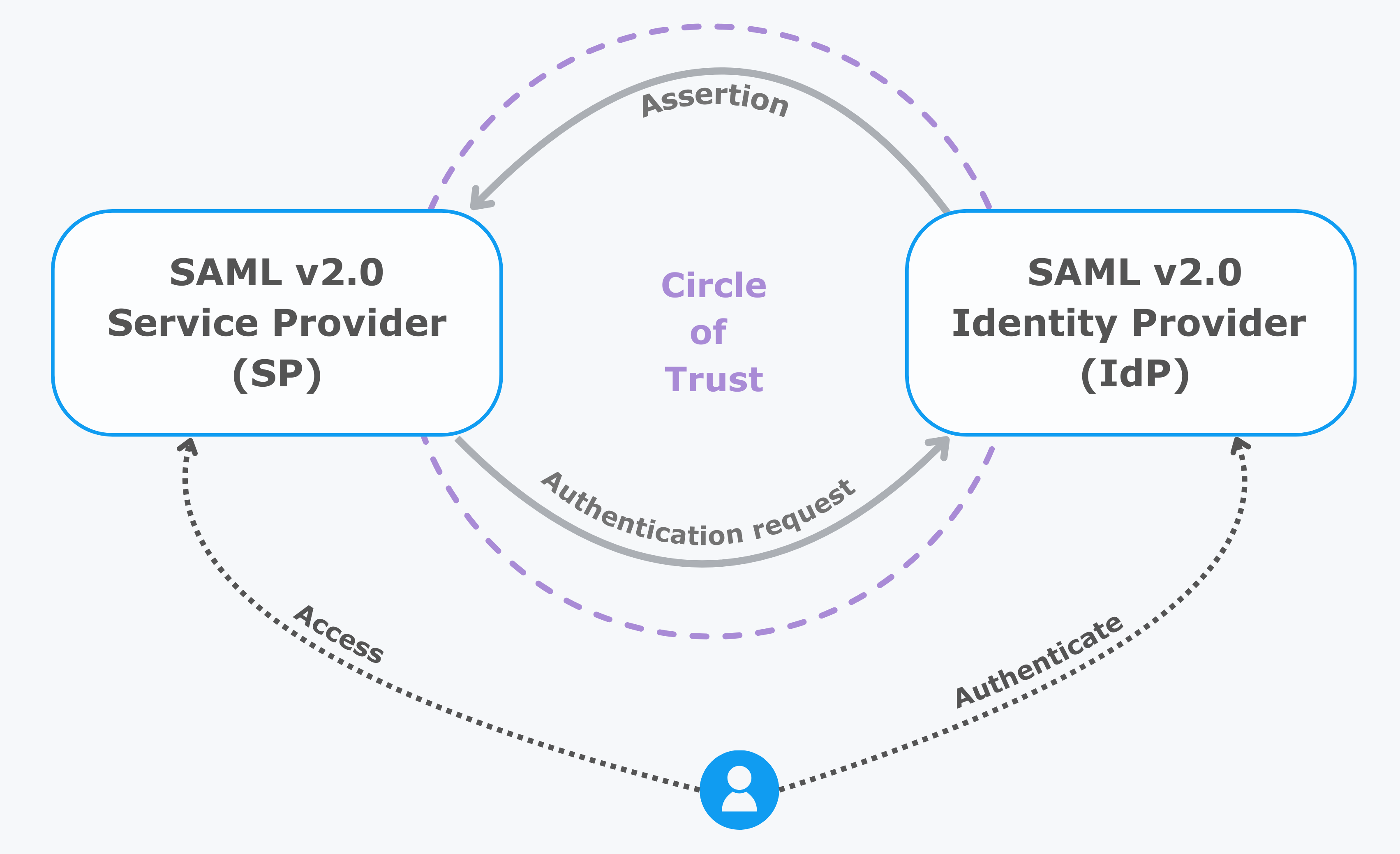
AM uses the concept of the circle of trust to manage the relationship between IdPs and SPs.
Terminology
| Term | Description |
|---|---|
End user |
The person who is attempting to access the resource or application. In SAML 2.0, the end user is often referred to as the subject. The end user uses a user-agent, usually a web browser, when performing a SAML 2.0 flow. |
Single sign-on (SSO) |
The ability for an end user to authenticate once but gain access to multiple applications, without having to authenticate separately to each one. |
Single log out (SLO) |
The ability for an end user to log out once but terminate sessions in multiple applications, without having to log out separately from each one. |
Assertions |
An assertion is a set of statements about an authenticated user that let services make authorization decisions, that is, whether to allow that user to access the service, and what functionality they can use. SAML assertions are XML-formatted tokens. Assertions issued by AM can contain the following information about an end user:
|
Identity provider (IdP) |
The IdP is responsible for authenticating end users, managing their account, and issuing SAML assertions about them. |
Service provider (SP) |
The provider of the service or application that the end user is trying to access. The SP has a trust relationship with the IdP, which enables the SP to rely on the assertions it receives from the IdP. |
Circle of trust (CoT) |
A circle of trust is an AM concept that groups at least one IdP and at least one SP who agrees to share authentication information. |
Hosted and remote providers |
A hosted provider is one served by the current AM instance; a remote provider is one hosted elsewhere. |
Metadata |
Providers in SAML 2.0 share metadata, which represents the configuration of the provider, as well as the mechanisms it can use to communicate with other providers. For example, the metadata may contain necessary certificates for signing verification, as well as which of the SAML 2.0 bindings are supported. Sharing metadata greatly simplifies the creation of SAML 2.0 providers in a circle of trust. AM can import the XML-formatted metadata provided by remote providers. You can also export the metadata from hosted providers. For more information about metadata, refer to Metadata for the OASIS Security Assertion Markup Language (SAML) 2.0 in the SAML 2.0 Standard. |
Concepts
Security Assertion Markup Language (SAML) 2.0 is a standard that lets users access multiple services with a single set of credentials. The services may be provided by different organizations, using multiple domains. In summary, SAML 2.0 provides cross-domain single sign-on (CDSSO).
For more information, refer to Security Assertion Markup Language (SAML) 2.0.
SAML 2.0 depends on standards for describing how the providers interact and exchange information. The SAML 2.0 standards describe the messages sent between providers, how they are relayed, how they are exchanged, and common use cases.
In federation deployments where not all providers support SAML 2.0, AM can act as a multi-protocol hub; translating for providers that rely on other and older standards, such as WS-Federation. You can find an integration example in How do I configure PingAM as an Identity Provider for Microsoft Office 365 and Azure using WS-Federation? in the Knowledge Base.
When your organization acts as the IdP and you want to enable SPs to federate their services with yours, you can generate configuration files for a fedlet.
An AM fedlet is a small Java web application that can act as an SP for a specific IdP without requiring that you install all of AM. For more information on fedlets, refer to Implement SAML 2.0 SPs by using Fedlets.
Example flow
When configuring AM to provide single sign-on using SAML 2.0, you can:
-
Map accounts at the IdP to accounts at the SP, including mapping to an anonymous user.
-
As the IdP, make assertions to the SP, for example, to attest that the end user has authenticated with the IdP.
The SP then consumes assertions from the IdP to make authorization decisions, for example, to let an authenticated user complete a purchase that gets charged to the user’s account at the IdP.
-
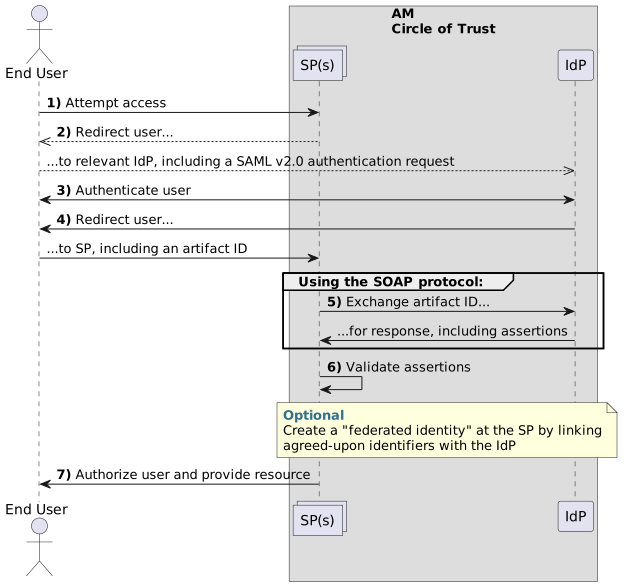
An unauthenticated user attempts to access a SAML 2.0 SP.
-
The SP determines the IdP associated with the end user, and redirects the user’s browser to the IdP, using an HTTP 302 Redirect message. A SAML 2.0 authentication request is included in the query string.
This is an example of HTTP-Redirect binding and is the default when requesting SAML authentication by AM. AM also supports the HTTP-POST binding for processing SAML 2.0 authentication requests.
AM provides two deployment models to support single sign-on (SSO) when contacting the SP initially. For details, refer to Implement SSO and SLO.
-
The IdP validates the request, determines the authentication method that should be used, and authenticates the user.
The SP can specify a particular tree for authentication, or it can include requirements for the user such as to authenticate with multiple factors.
-
The IdP creates a SAML Artifact, which contains a unique artifact ID for the SAML 2.0 response.
The IdP redirects the end user’s browser to the SP, and includes the SAML Artifact in the query parameters. The browser only has access to the artifact ID rather than the SAML response itself, reducing risk of malicious interference.
-
The SP communicates directly with the IdP using the SOAP protocol to retrieve the SAML response relating to the artifact ID.
The IdP returns the SAML response, including the assertion using the SOAP protocol, directly to the SP.
The information in the SAML response is not shared with the user agent. This is an example of HTTP-Artifact binding, and is the default when AM is returning SAML assertions. AM also supports the HTTP-POST binding for transmitting SAML 2.0 assertions.
-
The SP validates the SAML response and that the signature matches the public key it holds for the IdP.
Optionally, the SP can choose to create a new account locally for the user or associate an identifier in the assertion with a user account it already has locally. Linked accounts are often referred to as a federated identity. Refer to Federate identities.
To link to an existing account, the SP can require the end user to also authenticate to the SP to determine the matching local account. After linking, the user only needs to authenticate at the IdP when attempting access.
-
The SP can now use the information in the assertion and the local federated identity to authorize the user and decide whether to grant access to its services.
Use cases
The following use cases describe how AM SAML 2.0 can meet different authentication requirements.
Grant access to Google Workspace
A common use case for SAML 2.0 is giving your staff access Google Workspace applications, such as Google Docs and Google Sheets. This section explains how AM provides this solution.
In this scenario, Google acts as the SP, and AM acts as the IdP for a hypothetical organization, Example.com.
-
In AM, an admin user configures an AM instance as the IdP.
-
The admin user then configures Google Workspace as a remote SP and provides the values that Google requires to use AM as its IdP. For example, the login and logout URLs, profile management URLs, and validation certificate.
-
The Google Workspace administrator enters the provided URLs and certificate into the Google Workspace Admin console for the domain being configured.
-
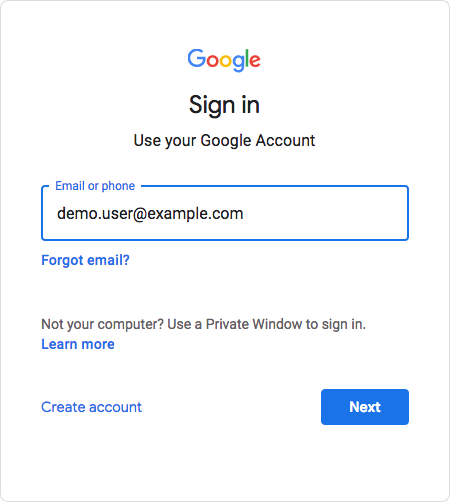
After configuration, users attempting to access a Google Workspace service must provide their corporate email address:
-
Based on the domain of the email address, Google redirects the user to sign in to AM, acting as the IdP.
-
After successfully authenticating with AM, the user is redirected back to the Google Workspace application, for example, Google Docs.
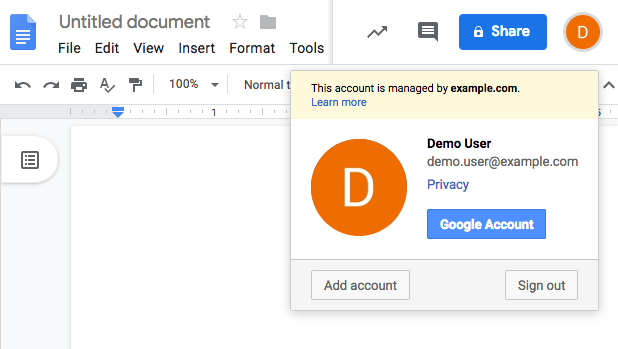
Google, acting as the SP, creates a federated identity in its systems to manage local account options, such as privacy settings. The user can now access any of the Google Workspace apps, by authenticating to the IdP using their corporate Example.com account:
Learn more about this SAML flow in SP-initiated SSO integrated mode flow.
Grant access to a pension application through a workplace portal
This scenario describes an employee who wants to check their pension details from their company website. The company, Example.com, provides an application dashboard to its employees, which includes an option to access their pension provider, MyPension.
An IdP-initiated SSO flow in integrated mode lets the employee authenticate with the third-party workplace portal and bypass the pension app’s login page.
-
In AM, the admin user configures MyPension as the hosted SP and imports the metadata for the remote IdP (Example.com) to create a circle of trust.
The hosted SP configuration includes a login journey to handle the pension provider’s authentication requirements, such as adding multi-factor authentication.
-
MyPension provides a URL for Example.com to embed in its website.
Learn more about configuring this URL in Assertion Consumer Service.
-
The employee provides their credentials to Example.com and clicks the embedded link to the pension app in the dashboard.
-
As the IdP, Example.com authenticates the employee and redirects them to MyPension (the SP).
-
AM, acting as the SP, validates the IdP, identifies the employee, and runs the authentication journey.
The authentication journey verifies that the employee has the required authorization level for their organization.
-
The employee is redirected to the MyPension website and granted access to their pension details.
Learn more about this SAML flow in IdP-initiated SSO integrated mode flow.