Key concepts
Take some time to familiarize yourself with some key concepts in Advanced Identity Cloud. You can find more detailed information about each topic in the linked pages.
Tenants
| Learn more about Advanced Identity Cloud tenants in Explain tenant environments on-demand training (9.30 minutes). |
Tenant environments
Advanced Identity Cloud provides development, staging, and production environments for you to build, test, and deploy your identity and access management (IAM) configuration and applications. These three environments share the same configuration.
Additionally, you can have two other environment types as add-on capabilities:
-
A user acceptance testing (UAT) environment for testing new features in a production-like setting. You can have as many UAT environments as you need, and they share configuration with your development, staging, and production environments.
-
A standalone sandbox environment for experimenting with new features. This environment is linked to the rapid release channel, meaning it receives the newest Ping Identity features and fixes before they’re deployed to your other environments. You can have more than one sandbox environment.
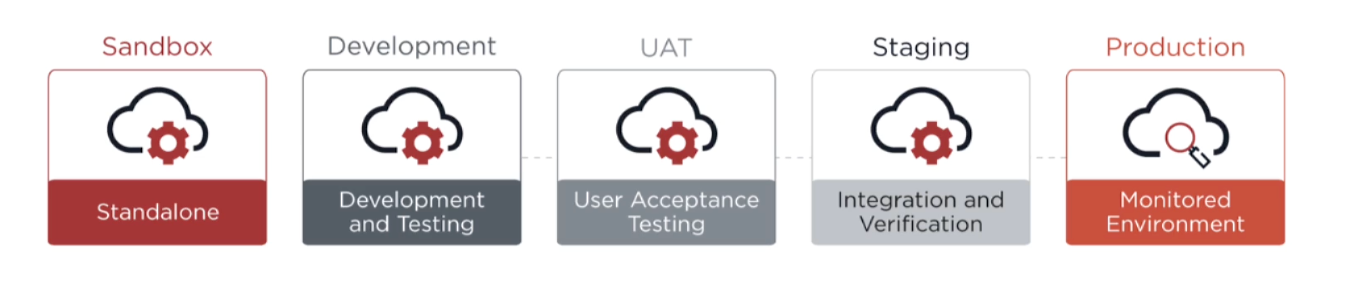
Learn more in Tenant environments.
Promotion model
Configuration in Advanced Identity Cloud is managed through a promotion model. You make changes to your static configuration (such as user journeys or scripts) in your development environment, and then promote those changes to staging for testing, and finally to production. This ensures a safe and repeatable process for deploying your changes. Any static configuration changes are applied immediately when you promote your changes to production.
You can use Environment Secrets and Variables (ESVs) to manage sensitive data or values that need to be different for each environment, such as API keys or external URLs.
| There is no automated process for promoting changes from a sandbox environment to a development environment. Non-sequential promotions (between the development environment and the production environment) are not supported. |
Learn more in Introduction to self-service promotions.
Realms
A realm is a self-contained unit within your tenant used to manage separate groups of users and applications. For example, you might use one realm for your employees and one realm for your customers.
Advanced Identity Cloud provides two realms: Alpha and Bravo. These realms are configurable, unlike the top-level realm that Advanced Identity Cloud configures for tenant administrator identities. You can’t add more realms. You can switch between realms in the Advanced Identity Cloud admin console.
Learn more in Realm settings.
Release cycles
Ping Identity delivers new features, fixes, and security updates through continuous general availability (GA) releases. These releases are deployed through two main channels:
-
Rapid channel: Used for sandbox[1] environments and contains the absolute newest GA features and fixes. This lets Ping Identity qualify and establish GA releases through cumulative usage and soak testing, typically over a 2-week period. When a GA release has been established, it’s allocated to the regular channel.
-
Regular channel: Used for development, UAT[2], staging, and production environments and contains more established GA features and fixes.
Learn more in Release process.
Tenant versions
Ping Identity assigns each release a unique version number, which helps track what’s included and when it’s released to a tenant. You can check the version in the Advanced Identity Cloud admin console, in the page footer.
Learn more in Release information.
Add-on capabilities
Add-on capabilities are features or products not included in the standard Advanced Identity Cloud offering that can be added to your subscription.
Learn more in Add-on capabilities.
User interfaces
Administrators and end users interact with the platform through these web interfaces:
-
Advanced Identity Cloud admin console: The administrative consoles where you configure tenants, design journeys, manage users, and set up applications. As an administrator, you’ll spend most of your time in this UI. Learn more in Task 2: Explore the platform.
-
Hosted account pages: A customizable dashboard for your end users. After signing on, end users can manage their profile, view their applications, and handle security settings such as changing their password or registering multi-factor authentication (MFA) devices. Learn more in Hosted account pages.
-
Hosted journey pages: The pages presented to end-users when signing on. Learn more in Hosted pages.
APIs
Many of the features available through Advanced Identity Cloud UIs are also available through REST APIs. This allows you to manage your identity solution programmatically using tools such as Postman, cURL, or custom scripts.
Learn more in Advanced Identity Cloud API reference.
Audit logs
Advanced Identity Cloud records detailed audit and debug logs for security and troubleshooting purposes. These logs capture important events related to authentication, administrative changes, and user activity. You can retrieve logs programmatically using APIs, stream them to an external monitoring tool or security information and event management (SIEM) system, or view them in the Advanced Identity Cloud admin console.
Learn more in Get audit and debug logs.
Core components
Journeys
In Advanced Identity Cloud, a journey is a visual workflow that guides your end users through processes such as signing on, registering for a new account, or resetting a password. Advanced Identity Cloud provides several pre-configured journeys for these common tasks, which you can customize with a drag-and-drop editor to meet your own requirements.
The editor also includes annotation features such as sticky notes and comments, which help you document complex logic or leave notes for other administrators.
Learn more in:
-
On-demand training: Explain Advanced Identity Cloud journeys (12.57 minutes)
| The Ping Identity Marketplace includes several preconfigured journeys, including threat detection with PingOne Protect and financial services journeys. You can download and import these journeys, and adapt them to suit your needs. |
Managed objects
A managed object is an identity-related entity or resource managed by Advanced Identity Cloud.
The main managed objects are:
-
Users: Your customers, employees, or partners.
-
Roles: Collections of permissions that define what a user can do.
-
Assignments: The link that grants a role to a user or group.
-
Groups: Collections of users, often used to simplify role assignments.
-
Organizations: Hierarchical structures for organizing users, such as business departments.
Learn more in:
-
Advanced Identity Cloud identity schema, Configure managed objects, Manage identities, Groups
-
On-demand training: Introduce user profiles (5.49 minutes)
|
Applications
In Advanced Identity Cloud, an application is a connection to an external application that you manage. You can configure an application for user provisioning or single sign-on (SSO):
-
User provisioning automates the creation and management of user accounts in external applications. For example, when a new employee is created in Advanced Identity Cloud, an account is automatically created for them in a target application, such as Workday or Salesforce.
-
SSO lets end users access external applications using their Advanced Identity Cloud credentials, through standard protocols such as OpenID Connect (OIDC), SAML, or WS-Federation.
Learn more in Application management.
Identity synchronization
With identity synchronization, you connect Advanced Identity Cloud to your existing user datastores, such as an on-premises LDAP directory or a database, to synchronize identities. This lets you keep user profiles consistent across systems, migrate users into the platform, or provision accounts to downstream applications.
Learn more in:
-
On-demand training: Explain identity synchronization (10.40 minutes)
Email providers
Email providers in Advanced Identity Cloud are services that handle sending emails on behalf of your tenant. These emails are for critical user interactions, such as completing a registration or resetting a forgotten password.
To help you get started, your tenant includes a built-in email service. This lets you quickly create and test email-dependent journeys in your development tenant environment.
| Before you go live, you must configure Advanced Identity Cloud to use your organization’s own email provider. |
Learn more in Email provider.