Google Workspace
The Google Workspace application template allows you to provision users and groups to a Google Workspace instance.
Register the application
-
In the Advanced Identity Cloud admin console, go to Applications > Applications, and click Browse App Catalog.
-
In the Browse App Catalog modal, select an application, and click Next.
-
Review the Application Integration information, and click Next.
-
In the Application Details window, specify the name, description, application owners, and logo for the application.
-
To make the application an Authoritative source of identity data, select the Authoritative check box. This option is not available for every application.
-
Click Create Application.
Configure the provisioner
-
In the Advanced Identity Cloud admin console, on the Provisioning tab:
-
If setting up provisioning for the first time, click Set up Provisioning.
-
When editing existing settings in the Connection area, click Settings.
-
-
In the Configure Google Workspace App modal, copy the values:
-
Authorized JavaScript Origins
-
Authorized Redirect URI
-
-
In a new browser tab, sign on to the Google Apps Developers Console and update your existing project or create a new project:
-
Enable the following APIs for your project:
-
Set up an OAuth 2.0 client:
The Google Workspace application template uses OAuth 2.0 to authorize the connection to the Google service:
-
In the Google Apps Developers Console, select Credentials > Create Credentials > OAuth client ID.
-
Click Configure Consent Screen, select Internal, and click Create.
-
On the OAuth consent screen, enter an Application name; for example,
Advanced Identity Cloud, and click Save.This name displays for all applications registered in this project.
-
Select Credentials > Create Credentials > OAuth client ID > Web application, and enter the previously copied information in the following fields:
- Authorized JavaScript origins
-
The URI that clients use to access your application copied from the Configure Google Workspace App modal in Advanced Identity Cloud.
- Authorized redirect URIs
-
The OAuth redirect URI copied from the Configure Google Workspace App modal in Advanced Identity Cloud.
-
Click Create.
-
On the OAuth client created modal, copy and save the Client ID and Client Secret.
-
-
Add Advanced Identity Cloud to the Trusted Apps list:
-
Sign on to the Google Admin Console.
-
From the upper-left menu, select Security > API Controls.
-
Select Manage Third-Party App Access, click Change Access, and change the Advanced Identity Cloud app settings to Trusted.
-
-
-
Return to the Advanced Identity Cloud admin console browser tab, and in the Configure Google Workspace App modal, click Next.
-
In the Connect to Google Workspace modal, enter the Client ID, Client Secret, and Domain.
-
Optionally, click Show advanced settings to set any of the following options:
Application specific settings Option Description Exclude Unmodified
Select this option to synchronize only the modified properties on a target resource.
Pool configuration Field Description Max idle and active container instances
The maximum number of idle and active container instances. The default value is
10.Max Idle Connector Instances
The maximum number of idle connector instances. The default value is
10.Set Timeout Period
Select to enable a timeout period for the connection. After enabling, configure the following:
-
Timeout period (ms): The timeout period in milliseconds.
Set Minimum Idle Time
Select to set a minimum time (in milliseconds) before an idle object is removed. After enabling, configure the following:
-
Min idle time (ms): The minimum idle time in milliseconds.
Min Idle Instances
The minimum number of idle connector instances.
Result Handler configuration Field Description Enable for connectors with the attribute normalizer interface
Enables the attribute normalizer interface for supported connectors.
Enable local filtering/search features
Enables local filtering and search capabilities.
Enable case insensitive filter
Configures filters to ignore case sensitivity.
Enable configuration of search attributes; disable for local connectors
Enables search attribute configuration. Disable this option for local connectors.
-
In the Operation Timeouts (ms) area, select the operations to enforce timeouts on and enter the duration in milliseconds.
Available operations include Create, Validate, Test, Enable a Script on the Connector, Schema, Delete, Update, Sync, Authenticate, Get, Enable a Script on the Target, and Search.
-
In the Operation Rate Limits area, select the operations to enforce rate limits on.
You can enforce limits on specific operations, including Create, Validate, Test, Script on Connector, Schema, Delete, Update, Sync, Authenticate, Get, Script on Target, and Search.
For each selected operation, configure the following fields:
Field Description Request Limit
Requests allowed over time.
Request Period
Limit resets after this time (ms).
Request Timeout
Time before exception thrown (ms).
-
-
Click Connect.
-
When you are redirected to Google, log in using your admin credentials.
-
On the next screen, click Allow. You are then redirected back to the Advanced Identity Cloud admin console.
-
Verify the information in the Details tab.
Configure provisioning and reconciliation resources
Use the object type list to select a provisioning and reconciliation resource, such as Account.
The selected object type determines the side tabs that display, as each resource has different provisioning and reconciliation requirements.
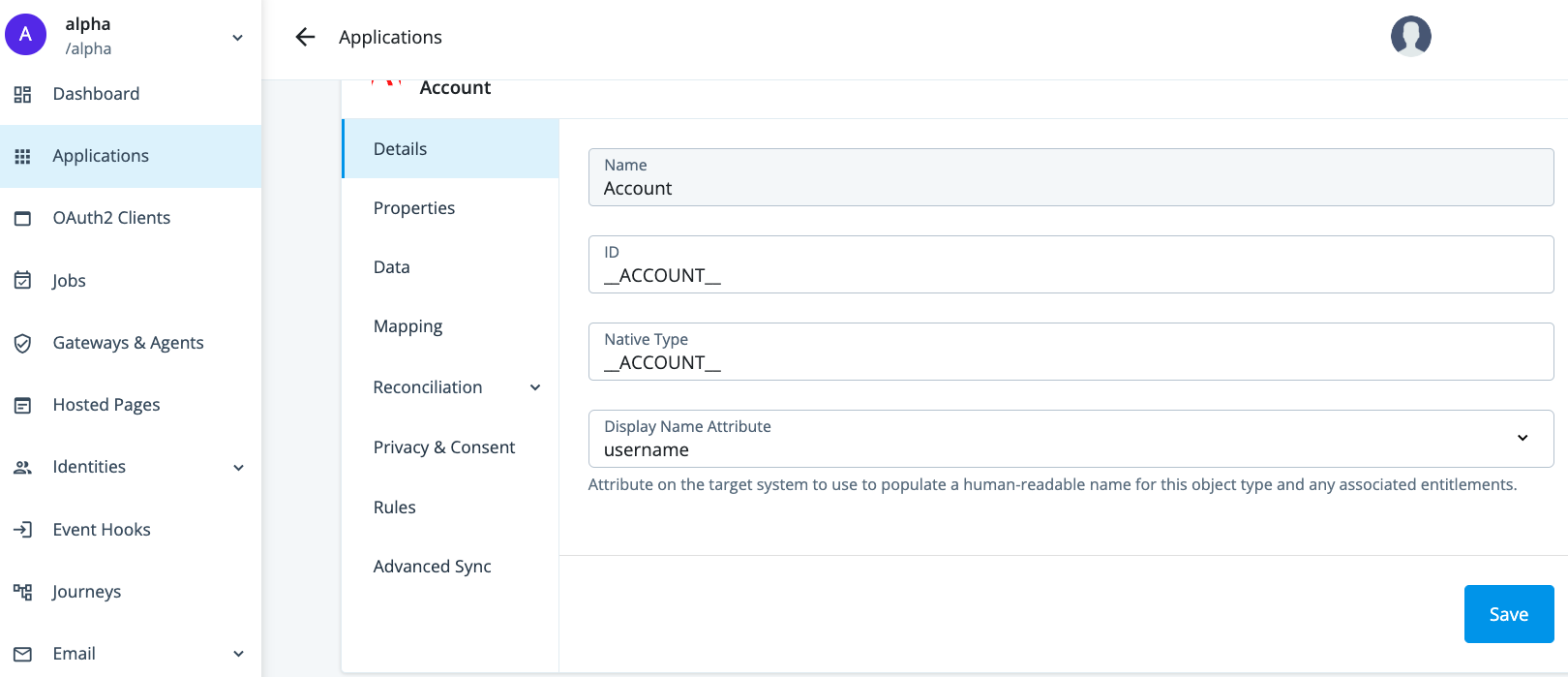
| Provisioning side tab | Description | Related sections |
|---|---|---|
Details |
View and manage an application, including name, ID, and native type. |
Select the specific application from Provision settings for an application. |
Properties |
View and manage properties for the selected object type. |
|
Data |
View data about the selected object type. |
|
Mapping |
View and manage mappings from the Advanced Identity Cloud admin console properties to external system properties and from external system properties to the Advanced Identity Cloud admin console properties. |
|
Reconciliation |
Preview mappings on target applications between external systems and the Advanced Identity Cloud admin console, and reconcile the data between the two systems. View and manage rules for the users and groups that use your application. View and manage schedules for Full and Incremental reconciliation. |
|
Privacy & Consent |
Manage end-user data sharing and synchronization. |
|
Rules |
View and manage provisioning rules for mappings between Advanced Identity Cloud and a target application. |
|
Advanced Sync |
Create and manage mappings between a managed object type and an application or between applications. |