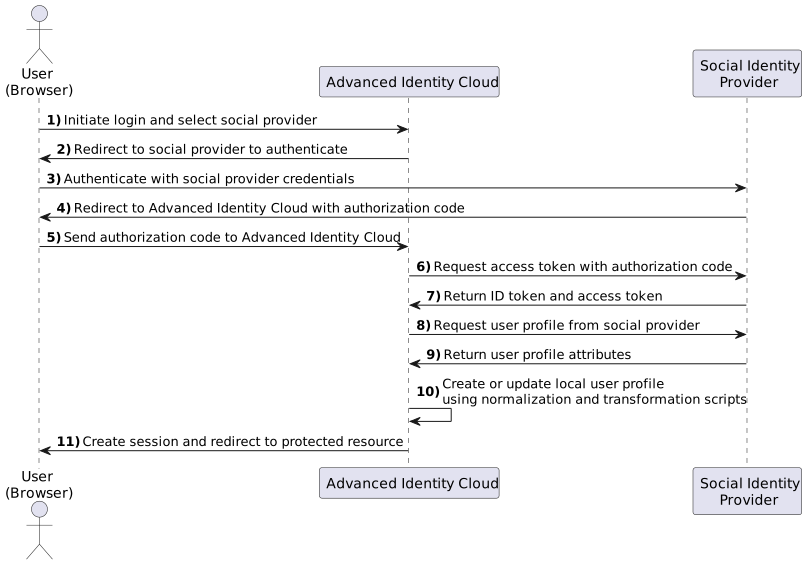
Social authentication
Social authentication (also known as social sign-on or social login) lets end users register and sign on to your applications using their existing accounts from social identity providers such as Google or Facebook. Instead of creating a new username and password for your application, end users can authenticate with a trusted provider they already use. Advanced Identity Cloud supports this by integrating with any OAuth 2.0 or OpenID Connect (OIDC) compliant identity provider.
Social authentication offers several benefits:
-
Improved end user experience: Simplifies registration and sign-on, reducing friction for new users.
-
Increased conversion rates: Users are more likely to sign up when they don’t have to fill out long registration forms or remember another password.
-
Verified email addresses: Social providers often supply a verified email address, which can increase the quality of your user data.
-
Access to profile data: With user consent, you can retrieve profile information (such as name and profile picture) from the social provider to personalize the end user experience.
End user flows involved in social authentication
It’s important to understand the different end user flows for social authentication:
- Social registration
-
A new user creates an account in Advanced Identity Cloud using their social identity. Advanced Identity Cloud creates a local user profile and links it to the social provider account.
- Social sign-on
-
An existing user signs on to your application using their linked social identity.
- Account linking (or account claiming)
-
A user who already has a local Advanced Identity Cloud account (created with a username and password) can link one or more social identities to that existing account. This allows them to sign on using either their local credentials or any of their linked social accounts.
Learn more about creating journeys for these flows in Configure basic social registration journeys.
Supported provider types
Advanced Identity Cloud supports social identity providers that are OAuth 2.0 or OIDC 1.0-compliant.
Default social identity provider configurations
The following social identity providers are configured by default:
| Identity provider | Specification | Configuration ID |
|---|---|---|
Amazon |
OAuth 2.0 |
|
Apple |
OIDC |
|
OAuth 2.0 |
|
|
OIDC |
|
|
OAuth 2.0 |
|
|
itsme(1) |
OIDC |
|
LINE (Browser) |
OIDC |
|
LINE (Native) |
OIDC |
|
LinkedIn (Legacy) (2) |
OAuth 2.0 |
|
OIDC |
|
|
Microsoft |
OAuth 2.0 |
|
Salesforce |
OAuth 2.0 |
|
OAuth 2.0 |
|
|
VK (Vkontakte) |
OAuth 2.0 |
|
OAuth 2.0 |
|
|
WordPress |
OAuth 2.0 |
|
Yahoo |
OIDC |
|
(1) To integrate with itsme, you must obtain an Organization Validation (OV) certificate.
(2) The OAuth 2.0 version of the profile is deprecated by LinkedIn.
Custom social identity provider configurations
You can add providers that aren’t configured by default, as long as these providers use OAuth 2.0 or OIDC:
| Identity provider | Specification | Configuration ID |
|---|---|---|
Any social identity provider that implements the OAuth 2.0 specification. |
OAuth 2.0 |
|
Any social identity provider that implements the OIDC specification. |
OIDC |
|