Configure user display properties
You can control which managed user attributes Identity Governance displays in user details across access request and certification workflows.
By default, Identity Governance shows all available attributes.
Use the user.displayProperties setting in iga_ui_config, the Identity Governance UI configuration resource, to restrict the view to a specific set of attributes.
|
You can’t configure user display properties in the Advanced Identity Cloud admin console. You must use the API for this configuration. |
The following table describes the three modals affected by this setting:
| Surface | Effect |
|---|---|
Certification task: user details modal |
Only the listed properties appear on the User Details tab. |
Certification task: column sort modal |
Identity Governance filters the User column category to the listed properties; you can’t add hidden properties as visible columns. |
Access request: New request user modal |
Only the listed properties appear when you open a requester’s user details. |
|
To configure user display properties:
-
Get the current
iga_ui_configto preserve any existing settings:curl \ --request GET \ --header "Authorization Bearer <access-token>" \ --header "Accept-API-Version: resource=1.0" \ "https://<tenant-env-fqdn>/iga/commons/config/iga_ui_config" -
Use
PUT iga/commons/config/iga_ui_configwith the full config object, settinguser.displayPropertiesto an array of attribute names:curl \ --request PUT \ --header "Authorization Bearer <access-token>" \ --header "Content-Type: application/json" \ --header "Accept-API-Version: resource=1.0" \ --data '{ ... "user": { "displayProperties": ["givenName", "sn", "mail", "userName"] } ... }' https://<tenant-env-fqdn>/iga/commons/config/iga_ui_config"The properties appear in the order listed. You can include any attribute from your managed user schema, including custom attributes. Changes take effect immediately on the next page load. To confirm the configuration, open a certification task or access request and verify the user details modal, where only the attributes you listed appear.
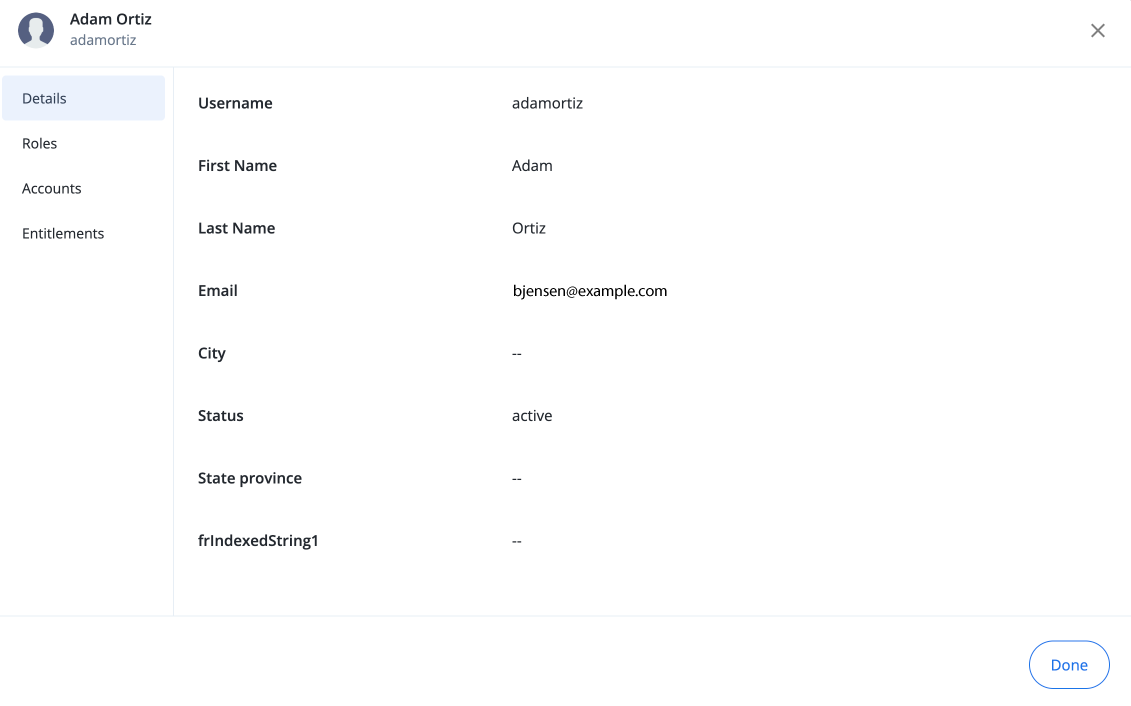
Remove the display restriction
To restore the default behavior and show all attributes, set displayProperties to an empty array or omit the key:
curl \
--request PUT \
--header "Authorization Bearer <access-token>" \
--header "Content-Type: application/json" \
--header "Accept-API-Version: resource=1.0" \
--data '{
  "user": {
    "displayProperties": []
  }
}'
"https://[.var]##<tenant-env-fqdn>##/iga/commons/config/iga_ui_config"