Hosted SP configuration
To edit hosted SP settings, go to Native Consoles > Access Management > Realms > Realm Name > Applications > Federation > Entity Providers > Provider Name.
Assertion Content
Signing and Encryption
- Request/Response Signing
-
The parts of messages the SP requires the IdP to sign digitally.
- Encryption
-
When selected, the IdP must encrypt the selected elements.
- Secret ID and Algorithms
-
- Secret ID Identifier
-
By default, Advanced Identity Cloud uses the entity provider’s role-specific, default global secret IDs. Alternatively, set an identifier for the secret ID Advanced Identity Cloud uses for this entity provider when resolving secrets. For example, when you set this to
demo, the entity provider uses the following secret IDs:-
am.applications.federation.entity.providers.saml2.demo.signing -
am.applications.federation.entity.providers.saml2.demo.encryption
-
- Signing Algorithm
-
The algorithms the provider uses to sign the request and response attributes selected in the Request/Response Signing group.
The provider’s metadata extension lists these algorithms.
This property has no default.
- Digest Algorithm
-
The digest algorithms the provider uses to sign the requests and responses selected in the Request/Response Signing group.
The provider’s metadata extension lists these algorithms.
This property has no default.
- Encryption Algorithm
-
The two types of encryption algorithms for the provider:
-
Symmetric algorithms; the provider uses these to encrypt the objects selected in the Encryption group. Select one or more AES algorithms from the drop-down list.
Default:
http://www.w3.org/2001/04/xmlenc#aes128-cbc -
Asymmetric algorithms; the provider advertises this as the transport key algorithm. When SAML 2.0 token encryption is enabled, hosted providers should use the algorithm the remote provider advertises to encrypt symmetric encryption keys.
Select one or more algorithms from the drop-down list:
-
http://www.w3.org/2001/04/xmlenc#rsa-oaep-mgf1p(default) -
http://www.w3.org/2009/xmlenc11#rsa-oaepFor this algorithm, Advanced Identity Cloud uses
http://www.w3.org/2009/xmlenc11#mgf1sha256to create the transport key. -
http://www.w3.org/2001/04/xmlenc#rsa-1_5For security reasons, don’t use this option.
-
-
NameID Format
- NameID Format List
-
Supported NameIDs for users shared between providers for SSO.
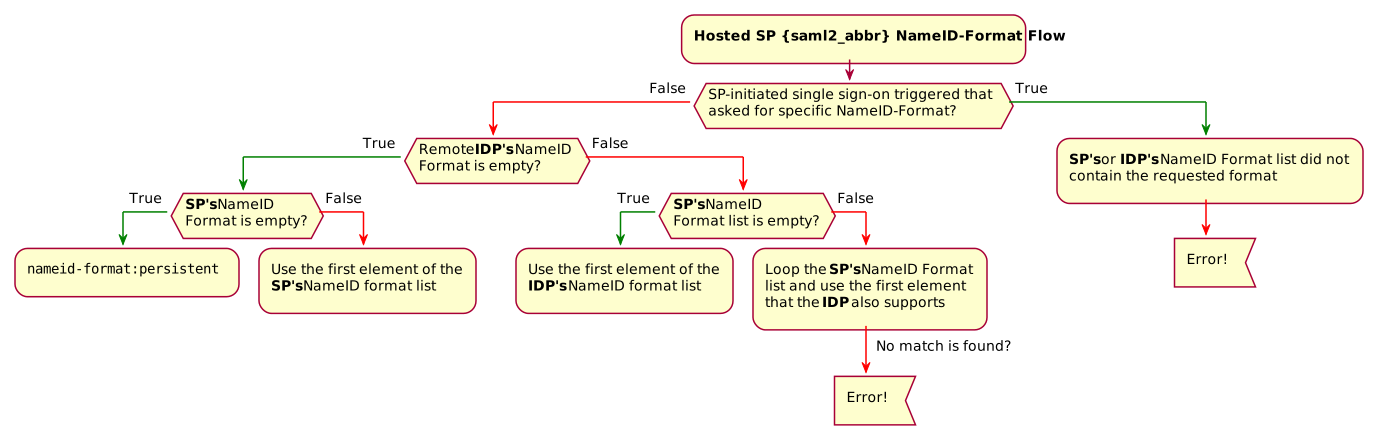
The following diagram shows how the hosted SP determines which NameID format to use:
- Disable NameID Persistence
-
By default, Advanced Identity Cloud stores NameIDs the IdP issues when the NameID format is persistent (
urn:oasis:names:tc:SAML:2.0:nameid-format:persistent) and the account manager matched a local user to the assertion. When you set this, Advanced Identity Cloud no longer stores persistent NameIDs.When you enable this setting, end users must authenticate locally for each SAML login.
Authentication Context
- Mapper
-
A class that implements the
SPAuthnContextMapperinterface and maps the incoming request parameters to an authentication context.Don’t edit this field.
Default:
com.sun.identity.saml2.plugins.DefaultSPAuthnContextMapper - Authentication Context
-
The authentication context maps the URI references to the IdP’s supported authentication context classes to authentication levels set on the SP side.
- Context Reference
-
Select from the following options to define a context reference:
-
Predefined Reference to choose from a list of supported context references.
-
Custom Reference to type your own reference to an authentication context.
-
- Level
-
The order of precedence of the context reference classes as a numeric value.
Classes with higher numbers are considered stronger than lower numbered classes. The values determine which authentication classes can be used when the SP makes an authentication request that uses a comparison attribute; for example,
minimumorbetter.
Learn about authentication context classes in Authentication Context for the OASIS Security Assertion Markup Language (SAML) V2.0 in the SAML V2.0 Standard.
Default value:
urn:oasis:names:tc:SAML:2.0:ac:classes:PasswordProtectedTransport - Comparison Type
-
Used in conjunction with the default authentication context to specify the possible range of authentication mechanisms the IdP can choose from.
For example, if the Comparison Type field is set to
better, and thePasswordProtectedTransportauthentication context class is selected in the Default Authentication Context field, the IdP must select an authentication mechanism with a higher level assigned.Default:
exact - Include Request Authentication Context
-
When enabled, include the authentication context class as the requested authentication context in the SAML 2.0 authentication request.
Default: Enabled
Assertion Processing
Attribute Mapper
Extension point to map the SP attributes included in the SAML assertion.
- Attribute Mapper
-
The Java class for the default implementation, which sets attributes in the user profile or properties in the session.
Don’t edit this field.
Default:
com.sun.identity.saml2.plugins.DefaultSPAttributeMapper - Attribute Map
-
Maps SAML attributes to user profile attributes or session properties.
The Key is a SAML attribute from the assertion. The Value is the profile attribute or session property.
By default, the SP maps SAML attributes to session properties with the same names. When the SP creates a profile during auto-federation, the SP maps SAML attributes to the new user profile.
The special mapping
Key: *, Value: *maps each attribute in the assertion to a session property or profile attribute with the same name. For example, if the SP receivesmailandgivenNamein the assertion, it maps them tomailandgivenName.Remove the special mapping and add key pairs to the map if:
-
(Auto-federation) The attributes in the IdP’s and the SP’s identity stores do not match.
-
You need control over the names of the session properties.
-
You need control over the attributes to map because the IdP adds too many to the assertion.
-
Auto Federation
- Enabled
-
When enabled, automatically federate the user’s accounts at different providers based on the specified SAML attribute.
- Attribute
-
The SAML attribute to match accounts at different providers.
Account Mapper
- Account Mapper
-
The Java class for the default implementation to map remote users to local user profiles.
- Account Mapper Script
-
A script to map remote users to local user profiles.
- Use Name ID as User ID
-
When selected, fall back to the NameID from the assertion to find the user.
- Transient User
-
When set, map all transient users from the IdP to this profile.
URL
- Local Authentication URL
-
If set, overrides the default redirect URL to use after validating the SAML 2.0 assertion from the IdP.
Use this setting, for example, if you have created a custom UI for federation.
In integrated mode, Advanced Identity Cloud appends query string parameters to this URL. The parameters contain details to let Advanced Identity Cloud continue the authentication journey.
In standalone mode, Advanced Identity Cloud redirects users to the specified URL and appends a
gotoparameter, identifying the next redirect URL for the user.To make sure a valid tree is configured, use Redirect Tree instead. However, if configured, the value for
Local Authentication URLoverridesRedirect Tree Name. - Intermediate URL
-
A URL to redirect the user to after authentication but before the original URL requested.
- External Application Logout URL
-
The URL to send an HTTP POST with all cookies when receiving a logout request. Add a user session property by including it as a query string parameter named
appsessionproperty.
Redirect Tree
- Redirect Tree Name
-
If specified, Advanced Identity Cloud redirects to this journey after validating the SAML2 assertion from the IdP.
For IdP-initiated SSO, you must set either
Redirect Tree NameorLocal Authentication URL, otherwise the SP fails to process the assertion and returns an invalid request error.If you provide a value for both settings, Advanced Identity Cloud prioritizes
Local Authentication URL.You can’t delete a journey if it’s set as the value for
Redirect Tree Name.Find information about setting a redirect journey in Redirect to a journey on the hosted SP.
- Default Relay State URL
-
The URL to redirect users to after completing the request. Advanced Identity Cloud uses this if the response does not specify the
RelayState.
Services
- MetaAlias
-
Read-only alias to locate the provider’s entity identifier, specified as
/realm-name/provider-name; for example:/alpha/mySP.
SP Service Attributes
- Single Logout Service
-
The endpoints to manage SLO depending on the SAML binding.
- Manage NameID Service
-
The endpoints to manage NameIDs depending on the SAML binding.
- Assertion Consumer Service
-
The endpoints to consume assertions, where the order corresponds to the index of the URL in the standard metadata.
The scheme, FQDN, and port configured must exactly match the SPs settings in its metadata.
If the base URL service is configured, Advanced Identity Cloud uses it to determine the SP’s endpoint URL.
If the URL doesn’t match, the SAML 2.0 flow fails and Advanced Identity Cloud logs an
Invalid Assertion Consumer Location specifiedmessage.Set the HTTP-Artifact and HTTP-POST service locations to
AuthConsumerfor integrated mode.
Advanced
SAE Configuration
- SP URL
-
The endpoint to manage SAE requests.
- SP Logout URL
-
The SP endpoint to process global logout requests.
- Application Security Configuration
-
Encryption settings for SAE.
ECP Configuration
- Request IDP List Finder Implementation
-
A Java class to return a list of preferred IdPs trusted for the SAML ECP profile.
Default:
com.sun.identity.saml2.plugins.ECPIDPFinder - Request IDP List Get Complete
-
A URI reference to retrieve the complete list of IdPs if the
IDPListelement is not complete. - Request IDP List
-
A list of IdPs for the ECP client or proxy to contact. The default finder implementation uses this.
IDP Proxy
- IDP Proxy
-
When enabled, Advanced Identity Cloud adds a
Scopingelement to the authentication request for proxying. - Introduction
-
When enabled, use introductions to find the proxy IDP.
- Proxy Count
-
The maximum number of proxy identity providers.
- IDP Proxy List
-
A list of URIs for preferred proxy IDPs.
Session Synchronization
- Enabled
-
When enabled, the SP sends backchannel SOAP logout requests to all IDPs when an authenticated session times out. An authenticated session can time out after the maximum idle time or maximum session time, for example.
Relay State URL List
- Relay State URL List
-
List of accepted
RelayStateURLs.Advanced Identity Cloud validates the
RelayStateredirection URLs against this list during SLO. Advanced Identity Cloud only allows redirection toRelayStateURLs in this list or matching the tenant domain; otherwise, a browser error occurs.Use the pattern matching rules in Success and failure redirection URLs to specify URLs.