Hosted IdP configuration
To edit hosted IdP settings, go to Native Consoles > Access Management > Realms > Realm Name > Applications > Federation > Entity Providers > Provider Name.
Assertion Content
Signing and Encryption
- Request/Response Signing
-
The parts of messages the IdP requires the SP to sign digitally.
- Encryption
-
When NameID Encryption is selected, the SP must encrypt name identifier (NameID) elements.
- Secret ID and Algorithms
-
- Secret ID Identifier
-
By default, Advanced Identity Cloud uses the entity provider’s role-specific, default global secret IDs. Alternatively, set an identifier for the secret ID Advanced Identity Cloud uses for this entity provider when resolving secrets. For example, when you set this to
demo, the entity provider uses the following secret IDs:-
am.applications.federation.entity.providers.saml2.demo.signing -
am.applications.federation.entity.providers.saml2.demo.encryption
-
- Signing Algorithm
-
The algorithms the provider uses to sign the request and response attributes selected in the Request/Response Signing group.
The provider’s metadata extension lists these algorithms.
This property has no default.
- Digest Algorithm
-
The digest algorithms the provider uses to sign the requests and responses selected in the Request/Response Signing group.
The provider’s metadata extension lists these algorithms.
This property has no default.
- Encryption Algorithm
-
There are two types of encryption algorithms for the provider:
-
Symmetric algorithms; the provider uses these to encrypt the objects selected in the Encryption group. Select one or more AES algorithms from the drop-down list.
Default:
http://www.w3.org/2001/04/xmlenc#aes128-cbc -
Asymmetric algorithms; the provider advertises this as the transport key algorithm. When SAML 2.0 token encryption is enabled, hosted providers should use the algorithm the remote provider advertises to encrypt symmetric encryption keys.
Select one or more algorithms from the drop-down list:
-
http://www.w3.org/2001/04/xmlenc#rsa-oaep-mgf1p(default) -
http://www.w3.org/2009/xmlenc11#rsa-oaepFor this algorithm, Advanced Identity Cloud uses
http://www.w3.org/2009/xmlenc11#mgf1sha256to create the transport key. -
http://www.w3.org/2001/04/xmlenc#rsa-1_5For security reasons, do not use this option.
-
-
NameID Format
- NameID Format List
-
Supported NameIDs for users shared between providers for single sign-on (SSO).
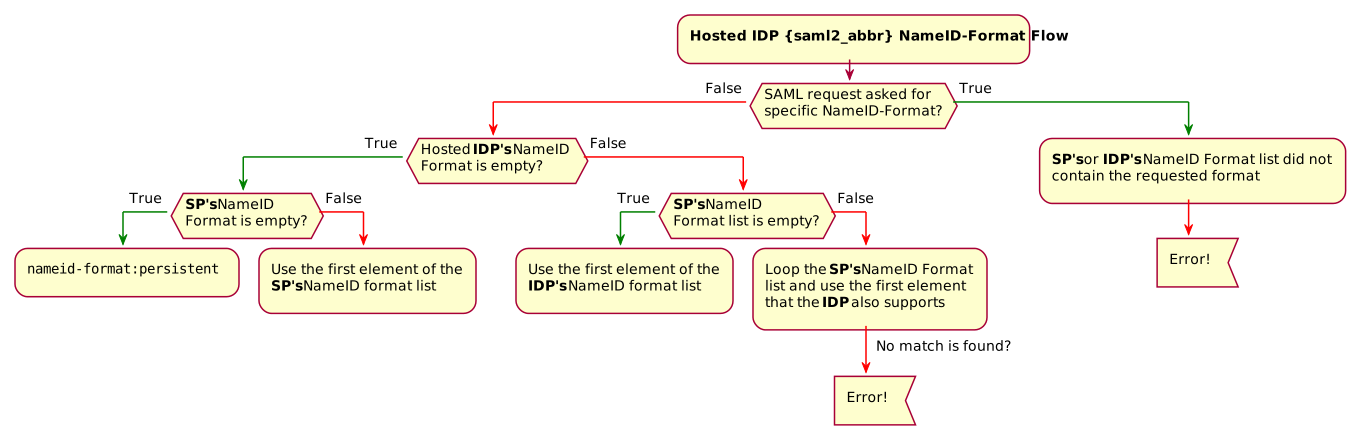
The following diagram shows how the hosted IdP determines which NameID format to use:
- NameID Value Map
-
Maps a NameID format (Key) to a user profile attribute (Value). The
persistentandtransientNameID formats don’t have to be mapped.The mapped user profile attribute must be one of the attributes listed in User identity attributes and properties reference. Make sure you use the AM attribute name.
NameID mapping supports Base64-encoded binary values. Select the Binary option to Base64-encode the attribute’s value before it’s added to the assertion.
Authentication Context
- Mapper
-
A class that implements the
IDPAuthnContextMapperinterface and sets up the authentication context.Don’t edit this field.
Default:
com.sun.identity.saml2.plugins.DefaultIDPAuthnContextMapper - Authentication Context
-
The supported authentication context classes and any authentication mechanisms Advanced Identity Cloud uses when an SP specifies the class in a SAML 2.0 authentication request. For details, refer to Authentication Context for the OASIS Security Assertion Markup Language (SAML) v2.0.
Default:
urn:oasis:names:tc:SAML:2.0:ac:classes:PasswordProtectedTransport- Context Reference
-
Select from the following options to define a context reference:
-
Predefined Reference to choose from a list of supported context references.
-
Custom Reference to type your own reference to an authentication context.
-
- Key
-
Select an authentication mechanism from the list for Advanced Identity Cloud to use when the SP specifies an authentication context class in a SAML 2.0 request.
Authentication mechanisms
- Service
-
Set the Value to the authentication journey to use.
- Module
-
Not supported.
- User
-
Not supported.
- Role
-
Not supported.
- Authentication Level
-
Advanced Identity Cloud uses a method where the authentication level is greater than or equal to the Value. Match the Value field with the Level field to avoid requiring users to re-authenticate unnecessarily.
If more than one suitable method exists, Advanced Identity Cloud presents the available options with a
ChoiceCallback.
- Value
-
Depends on the Key. For example, if you selected
Service, enter the name of the journey. - Level
-
The order of precedence for supported context reference classes as a numeric value.
Higher numbers are stronger than lower numbers.
Assertion Time
- Not-Before Time Skew
-
Grace period in seconds for the
NotBeforetime in assertions. - Effective Time
-
Assertion validity in seconds.
Assertion Processing
Attribute Mapper
Extension point to map the IdP attributes included in the SAML assertion.
- Attribute Mapper
-
The Java class for the default implementation, which retrieves attributes from the user profile. If the attributes are not present in the profile, retrieve attributes from the user session.
Do not edit this field. It is not used if Attribute Mapper Script is set.
Default:
com.sun.identity.saml2.plugins.DefaultIDPAttributeMapper - Attribute Mapper Script
-
A JavaScript implementation of an attribute mapper.
Select a
Saml2 IDP Attribute Mapperscript from this realm.For an example, refer to saml2-idp-attribute-mapper.js.
- Attribute Map
-
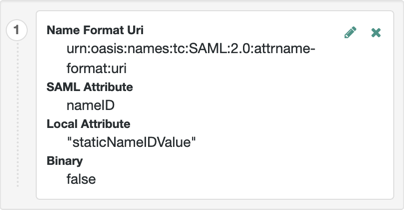
Maps SAML attributes to user profile attributes or session properties.
The default implementation also supports static values. Enclose the profile attribute name in double quotes (
"):
Account Mapper
- Account Mapper
-
The Java class for the default implementation to map remote users to local user profiles.
- Disable NameID Persistence
-
By default, Advanced Identity Cloud stores NameIDs the IDP issues when the NameID format is persistent (
urn:oasis:names:tc:SAML:2.0:nameid-format:persistent). When you set this, Advanced Identity Cloud no longer stores persistent NameIDs.Only enable this setting after configuring a NameID Value Mapping for persistent NameIDs; otherwise, the
ManageNameIDand theNameIDMappingSAML profiles no longer work with persistent NameIDs.Advanced Identity Cloud does not remove existing, stored account links when you enable this setting.
Local Configuration
- Auth URL
-
If set, overrides the default UI login URL to authenticate users during federation.
Use this setting, for example, if you have created a custom UI for federation.
The application exposing the URL must authenticate federated users, establish their sessions, and return SSO tokens in the tenant session cookies.
Advanced Identity Cloud must accept the cookie for the domain of the URL. If Advanced Identity Cloud uses host cookies, the FQDN of the URL must match your tenant’s FQDN.
Advanced Identity Cloud redirects users to the URL, appending a
gotoparameter. The parameter contains the URL to redirect to after authentication. The application must not override thegotoparameter, as changing it causes federation to fail. For details, refer to Success and failure redirection URLs.
- Reverse Proxy URL
-
The URL of the reverse proxy for SAML endpoints if one exists.
- External Application Logout URL
-
The URL to send an HTTP POST with all cookies when receiving a logout request. Add a user session property by including it as a query string parameter named
appsessionproperty.
Services
- MetaAlias
-
Read-only alias to locate the provider’s entity identifier, specified as
/realm-name/provider-name, for example:/alpha/myIDP.
IDP Service Attributes
- Artifact Resolution Service
-
The endpoint to manage artifact resolution.
- Single Logout Service
-
The endpoints to manage single logout (SLO) depending on the SAML binding.
- Manage NameID Service
-
The endpoints to manage NameIDs depending on the SAML binding.
- Single SignOn Service
-
The endpoints to manage SSO.
These endpoints are used only for SP-initiated flows but are included as a requirement of the SAML V 2.0 Metadata specification.
- NameID Mapping
-
The endpoint to manage NameID mapping.
- Assertion ID Request Service
-
The endpoints to request a specific assertion by assertion ID.
Advanced
SAE Configuration
- IDP URL
-
The endpoint to manage Secure Attribute Exchange (SAE) requests.
- Application Security Configuration
-
Encryption settings for SAE.
ECP Configuration
- IDP Session Mapper
-
A Java class to find a valid session in an HTTP servlet request to an IdP with a SAML Enhanced Client or Proxy (ECP) profile.
Do not edit this field.
Session Synchronization
- Enabled
-
When enabled, the IdP sends backchannel SOAP logout requests to all SPs when an authenticated session times out. An authenticated session can time out after the maximum idle time or maximum session time, for example.
IDP Finder Implementation
- IDP Finder Implementation Class
-
A Java class to find the preferred IdP for a proxied authentication request.
- IDP Finder JSP
-
A JSP to present the list of IdPs to the user.
- Enable Proxy IDP Finder For All SPs
-
When enabled, Advanced Identity Cloud applies the finder for all remote SPs.
Relay State URL List
- Relay State URL List
-
List of accepted
RelayStateURLs.Advanced Identity Cloud validates the
RelayStateredirection URLs against this list during SLO. Advanced Identity Cloud only allows redirection toRelayStateURLs in this list or matching the tenant domain; otherwise, a browser error occurs.This setting does not apply to IdP-initiated SSO as the SP validates the
RelayStateURL.Use the pattern matching rules in Success and failure redirection URLs to specify URLs.
IDP Adapter
- IDP Adapter Class
-
A Java class Advanced Identity Cloud invokes immediately before sending a SAML 2.0 response.
- IDP Adapter Script
-
A JavaScript implementation of an IdP adapter.
Select a
Saml2 IDP Adapterscript from this realm.Find an example script in SAML2 IDP Adapter Script (Next Gen).
Application Context
- Enable Application Context
-
When enabled, this setting makes the application context available in all SAML 2.0 flows through the
samlApplicationbinding in Scripted Decision node scripts.You can override this value by setting
Application Context Enabledin the remote SP configuration.
Authentication Request Storage
- Authentication Request Storage
-
The storage mechanism Advanced Identity Cloud uses to store the SAML 2.0 authentication request from the SP.
Select one of the following options:
- Browser-Based Storage
-
(Default) Authentication requests are stored in the browser’s local storage. Because local storage is shared across all tabs in a browser, only one SAML 2.0 SSO flow can run at a time.
Concurrent SSO attempts from multiple tabs can cause session data conflicts.
- CTS Storage
-
Authentication requests are stored in the Core Token Service (CTS) on the server side.
Each browser tab maintains an independent flow, so multiple concurrent SAML 2.0 SSO attempts can succeed without disrupting each other.
If you’ve configured a Reverse Proxy URL on the hosted IdP, add the proxy URL to the Validation service when the CTS storage option is selected.