Client ID metadata document (CIMD)
The client ID metadata document (CIMD) feature lets you configure OAuth 2.0 clients to identify themselves using an HTTPS URL as their client_id.
Advanced Identity Cloud fetches the JSON metadata document at that URL and uses it to configure the client at runtime, with no prior registration required.
CIMD is particularly suited to large numbers of clients such as AI agents in Model Context Protocol (MCP) flows, where preregistering every short-lived or externally-hosted client is impractical.
Advanced Identity Cloud’s support for CIMD aligns with the IETF OAuth Client ID Metadata Document draft specification.
How it works
When Advanced Identity Cloud receives an OAuth 2.0 request with a client_id that begins with https://,
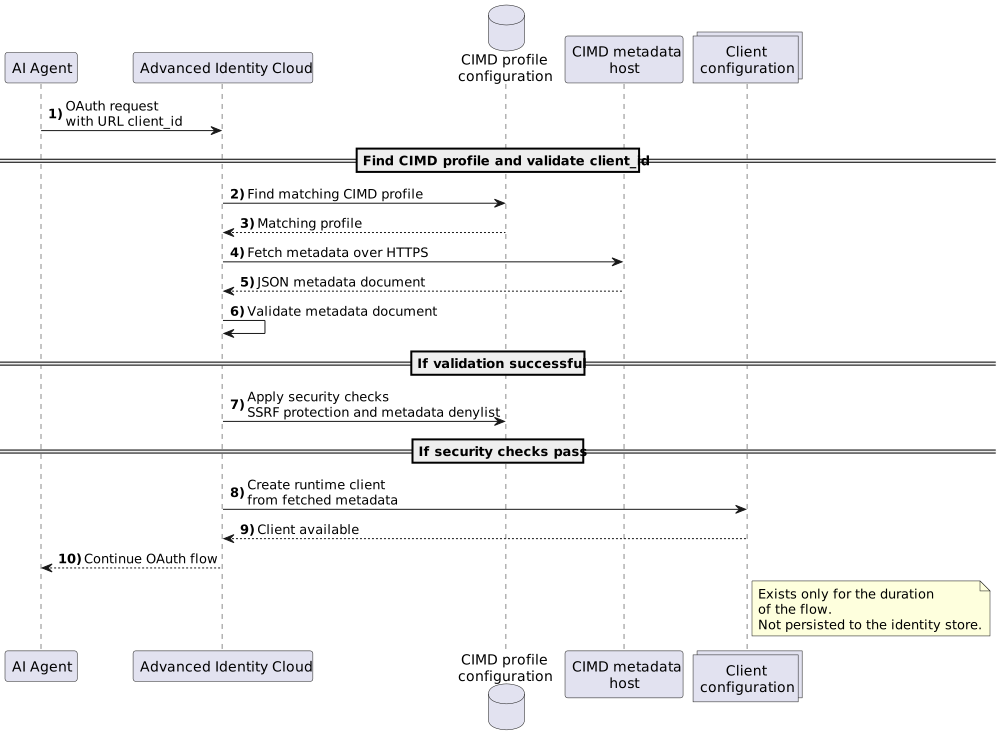
it treats the value as a URL pointing to a CIMD document and performs the following steps:
-
Advanced Identity Cloud receives a request with a URL-valued
client_id. -
Advanced Identity Cloud checks the realm for a CIMD profile whose URL pattern matches the
client_id.If no matching profile exists, or if more than one profile matches, Advanced Identity Cloud rejects the request with an
invalid_clienterror. -
A matching CIMD profile defines the security settings that Advanced Identity Cloud applies to the request.
-
Advanced Identity Cloud fetches the JSON document at the
client_idURL over HTTPS.Redirects aren’t followed. Only an HTTP 200 response is accepted.
-
Advanced Identity Cloud receives the metadata document and …
-
… validates that the document’s own
client_idfield exactly matches the URL it was fetched from.If validation fails, the request is rejected with an
invalid_clienterror. -
Advanced Identity Cloud applies the security checks defined in the matching CIMD profile, including server-side request forgery (SSRF) protection and metadata denylist.
-
If the security checks are successful, Advanced Identity Cloud uses the fetched metadata as the client’s runtime configuration for the flow.
-
The resulting client exists only for the duration of the flow and isn’t persisted to the identity store.
-
The OAuth 2.0 flow continues.
Document format
The metadata document follows the RFC 7591 OAuth 2.0 Dynamic Client Registration Protocol client metadata format.
Example document:
{
  "client_id": "https://app.example.com/oauth/client.json",
  "client_name": "Example MCP Client",
  "client_uri": "https://app.example.com",
  "redirect_uris": [
    "https://app.example.com/callback"
  ],
  "grant_types": ["authorization_code", "refresh_token"],
  "response_types": ["code"],
  "token_endpoint_auth_method": "none",
  "scope": "read write"
}
When Advanced Identity Cloud processes a CIMD metadata document, it applies the following constraints:
-
The
client_idmust be an HTTPS URL that exactly matches the URL where the document is hosted. -
The following secret-based authentication fields are rejected:
-
client_secret -
client_secret_expires_at -
token_endpoint_auth_methodsecret values (client_secret_basic,client_secret_post,client_secret_jwt)
-
-
The document must not exceed 5 KB.
-
The following fields support localization using locale tags, for example
client_name#enorclient_name#fr:-
client_name -
client_uri -
logo_uri -
policy_uri -
tos_uri
-
Learn more about metadata document constraints in the Limitations section.
The matching CIMD profile and the metadata document both contribute to the client’s runtime configuration. For each metadata field, Advanced Identity Cloud resolves the value in the following order:
-
If the field is in the profile’s metadata override denylist, the profile’s value is used.
-
Otherwise, if the document specifies the field, the document’s value overrides the profile’s value.
-
If neither the document nor the profile specifies a value, Advanced Identity Cloud applies the following defaults:
| Field | Default |
|---|---|
|
The realm’s default scopes. |
|
|
|
|
|
|
Redirect URIs aren’t required to share the same origin as the client_id URL. You can add redirect_uri to the override denylist to enforce that the requested redirect URI must be configured in the CIMD profile.
|
Grant types
The following grant types are available to CIMD clients:
-
authorization_code -
client_credentials -
refresh_token -
urn:ietf:params:oauth:grant-type:device_code -
urn:ietf:params:oauth:grant-type:jwt-bearer -
urn:ietf:params:oauth:grant-type:token-exchange
A client’s declared grant_types are filtered to the intersection of this list and the grant types enabled in the realm’s OAuth 2.0 provider.
If a client declares grant types but none survive the filtering, Advanced Identity Cloud rejects the request. This prevents a client from accidentally proceeding with a misconfigured or entirely unsupported set of grant types.
Authentication methods
The following token endpoint authentication methods are available to CIMD clients:
-
none -
private_key_jwt -
tls_client_auth -
self_signed_tls_client_auth
|
You can’t set the client type. Advanced Identity Cloud derives it from the authentication method in the metadata document:
CIMD clients are public by design but can authenticate confidentially using |
Limitations
The following features aren’t supported for CIMD clients:
-
UMA (User-Managed Access)
-
CIBA (Client-Initiated Backchannel Authentication)
-
Backchannel logout. Advanced Identity Cloud ignores
backchannel_logout_uriandbackchannel_logout_session_requiredin the metadata document. -
Wildcard ports in CIMD profile URL patterns, for example
https://app.example.com:*/ -
Client secrets and symmetric authentication methods
-
Setting the client type (public or confidential). This is derived from the authentication method in the metadata document.
-
Authorization response signing and encryption
The CIMD profile doesn’t expose the following OAuth 2.0 client properties, and CIMD documents can’t set them:
-
JavaScript origins
-
Access token endpoint override
-
Software identity and version (
software_idandsoftware_version) -
Group
-
Secret label identifier
Additionally, CIMD has the following constraints:
-
If the matching profile requires pushed authorization requests, CIMD clients must use a pushed authorization request (PAR).
A direct authorization request without PAR is rejected.
-
Advanced Identity Cloud doesn’t advertise support for CIMD in its authorization server metadata yet, so clients can’t tell whether a realm supports CIMD until they try a CIMD flow.
Configure a CIMD profile
CIMD is controlled by CIMD profiles.
Each profile defines a URL pattern that Advanced Identity Cloud matches against incoming client_id values,
along with security settings for that pattern.
You configure CIMD profiles per realm in the Advanced Identity Cloud admin console.
|
You use CIMD profiles to allow or deny specific origins. If no CIMD profile matches the |
-
Under Native Consoles > Access Management, go to Realms > realm name > Applications > OAuth 2.0 > CIMD Profiles.
-
Click Add CIMD Profile.
-
Enter a unique CIMD profile name that adheres to the following rules:
-
Must not start with the
#or"characters. -
Must not start or end with the space character.
-
Must not contain any of the following characters:
\/+;,%[]|?. -
Must not be
.or...
-
-
Enter a valid CIMD Client ID URL Pattern that starts with
https://. Advanced Identity Cloud matches the URL pattern against incomingclient_idvalues. For example,https://app.example.com/*allows all CIMD clients hosted under that origin. -
Click Create.
-
Configure additional profile properties as required and save your changes.
Property Description CIMD Client ID URL Patterns
Required. One or more HTTPS URLs that the
client_idvalue must match.Only
https://patterns are accepted. Wildcard paths are accepted, for examplehttps://app.example.com/*allows all CIMD clients hosted under that origin. An explicit port is allowed, for examplehttps://app.example.com:8443/*, but wildcard ports aren’t.CIMD Metadata Override Deny List
Optional. A list of metadata field names that always use the profile value. Advanced Identity Cloud ignores the corresponding fields in CIMD documents matched by this profile. For example, select
scopefrom the list to ensure the client can’t override the scope in the profile with a different value in its metadata document.Use this to prevent clients from asserting sensitive metadata values that your realm policy doesn’t permit.
CIMD SSRF Protection Enabled
When
true, Advanced Identity Cloud blocksclient_idURLs that resolve to special-use or loopback IP addresses, to prevent SSRF attacks.Only set to
falsein controlled test environments where the CIMD server runs on loopback.Default:
true
Example authorization code flow
-
Configure a CIMD profile that allows the client to use its metadata document URL as the
client_id.For test purposes, use the following values in the example metadata document to create the profile:
- CIMD Client ID URL Pattern
-
https://app.example.com/oauth/client.json - CIMD Metadata Override Deny List
-
scope - CIMD SSRF Protection Enabled
-
false
-
Save the profile.
-
On the Core tab in the client profile, set Scope(s) to
openidand save your changes. -
Get an authorization code in a browser using the metadata document URL as the
client_id:https://<tenant-env-fqdn>/am/oauth2/realms/root/realms/alpha/authorize ?client_id=https%3A%2F%2Fapp.example.com%2Foauth%2Fclient.json &response_type=code &redirect_uri=https%3A%2F%2Fapp.example.com%2Fcallback &scope=read &state=stateThe URL is split for readability purposes. Advanced Identity Cloud fetches and validates the metadata document, then proceeds with the standard flow.
-
Exchange the authorization code for an access token using the same
client_idURL:$ curl \ --request POST \ --data "grant_type=authorization_code" \ --data "code=authorization-code" \ --data "client_id=https://app.example.com/oauth/client.json" \ --data "redirect_uri=https://app.example.com/callback" \ 'https://<tenant-env-fqdn>/am/oauth2/realms/root/realms/alpha/access_token' { "access_token": "access-token", "refresh_token": "refresh-token", "scope":"openid", "id_token":"id-token", "token_type":"Bearer", "expires_in":3599 }The
scopein the access token isopenid, which comes from the configured CIMD profile, notreadfrom the authorization request, because the profile’s metadata override denylist includesscope. Theid_tokenis also returned.