Validate user properties with custom policies
Description
Estimated time to complete: 45 minutes
Your organization might need to enforce its own rules on identity data. For example, an email address must belong to your company domain, or a phone number must match your local numbering plan.
Advanced Identity Cloud can enforce these business rules with custom validation policies. You define a policy once and attach it to a property on the user object. Then Advanced Identity Cloud validates the value when you create or update a user with the REST API. It also validates the value when a journey collects it with the Attribute Collector node.
In this use case, you:
-
Define custom validation policies.
-
Attach the policies to properties on the Alpha realm user object (
managed/alpha_user). -
(Optional) Translate the policy requirement keys into friendly messages on the hosted pages.
-
Test the policies with the REST API and a registration journey.
-
Promote the configuration to your other tenant environments.
Goals
After completing this use case, you’ll know how to:
-
Write and deploy a custom validation policy.
-
Attach a policy to a property and pass parameters to it.
-
Read a policy validation response.
-
Show friendly validation messages on the hosted pages.
Prerequisites
Before you start work on this use case, ensure you have these prerequisites:
-
Access to your Advanced Identity Cloud development environment as an administrator.
-
An access token with the
fr:idm:*scope to call the REST API. Learn more in Get an access token. -
A basic understanding of identity object properties and validation policies. Learn more in Apply policies to managed objects.
-
A basic understanding of journeys and nodes.
Access tokens expire after 15 minutes. If a request returns 401 Unauthorized, get a new access token and try again.
|
Tasks
Complete Tasks 1 - 5 in your development tenant environment. When you’re done, promote the configuration to your other tenant environments in Task 6.
Task 1: Define and deploy the custom policies
A custom policy has two parts that you write together:
-
A call to
addPolicythat registers the policy. It sets the policy ID, the name of the function to run, and the requirement keys the policy can return. -
A function that checks the value. It returns an empty array when the value is valid, or an array of failed requirements when it isn’t.
The addPolicy call accepts these fields:
| Field | Description |
|---|---|
|
The unique ID you use to attach the policy to a property. |
|
The name of the function that contains the policy logic. |
|
When |
|
The requirement keys that the function can return. You use these keys to translate validation messages. |
The function receives these arguments:
| Argument | Description |
|---|---|
|
The complete object that Advanced Identity Cloud is validating. |
|
The value of the property that Advanced Identity Cloud is validating. |
|
The parameters you set when you attach the policy to a property. |
|
The name of the property that Advanced Identity Cloud is validating. |
When the value doesn’t meet the rule, the function returns an array of objects. Each object has a policyRequirement key and params (optional) that Advanced Identity Cloud returns to the caller. Hosted page messages can use these parameters.
The following policy checks that an email address ends with a configured domain. It uses @example.com when you don’t set the domain parameter, ignores case, and skips empty values:
/*
 * Validates that an email address ends with the configured domain.
 * Defaults to @example.com when params.domain isn't supplied.
 */
addPolicy({
  policyId: "example-email-domain",
  policyExec: "exampleEmailDomain",
  validateOnlyIfPresent: true,
  policyRequirements: ["EXAMPLE_EMAIL_DOMAIN"]
});
function exampleEmailDomain(fullObject, value, params, property) {
  if (value === null || typeof value === "undefined" || String(value).length === 0) {
    return [];
  }
  var domain = (params && params.domain) ? String(params.domain) : "@example.com";
  if (domain.charAt(0) !== "@") {
    domain = "@" + domain;
  }
  domain = domain.toLowerCase();
  var normalizedValue = String(value).toLowerCase();
  if (normalizedValue.length < domain.length || normalizedValue.substring(normalizedValue.length - domain.length) !== domain) {
    return [{ policyRequirement: "EXAMPLE_EMAIL_DOMAIN" }];
  }
  return [];
}
This use case uses six policies with the same structure. The following table summarizes them:
| Policy ID | Requirement key | What it validates | Parameters |
|---|---|---|---|
|
|
The email address ends with the configured domain. |
|
|
|
An Australian phone number in local format, such as |
None |
|
|
An Australian state or territory abbreviation, such as |
None |
|
|
An Australian postcode, which is exactly four digits. |
None |
|
|
A string or array has at least the minimum length. |
|
|
|
A string or array has no more than the maximum length. |
|
Before you write a custom policy, review the built-in policies in the policy reference. The built-in regexpMatches policy validates many patterns, such as an email domain or a postcode. The built-in minimum-length and maximum-length policies measure string lengths only. The custom length policies in this use case also measure array lengths.
|
Show the scripts for the other policies
/*
 * Validates an Australian phone number.
 * Accepts local format (for example 0412345678, 0298765432) and
 * international format (+61412345678). Whitespace, hyphens and
 * parentheses are tolerated.
 * Valid area codes: 02 (NSW/ACT), 03 (VIC/TAS), 04 (mobile),
 * 07 (QLD), 08 (SA/NT/WA).
 */
addPolicy({
  policyId: "example-valid-au-phone",
  policyExec: "exampleValidAuPhone",
  validateOnlyIfPresent: true,
  policyRequirements: ["EXAMPLE_VALID_AU_PHONE"]
});
function exampleValidAuPhone(fullObject, value, params, property) {
  if (value === null || typeof value === "undefined" || String(value).length === 0) {
    return [];
  }
  var normalized = String(value).replace(/[\s()-]/g, "");
  if (/^\+61[2-478]\d{8}$/.test(normalized)) {
    return [];
  }
  if (/^0[2-478]\d{8}$/.test(normalized)) {
    return [];
  }
  return [{ policyRequirement: "EXAMPLE_VALID_AU_PHONE" }];
}

/*
 * Validates an Australian state or territory abbreviation.
 * Accepts upper or lower case. Leading and trailing whitespace
 * is tolerated.
 */
addPolicy({
  policyId: "example-valid-au-state",
  policyExec: "exampleValidAuState",
  validateOnlyIfPresent: true,
  policyRequirements: ["EXAMPLE_VALID_AU_STATE"]
});
function exampleValidAuState(fullObject, value, params, property) {
  if (value === null || typeof value === "undefined" || String(value).length === 0) {
    return [];
  }
  var allowed = ["ACT", "NSW", "NT", "QLD", "SA", "TAS", "VIC", "WA"];
  var normalized = String(value).trim().toUpperCase();
  for (var i = 0; i < allowed.length; i++) {
    if (normalized === allowed[i]) {
      return [];
    }
  }
  return [{ policyRequirement: "EXAMPLE_VALID_AU_STATE" }];
}

/*
 * Validates an Australian postcode.
 * Australian postcodes are exactly four digits. Leading and
 * trailing whitespace is tolerated.
 */
addPolicy({
  policyId: "example-valid-au-postcode",
  policyExec: "exampleValidAuPostcode",
  validateOnlyIfPresent: true,
  policyRequirements: ["EXAMPLE_VALID_AU_POSTCODE"]
});
function exampleValidAuPostcode(fullObject, value, params, property) {
  if (value === null || typeof value === "undefined" || String(value).length === 0) {
    return [];
  }
  var normalized = String(value).trim();
  if (!/^\d{4}$/.test(normalized)) {
    return [{ policyRequirement: "EXAMPLE_VALID_AU_POSTCODE" }];
  }
  return [];
}

/*
 * Validates that a string or array value meets a minimum length.
 * Requires params.min (number). Non string, non array values are
 * ignored so the policy can be attached to mixed type schemas
 * without side effects.
 */
addPolicy({
  policyId: "example-min-length",
  policyExec: "exampleMinLength",
  validateOnlyIfPresent: true,
  policyRequirements: ["EXAMPLE_MIN_LENGTH"]
});
function exampleMinLength(fullObject, value, params, property) {
  var min = (params && typeof params.min === "number") ? params.min : 0;
  if (value === null || typeof value === "undefined") {
    return [];
  }
  var length;
  if (typeof value === "string") {
    length = value.length;
  } else if (value instanceof Array) {
    length = value.length;
  } else {
    return [];
  }
  if (length < min) {
    return [{ policyRequirement: "EXAMPLE_MIN_LENGTH", params: { min: min } }];
  }
  return [];
}

/*
 * Validates that a string or array value does not exceed a maximum length.
 * Requires params.max (number). Non string, non array values are ignored.
 */
addPolicy({
  policyId: "example-max-length",
  policyExec: "exampleMaxLength",
  validateOnlyIfPresent: true,
  policyRequirements: ["EXAMPLE_MAX_LENGTH"]
});
function exampleMaxLength(fullObject, value, params, property) {
  var max = (params && typeof params.max === "number") ? params.max : 0;
  if (value === null || typeof value === "undefined") {
    return [];
  }
  var length;
  if (typeof value === "string") {
    length = value.length;
  } else if (value instanceof Array) {
    length = value.length;
  } else {
    return [];
  }
  if (length > max) {
    return [{ policyRequirement: "EXAMPLE_MAX_LENGTH", params: { max: max } }];
  }
  return [];
}
Advanced Identity Cloud doesn’t accept the readable form of a policy. Instead, each policy is a single string in the globals.additionalPolicies array of the config/policy object.
To turn a readable policy into a JSON string, put the addPolicy call and the function on one line. Escape the double quotes and backslashes so that the line is a valid JSON string, then add the string to the additionalPolicies array.
|
The following config/policy object contains all six policies:
Show the complete config/policy object
{
  "_id": "policy",
  "additionalFiles": [],
  "resources": [],
  "globals": {
    "additionalPolicies": [
      "addPolicy({\"policyId\":\"example-email-domain\",\"policyExec\":\"exampleEmailDomain\",\"validateOnlyIfPresent\":true,\"policyRequirements\":[\"EXAMPLE_EMAIL_DOMAIN\"]}); function exampleEmailDomain(fullObject, value, params, property) { var domain; var normalizedValue; if (value === null || typeof value === \"undefined\" || String(value).length === 0) { return []; } domain = (params && params.domain) ? String(params.domain) : \"@example.com\"; if (domain.charAt(0) !== \"@\") { domain = \"@\" + domain; } domain = domain.toLowerCase(); normalizedValue = String(value).toLowerCase(); if (normalizedValue.length < domain.length || normalizedValue.substring(normalizedValue.length - domain.length) !== domain) { return [{\"policyRequirement\":\"EXAMPLE_EMAIL_DOMAIN\"}]; } return []; }",
      "addPolicy({\"policyId\":\"example-valid-au-phone\",\"policyExec\":\"exampleValidAuPhone\",\"validateOnlyIfPresent\":true,\"policyRequirements\":[\"EXAMPLE_VALID_AU_PHONE\"]}); function exampleValidAuPhone(fullObject, value, params, property) { if (value === null || typeof value === \"undefined\" || String(value).length === 0) { return []; } var normalized = String(value).replace(/[\\s()-]/g, \"\"); if (/^\\+61[2-478]\\d{8}$/.test(normalized)) { return []; } if (/^0[2-478]\\d{8}$/.test(normalized)) { return []; } return [{\"policyRequirement\":\"EXAMPLE_VALID_AU_PHONE\"}]; }",
      "addPolicy({\"policyId\":\"example-valid-au-state\",\"policyExec\":\"exampleValidAuState\",\"validateOnlyIfPresent\":true,\"policyRequirements\":[\"EXAMPLE_VALID_AU_STATE\"]}); function exampleValidAuState(fullObject, value, params, property) { if (value === null || typeof value === \"undefined\" || String(value).length === 0) { return []; } var allowed = [\"ACT\", \"NSW\", \"NT\", \"QLD\", \"SA\", \"TAS\", \"VIC\", \"WA\"]; var normalized = String(value).trim().toUpperCase(); for (var i = 0; i < allowed.length; i++) { if (normalized === allowed[i]) { return []; } } return [{\"policyRequirement\":\"EXAMPLE_VALID_AU_STATE\"}]; }",
      "addPolicy({\"policyId\":\"example-valid-au-postcode\",\"policyExec\":\"exampleValidAuPostcode\",\"validateOnlyIfPresent\":true,\"policyRequirements\":[\"EXAMPLE_VALID_AU_POSTCODE\"]}); function exampleValidAuPostcode(fullObject, value, params, property) { if (value === null || typeof value === \"undefined\" || String(value).length === 0) { return []; } var normalized = String(value).trim(); if (!/^\\d{4}$/.test(normalized)) { return [{\"policyRequirement\":\"EXAMPLE_VALID_AU_POSTCODE\"}]; } return []; }",
      "addPolicy({\"policyId\":\"example-min-length\",\"policyExec\":\"exampleMinLength\",\"validateOnlyIfPresent\":true,\"policyRequirements\":[\"EXAMPLE_MIN_LENGTH\"]}); function exampleMinLength(fullObject, value, params, property) { var min = (params && typeof params.min === \"number\") ? params.min : 0; if (value === null || typeof value === \"undefined\") { return []; } var length; if (typeof value === \"string\") { length = value.length; } else if (value instanceof Array) { length = value.length; } else { return []; } if (length < min) { return [{\"policyRequirement\":\"EXAMPLE_MIN_LENGTH\",\"params\":{\"min\":min}}]; } return []; }",
      "addPolicy({\"policyId\":\"example-max-length\",\"policyExec\":\"exampleMaxLength\",\"validateOnlyIfPresent\":true,\"policyRequirements\":[\"EXAMPLE_MAX_LENGTH\"]}); function exampleMaxLength(fullObject, value, params, property) { var max = (params && typeof params.max === \"number\") ? params.max : 0; if (value === null || typeof value === \"undefined\") { return []; } var length; if (typeof value === \"string\") { length = value.length; } else if (value instanceof Array) { length = value.length; } else { return []; } if (length > max) { return [{\"policyRequirement\":\"EXAMPLE_MAX_LENGTH\",\"params\":{\"max\":max}}]; } return []; }"
    ]
  }
}
Advanced Identity Cloud replaces the config/policy object in full. If your request contains only some of your policies, Advanced Identity Cloud removes the rest. Always send the complete set of policies that you want deployed.
|
The requests in this use case use two variables. Replace <tenant-env-fqdn> with the domain of your environment, for example openam-mycompany.forgeblocks.com. Replace <access-token> with your access token.
-
Get the current
config/policyobject and save a copy of the response:Request
curl \
--header "Authorization: Bearer <access-token>" \
--header "Accept-API-Version: resource=1.0" \
--request GET \
"https://<tenant-env-fqdn>/openidm/config/policy"
Response
{ "_id": "policy", "additionalFiles": [], "resources": [] } -
Add your policy strings to the
globals.additionalPoliciesarray. If the object has noglobalsproperty, add one. Ifglobals.additionalPoliciesalready has policies, keep them. -
Replace the
config/policyobject with the complete updated object:Request
curl \
--header "Authorization: Bearer <access-token>" \
--header "Content-type: application/json" \
--header "Accept-API-Version: resource=1.0" \
--request PUT "https://<tenant-env-fqdn>/openidm/config/policy" \
--data '{
  "_id": "policy",
  "additionalFiles": [],
  "resources": [],
  "globals": {
    "additionalPolicies": [
      "addPolicy({\"policyId\":\"example-email-domain\",\"policyExec\":\"exampleEmailDomain\", ... }", (1)
      "addPolicy({\"policyId\":\"example-valid-au-phone\",\"policyExec\":\"exampleValidAuPhone\", ... }",
      "addPolicy({\"policyId\":\"example-valid-au-state\",\"policyExec\":\"exampleValidAuState\", ... }",
      "addPolicy({\"policyId\":\"example-valid-au-postcode\",\"policyExec\":\"exampleValidAuPostcode\", ... }",
      "addPolicy({\"policyId\":\"example-min-length\",\"policyExec\":\"exampleMinLength\", ... }",
      "addPolicy({\"policyId\":\"example-max-length\",\"policyExec\":\"exampleMaxLength\", ... }"
    ]
  }
}'
1 Each string is one complete policy from the object in the previous step. Send all six in full, not the truncated versions shown here. The response is the saved object. This example truncates each policy string:
Response
{
  "_id": "policy",
  "additionalFiles": [],
  "resources": [],
  "globals": {
    "additionalPolicies": [
      "addPolicy({\"policyId\":\"example-email-domain\",\"policyExec\":\"exampleEmailDomain\", ... }",
      "addPolicy({\"policyId\":\"example-valid-au-phone\",\"policyExec\":\"exampleValidAuPhone\", ... }",
      "addPolicy({\"policyId\":\"example-valid-au-state\",\"policyExec\":\"exampleValidAuState\", ... }",
      "addPolicy({\"policyId\":\"example-valid-au-postcode\",\"policyExec\":\"exampleValidAuPostcode\", ... }",
      "addPolicy({\"policyId\":\"example-min-length\",\"policyExec\":\"exampleMinLength\", ... }",
      "addPolicy({\"policyId\":\"example-max-length\",\"policyExec\":\"exampleMaxLength\", ... }"
    ]
  }
}
To confirm the change, repeat the request in step 1. The response now includes the
globals.additionalPoliciesarray.
Task 2: Attach the policies to user properties
A policy only runs when you attach it to a property on a managed object. In this task, you attach the policies to properties on the Alpha realm user object.
You can attach policies only to top-level properties. You can’t attach them to properties in an array or to nested properties.
| The Validation tab for a property in the Advanced Identity Cloud admin console lists only the built-in policies. Attach custom policies with the REST API. |
Attach the policies as follows:
| Property | Policy | Parameters |
|---|---|---|
|
|
|
|
|
|
|
|
|
|
|
None |
|
|
None |
|
|
None |
Set min and max as numbers, such as 2, not as strings, such as "2". If you use a string, the policy falls back to a limit of 0: example-min-length then never fails, and example-max-length fails for every non-empty value.
|
Advanced Identity Cloud replaces the config/managed object in full. It contains every managed object type for all realms, not only alpha_user. If your request omits any of them, Advanced Identity Cloud removes them. Always send the complete object.
|
-
Get the current
config/managedobject and save a copy of the response:Request
curl \
--header "Authorization: Bearer <access-token>" \
--header "Accept-API-Version: resource=1.0" \
--request GET \
"https://<tenant-env-fqdn>/openidm/config/managed"
The response is large because it contains every managed object type. This example shows only its structure:
Response
{ "_id": "managed", "objects": [ { "name": "alpha_user", "schema": { "properties": { ... }, ... }, ... }, ... ] } -
In the
alpha_userobject, add apoliciesarray to each property inschema.properties. Keep any policies that a property already has. For example,mailalready has thevalid-email-address-formatpolicy:"mail": { ... "policies": [ { "policyId": "valid-email-address-format" }, { "policyId": "example-email-domain", "params": { "domain": "@example.com" } } ] }, "givenName": { ... "policies": [ { "policyId": "example-min-length", "params": { "min": 2 } }, { "policyId": "example-max-length", "params": { "max": 50 } } ] }, "telephoneNumber": { ... "policies": [ { "policyId": "example-valid-au-phone" } ] }Add policies to
sn,stateProvince, andpostalCodein the same way, using the values in the table. -
Replace the
config/managedobject with the complete updated object:Request
curl \
--header "Authorization: Bearer <access-token>" \
--header "Content-type: application/json" \
--header "Accept-API-Version: resource=1.0" \
--request PUT "https://<tenant-env-fqdn>/openidm/config/managed" \
--data '{
  "_id": "managed",
  "objects": [
    ... (1)
  ]
}'
1 The complete objectsarray from step 1, including every object type, with your changes toalpha_user.The response is the saved object. This example shows only its structure:
Response
{
  "_id": "managed",
  "objects": [
    ...
  ]
}
Task 3: (Optional) Translate the policy requirement keys
When a policy fails, Advanced Identity Cloud returns the requirement key, such as EXAMPLE_EMAIL_DOMAIN. If you do nothing, a journey page shows the key as text, such as common.policyValidationMessages.EXAMPLE_EMAIL_DOMAIN:
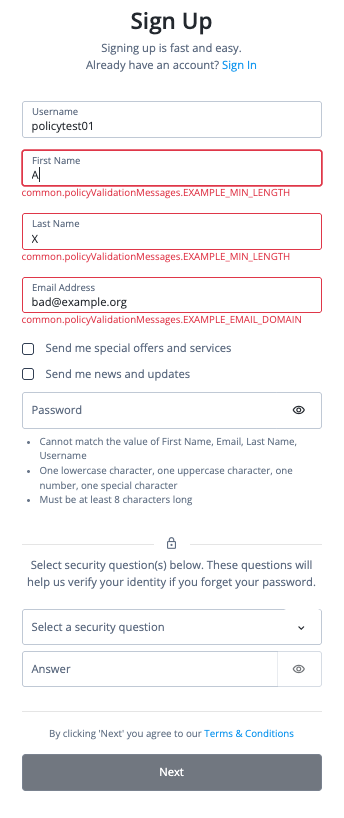
If you build your own interface, the raw keys are often what you want, because your interface can translate them. For the hosted pages, map each key to a friendly message in the language set.
Add these messages to the English language set:
| Requirement key | Message |
|---|---|
|
|
|
|
|
|
|
|
|
|
|
|
Keep these points in mind:
-
Advanced Identity Cloud replaces
{min}and{max}with the values in theparamsobject that the policy function returns. This is why the policies returnparamsinstead of writing the number into the message. -
Write a literal
@as{'@'}. Without the escape, the hosted page can fail to render the message.-
Confirm whether your tenant has a custom English language set. You don’t need an access token to view a language set:
Request
curl \
--request GET \
"https://<tenant-env-fqdn>/openidm/config/uilocale/en"
A
404response means that your tenant has no custom English language set. In that case, go to step 2. If the response contains a language set, go to step 3.Response
{ "code": 404, "reason": "Not Found", "message": "Not Found" } -
Create the English language set with the messages:
Request
curl \
--header "Authorization: Bearer <access-token>" \
--header "Content-type: application/json" \
--request PUT "https://<tenant-env-fqdn>/openidm/config/uilocale/en" \
--data '{
  "login": {
    "common": {
      "policyValidationMessages": {
        "EXAMPLE_EMAIL_DOMAIN": "Use an email address that ends in {'\''@'\''}example.com.",
        "EXAMPLE_MIN_LENGTH": "Enter at least {min} characters.",
        "EXAMPLE_MAX_LENGTH": "Enter no more than {max} characters.",
        "EXAMPLE_VALID_AU_PHONE": "Enter a valid Australian phone number.",
        "EXAMPLE_VALID_AU_STATE": "Use a valid Australian state or territory abbreviation, for example NSW or VIC.",
        "EXAMPLE_VALID_AU_POSTCODE": "Enter a valid 4-digit Australian postcode."
      }
    }
  }
}'
Advanced Identity Cloud creates the language set and returns a
201status with the saved language set:Response
{
  "_id": "uilocale/en",
  "login": {
    "common": {
      "policyValidationMessages": {
        "EXAMPLE_EMAIL_DOMAIN": "Use an email address that ends in {'@'}example.com.",
        "EXAMPLE_MIN_LENGTH": "Enter at least {min} characters.",
        "EXAMPLE_MAX_LENGTH": "Enter no more than {max} characters.",
        "EXAMPLE_VALID_AU_PHONE": "Enter a valid Australian phone number.",
        "EXAMPLE_VALID_AU_STATE": "Use a valid Australian state or territory abbreviation, for example NSW or VIC.",
        "EXAMPLE_VALID_AU_POSTCODE": "Enter a valid 4-digit Australian postcode."
      }
    }
  }
}
To confirm the change, repeat the request in step 1. The response now contains the language set.
-
If your tenant already has a custom English language set, don’t use a PUT request, because it replaces the entire language set. Instead, add each message with a PATCH request. The
fieldvalue is the path to the message, with slashes between levels. This example adds one message. Repeat it for the other five requirement keys. Learn more in Create or replace individual language set keys.Request
curl \
--header "Authorization: Bearer <access-token>" \
--header "Content-type: application/json" \
--request PATCH "https://<tenant-env-fqdn>/openidm/config/uilocale/en" \
--data '[
  {
    "operation": "add",
    "field": "login/common/policyValidationMessages/EXAMPLE_MAX_LENGTH",
    "value": "Enter no more than {max} characters."
  }
]'
Advanced Identity Cloud returns a
200status with the updated language set:Response
{
  "_id": "uilocale/en",
  "login": {
    "common": {
      "policyValidationMessages": {
        "EXAMPLE_EMAIL_DOMAIN": "Use an email address that ends in {'@'}example.com.",
        "EXAMPLE_MIN_LENGTH": "Enter at least {min} characters.",
        "EXAMPLE_MAX_LENGTH": "Enter no more than {max} characters.",
        "EXAMPLE_VALID_AU_PHONE": "Enter a valid Australian phone number.",
        "EXAMPLE_VALID_AU_STATE": "Use a valid Australian state or territory abbreviation, for example NSW or VIC.",
        "EXAMPLE_VALID_AU_POSTCODE": "Enter a valid 4-digit Australian postcode."
      }
    }
  }
}
-
Task 4: Test the policies with the REST API
Create a user with values that break the policies from Task 2, and confirm that Advanced Identity Cloud rejects the request:
Request
curl \
--header "Authorization: Bearer <access-token>" \
--header "Content-type: application/json" \
--header "Accept-API-Version: resource=1.0" \
--request POST "https://<tenant-env-fqdn>/openidm/managed/alpha_user?_action=create" \
--data '{
  "userName": "policy-test-user",
  "givenName": "A",
  "sn": "X",
  "mail": "bad@example.org",
  "telephoneNumber": "123",
  "stateProvince": "ZZ",
  "postalCode": "ABC"
}'
Advanced Identity Cloud rejects the request with a 403 status:
Response
{
  "code": 403,
  "reason": "Forbidden",
  "message": "Policy validation failed",
  "detail": {
    "result": false,
    "failedPolicyRequirements": [
      {
        "policyRequirements": [
          {
            "params": {
              "min": 2
            },
            "policyRequirement": "EXAMPLE_MIN_LENGTH"
          }
        ],
        "property": "givenName"
      },
      {
        "policyRequirements": [
          {
            "policyRequirement": "EXAMPLE_EMAIL_DOMAIN"
          }
        ],
        "property": "mail"
      },
      {
        "policyRequirements": [
          {
            "policyRequirement": "EXAMPLE_VALID_AU_POSTCODE"
          }
        ],
        "property": "postalCode"
      },
      {
        "policyRequirements": [
          {
            "params": {
              "min": 2
            },
            "policyRequirement": "EXAMPLE_MIN_LENGTH"
          }
        ],
        "property": "sn"
      },
      {
        "policyRequirements": [
          {
            "policyRequirement": "EXAMPLE_VALID_AU_STATE"
          }
        ],
        "property": "stateProvince"
      },
      {
        "policyRequirements": [
          {
            "policyRequirement": "EXAMPLE_VALID_AU_PHONE"
          }
        ],
        "property": "telephoneNumber"
      }
    ]
  }
}
The response lists every property that failed in detail.failedPolicyRequirements:
| Field | Description |
|---|---|
|
An array in the |
|
The name of the property that failed. |
|
The requirements that the property failed. |
|
The requirement key that the policy returned. Your client can match on this key. |
|
The parameters that the policy returned, if any. |
Advanced Identity Cloud returns the same response format for built-in policy failures. A client that already handles policy errors handles custom policy errors the same way.
Task 5: Test the policies in a registration journey
The Attribute Collector node can validate the values it collects against the policies on each property. The journey doesn’t repeat any rules. It asks Advanced Identity Cloud to validate against the policies that you attached in Task 2.
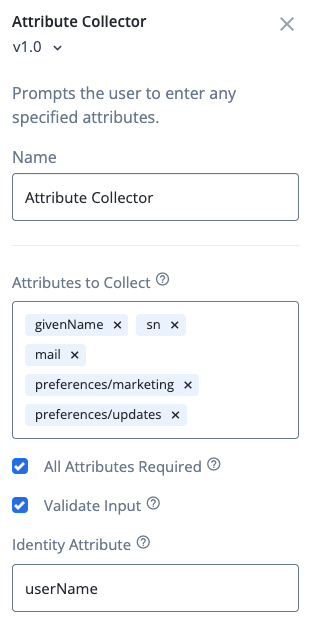
The default Registration journey already works this way. Its Attribute Collector node collects givenName, sn, mail, and two preference properties, and has Validate Input selected. The default journey doesn’t collect telephoneNumber, stateProvince, or postalCode, so only the policies on givenName, sn, and mail apply here.
| To use the Validate Input option, the properties that the node collects must be user editable. |
-
In the Advanced Identity Cloud admin console, go to Journeys > Journeys.
-
Click the Registration journey.
-
Click the Attribute Collector node, and make sure that Validate Input is selected. If it isn’t, select it and click Save. The following image displays the node properties:
-
In the Preview URL field, click and paste the URL into an incognito window.
-
Enter values that break the policies. For example, enter
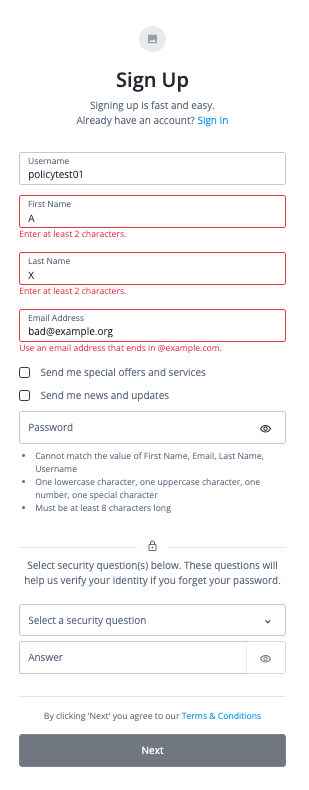
Aas the first name,Xas the last name, andbad@example.orgas the email address. Complete the other fields, and click Next.The page shows an error for each property that failed validation. If you completed Task 3, the errors show your friendly messages. If you didn’t, they show the raw requirement keys.
The following image displays the page with the messages from Task 3 in place:
Task 6: Promote the configuration to your other tenant environments
After you complete Tasks 1 - 5 in your development tenant environment, you can promote the configuration to your other tenant environments (UAT[1], staging, production). Advanced Identity Cloud promotes the config/policy object, the managed object schema, and your language sets. You don’t need to recreate the policies in each environment.
-
Determine the promotion order of your tenant environments. This depends on whether you have a standard promotion group of environments or whether you also have additional UAT environments.
-
In promotion order, for each upper tenant environment in your promotion group, run a promotion to move the configuration to the upper tenant environment from its respective lower tenant environment. Learn more in:
-
In the upper tenant environment, confirm that the policies, schema, and language sets from Tasks 1 - 3 are present.
-
(Optional) If you have sandbox[2] tenant environments, repeat Tasks 1 - 5 for each of those.
Validation
To verify that custom validation works, confirm these results:
-
The create request in Task 4 returns a
403status with the messagePolicy validation failed. Thedetail.failedPolicyRequirementsarray listsgivenName,mail,postalCode,sn,stateProvince, andtelephoneNumber. -
A create request with values that follow the policies returns a
201status and creates the user. For example, useAnnaas the first name,Leeas the last name, andanna.lee@example.comas the email address. Use0412345678as the telephone number,NSWas the state, and2000as the postal code. Delete the test user afterward. -
An update request that sets values that break the policies, such as a PATCH request on an existing user, also returns a
403status. The message isFailed policy validation, and thedetail.failedPolicyRequirementsarray has the same structure as in the create response. Because the message text differs from the create response, have your client match on the requirement keys and not on the message. -
If you completed Task 3, the Registration journey preview shows these messages:
Property Value Message First name
AEnter at least 2 characters.
Last name
XEnter at least 2 characters.
Email address
bad@example.orgUse an email address that ends in @example.com.
Explore further
Manage your policies as code
The config/policy object is a single JSON document. Optionally, store the JSON in your preferred version control system (for example, Git) to track changes over time and review them as diffs before you update the object with the REST API.
Because an update replaces the whole object, the copy in your version control system must always contain the complete set of policies that you want deployed.
Reference material
| Reference | Description |
|---|---|
Apply built-in validation policies to properties and learn about the policy configuration object. |
|
Manage and validate policies over REST. |
|
Change the text that the hosted pages show by editing a language set. |
|
Manage language sets with the REST API. |
|
Learn which configuration changes flow through the promotion pipeline. |
|
Authenticate to Advanced Identity Cloud REST API with access token |
Get an access token to call the REST API. |