Combining algorithms
PingOne Authorize policies can combine multiple rules to produce a Permit, Deny, Indeterminate, or Not Applicable decision.
To evaluate the overall decision of a policy, the decision service applies a combining algorithm. The default algorithm for a new policy is The first applicable decision will be the final decision. This algorithm stops evaluating as soon as it reaches a decision other than Not Applicable, unless the Evaluate All checkbox is selected.
The following table identifies available combining algorithms and describes their effects. The diagrams show one example of a decision evaluation for each combining algorithm; other evaluation paths are possible. The diagram legend is displayed before the table. The first column in each diagram represents the overall decision returned by the policy. The second column represents child decisions that produce the resulting policy decision.

| Combining algorithm | Details |
|---|---|
A single permit will override any deny decisions 
|
If any children produce the decision If no If none of the previous situations occur, the policy returns |
A single deny will override any permit decisions 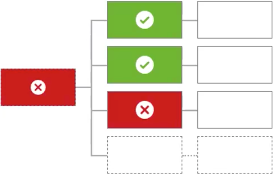
|
If any children produce the decision If no If none of the previous situations occur, the policy returns |
Unless one decision is deny, the decision will be permit 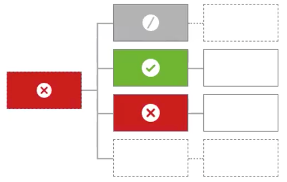
|
The policy defaults to |
Unless one decision is permit, the decision will be deny 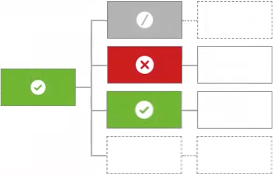
|
The policy defaults to |
The first applicable decision will be the final decision 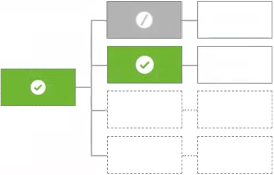
|
The decision service evaluates the children in turn until one produces an applicable value of If the evaluation produces no applicable decisions, the policy returns |
Only one child may produce a decision. If more than one is produced, the result will be indeterminate 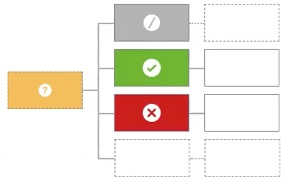
|
The decision service evaluates the children in turn. If at any point two children produce a decision other than If exactly one child produces an applicable decision, the policy uses it. If evaluation produces no applicable decisions, the policy returns |
Evaluate all
By default, combining algorithms stop evaluating a policy’s child elements as soon as a final decision is reached. For example, when using the The first applicable decision will be the final decision combining algorithm, evaluation ends immediately if any child returns a Permit or Deny.
To override this behavior and ensure that all child policies or rules are evaluated, select the Evaluate All checkbox next to the Combining Algorithm list.

Evaluate All ensures that every child element is evaluated, even if a final decision has already been reached. This doesn’t affect the final decision, but it allows additional statement information to propagate up to the parent policy, such as the reason for transaction denial. This information is useful for auditing, debugging, and understanding policy outcomes.
|
Even with Evaluate All selected, targets still determine whether a policy or rule is evaluated for a given request. |
Example: Detecting fraud with full rule visibility
Consider a bank that approves or denies transactions based on multiple risk signals. These signals are modeled as child rules in a Fraud detection policy that uses the A single deny will override any permit decisions combining algorithm.
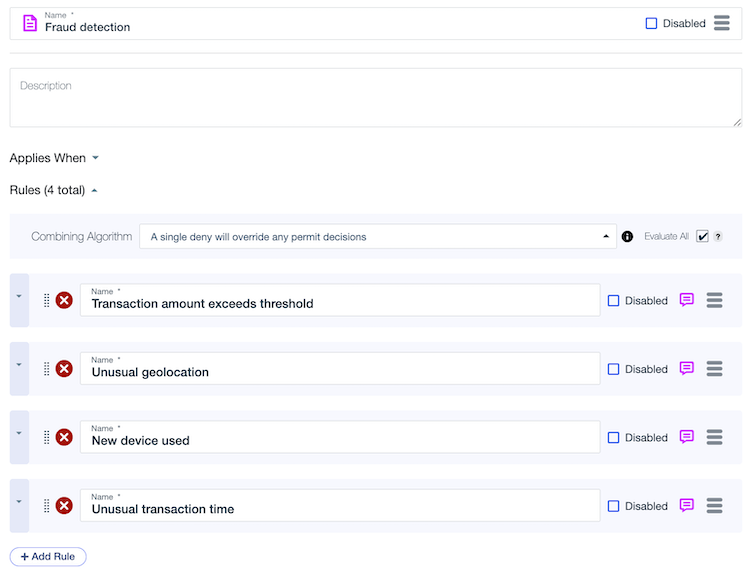
The policy includes the following rules:
-
Transaction amount exceeds threshold: Denies if the transaction amount exceeds 10,000 USD.
-
Unusual geolocation: Denies if the transaction originates from an IP or country not associated with the account.
-
New device used: Denies if the transaction comes from a device not associated with the account.
-
Unusual transaction time: Denies if the transaction occurs at an unusual time.
Each rule includes a statement explaining why the rule denied the transaction.
With Evaluate All selected, the policy evaluates every rule, regardless of whether an earlier rule has returned a Deny. This provides analysts full visibility into every risk signal, helping detect fraud patterns, meet audit requirements, and enforce internal risk policies more effectively.
Without Evaluate All selected, the combining algorithm stops evaluating when the first Deny occurs and skips evaluation of other potentially relevant rules. For example, if the transaction amount exceeds the threshold, the policy doesn’t evaluate the geolocation or device rules, and their corresponding denial reasons aren’t included in the final decision.
Combining algorithm visualization
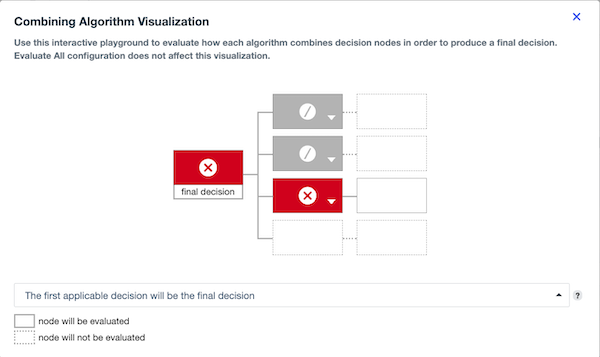
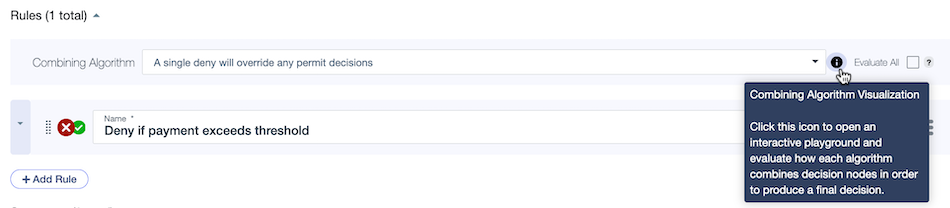
The combining algorithm visualizer is an interactive tool that shows how different algorithms process child decisions to reach a final policy outcome. By making the decision flow transparent, the visualizer simplifies complex policy logic, accelerates troubleshooting, and supports more confident policy design.
To open the visualizer, click the Information icon () next to the Combining Algorithm list.
|
Selecting the Evaluate All checkbox doesn’t affect the visualizer’s behavior. |
When you open the visualizer, no combining algorithm is selected by default. After selecting a combining algorithm, hover over the Question Mark icon () for details of that algorithm’s behavior.
Visualizer components
The visualizer uses a tree structure to show the flow of logic from child policy nodes to the final policy decision. The following table describes each tree component and its role in the visualization:
| Tree component | Description |
|---|---|
Final decision 
|
Represents the final policy decision. This node updates dynamically as you update child decisions. |
Child decisions 
|
Represent decisions from the policy’s immediate children. You can select |
Nested decisions 
|
Indicate whether nested children are evaluated, depending on their parents' decisions. Dotted nodes indicate the children are skipped, and solid nodes indicate the children are evaluated. |
|
When a child decision is set to
|
Example
The following example uses the The first applicable decision will be the final decision algorithm to show how the visualizer responds as you update child node decisions.
When the first child node is set to Permit, the algorithm immediately sets this as the final decision. Nested nodes under the first child are solid to indicate they’re evaluated, and all remaining child nodes are dotted to indicate they’re skipped.
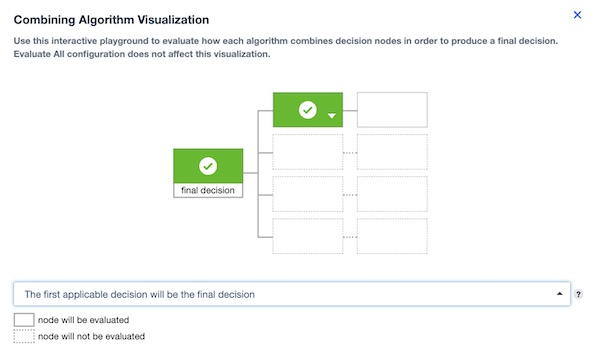
When the first two child nodes are set to Not Applicable, the algorithm continues evaluating until it reaches the third child node, which is set to Deny. The algorithm sets this as the final decision, the nested nodes under the third child are solid to indicate they’re evaluated, and the last child node is dotted to indicate it’s skipped.