Authentication flows
When using the PingOne MFA IdP Adapter through the PingFederate authentication application programming interface (API), the following flows are used for multi-factor authentication (MFA) requests. These are initiated in the web browser.
MFA using email
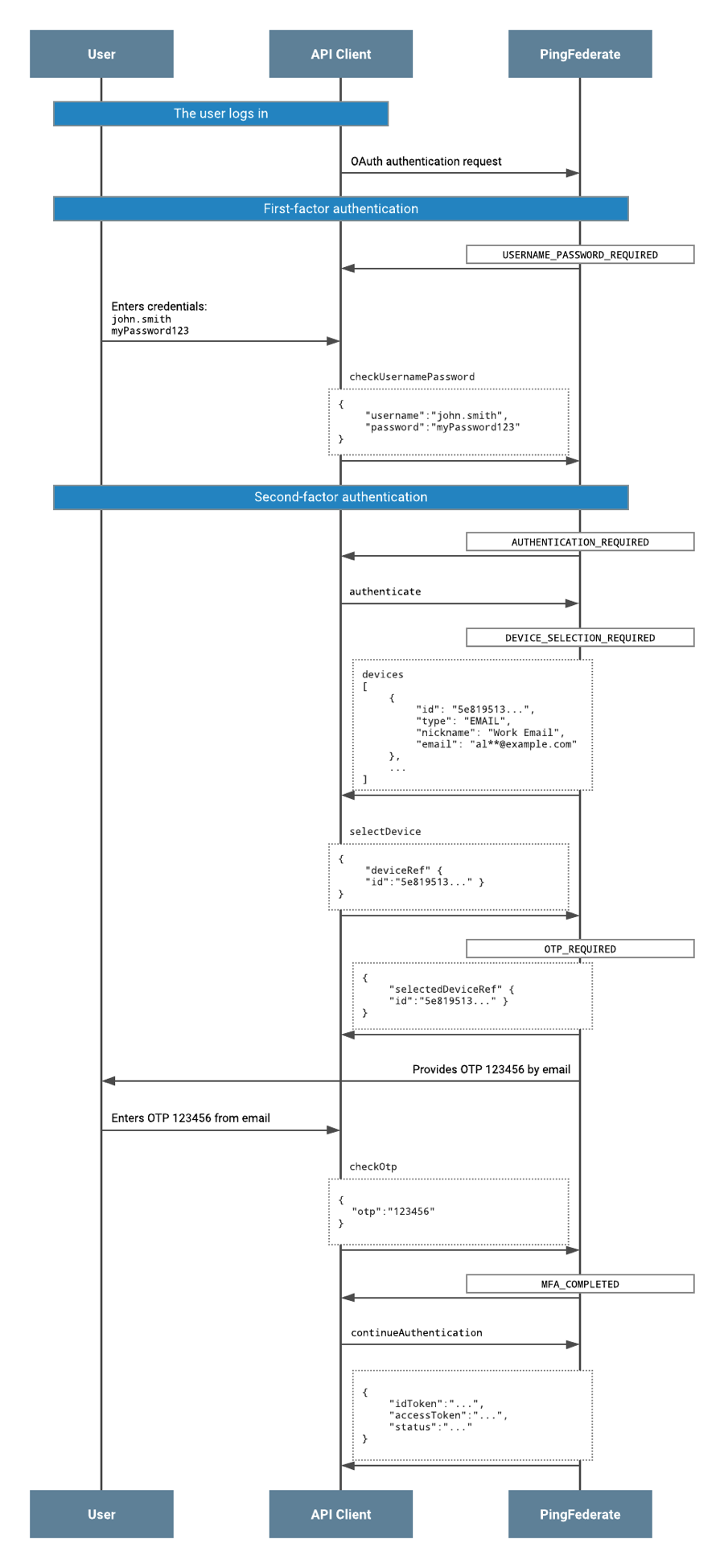
-
The user completes first-factor authentication. Completion of first-factor authentication is a prerequisite before progressing to MFA, when using the PingOne MFA IdP Adapter with the PingFederate Authentication API flow.
-
The status of
AUTHENTICATION_REQUIREDis returned in the response to the API client. -
The API client invokes the
authenticateaction. -
The status of
DEVICE_SELECTION_REQUIREDis returned with the devices object in the response to the API client. -
The API client invokes
selectDeviceaction and specifies the device ID of the device to use for MFA. -
The status of
OTP_REQUIRED, together with the devices andselectedDeviceRefobject, are returned in the response to the API client. In parallel, the user receives an email containing the one-time passcode (OTP) for authentication. -
After the user has entered the OTP, the API client invokes the
checkOtpaction, submitting the OTP value to PingFederate. -
On successful completion of MFA, PingFederate returns the status of
MFA_COMPLETEDto the API client. -
The API client invokes the
continueAuthenticationaction. The API client must callcontinueAuthenticationin order to progress in the OIDC flow, and to complete it. -
PingFederate returns a single sign-on (SSO) ID token and access token to the API client.
MFA using the mobile app
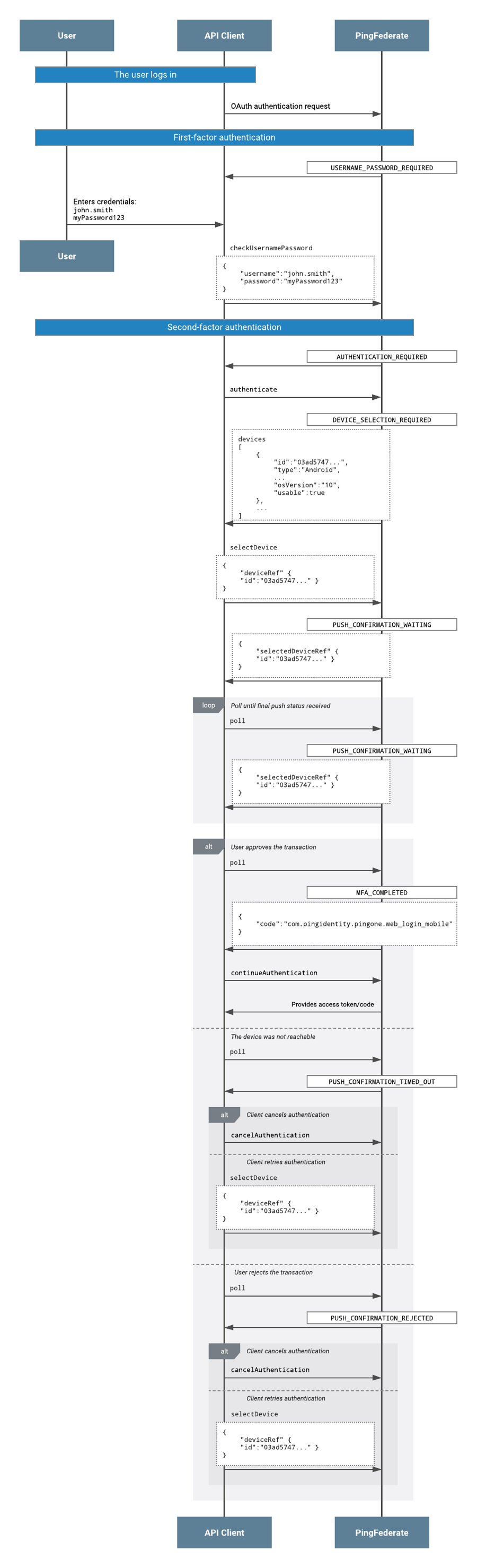
-
The user completes first-factor authentication. Completion of first-factor authentication is a prerequisite before progressing to MFA, when using the PingOne MFA IdP Adapter with the PingFederate Authentication API flow.
-
The status of
AUTHENTICATION_REQUIREDis returned in the response to the API client. -
The API client invokes the
authenticateaction. -
The status of
DEVICE_SELECTION_REQUIREDis returned with the devices object in the response to the API client. -
The API client invokes
selectDeviceaction and specifies the device ID of device to use for multi-factor authentication. -
The status of
PUSH_CONFIRMATION_WAITING, together with the devices andselectedDeviceRefobject, are returned in the response to the API client. -
The API client invokes the
pollaction, so that PingFederate gets the status of the mobile push. This is repeated until either a successful status is received or a timeout is reached. -
One of the following alternative statuses is reached:
-
MFA_COMPLETED:-
The user receives a push notification and approves the authentication.
-
The API client invokes the
continueAuthenticationaction. The API client must callcontinueAuthenticationin order to progress in the OIDC flow, and to complete it. -
PingFederate returns an access token for SSO, to the API client.
-
-
PUSH_CONFIRMATION_TIMED_OUT:-
The device was not reachable.
-
The following options are available through the API client:
-
Retry by calling
selectDevicewith thedeviceRefobject. -
Select a different device by calling
selectDevicewith a differentdeviceRefobject. -
Cancel the authentication request by calling
cancelAuthentication.
-
-
-
PUSH_CONFIRMATION_REJECTED:-
The user receives a push notification, but denies it.
-
The following options are available through the API client:
-
Retry by calling
selectDevicewith thedeviceRefobject. -
Select a different device by calling
selectDevicewith a differentdeviceRefobject. -
Cancel the authentication request by calling
cancelAuthentication.
-
-
-
PUSH_CONFIRMATION_TIMED_OUT:-
When Show Timeout Screens is enabled in the adapter configuration, the API client can invoke
checkOtpdirectly from this state to allow the user to authenticate with an OTP instead of retrying the push.
-
-
MFA using the PingID Desktop App
-
The user completes first-factor authentication.
-
The status of
AUTHENTICATION_REQUIREDis returned in the response to the API client. -
The API client invokes the
authenticateaction. -
The status of
DEVICE_SELECTION_REQUIREDis returned with the devices object in the response to the API client. -
The API client invokes the
selectDeviceaction and specifies the device ID of the PingID Desktop App device. -
The status of
PINGID_DESKTOP_GEN2_ASSERTION_REQUIREDis returned. The user approves the authentication request in the PingID Desktop App. -
The API client invokes the
pingIdDesktopGen2CheckAssertionaction. -
On successful completion of MFA, PingFederate returns the status of
MFA_COMPLETEDto the API client. -
The API client invokes the
continueAuthenticationaction to complete the OIDC flow. -
PingFederate returns an SSO ID token and access token to the API client.