Device pairing flows
When using the PingOne MFA IdP Adapter through the PingFederate authentication application programming interface (API), the following flows are used for device pairing. These are initiated in the mobile app.
Pairing an initial device using automatic pairing
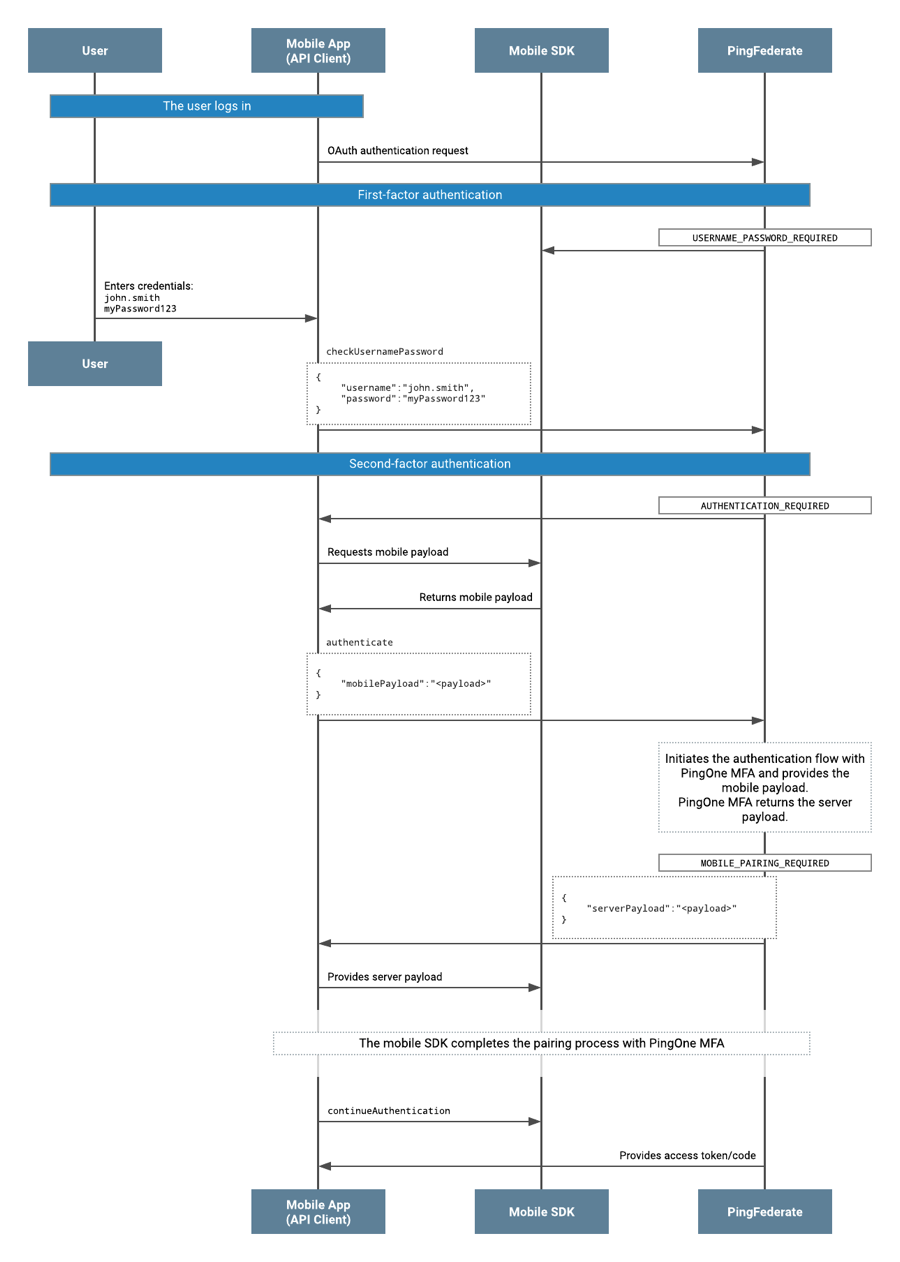
-
The user completes first-factor authentication. Completion of first-factor authentication is a prerequisite before progressing to multi-factor authentication (MFA), when using the PingOne MFA IdP Adapter with the PingFederate Authentication API flow.
-
The status of
AUTHENTICATION_REQUIREDis returned in the response to the Mobile app (API client). -
The Mobile app (API client) gets a mobile payload from the mobile SDK.
-
The Mobile app (API client) invokes the
authenticateaction, using the mobile payload. -
The status of
MOBILE_PAIRING_REQUIREDis returned along with thePingOneEnrollmentobject, which includes theserverPayload,pairingKey, andpairingKeyIdproperties. -
The Mobile app (API client) passes the
serverPayloadto the mobile SDK, in order to continue with the pairing process. -
Once pairing is done, the Mobile app (API client) invokes the
continueAuthenticationaction. The Mobile app (API client) must callcontinueAuthenticationin order to progress in the OpenID Connect (OIDC) flow, and to complete it. -
PingFederate returns an access token to the Mobile app (API client).
-
Even if the pairing is not successful, it is possible for the Mobile app (API client) to send the
continueAuthenticationaction. In this case, the contract attributepingone.mfa.statuswill have the valuecom.pingidentity.pingone.device_not_paired, rather than the valuecom.pingidentity.pingone.device_paired. -
In the event of an error occuring during device pairing, the adapter will return a success status, and
pingone.mfa.statuswill have the valuecom.pingidentity.pingone.pairing_error.
-
Pairing an additional device using automatic pairing
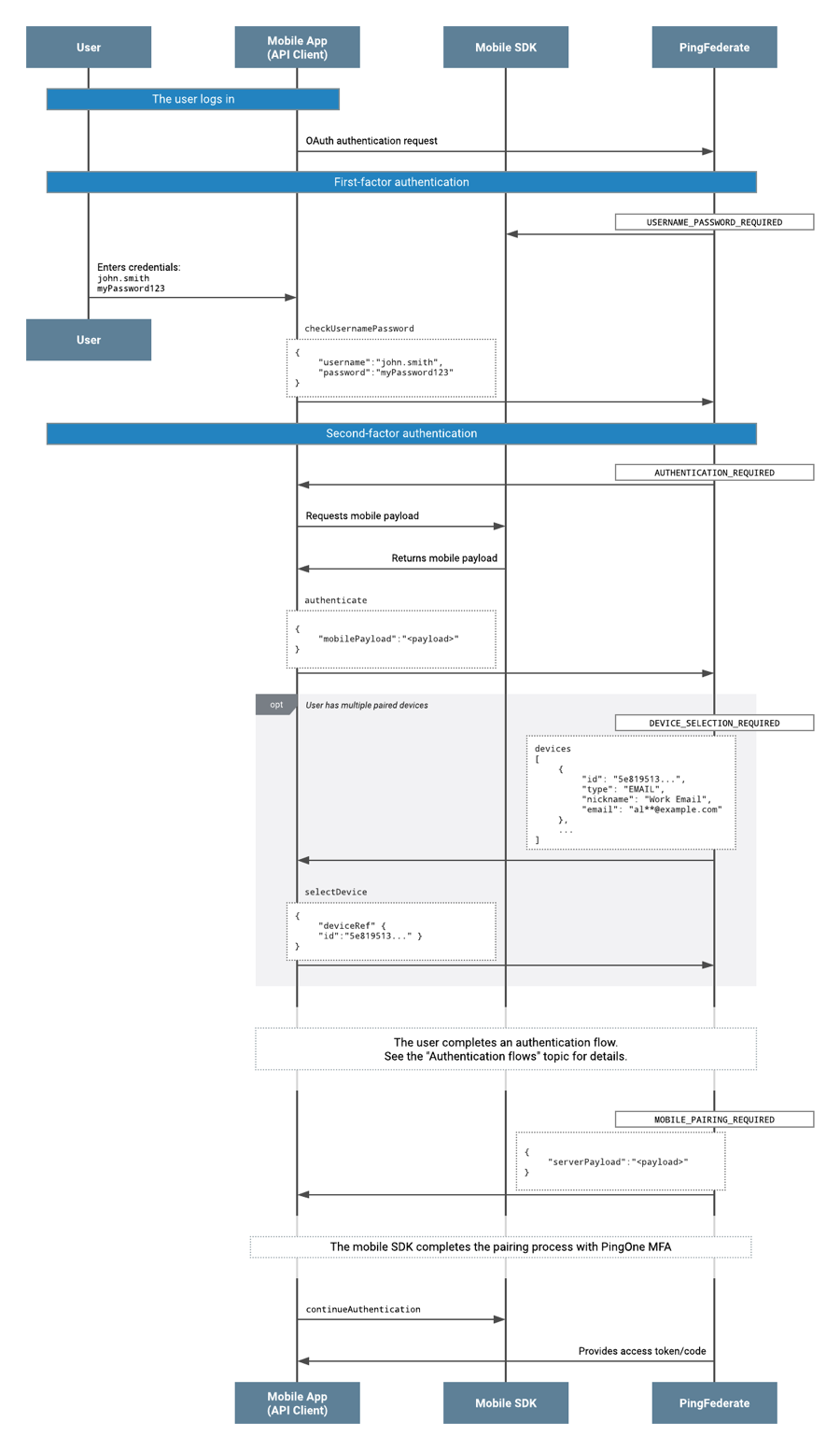
-
The user completes first-factor authentication. Completion of first-factor authentication is a prerequisite before progressing to MFA, when using the PingOne MFA IdP Adapter with the PingFederate Authentication API flow.
-
The status of
AUTHENTICATION_REQUIREDis returned in the response to the Mobile app (API client). The returned device is the user’s primary device. -
The Mobile app (API client) gets a mobile payload from the mobile SDK.
-
The Mobile app (API client) invokes the
authenticateaction, using the mobile payload. -
The response status would be different since users may have one or more devices already paired:
-
The status of
PUSH_CONFIRMATION_WAITINGis returned if the mobile device is the only device that is paired. Push notification is sent to the paired mobile.The Mobile app (API client) invokes the
pollaction, so that PingFederate gets the status of the mobile push. This is repeated until the user approves or denies the push authentication request. -
The status of
OTP_REQUIREDis returned if the only device that is paired is SMS or Time-based One-Time Password (TOTP) authenticator or email.The Mobile app (API client) invokes the
checkOtpaction submitting the OTP value to PingFederate. -
The status of
DEVICE_SELECTION_REQUIREDis returned with thedevicesobject in the response to the API client if the user has more than one device paired.The Mobile app (API client) invokes the
selectDeviceaction with thedeviceRefobject. This in turn can get thePUSH_CONFIRMATION_WAITINGorDEVICE_SELECTION_REQUIREDstatus as mentioned above.
-
Even if the pairing is not successful, it is possible for the Mobile app (API client) to send the continueAuthentication action. In this case, the contract attribute pingone.mfa.status will have the value com.pingidentity.pingone.device_not_paired, rather than the value com.pingidentity.pingone.device_paired.
In the event of an error occurring during device pairing, the adapter will return a success status, and com.pingidentity.pingone.status will have the value com.pingidentity.pingone.pairing_error.
Pairing a PingID Desktop App device
-
The user completes first-factor authentication.
-
The status of
AUTHENTICATION_REQUIREDis returned in the response to the API client. -
The API client invokes the
authenticateaction. -
The status of
DEVICE_PAIRING_METHOD_REQUIREDis returned. The API client invokes theselectDevicePairingMethodaction, specifying the PingID Desktop App pairing method. -
The status of
PINGID_DESKTOP_GEN2_ACTIVATION_REQUIREDis returned. The user completes the activation in the PingID Desktop App. -
The API client invokes the
activatePingIdDesktopGen2Deviceaction, submitting the activation response. -
PingFederate returns the status of
MFA_COMPLETED. -
The API client invokes the
continueAuthenticationaction to complete the OIDC flow.
Pairing a PingID Desktop App (Legacy) device
-
The user completes first-factor authentication.
-
The status of
AUTHENTICATION_REQUIREDis returned in the response to the API client. -
The API client invokes the
authenticateaction. -
The status of
DEVICE_PAIRING_METHOD_REQUIREDis returned. The API client invokes theselectDevicePairingMethodaction, specifying the PingID Desktop App (Legacy) pairing method. -
The status of
PINGID_DESKTOP_ACTIVATION_REQUIREDis returned. The API client invokes thepingIdDesktopPollaction until the user completes activation in the PingID Desktop App (Legacy). -
PingFederate returns the status of
MFA_COMPLETED. -
The API client invokes the
continueAuthenticationaction to complete the OIDC flow.
Pairing a YubiKey device
-
The user completes first-factor authentication.
-
The status of
AUTHENTICATION_REQUIREDis returned in the response to the API client. -
The API client invokes the
authenticateaction. -
The status of
DEVICE_PAIRING_METHOD_REQUIREDis returned. The API client invokes theselectDevicePairingMethodaction, specifying YubiKey as the pairing method. -
The status of
YUBIKEY_ACTIVATION_REQUIREDis returned. The user inserts their YubiKey and touches it to generate the activation OTP. -
The API client invokes the
activateYubikeyDeviceaction, submitting the YubiKey OTP. -
PingFederate returns the status of
MFA_COMPLETED. -
The API client invokes the
continueAuthenticationaction to complete the OIDC flow.