Delegation
Delegation is one of the use cases supported by OAuth 2.0 token exchange in PingOne. Learn more about how it works and the supported use cases in Configuring OAuth 2.0 token exchange.
Use delegation for token exchange to enable an application (client) to act on the user’s behalf while maintaining separate identities for the user (subject) and the application (actor), such as accessing a protected resource.
In general, your organization’s PingOne administrator, application, and resource server teams are responsible for collaborating to determine which attributes PingOne should include in the access tokens to represent delegation. The OAuth 2.0 token exchange specification provides a delegation token exchange example.
In delegation, the application has two tokens:
-
A subject token represents the authenticated user and is obtained with the user’s authorization.
-
An actor token represents the identity acting on behalf of the user and is obtained for the application itself or a user it represents. The actor token is required only for delegation flows.
The application exchanges both tokens for a new token to access the protected resource. The act (actor) claim in the new token informs the resource server that the application using the token isn’t the actual user but is acting on the user’s behalf.
Example scenario
In this scenario, users order coffee using an application, Yankee Coffee, and apply their reward points to redeem free coffee. To complete an order:
-
The application, Yankee Coffee, must retrieve the reward points balance of the user from a resource server, Goodies.
-
Goodies must verify whether the user’s birthday bonus reward has been claimed, but Goodies doesn’t have this information and must retrieve it from another resource server, DoB.
-
Yankee Coffee must include the identity (actor) that can act on behalf of the user to Goodies so that Goodies can include the delegation information when it requests the birthday bonus reward from DoB.
What you’ll do
To set up the example scenario for delegation, you’ll add:
-
Yankee Coffee application: The user interacts with this application to initiate the flow.
-
Goodies custom resource: This resource has the information needed by the Yankee Coffee application.
-
Goodies Token Exchange application: This application processes the token exchange request.
-
DoB custom resource: This resource has the additional information the Yankee Coffee application can act on behalf of the user to retrieve.
Example tasks
Adding DoB as a custom resource
As a PingOne administrator, add a custom resource in PingOne for the DoB resource server.
Steps
-
In the PingOne admin console, go to Applications > Resources and click the icon.
-
In the Create Resource Profile step:
-
For Resource Name, enter
DoB. -
For Audience, enter the audience for resource in the format of
https://api.example.com/d. -
(Optional) For Description, enter a brief description of the resource.
-
For Access token time to live, leave the default or optionally edit the maximum time that the access token will be valid for use in the application, in seconds.
-
Click Next.
-
-
In the Attributes step:
-
Click the Gear icon () next to the
subattribute to open the Advanced Expressions modal. -
In the modal, enter the following and click Save:
#root.context.requestData.subjectToken.subThis expression populates the
subclaim value in the issued token with thesubclaim value from the subject token. -
Click Add to add another attribute.
-
In the Attribute field, enter
actand then click next to the attribute to open the Advanced Expressions modal. -
In the modal, enter the following and click Save:
(#root.context.requestData.grantType == "client_credentials")?"noActor":((#root.context.requestData.subjectToken.may_act.sub == #root.context.requestData.actorToken.client_id)?#root.context.requestData.subjectToken.may_act:null) -
Select the checkbox to make the
actattribute required.This expression checks whether the token request uses the client credentials grant type.
-
If the token request uses the client credentials grant type, it populates
actwith a hard-coded value ofnoActorto signal to DoB that no delegation is involved. -
If the token request doesn’t use the client credentials grant type, it assumes the token request uses the token exchange grant type and checks whether the
may_actclaim value in the subject token matches theclient_idin the actor token.-
If the value matches, it populates
actwith themay_actclaim value from the subject token. -
If the value doesn’t match, it sets
actasnull, and the token exchange token request fails because theactclaim is marked as required.
-
-
-
Click Next.
-
-
In the Scopes step:
-
Click Add Scope.
-
For Scope Name, enter a name, such as
d.read. -
(Optional) Enter a Description for the scope.
-
Click Save.
-
Adding the Goodies Token Exchange application
Create an application to handle the token exchange requests and obtain access tokens from PingOne to send API requests to DoB. The Goodies Token Exchange application must use:
-
The token exchange grant type to obtain access tokens from PingOne to send API requests to DoB to retrieve birthday reward information
-
The application credentials in its token request because only applications can send token requests to PingOne, and custom resources can’t.
The resulting access token contains:
-
The identity of the actor acting on behalf of the user as the subject (
sub). The subject is taken taken directly from the subject of the access token from Yankee Coffee. -
An
actclaim indicating the identity acting on behalf of the user. In this scenario, the identity is the Goodies Token Exchange application.
Steps
-
Go to Applications > Applications and click the icon.
-
In the Add Application panel:
-
For Application Name, enter
Goodies Token Exchange. -
(Optional) Enter a Description for the application.
-
Select an OIDC-based application type and click Save.
-
-
On the Configuration tab:
-
Click the Pencil icon ().
-
For Grant Type, select Client Credentials and Token Exchange.
-
Leave all other default settings.
-
Click Save.
-
-
On the Resources tab:
-
Click .
-
Assign the resource you created in Adding DoB as a custom resource.
-
Click Save.
-
-
On the Overview tab, click the Copy to clipboard icon () for Client ID. You’ll need the client ID to configure the subject for the
may_actattribute in the Goodies custom resource.
Adding Goodies as a custom resource
Add a custom resource in PingOne for the Goodies resource server.
Steps
-
Go to Applications > Resources and click the icon.
-
In the Create Resource Profile step:
-
For Resource Name, enter
Goodies. -
For Audience. enter the audience for resource in the format of
https://api.example.com/g. -
(Optional) For Description, enter a brief description of the resource.
-
For Access token time to live, leave the default or optionally edit the maximum time that the access token will be valid for use in the application, in seconds.
-
Click Next.
-
-
In the Attributes step:
-
Leave
submapped to User ID (default). -
Click Add.
-
For Attribute, enter
may_actand then click next to the attribute to open the Advanced Expressions modal. -
In the modal, enter the following, using the client ID that you copied in step 6 of Adding the Goodies Token Exchange application:
{"sub": "<client ID of the Goodies Token Exchange application>"} -
Click Save.
-
Click Next.
-
-
In the Scopes step:
-
Click Add Scope.
-
For Scope Name, enter a name, such as
g.crud. -
(Optional) Enter a Description for the scope.
-
Click Save.
-
Adding Yankee Coffee as an application
Add an end-user application in PingOne for Yankee Coffee and and assign the scope from the Goodies custom resource. Yankee Coffee must use the authorization code grant type to obtain access tokens from PingOne to send API requests to the Goodies custom resource to retrieve the user’s reward points balance. The access tokens contain:
-
The identity that can act on behalf of the user as the subject (
sub). The subject is the user who authenticates and authorizes the application request from Yankee Coffee. -
A
may_actclaim indicating the identity that can act on behalf of the user. In this scenario, the identity is the Goodies Token Exchange application.
Steps
-
Go to Applications > Applications and click the icon.
-
In the Add Application panel:
-
For Application Name, enter
Yankee Coffee. -
(Optional) Enter a Description for the application.
-
Select an OIDC-based application type and click Save.
-
-
On the Configuration tab:
-
Click .
-
For Grant Type, select Authorization Code.
-
Leave all other default settings.
-
Click Save.
-
-
On the Resources tab:
-
Click .
-
Assign the resource you created in Adding Goodies as a custom resource.
-
Click Save.
-
-
Provide the application credentials and custom resource credentials to your organization’s developers for the applications and custom resources, respectively.
Required configurations
The following table lists the required configurations for the applications and custom resources and includes example client IDs that correspond to the runtime process overview:
| Applications | Custom resources |
|---|---|
Yankee Coffee
|
Goodies
|
Goodies Token Exchange
|
DoB
|
Runtime process overview
The following diagram shows a high-level overview of the example delegation flow:
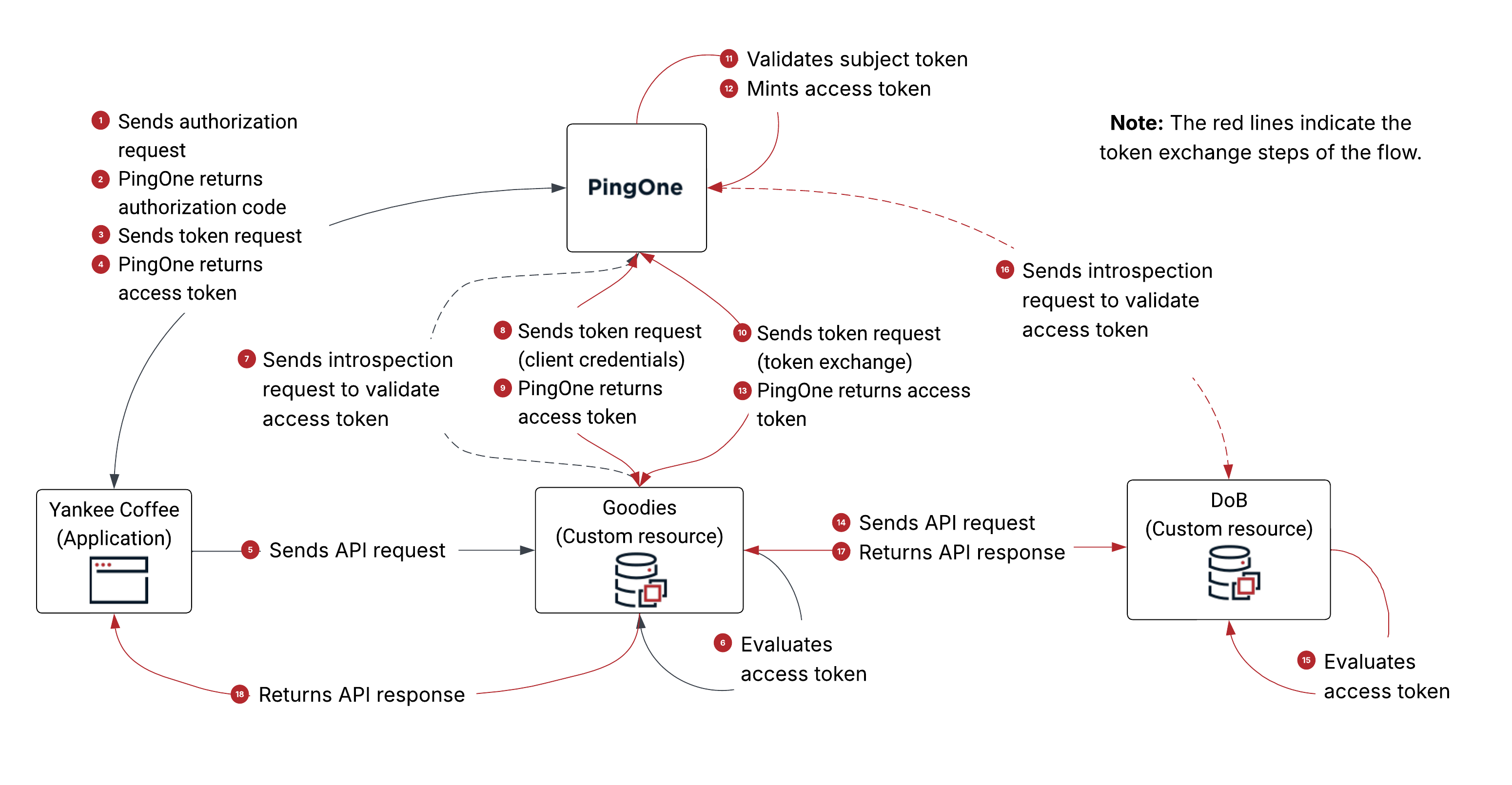
-
Yankee Coffee sends an authorization request to PingOne with
scope=openid+g.crud,client_id=f6c78a5b, and other parameters. -
PingOne authenticates the user, obtains the authorization from the user, and returns an authorization code to Yankee Coffee.
-
Yankee Coffee sends a token request using the authorization code grant type to PingOne.
-
PingOne returns an access token to Yankee Coffee.
The payload is decoded as follows:
{ "client_id": "f6c78a5b-9d39-4cd7-b94e-81dad33c8773", # the client ID of Yankee Coffee "iss": "https://auth.pingone.com/6991589d-87eb-47f4-9131-284cebe106b3/as", "jti": "54ffa426-1410-4383-8ec5-344a7b1b948e", "iat": 1770574186, "exp": 1770577786, "aud": [ "https://api.example.com/g" # the audience is Goodies ], "scope": "g.crud", # the scope of this access token "sub": "user@example.net", # the user using Yankee Coffee "sid": "86635114-c633-4c13-b1eb-4a8a3f0e7dcd", "auth_time": 1770573761, "acr": "1Single_Factor", "may_act": { # the identity that can act on behalf of the user "sub": "45f60a71-df8c-42d6-9410-f64f0454874d" # the client ID of Goodies Token Exchange App }, "env": "6991589d-87eb-47f4-9131-284cebe106b3", "org": "d4229c38-0f5e-4bf7-9292-9d3b0df7294c", "p1.userId": "8ca2b15a-e3bd-43a5-bee1-1e533bae759d" } -
Yankee Coffee sends an API request to Goodies. For authorization, Yankee Coffee includes the access token (from step 4) as the
AuthorizationHTTP request header value in the API request. -
Goodies evaluates the access token and determines that:
-
The issuer of the access token is PingOne.
-
The application requesting the token is Yankee Coffee.
-
The audience of the access token includes itself, Goodies.
-
-
Goodies sends an introspection request to PingOne to validate the access token.
For client identification and authentication, Goodies uses the client ID and secret defined in PingOne for the custom resource (
client_id=75d8cea3). -
Goodies sends a token request using the client credentials grant type to PingOne.
For client identification and authentication, Goodies uses the client ID and secret defined in PingOne for the Goodies Token Exchange application (
client_id=45f60a71). -
PingOne returns an access token to Goodies.
The payload is decoded as follows:
{ "client_id": "45f60a71-df8c-42d6-9410-f64f0454874d", # the client ID of Goodies Token Exchange App "iss": "https://auth.pingone.com/6991589d-87eb-47f4-9131-284cebe106b3/as", "jti": "47d54766-7b9a-4485-96d9-6c09d410b943", "iat": 1770574217, "exp": 1770577817, "aud": [ "https://api.example.com/d" # the audience is DoB ], "scope": "d.read", "act": "noActor", # a value of `noActor’ indicates (to DoB) that no delegation is involved "env": "6991589d-87eb-47f4-9131-284cebe106b3", "org": "d4229c38-0f5e-4bf7-9292-9d3b0df7294c", "p1.rid": "47d54766-7b9a-4485-96d9-6c09d410b943" } -
Goodies sends a token request using the token exchange grant type to PingOne.
-
For client identification and authentication, Goodies uses the client ID and secret defined in PingOne for the Goodies Token Exchange application (
client_id=45f60a71). -
Goodies includes the following parameters in the token request:
-
scope=d.read -
subject_token=<access token from step 5> -
subject_token_type=urn:ietf:params:oauth:token-type:access_token -
actor_token=<access token from step 9> -
actor_token_type=urn:ietf:params:oauth:token-type:access_token -
requested_token_type=urn:ietf:params:oauth:token-type:access_token
-
-
-
PingOne validates the subject token for the following:
-
The subject token and the actor token are valid JWTs.
-
The issuer of the subject token and the actor token matches the issuer of the current PingOne environment.
-
The associated PingOne user session is valid.
-
-
PingOne mints an access token based on the attribute mappings defined in PingOne for DoB.
-
PingOne returns a token response containing an access token to Goodies.
The following is the token response:
{
    "access_token": "eyJ…", # the access token as a result of the token exchange token request
    "token_type": "Bearer",
    "expires_in": 3600,
    "scope": "d.read",
    "issued_token_type": "urn:ietf:params:oauth:token-type:access_token"
}
The access token is decoded as follows:
{ "client_id": "45f60a71-df8c-42d6-9410-f64f0454874d", # the client ID of Goodies Token Exchange App "iss": "https://auth.pingone.com/6991589d-87eb-47f4-9131-284cebe106b3/as", "jti": "337a5736-bea4-44dd-9692-dc5f696ef710", "iat": 1770574249, "exp": 1770577849, "aud": [ "https://api.example.com/d" # the audience is DoB ], "scope": "d.read", "sub": "user@example.net", # the user using Yankee Coffee "sid": "86635114-c633-4c13-b1eb-4a8a3f0e7dcd", "auth_time": 1770573761, "acr": "1Single_Factor", "act": { # the identity acting on behalf of the user "sub": "45f60a71-df8c-42d6-9410-f64f0454874d" # the client ID of Goodies Token Exchange App }, "env": "6991589d-87eb-47f4-9131-284cebe106b3", "org": "d4229c38-0f5e-4bf7-9292-9d3b0df7294c", "p1.userId": "8ca2b15a-e3bd-43a5-bee1-1e533bae759d" } -
Goodies sends an API request to DoB. For authorization, Goodies includes the access token (from step 13) as the
AuthorizationHTTP request header value in the API request. -
DoB evaluates the access token and determines that:
-
The issuer of the access token is PingOne.
-
The application requesting the token is the Goodies Token Exchange application.
-
The audience of the access token includes itself, DoB.
-
-
DoB sends an introspection request to PingOne to validate the access token.
-
DoB returns an API response to Goodies. At this point, Goodies as a resource server can fulfill the API request from Yankee Coffee (in step 5).
-
Goodies returns an API response to Yankee Coffee.