PingOne Verify mobile driver licenses
A mobile driver license (mDL) is a secure, digital representation of a physical government-issued identification stored on a mobile device. It functions as a verifiable credential that enables remote and contactless identity authentication.
The Digital Credentials (DC) API is a browser-based extension of the web credentials API that allows websites to request and verify cryptographically signed information, such as IDs or certificates, directly from a user’s digital wallet. By replacing manual document uploads and data entry with a seamless verification flow, the API provides the same phishing-resistant, proximity-based interaction used for passkeys and digital payments.
Standards
A digital ID is a new credential created using your United States passport and is used if you live in a state that hasn’t adopted mDL yet. For a digital ID to work globally, devices must agree on what the data looks like. This is achieved through a combination of International Organization for Standardization (ISO) standards and OpenID protocols.
To maintain security and privacy, mobile device wallets require an approval process. Apple, for example, achieves this by using a trust anchor system. This framework requires any organization requesting identity documents to undergo a formal approval process through Apple Business Connect. By verifying relying parties before they can interact with the Apple Wallet, this process protects users from inadvertent sharing, data harvesting, and fraudulent websites. Google also requires similar approval of relying parties, but currently doesn’t have a process in place.
ISO/IEC 18013
The ISO and the International Electrotechnical Commission (IEC) 18013 define standards for mDLs, ensuring your digital license is cryptographically secure and recognized by authorities such as Transportation Security Administration (TSA) agents or police officers.
-
ISO/IEC 18013-5 is the foundation for physical interactions. It allows you to tap your phone at a reader using Near Field Communication (NFC) or Bluetooth. It works offline, allowing verification of your ID without an internet connection.
-
ISO/IEC 18013-7 is the internet standard for mDLs. It describes how a website or application can securely ask for your ID data remotely, by enabling age gating (restricting online access to content or features for users under a specific age) or identity proofing (verifying a person is who they say they are with documents and biometrics) without needing you to upload a picture of your physical card.
OID4VP
While ISO defines the mDL, OpenID for Verifiable Credentials (OID4VP) is the protocol used by the DC API and provides the exchange framework to move the data in an mDL over the web.
OID4VP is a standardized, OpenID-based protocol that governs how a digital wallet securely and with user consent presents verifiable credentials to a relying party. This relying party can be a website, application, or service.
Standards-based vs proprietary apps
Not all digital IDs are the same. Their underlying technology determines if they’ll work with the DC API.
Standards-based wallets (mDL standard)
For an ID to be compatible with the DC API, it must be stored in a wallet that supports international standards. A standards-based mDL issued by California will work with a verifier in New York because they both use the same communication protocol.
Apple Wallet and Google Wallet are built on these standards, ensuring they work with any website using the DC API. Apple users create IDs in Apple Wallet using Digital ID. Learn more in Apple introduces Digital ID, a new way to create and present an ID in Apple Wallet.
Proprietary state apps (non-standard)
Several early-adopter states built standalone applications that don’t follow the ISO standards. These apps often rely on displaying a proprietary QR code or a visual animation on the screen that only a specific, state-issued reader can understand.
Because these apps don’t use the standard handshake protocols, such as OID4VP, a web browser can’t talk to them. If a website uses the DC API to request your ID, these proprietary apps won’t show up in the wallet picker.
Users with proprietary state applications won’t be able to use the one-tap verification flow and must take photos of their physical cards.
Why it matters
An mDL is better than a physical ID because of its enhanced security, accuracy, and privacy features. Key differences include the following:
| Feature | Physical ID | mDL |
|---|---|---|
Trust source |
Relies on visual features, such as holograms, UV-reactive inks, and watermarks. |
Utilizes cryptographic signatures, a digital seal that breaks if the data is tampered with. |
Verification |
Verification is performed by a human and makes the physical card susceptible to forgeries. |
A computer instantly verifies the digital seal against the Department of Motor Vehicles (DMV) public key. |
Data presentation |
Required presentation of the physical card exposes the entire dataset’s personally identifiable information (PII) to the relying party. |
Facilitates the release of specific claims or attributes, such as age, without exposing unrelated data. |
Storage |
Stored in a physical wallet and requires manual updates and physical reissuance for data changes. |
Stored in a digital wallet, such as Apple or Google Wallet. |
How it works
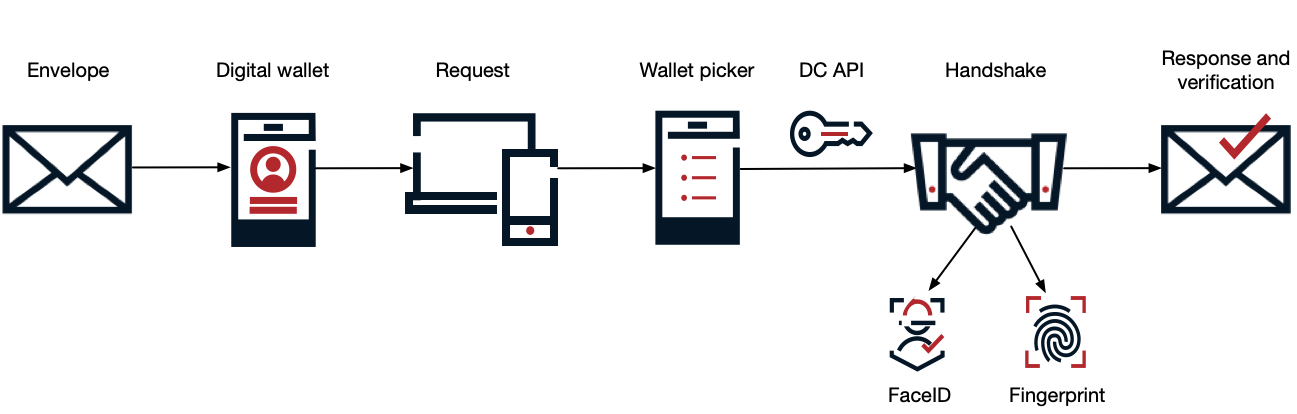
An mDL is a type of verifiable credential and works as a digital envelope to stay secure. The DC API is the engine inside your web browser and acts as a neutral mediator between a website and any digital wallet.
The following is an example of a digital identity flow using an mDL (digital envelope) and the DC API:
-
The DMV puts the end user’s information in a digital envelope and seals it with a secure digital stamp.
-
The end user’s mobile device stores this envelope in a secure app, such as Apple Wallet or Google Wallet.
-
When a web service, such as an online bank, requests the end user’s mDL, it calls
navigator.credentials.get()and asks their device if they have a valid government ID they can share. -
The browser or operating system (OS) shows a system-level menu of all compatible wallets on the end user’s device, such as Google Wallet, Apple Wallet, or a state-specific ID app, allowing the end user to select their preferred compatible digital wallet.
-
After the end user chooses a wallet, the DC API creates an encrypted link between that wallet and the web service that asked for their ID.
-
The wallet app opens, showing exactly what data is being requested, such as the end user’s age. The end user authorizes the release with a handshake, using FaceID or a fingerprint.
-
The wallet sends a signed digital envelope back through the API, and the web service verifies the DMV’s digital seal to ensure the data is authentic.
Browser and OS support
You can use an mDL on almost any device:
| Platform | Browser | Method |
|---|---|---|
Android |
Google Chrome |
Provides a direct link to Google Wallet or other compatible state applications. |
iOS and macOS |
Apple Safari |
Deep integration with Apple Wallet. |
Desktop |
Google Chrome and Microsoft Edge |
Displays a QR code for cross-device verification. |