How MCP authorization works
PingOne Authorize protects Model Context Protocol (MCP) servers by combining access token validation, challenge responses, and custom policies. This page describes the end-to-end authorization flow for an MCP client that accesses an MCP server protected by PingOne Authorize.
Roles
The MCP specification assigns standard OAuth 2.1 roles to each participant in the flow:
-
The MCP server is an OAuth 2.1 resource server. It accepts requests for protected resources and validates access tokens.
-
The MCP client is an OAuth 2.1 client. It makes requests on behalf of a resource owner, such as the user who prompted an AI agent to take an action.
-
The authorization server interacts with the user and issues access tokens for use at the MCP server.
PingOne Authorize works with your MCP gateway to act as the policy enforcement point in front of the MCP server. The gateway sends HTTP requests to PingOne Authorize, and PingOne Authorize directs the gateway to forward the request or return an error to the client. If the request is denied, PingOne Authorize can direct the gateway to return a challenge response that points the MCP client to the authorization server for an access token.
Learn more about MCP authorization in the MCP specification.
The authorization flow
The authorization flow has two parts. In the first, an MCP client without an access token discovers the authorization server that can issue one. In the second, the client uses the access token to request a protected resource from the MCP server. The following sections describe this flow in more detail.
Discovery
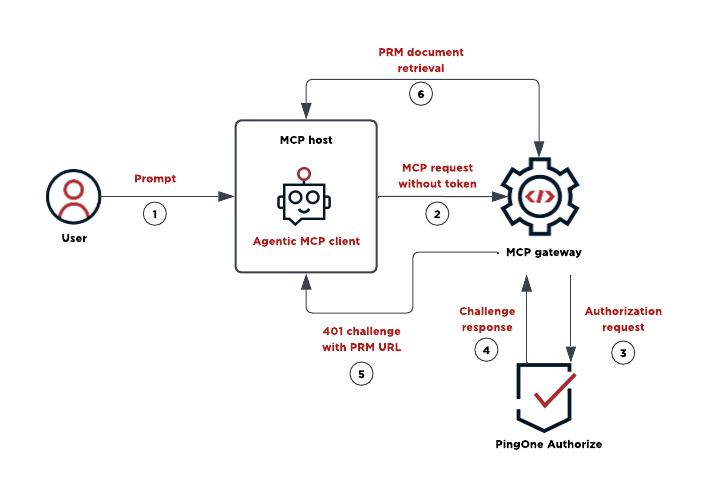
The following diagram and steps describe the flow for an MCP client that doesn’t present an access token when connecting to an MCP server:
-
The user prompts the MCP host.
The user asks the MCP host to perform a task that requires the MCP server. The host’s agentic MCP client makes requests to the MCP server on the user’s behalf.
-
The MCP client sends a request without an access token.
The MCP client doesn’t yet have an access token for the MCP server, so the request doesn’t include one.
-
The MCP gateway sends an authorization request to PingOne Authorize.
The gateway doesn’t make authorization decisions itself. It sends each request to PingOne Authorize before the request reaches the MCP server.
-
PingOne Authorize returns a challenge response.
Because the request doesn’t include an access token, PingOne Authorize directs the gateway to return a 401 Unauthorized response with a
WWW-Authenticatechallenge header. -
The gateway returns the challenge with the PRM URL to the MCP client.
The challenge header includes the
resource_metadataURL that you configured on the MCP server. This URL points to a protected resource metadata (PRM) document, as described in RFC 9728. -
The MCP client retrieves the PRM document.
The document identifies the authorization servers that can issue access tokens for the MCP server.
MCP clients can also discover the PRM document without a challenge by requesting a well-known URL derived from the MCP endpoint, such as https://example.com/.well-known/oauth-protected-resource/mcp. Hosting PRM documents at the well-known locations makes this fallback work.
Authorized request
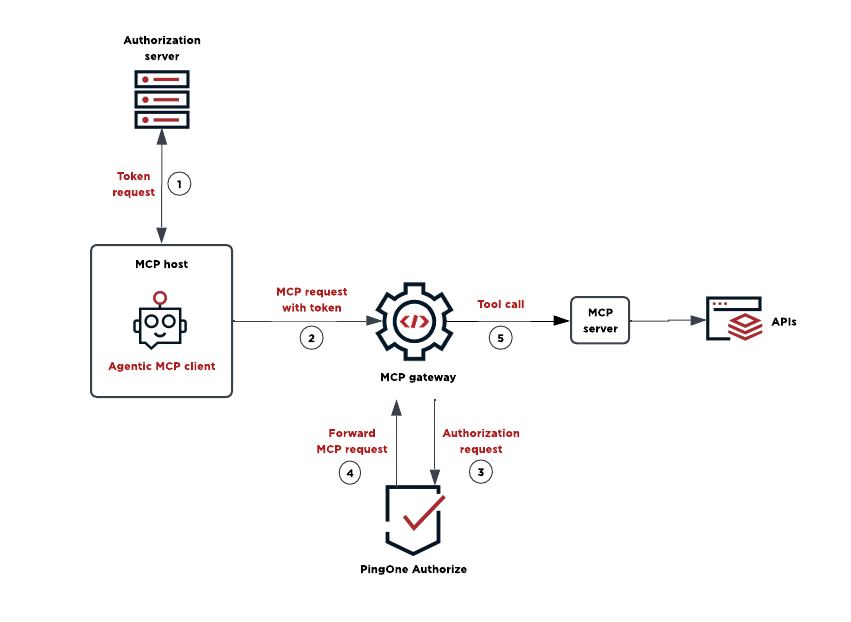
The following diagram and steps describe the flow for an MCP client that requests a sufficiently scoped access token and presents it when connecting to an MCP server:
-
The MCP client requests an access token from the authorization server.
The MCP client follows the authorization flow exposed by the authorization server metadata and obtains an access token with the scopes listed in the PRM document.
-
The MCP client retries the request with the access token.
The MCP client resends the original MCP request, now with the access token in the
Authorizationheader. -
The gateway sends an authorization request to PingOne Authorize.
PingOne Authorize validates the access token and evaluates the request against custom policies.
-
PingOne Authorize directs the gateway to forward the MCP request.
Because the access token is valid and the request satisfies the custom policies, PingOne Authorize produces a permit decision and directs the gateway to forward the request.
-
The gateway forwards the tool call to the MCP server.
With the request authorized, the gateway routes the tool call to the MCP server. The MCP server accesses its backend resources, such as data, APIs, and websites, and returns the result to the MCP client.
This request is the same as the initial request made by the client, now authorized with an access token.
Insufficient scope challenges
The preceding flow describes a client that obtains a token with the scopes required for the MCP resource. A valid access token can still lack the scopes that a specific tool call requires. In that case, the request is evaluated by custom policies, and a policy can deny the request with an auth-challenge statement that constructs a 403 Forbidden response. The WWW-Authenticate header lists the required scopes and includes the PRM URL, so the MCP client can obtain a new access token and retry the request.
The resourceMetadata challenge property
To include the PRM URL in 401 challenge responses, PingOne Authorize automatically adds the resource_metadata attribute to the WWW-Authenticate header. The attribute’s value is the PRM URL that you configured for the MCP server.
To include the PRM URL in a challenge response from a custom policy, add the resourceMetadata property to the payload of an auth-challenge statement. PingOne Authorize includes the property’s value as the resource_metadata attribute of the WWW-Authenticate header. Set this value to the built-in PingOne.API Access Management.Identity.Protected Resource Metadata URI attribute so that the challenge always carries the PRM URL configured for the matched MCP server.
The policy Library includes the Respond with Protected Resource Metadata Scope Challenge statement template that you can clone and adapt to your needs.
Error responses
PingOne Authorize returns standard HTTP status codes for authorization errors, as required by the MCP specification:
-
401 Unauthorized: Authorization is required or the access token is missing or invalid. The response automatically includes a
WWW-Authenticateheader with the PRM URL. -
403 Forbidden: The access token is valid but doesn’t have sufficient scopes or permissions. A custom policy can construct a
WWW-Authenticateheader that lists the required scopes.
Other errors, such as a malformed JSON-RPC request, are returned as JSON-RPC 2.0 error responses with an HTTP 200 status code. JSON-RPC is a remote procedure call protocol, so application-level errors don’t change the HTTP status code.