Agent Detection (CUA) Dashboard (early access)
The Agent Detection (CUA) Dashboard is now available for early access in PingOne.
The Agent Detection (CUA) Dashboard shows a summary of computer-using agent (CUA) activity detected by PingOne Protect in the environment. Data in the dashboard is based on PingOne Protect risk evaluations using the Bot Detection predictor and its agent type detection capabilities. Learn more in PingOne Protect Bot Detection predictor.
The Agent Detection (CUA) Dashboard tracks transactions evaluated by PingOne Protect that result in a high score for artificial intelligence (AI)-based browser automation. You can use it to measure how effectively your configured PingOne Protect risk policies identify CUA activity across the environment. Metrics reflect only transactions evaluated by PingOne Protect, not all PingOne traffic.
|
To populate the Agent Detection (CUA) Dashboard, you must:
|
Accessing the dashboard
To access the Authentication Dashboard, in the PingOne admin console, go to Monitoring > Agent Detection (CUA).
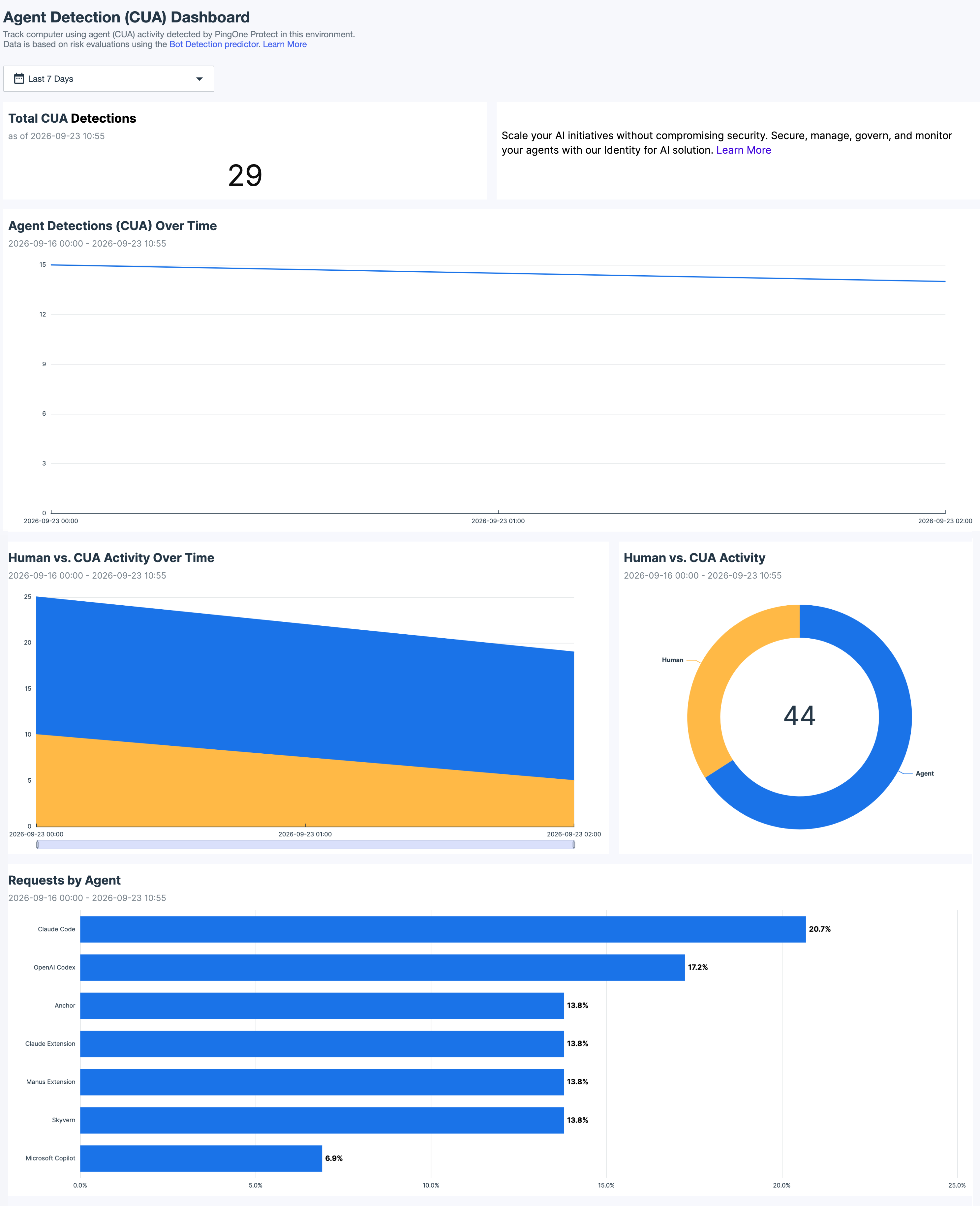
Filters
Use filters to refine the data displayed on the dashboard. You can limit data to a specific time range:
-
Today: Displays data for the current day only.
-
From Yesterday: Displays data for the previous day only.
-
Last 7 Days (default): Displays data for the previous 7 days only.
-
Last 30 Days: Displays data for the previous 30 days only.
-
Last 90 Days: Displays data for the previous 90 days only.
-
This Month: Displays data for the current calendar month only.
-
Last Month: Displays data for the previous calendar month only.
-
Custom Range: Enables you to define a date range within the last 6 months. Select a start date and an end date in the date picker, then click Apply.
This filter applies to all charts on the dashboard.
|
The Agent Detection (CUA) Dashboard displays data only for the past 6 months. |
Charts
Use the following controls to adjust the charts:
| Icon | Name | Description |
|---|---|---|
|
Maximize |
Expands the chart to fill the dashboard. To minimize the chart, click the icon again. |
|
Menu options |
Options can vary for different types of charts:
|
|
Sort visual |
Sorts the chart data in ascending or descending order. |


Total CUA Detections
Displays the total number of requests evaluated by PingOne Protect that scored high for AI-based browser automation during the selected time period.
Agent Detections (CUA) Over Time
Displays a rolling average line of CUA detections over time for the selected time period.
Human vs. CUA Activity Over Time
Displays the number of human versus CUA requests for the selected time period.